Page 286 of 516
Black plate (96,1)Chevrolet Volt Owner Manual - 2011
7-96 Infotainment System
3. Turn the TUNE/MENU knob untilDevice List displays. Press the
TUNE/MENU knob or press the
Device List screen button to
display other options.4. Select the phone to be linkedand then follow the on-screen
prompts.5. The Phone menu will bedisplayed with the name
of the phone linked.
Page 287 of 516
Black plate (97,1)Chevrolet Volt Owner Manual - 2011
Infotainment System 7-97
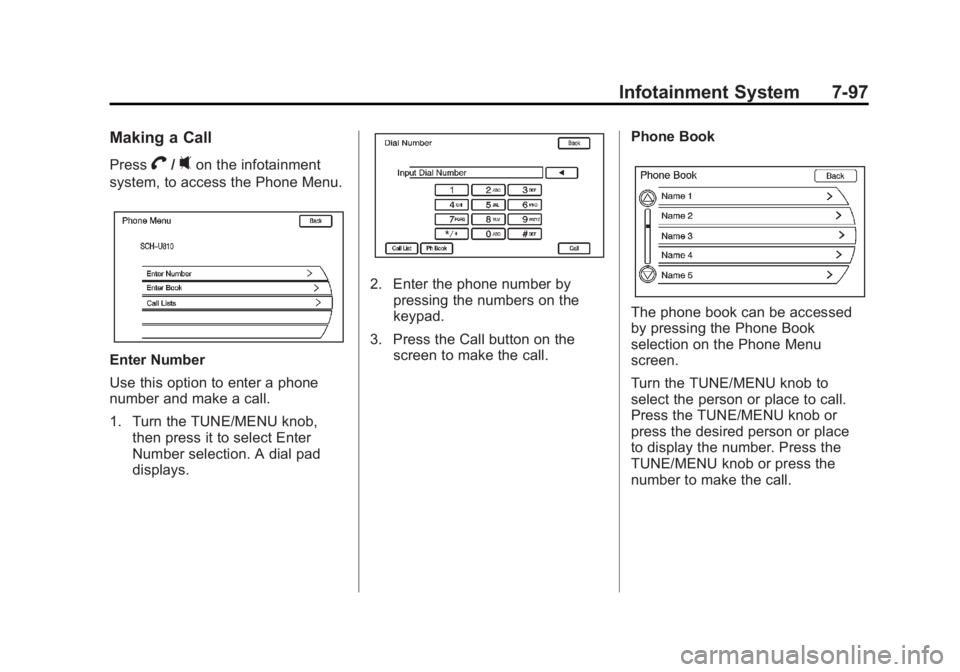
Making a Call
PressV/0on the infotainment
system, to access the Phone Menu.
Enter Number
Use this option to enter a phone
number and make a call.
1. Turn the TUNE/MENU knob, then press it to select Enter
Number selection. A dial pad
displays.
2. Enter the phone number bypressing the numbers on the
keypad.
3. Press the Call button on the screen to make the call. Phone Book
The phone book can be accessed
by pressing the Phone Book
selection on the Phone Menu
screen.
Turn the TUNE/MENU knob to
select the person or place to call.
Press the TUNE/MENU knob or
press the desired person or place
to display the number. Press the
TUNE/MENU knob or press the
number to make the call.
Page 288 of 516
Black plate (98,1)Chevrolet Volt Owner Manual - 2011
7-98 Infotainment System
The Phone Book feature also has a
search menu that can be accessed
by pressing that option screen
button. Once the Search menu
displays, turn the TUNE/MENU
knob to scroll through the list, then
press the TUNE/MENU button to
select the desired list item. These
lists are saved in alphabetical order.Press the TUNE/MENU knob or
press the appropriate search line
to obtain the numbers of the listed
persons or places that have been
saved.
Call Lists
The Call Lists selection from the
Phone Menu screen can be used
to show a list of incoming calls,
outgoing calls, and missed calls.
1. Press the CONFIG button.
Turn the TUNE/MENU knob
until Phone displays. Press the
MENU knob or press the Phone
screen button to display other
options.
Page 289 of 516
Black plate (99,1)Chevrolet Volt Owner Manual - 2011
Infotainment System 7-99
2. Turn the TUNE/MENU knob,then press this knob or press
either Incoming Calls, Outgoing
Calls, or Missed Calls.
Once one of these options has been
selected, a pop-up menu displays.
A list of persons and places will
display for the selected option.
Turn the TUNE/MENU knob,
then press this knob or press
the appropriate screen button to
select someone on that list. A menu
displays showing the phone number
for that person.
Accepting or Declining an
Incoming Call
When an incoming call is received,
the audio is muted and a ring tone
sounds.
Accepting a Call
Press the appropriate screen button
for the Answer option on the screen
to answer the call.
Declining a Call
Select the Decline option on the
screen.
Page 290 of 516

Black plate (100,1)Chevrolet Volt Owner Manual - 2011
7-100 Infotainment System
Call Waiting
Call waiting must be supported on
the Bluetooth phone and enabled by
the wireless service carrier to work.
Switching Calls (Only Available
with Call Waiting)
This feature allows switching
between calls, making one call
active, and placing the other
on hold.
Switch Call:Turn or press the
TUNE/MENU knob to Switch Call
and press Enter or press the Switch
Call option.
Conference Calling
Conference and three-way calling
must be supported on the Bluetooth
phone and enabled by the wireless
service carrier to work.
To start a conference while in a
current call:
1. Press
V/0on the infotainment
system until the Phone main
screen is shown with the current
active call.
2. Select Enter Number on the screen.
3. Make another call. The first
call will be placed on hold while
the second call is dialing and
connected.
4. To make a conference call, select Merge Calls and
both calls merge into one
conference call.
5. To add more callers to the conference call, repeat Steps 2
through 4. The number of callers
that can be added is limited by
your wireless service carrier.
Page 291 of 516
Black plate (101,1)Chevrolet Volt Owner Manual - 2011
Infotainment System 7-101
Ending a Call
To end a call:
1. Press
V/0.
2. Select Hang Up.
Mute or UnMute a Call
1. PressV/0.
2. Select Mute Call.
3. Select Mute Call again to unmute the call.
Dual Tone Multi-Frequency
(DTMF) Tones
The in-vehicle Bluetooth system can
send numbers during a call. This is
used when calling a menu-driven
phone system.
1. Press
V/0.
2. Turn the TUNE/MENU knob,then press this knob or press the
Enter Number option and enter
the number sequence.
The DTMF Tones will be generated
on the network as you enter each
number.
Page 292 of 516
Black plate (102,1)Chevrolet Volt Owner Manual - 2011
7-102 Infotainment System
2NOTES
Page 348 of 516

Black plate (46,1)Chevrolet Volt Owner Manual - 2011
9-46 Driving and Operating
Rear Vision
Camera (RVC)
The vehicle may have a Rear Vision
Camera (RVC) system. Read this
entire section before using it.
The RVC system can assist
the driver when backing up by
displaying a view of the area
behind the vehicle.
{WARNING
The Rear Vision Camera (RVC)
system does not replace driver
vision. RVC does not:
.Detect objects that are
outside the camera's field
of view, below the bumper,
or underneath the vehicle.
.Detect children, pedestrians,
bicyclists, or pets.(Continued)
WARNING (Continued)
Do not back the vehicle by only
looking at the RVC screen, or use
the screen during longer, higher
speed backing maneuvers or
where there could be cross-traffic.
Your judged distances using the
screen will differ from actual
distances.
If you do not use proper care
before backing up, you could
hit a vehicle, child, pedestrian,
bicyclist, or pet, resulting in
vehicle damage, injury, or death.
Even though the vehicle has
the RVC system, always check
carefully before backing up by
checking behind and around the
vehicle.
How the System Works
When the vehicle is shifted
into R (Reverse), the image
of the area behind the vehicle
appears in the center stack
display with the message CHECK
SURROUNDINGS FOR SAFETY.
The previous screen displays
when the vehicle is shifted out of
R (Reverse) after approximately
10 seconds.
To cancel the delay, do one of the
following:
.Press a button on the
infotainment system.
.Shift into P (Park).
.Reach a vehicle speed of
8 km/h (5 mph).