2011 CHEVROLET VOLT DIC
[x] Cancel search: DICPage 346 of 516

Black plate (44,1)Chevrolet Volt Owner Manual - 2011
9-44 Driving and Operating
How the System Works
UFRPA comes on automatically
when the shift lever is moved into
R (Reverse). The front and rear
sensors are automatically turned on.
After the vehicle is shifted out of
R (Reverse), the rear sensors are
turned off and the front sensors
stay on until the vehicle is above a
speed of 8 km/h (5 mph). The front
sensors may also be turned on by
pressing the park assist button
in the overhead console without
shifting into R (Reverse) while the
vehicle is traveling at a low speed.
See“Turning the System On and
Off” later in this section.
When the vehicle is in N (Neutral),
the system may be active. If the
vehicle is in a car wash, the sensors
may detect objects in the car wash.
See “Turning the System On and
Off” later in this section to turn the
system off. High-toned beeps from the front
speakers are for objects detected
near the front bumper. Low-toned
beeps from the rear speakers are
for objects detected near the rear
bumper. The interval between the
beeps becomes shorter as the
vehicle gets closer to the obstacle.
When the distance is less than
30 cm (12 in) the beeps are
continuous.
To be detected, objects must be at
least 25.4 cm (10 in) off the ground
and below hood or hatch level.
Objects must also be within
1.2 m (4 ft) in front of the vehicle
and 2.5 m (8 ft) from the rear
bumper. This distance may be less
during warmer or humid weather.
PARK ASSIST OFF displays on
the Driver Information Center (DIC)
to indicate that UFRPA is off.
The message disappears after
a short period of time.
Objects Detected by Both the
Front and Rear Sensors
If objects are detected at the
same time near both the front and
rear bumpers while backing up,
the beeps only sound to indicate
that objects are close to the rear
bumper.
If an object comes within 0.3 m (1 ft)
of the front bumper while the vehicle
is backing up and at the same time
there is another object further than
0.3 m (1 ft) from the rear bumper,
then the beeps only sound to
indicate the object that is closer
to the front bumper.
Page 347 of 516

Black plate (45,1)Chevrolet Volt Owner Manual - 2011
Driving and Operating 9-45
Turning the System On and Off
The UFRPA system can be turned
on and off by pressing the park
assist button in the overhead
console.
The park assist button lights up
when the system is on and turns
off when it has been disabled.
When the System Does Not
Seem to Work Properly
If UFRPA does not turn on due to a
temporary condition, the message
PARK ASSIST OFF displays on the
DIC, and the light on the park assist
button turns off. This can occur
under the following conditions:
.The ultrasonic sensors are not
clean. Keep the sensors free of
mud, dirt, snow, ice, and slush.
For cleaning instructions, see
Exterior Care on page 10‑89.
.The vehicle was washed in cold
weather. This may cause frost
or ice to form in the park assist
sensors. Keep the sensors free
of frost or ice.
.An object was hanging out of the
hatch during the last drive cycle.
Once the attached object is
removed, UFRPA will return to
normal operation.
.The bumper is damaged.
Take the vehicle to your
dealer to repair the system.
.Other conditions may affect
system performance, such as
vibrations from a jackhammer or
the compression of air brakes
on a very large truck.
Page 352 of 516

Black plate (50,1)Chevrolet Volt Owner Manual - 2011
9-50 Driving and Operating
In cold weather conditions, ice
may form around the charge port
door. The charge port door may
not open on the first attempt.
Remove ice from the area and
repeat attempting to open the
charge port door.
2. Open the rear hatch, lift the loadsupport floor covering (A), and
remove the charge cord (D). It is located near the tire sealant
and compressor kit (C). Pull up
on the charge cord handle (D)
to release it from the handle
clip (E). Lift the charge cord up
and rearward to remove it from
the vehicle. The vehicle plug (B)
is stored as shown.
3. Plug the charge cord into the electrical outlet. See Electrical
Requirements for Battery
Charging on page 9‑56.
Verify that the charge cord
status indicators are both green.
See Charge Cord on page 9‑54
for more information.
4. Then plug in the vehicle plug of the charge cord into the
charge port on the vehicle.
Verify that the charging status
indicator illuminates on top of
the instrument panel and a horn
chirp occurs. See Charging
Status Feedback on page 9‑52
for more information.
5. To arm the charge cord theft alert, lock the vehicle with the
RKE transmitter. This feature
can be disabled by a service
technician.
Page 354 of 516

Black plate (52,1)Chevrolet Volt Owner Manual - 2011
9-52 Driving and Operating
Delayed Charging
Override
To temporarily override a delayed
charge event, unplug the charge
cord from the charge port and then
plug it back in within five seconds.
A single horn chirp will sound and
charging will begin immediately.
To cancel a temporary override,
unplug the charge cord, wait for
10 seconds, and then plug the
charge cord back in. A double horn
chirp will sound and charging will
be delayed.
See“Programmable Charging” in
Charging on page 5‑33 for advance
charge scheduling options.
Charging Status
Feedback
The vehicle has a Charging
Status Indicator (CSI) at the
center of the instrument panel near the windshield. When the vehicle is
plugged in and the vehicle power is
off, the CSI indicates the following:
.Solid Green
–Vehicle is plugged
in. Battery is not fully charged.
Battery is charging.
.Long Flashing Green –Vehicle
is plugged in. Battery is not fully
charged. Battery charging is
delayed.
.Short Flashing Green –Vehicle
is plugged in. Battery is fully
charged.
.Solid Yellow –Vehicle is plugged
in. It is normal for the CSI to
turn yellow for a few seconds
after plugging in a compatible
charge cord. Otherwise,
charging system has detected
a fault and will not charge the
battery. See “Charge Cord
Status Indicators” later in
this section.
Page 355 of 516
Black plate (53,1)Chevrolet Volt Owner Manual - 2011
Driving and Operating 9-53
The system may be thermally
conditioning the battery during
any of the states above, requiring
electrical energy to be transferred
to the vehicle.
If the vehicle is plugged in and
vehicle power is on, the CSI will be
on solid green. The same is true
during a remote start if the vehicle
is plugged in.
If the vehicle is plugged in and the
CSI is off, a charging fault has been
detected. See“Charge Cord Status
Indicators” later in this section.
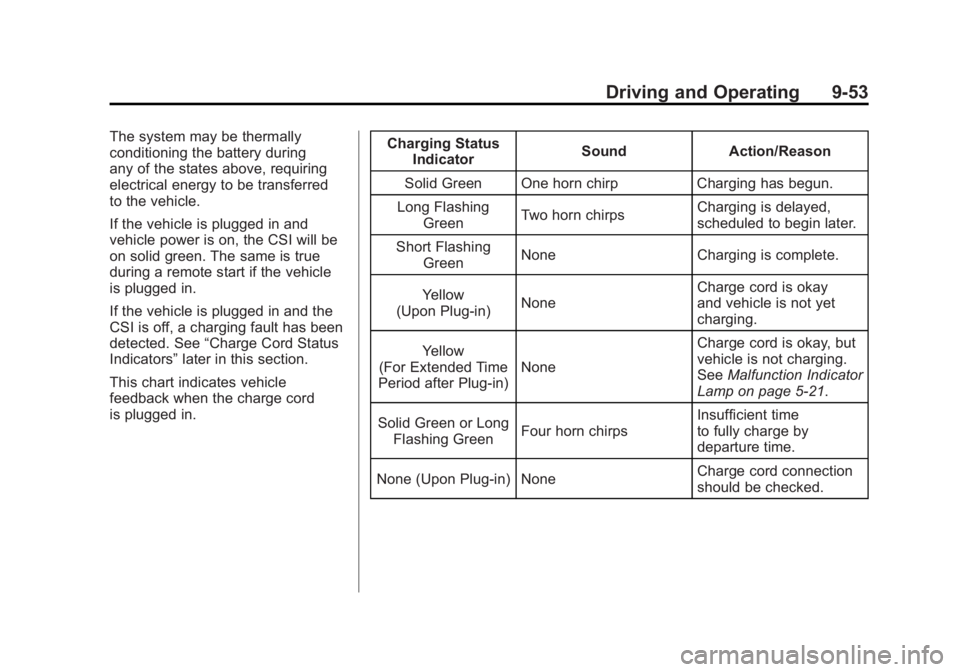
This chart indicates vehicle
feedback when the charge cord
is plugged in. Charging Status
Indicator Sound Action/Reason
Solid Green One horn chirp Charging has begun.
Long Flashing Green Two horn chirps Charging is delayed,
scheduled to begin later.
Short Flashing Green None Charging is complete.
Yellow
(Upon Plug‐in) None Charge cord is okay
and vehicle is not yet
charging.
Yellow
(For Extended Time
Period after Plug‐in) None Charge cord is okay, but
vehicle is not charging.
See
Malfunction Indicator
Lamp on page 5‑21.
Solid Green or Long Flashing Green Four horn chirps Insufficient time
to fully charge by
departure time.
None (Upon Plug‐in) None Charge cord connection
should be checked.
Page 356 of 516

Black plate (54,1)Chevrolet Volt Owner Manual - 2011
9-54 Driving and Operating
Charging StatusIndicator Sound Action/Reason
None (After Green or Yellow CSI
Indication Observed) None Charge cord connection
should be checked.
See
Malfunction Indicator
Lamp on page 5‑21.
None Repeated horn chirps
This feature can be
disabled by a service
technician.
To stop this alert, do one
of the following:
.Unplug the
charge cord.
.Press Unlock symbol
on the RKE.
.Press and hold the
Panic Alarm symbol
on the RKE, then
press again to stop
the panic alarm.
.Press the horn pad. Electricity was
interrupted before
charging was complete.
Charge Cord
See
Radio Frequency
Statement on page 13‑28 for
information regarding Part 15
of the Federal Communications
Commission (FCC) rules and
Industry Canada Standards
RSS-210/220/310.
A. Charge Level Button
B. Charge Level Indicators
C. Charge Cord Status Indicators
D. Vehicle Plug
E. Wall Plug
Page 357 of 516

Black plate (55,1)Chevrolet Volt Owner Manual - 2011
Driving and Operating 9-55
A portable charge cord used to
charge the vehicle high voltage
battery is stored under the rear
luggage compartment.
The charge cord used to charge the
vehicle is a high‐powered electrical
device. During normal operation, the
AC wall plug of the charge cord may
feel warm. The AC wall plug must fit
tightly into an AC outlet that is in
good condition.
{WARNING
Using the charge cord with a
worn or damaged AC outlet
may cause burns or start a fire.
Periodically, check the AC wall
plug and charge cord while the
vehicle is charging. If the AC wall
plug feels hot, unplug the charge
cord and have the AC outlet
replaced by a qualified electrician.
Replace the charge cord if the AC
wall plug or cord are damaged.
Do not use an AC outlet that is
worn or damaged.
{WARNING
An extension cord should not
be used to charge the vehicle.
Use of an extension cord may
increase the risk of electric
shock or other hazards.
If an extension cord is used
because of limited access
to 120V AC power, use the
following safeguards:
The 120V AC outlet should be
GFCI protected.
The extension cord should be:
.GFCI protected.
.12 or 14 gage, 3 conductor.
.Rated for outdoor.
Charge Cord Status Indicators
The charge cord status indicators
illuminate green or flashing red to
identify the charge cord status.
When both indicators are green,
the vehicle can be charged. If any
indicators are flashing red, the
charge cord will not permit vehicle
charging.
A flashing red AC PRESENT (A)
indicates the AC voltage is out of
range.
Flashing red AC PRESENT (A) and
FAULT (B) indicate the AC outlet
does not have a proper safety
ground. Charging is not permitted
for safety reasons. The AC outlet
must be repaired or another outlet
source should be used.
Page 358 of 516

Black plate (56,1)Chevrolet Volt Owner Manual - 2011
9-56 Driving and Operating
A flashing red FAULT (B) indicates a
charge cord fault. The charge cord
will attempt to reset automatically.
If the flashing red FAULT (B)
continues for more than
30 seconds, unplug the charge
cord from the wall to reset. If the
fault remains, see your dealer for
service.
Charge Level Button
Two charge levels are available by
pressing the charge level button.
Select reduced or normal level.
The charge level cannot be
changed when the vehicle plug is
plugged into the charge port on the
vehicle. If the charge level button
is pressed while the vehicle plug is
plugged into the charge port on the
vehicle, the charge level indicatorswill flash briefly. To change the
charge level, unplug the vehicle
plug from the charge port on the
vehicle and select the desired
charge level.
Normal Level:
This level is
recommended. All four charge
level indicators will be lit.
Reduced Level: Use when the
electrical current is limited. Two
charge level indicators will be lit.
Vehicle Plug
The vehicle plug attaches to the
charge port on the vehicle. There
is a flashlight built into the vehicle
plug that can be used by squeezing
the vehicle plug lever. The flashlight
will turn off when the connection is
complete and the lever is released.
Electrical Requirements
for Battery Charging
The AC outlet must have a
grounded, dedicated, 15 amp or
greater, three‐prong wall plug.
That means there should be no
other major appliances connected
to the same circuit. If it is not a
dedicated circuit, the current rating
of the outlet circuit breaker could
be exceeded and cause it to trip
or open. The vehicle can be
charged in the reduced level mode.
See “Charge Level Button” in this
section. Reduced level mode allows
a non‐dedicated circuit to be used
but increases the charging time.
This vehicle is capable of being
charged with a variety of standard
vehicle charging equipment.