2011 CHEVROLET SUBURBAN buttons
[x] Cancel search: buttonsPage 9 of 542

Black plate (3,1)Chevrolet Tahoe/Suburban Owner Manual - 2011
In Brief 1-3
A.Air Vents on page 8‑13.
B. Turn and Lane‐Change Lever. See Turn and Lane-Change
Signals on page 6‑5.
Windshield Wiper/Washer on
page 5‑5.
Rear Window Wiper/Washer on
page 5‑6.
C. Instrument Cluster on
page 5‑13.
D. Hazard Warning Flashers on
page 6‑5.
E. Shift Lever. See Automatic
Transmission on page 9‑39.
F. Tow/Haul Mode on page 9‑44
(If Equipped).
G. Driver Information Center (DIC) Buttons. See Driver Information
Center (DIC) on page 5‑29.
H. AM-FM Radio on page 7‑8.
I. Exterior Lamp Controls on
page 6‑1. J.
Dome Lamps on page 6‑7.
Instrument Panel Illumination
Control on page 6‑7.
Fog Lamps on page 6‑6
(If Equipped).
K. Hood Release. See Hood on
page 10‑5.
L. Integrated Trailer Brake Controller (If Equipped). See
Towing Equipment on
page 9‑87.
M. Data Link Connector (DLC) (Out of view). See Malfunction
Indicator Lamp on page 5‑22.
N. Automatic Transfer Case Control. (If Equipped). See
Four-Wheel Drive (Two Speed
Automatic Transfer Case) on
page 9‑46 orFour-Wheel Drive
(Single Speed Automatic
Transfer Case) on page 9‑51.
O. Cruise Control on page 9‑58. P.
Steering Wheel Adjustment on
page 5‑2.
Q. Horn on page 5‑5.
R. Steering Wheel Controls on
page 5‑3.
S. Climate Control Systems on
page 8‑1 (If Equipped).
Dual Automatic Climate Control
System on page 8‑4
(If Equipped).
T. Power Outlets on page 5‑10.
U. StabiliTrak
®System on
page 9‑55 (If Equipped).
Pedal Adjust Button
(If Equipped). See Adjustable
Throttle and Brake Pedal on
page 9‑29. Ultrasonic Parking
Assist on page 9‑61
(If Equipped).
Power Assist Steps on
page 2‑14 (If Equipped).
V. Glove Box on page 4‑1.
Page 10 of 542
Black plate (4,1)Chevrolet Tahoe/Suburban Owner Manual - 2011
1-4 In Brief
Initial Drive
Information
This section provides a brief
overview about some of the
important features that may or may
not be on your specific vehicle.
For more detailed information, refer
to each of the features which can be
found later in this owner manual.
Remote Keyless Entry
(RKE) System
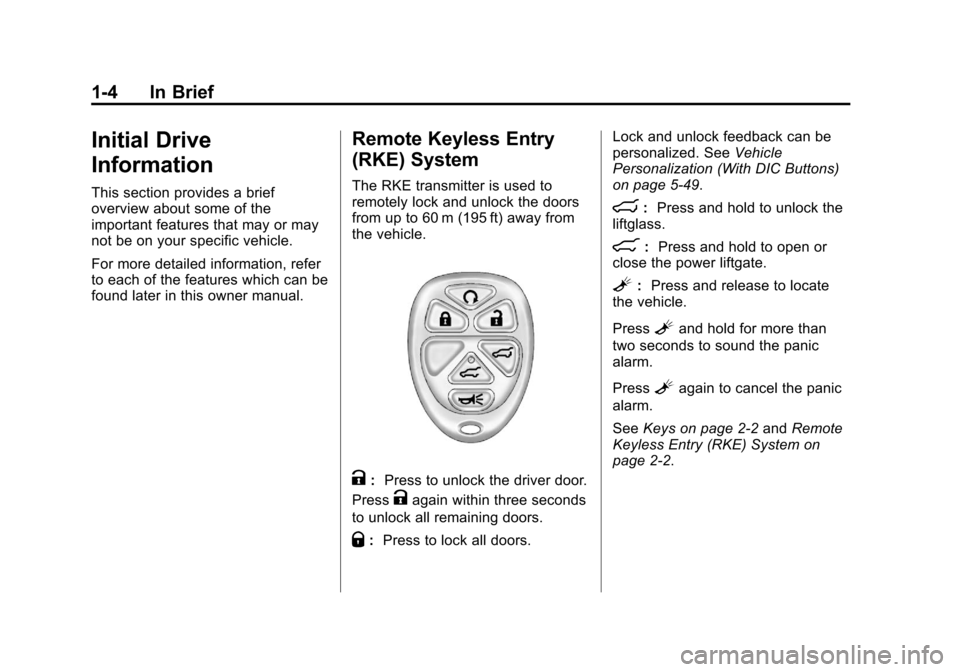
The RKE transmitter is used to
remotely lock and unlock the doors
from up to 60 m (195 ft) away from
the vehicle.
K:Press to unlock the driver door.
Press
Kagain within three seconds
to unlock all remaining doors.
Q: Press to lock all doors. Lock and unlock feedback can be
personalized. See
Vehicle
Personalization (With DIC Buttons)
on page 5‑49.
m: Press and hold to unlock the
liftglass.
&: Press and hold to open or
close the power liftgate.
L: Press and release to locate
the vehicle.
Press
Land hold for more than
two seconds to sound the panic
alarm.
Press
Lagain to cancel the panic
alarm.
See Keys on page 2‑2 andRemote
Keyless Entry (RKE) System on
page 2‑2.
Page 16 of 542
Black plate (10,1)Chevrolet Tahoe/Suburban Owner Manual - 2011
1-10 In Brief
Storing Memory Positions
To save into memory:
1. Adjust the driver seat andseatback recliner, both outside
mirrors, and the throttle and
brake pedals, if available.
See Power Mirrors on page 2‑18
and Adjustable Throttle and
Brake Pedal on page 9‑29 for
more information.
Not all mirrors and adjustable
throttles and brake pedals will
have the ability to save and
recall their positions.
2. Press and hold “1”until
two beeps sound.
3. Repeat for a second driver position using “2.” To recall, press and release
“1”or
“2.” The vehicle must be in P (Park).
A single beep will sound. The seat,
outside mirrors, and adjustable
throttle and brake pedals,
if available, will move to the position
previously stored for the identified
driver.
See “Memory Seat, Mirrors, and
Pedals” underPower Seat
Adjustment on page 3‑4 andVehicle
Personalization (With DIC Buttons)
on page 5‑49 for more information.
Easy Exit Driver Seat
This feature can move the seat
rearward to allow extra room to exit
the vehicle.
B: Press to recall the easy exit
seat position. The vehicle must be
in P (Park).
See “Memory Seat, Mirrors, and
Pedals” underPower Seat
Adjustment on page 3‑4 andVehicle
Personalization (With DIC Buttons)
on page 5‑49 for more information.
Second Row Seats
On vehicles with a 60/40 split bench
or buckets seats, the seatbacks can
be folded for additional cargo space,
or the seats can be folded and
tumbled for easy entry/exit to the
third row seats, if equipped. On
vehicles with bucket seats, the
seatbacks also recline.
SeeSecond Row Seats (60/40 Split
Bench Seat) on page 3‑11 or
Second Row Seats (Bucket Seats)
on page 3‑15 for more information.
Third Row Seats
On vehicles with third row seats, the
seatbacks can be folded, and the
entire seat can be tumbled or
removed from the vehicle.
For detailed instructions, see Third
Row Seats on page 3‑20.
Page 25 of 542
Black plate (19,1)Chevrolet Tahoe/Suburban Owner Manual - 2011
In Brief 1-19
Press the plus/minus buttons,
located on the steering column shift
lever, to select the desired range of
gears for current driving conditions.
SeeManual Mode on page 9‑43.
While using Range Selection Mode,
cruise control and the Tow/Haul
mode can be used.
Grade Braking is not available when
Range Selection Mode is active.
See Tow/Haul Mode on page 9‑44.
Four-Wheel Drive
If the vehicle has Four-Wheel Drive,
you can send the engine's driving
power to all four wheels for extra
traction.
Automatic Transfer Case
Two Speed Transfer Case
Single Speed Transfer Case
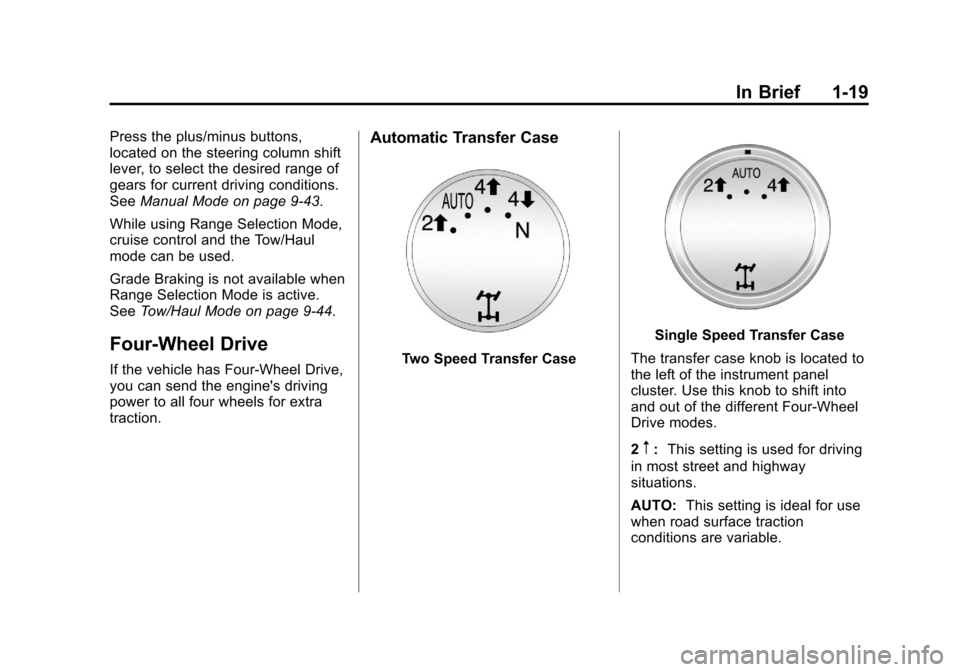
The transfer case knob is located to
the left of the instrument panel
cluster. Use this knob to shift into
and out of the different Four-Wheel
Drive modes.
2
m: This setting is used for driving
in most street and highway
situations.
AUTO: This setting is ideal for use
when road surface traction
conditions are variable.
Page 29 of 542

Black plate (23,1)Chevrolet Tahoe/Suburban Owner Manual - 2011
In Brief 1-23
Steering Wheel Controls
If available, some audio controls
can be adjusted at the steering
wheel.
w/cx:Press to change
favorite radio stations, select tracks
on a CD/DVD, or to navigate tracks
or folders on an iPod or USB
device.
b g: Press to silence the vehicle
speakers only. Press again to turn
the sound on. Press and hold longer
than two seconds to interact with
OnStar
®or Bluetooth systems,
if equipped.
+
e−e: Press to increase or
decrease volume.
c x:Press to reject an
incoming call, or to end a call.
SRCE: Press to switch between
the radio and CD, and for equipped
vehicles, the DVD, front auxiliary,
and rear auxiliary.
¨: Press to seek the next radio
station, the next track or chapter
while sourced to the CD or DVD
slot, or to select tracks and folders
on an iPod or USB device.
For more information, see Steering
Wheel Controls on page 5‑3.
Cruise Control
The cruise control buttons are
located on the left side of the
steering wheel.
T: Press to turn the system on
or off. The indicator light is on when
cruise control is on and turns off
when cruise control is off.
+ RES : Press briefly to make the
vehicle resume to a previously set
speed, or press and hold to
accelerate.
Page 33 of 542
Black plate (27,1)Chevrolet Tahoe/Suburban Owner Manual - 2011
In Brief 1-27
For more information, see
StabiliTrak®System on page 9‑55.
Tire Pressure Monitor
This vehicle may have a Tire
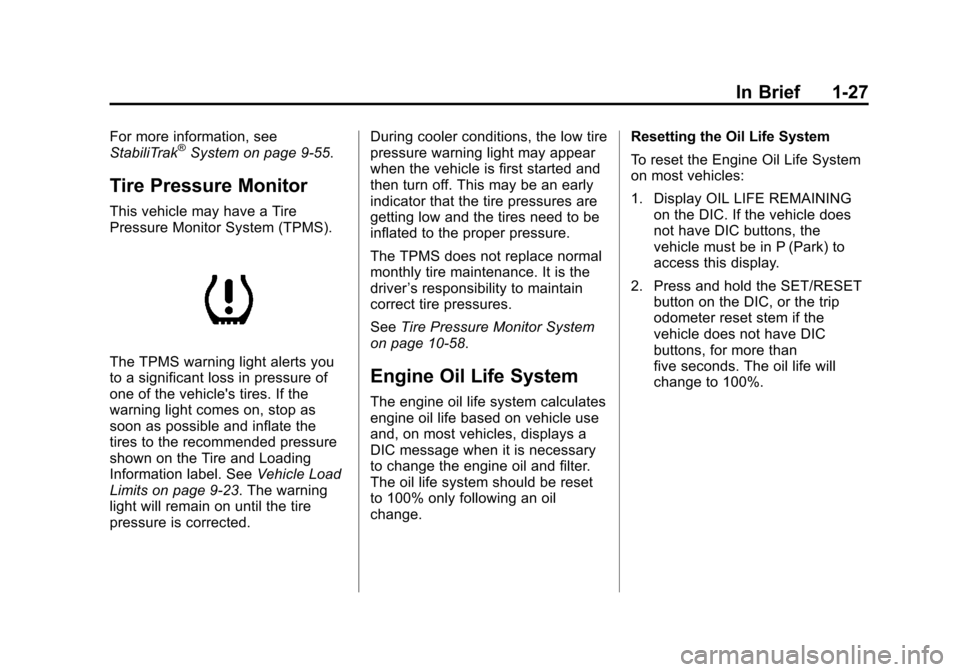
Pressure Monitor System (TPMS).
The TPMS warning light alerts you
to a significant loss in pressure of
one of the vehicle's tires. If the
warning light comes on, stop as
soon as possible and inflate the
tires to the recommended pressure
shown on the Tire and Loading
Information label. SeeVehicle Load
Limits on page 9‑23. The warning
light will remain on until the tire
pressure is corrected. During cooler conditions, the low tire
pressure warning light may appear
when the vehicle is first started and
then turn off. This may be an early
indicator that the tire pressures are
getting low and the tires need to be
inflated to the proper pressure.
The TPMS does not replace normal
monthly tire maintenance. It is the
driver
’s responsibility to maintain
correct tire pressures.
See Tire Pressure Monitor System
on page 10‑58.Engine Oil Life System
The engine oil life system calculates
engine oil life based on vehicle use
and, on most vehicles, displays a
DIC message when it is necessary
to change the engine oil and filter.
The oil life system should be reset
to 100% only following an oil
change. Resetting the Oil Life System
To reset the Engine Oil Life System
on most vehicles:
1. Display OIL LIFE REMAINING
on the DIC. If the vehicle does
not have DIC buttons, the
vehicle must be in P (Park) to
access this display.
2. Press and hold the SET/RESET button on the DIC, or the trip
odometer reset stem if the
vehicle does not have DIC
buttons, for more than
five seconds. The oil life will
change to 100%.
Page 37 of 542

Black plate (31,1)Chevrolet Tahoe/Suburban Owner Manual - 2011
In Brief 1-31
OnStar Steering Wheel
Controls
This vehicle may have a Talk/Mute
button that can be used to interact
with OnStar hands-free calling. See
Steering Wheel Controls on
page 5‑3for more information.
On some vehicles, the mute button
can be used to dial numbers into
voice mail systems, or to dial phone
extensions. See the OnStar Owner's
Guide for more information.
Your Responsibility
Increase the volume of the radio if
the OnStar advisor cannot be heard.
If the light next to the OnStar
buttons is red, the system may not
be functioning properly. Press
Q
and request a vehicle diagnostic.
If the light appears clear (no light
is appearing), your OnStar
subscription has expired and all
services have been deactivated.
Press
Qto confirm that the OnStar
equipment is active.
Page 42 of 542
Black plate (4,1)Chevrolet Tahoe/Suburban Owner Manual - 2011
2-4 Keys, Doors and Windows
If enabled through the Driver
Information Center (DIC), the turn
signal lamps flash once to indicate
locking has occurred. If enabled
through the DIC, the horn chirps
when the lock button is pressed
again within three seconds. See
Vehicle Personalization (With DIC
Buttons) on page 5‑49for additional
information.
Pressing
Qarms the content
theft‐deterrent system. See
Anti-Theft Alarm System on
page 2‑14.
K(Unlock): Press once to unlock
only the driver door. If
Kis pressed
again within three seconds, all
remaining doors unlock. The interior
lamps may come on and stay on for
20 seconds or until the ignition is
turned on. If enabled through the DIC, the turn
signal lamps flash twice to indicate
unlocking has occurred. See
Vehicle
Personalization (With DIC Buttons)
on page 5‑49. If enabled through
the DIC, the exterior lights turn on
briefly if it is dark enough outside.
See “Approach Lighting” under
Vehicle Personalization (With DIC
Buttons) on page 5‑49.
Pressing
Kon the RKE transmitter
disarms the content theft‐deterrent
system. See Anti-Theft Alarm
System on page 2‑14.
m(Liftglass): Press and hold to
unlock the liftglass.
&(Power Liftgate): Press and
hold to open and close the liftgate.
The taillamps flash and a chime
sounds to indicate when the liftgate
is opening and closing.
L(Vehicle Locator/Panic
Alarm): Press and release to
locate the vehicle. The turn signal
lamps flash and the horn sounds
three times. Press and hold
Lfor more than
two seconds to activate the panic
alarm. The turn signal lamps flash
and the horn sounds repeatedly for
30 seconds. The alarm turns off
when the ignition is moved to ON/
RUN or
Lis pressed again. The
ignition must be in LOCK/OFF for
the panic alarm to work.
The vehicle comes with two
transmitters. Each transmitter will
have a number on it, “1”or“2”.
These numbers correspond to the
driver of the vehicle. For example,
the memory seat position for driver
1 will be recalled when using the
transmitter labeled “1”, if enabled
through the DIC. See “Memory
Seat, Mirrors, and Pedals” under
Power Seat Adjustment on page 3‑4
and Vehicle Personalization (With
DIC Buttons) on page 5‑49 for more
information.