2011 CHEVROLET SUBURBAN mirror
[x] Cancel search: mirrorPage 307 of 542
Black plate (19,1)Chevrolet Tahoe/Suburban Owner Manual - 2011
Driving and Operating 9-19
Highway Hypnosis
Always be alert and pay attention to
your surroundings while driving.
If you become tired or sleepy, find a
safe place to park the vehicle
and rest.
Other driving tips include:
.Keep the vehicle well ventilated.
.Keep interior temperature cool.
.Keep your eyes moving—scan
the road ahead and to the sides.
.Check the rearview mirror and
vehicle instruments often.
Hill and Mountain Roads
Driving on steep hills or through
mountains is different than driving
on flat or rolling terrain. Tips for
driving in these conditions include:
.Keep the vehicle serviced and in
good shape.
.Check all fluid levels and brakes,
tires, cooling system, and
transmission.
.Shift to a lower gear when going
down steep or long hills.
{WARNING
If you do not shift down, the
brakes could get so hot that they
would not work well. You would
then have poor braking or even
none going down a hill. You could
crash. Shift down to let the engine
assist the brakes on a steep
downhill slope.
{WARNING
Coasting downhill in N (Neutral)
or with the ignition off is
dangerous. The brakes will have
to do all the work of slowing down
and they could get so hot that
they would not work well. You
would then have poor braking or
even none going down a hill. You
(Continued)
WARNING (Continued)
could crash. Always have the
engine running and the vehicle in
gear when going downhill.
.Stay in your own lane. Do not
swing wide or cut across the
center of the road. Drive at
speeds that let you stay in your
own lane.
.Top of hills: Be
alert—something could
be in your lane (stalled car,
accident).
.Pay attention to special road
signs (falling rocks area, winding
roads, long grades, passing or
no-passing zones) and take
appropriate action.
Page 308 of 542
Black plate (20,1)Chevrolet Tahoe/Suburban Owner Manual - 2011
9-20 Driving and Operating
Winter Driving
Driving on Snow or Ice
Drive carefully when there is snow
or ice between the tires and the
road, creating less traction or grip.
Wet ice can occur at about 0°C
(32°F) when freezing rain begins to
fall, resulting in even less traction.
Avoid driving on wet ice or in
freezing rain until roads can be
treated with salt or sand.
Drive with caution, whatever the
condition. Accelerate gently so
traction is not lost. Accelerating too
quickly causes the wheels to spin
and makes the surface under the
tires slick, so there is even less
traction.
Try not to break the fragile traction.
If you accelerate too fast, the drive
wheels will spin and polish the
surface under the tires even more.The
Antilock Brake System (ABS)
on page 9‑53 improves vehicle
stability during hard stops on
slippery roads, but apply the brakes
sooner than when on dry pavement.
Allow greater following distance on
any slippery road and watch for
slippery spots. Icy patches can
occur on otherwise clear roads in
shaded areas. The surface of a
curve or an overpass can remain icy
when the surrounding roads are
clear. Avoid sudden steering
maneuvers and braking while
on ice.
Turn off cruise control on slippery
surfaces.
Blizzard Conditions
Being stuck in snow can be a
serious situation. Stay with the
vehicle unless there is help nearby.
If possible, use the Roadside
Assistance Program (U.S. and
Canada) on page 13‑7 orRoadside
Assistance Program (Mexico) on
page 13‑10. To get help and keep
everyone in the vehicle safe:
.Turn on the hazard warning
flashers.
.Tie a red cloth to an outside
mirror.
{WARNING
Snow can trap engine exhaust
under the vehicle. This may
cause exhaust gases to get
inside. Engine exhaust contains
Carbon Monoxide (CO) which
cannot be seen or smelled. It can
cause unconsciousness and even
death.
(Continued)
Page 349 of 542
Black plate (61,1)Chevrolet Tahoe/Suburban Owner Manual - 2011
Driving and Operating 9-61
Object Detection
Systems
Ultrasonic Parking Assist
For vehicles with the Ultrasonic
Rear Parking Assist (URPA) system,
it operates at speeds less than
8 km/h (5 mph), and assists the
driver with parking and avoiding
objects while in R (Reverse). The
sensors on the rear bumper are
used to detect the distance to an
object up to 2.5 m (8 ft) behind the
vehicle, and at least 25.4 cm (10 in)
off the ground.
{WARNING
The Ultrasonic Rear Parking
Assist (URPA) system does not
replace driver vision. It cannot
detect:
.Objects that are below the
bumper, underneath the
vehicle, or too close or far
from the vehicle
.Children, pedestrians,
bicyclists, or pets.
If you do not use proper care
before and while backing, vehicle
damage, injury, or death could
occur. Even with URPA, always
check behind the vehicle before
backing up. While backing, be
sure to look for objects and check
the vehicle's mirrors.
How the System Works
URPA comes on automatically when
the shift lever is moved into
R (Reverse). A single tone sounds
to indicate the system is working.
URPA operates only at speeds less
than 5 mph (8 km/h).
An obstacle is indicated by audible
beeps. The interval between the
beeps becomes shorter as the
vehicle gets closer to the obstacle.
When the distance is less than
30 cm (12 in) the beeps are
continuous.
To be detected, objects must be at
least 25.4 cm (10 in) off the ground
and below liftgate level. Objects
must also be within 2.5 m (8 ft) from
the rear bumper. This distance may
be less during warmer or humid
weather.
Page 351 of 542
Black plate (63,1)Chevrolet Tahoe/Suburban Owner Manual - 2011
Driving and Operating 9-63
Side Blind Zone
Alert (SBZA)
The vehicle may have a Side Blind
Zone Alert (SBZA) system. Read
this entire section before using the
system.
{WARNING
SBZA is only a lane changing aid
and does not replace driver
vision. SBZA does not detect:
.Vehicles outside the side
blind zones which may be
rapidly approaching.
.Pedestrians, bicyclists,
or animals.(Continued)
WARNING (Continued)
Failure to use proper care when
changing lanes may result in
damage to the vehicle, injury,
or death. Always check the
outside and rearview mirrors,
glance over your shoulder, and
use the turn signal before
changing lanes.
When the system detects a vehicle
in the side blind zone, amber SBZA
displays light up in the side mirrors.
This indicates that it may be unsafe
to change lanes. Before making a
lane change, always check the
SBZA display, check the outside
and rearview mirrors, look over your
shoulder for vehicles and hazards,
and use the turn signal.
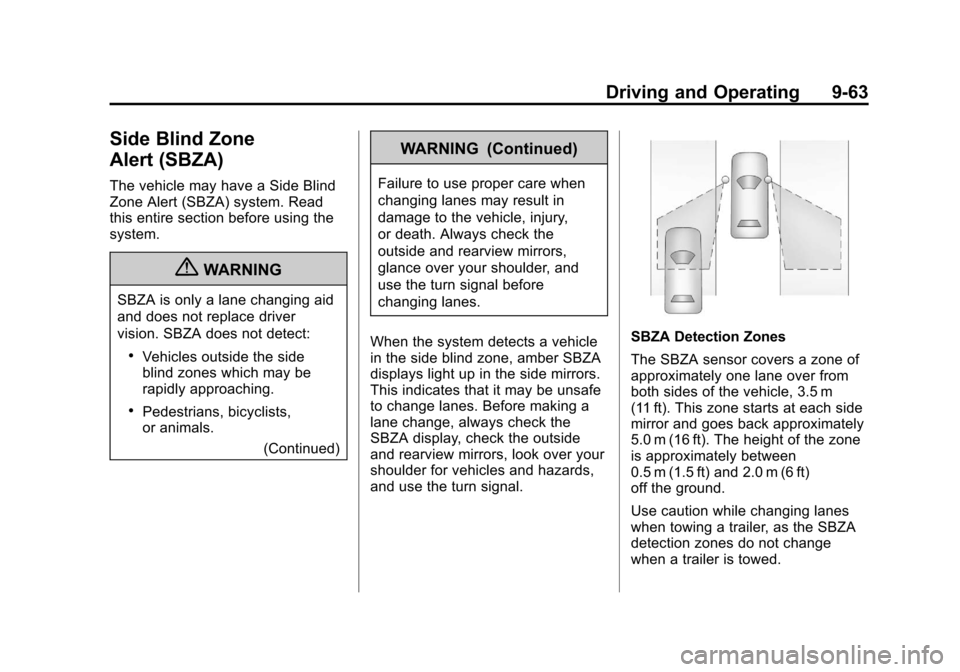
SBZA Detection Zones
The SBZA sensor covers a zone of
approximately one lane over from
both sides of the vehicle, 3.5 m
(11 ft). This zone starts at each side
mirror and goes back approximately
5.0 m (16 ft). The height of the zone
is approximately between
0.5 m (1.5 ft) and 2.0 m (6 ft)
off the ground.
Use caution while changing lanes
when towing a trailer, as the SBZA
detection zones do not change
when a trailer is towed.
Page 352 of 542

Black plate (64,1)Chevrolet Tahoe/Suburban Owner Manual - 2011
9-64 Driving and Operating
How the System Works
Left Side MirrorDisplayRight Side Mirror Display
When the vehicle is started, both
outside mirror displays will briefly
come on to indicate that the system
is operating. When the vehicle is
moving forward, the left or right side
mirror SBZA display will light up if a
vehicle is detected in that blind
zone. If the turn signal is activated
and a vehicle is also detected on
the same side, the SBZA display will
flash to give you extra warning not
to change lanes.
SBZA displays do not come on
while the vehicle is approaching or
passing other vehicles. At speeds
greater then 32 km/h (20 mph),
SBZA displays may come on when a vehicle you have passed remains
in or drops back into the
detection zone.
SBZA can be disabled through the
Driver Information Center (DIC). See
Driver Information Center (DIC) on
page 5‑29
for more information.
If the SBZA is disabled by the
driver, the SBZA mirror displays will
not light up during normal driving.
When the System Does Not Seem
To Work Properly
Occasional missed alerts can occur
under normal circumstances and will
increase in wet conditions. The
system does not need to be
serviced due to an occasional
missed alert. The number of missed
alerts will increase with increased
rainfall or road spray.
If the SBZA displays do not light up
when the system is on and vehicles
are in the blind zone, the system
may need service. Take the vehicle
to your dealer. SBZA is designed to ignore
stationary objects; however, the
system may occasionally light up
due to guard rails, signs, trees,
shrubs, and other stationary objects.
This is normal system operation, the
vehicle does not need service.
SBZA does not operate when the
left or right corners of the rear
bumper are covered with mud, dirt,
snow, ice, slush, or in heavy
rainstorms. For cleaning
instructions, see
“Washing the
Vehicle” underExterior Care on
page 10‑98. If the DIC still displays
the SIDE BLIND ZONE SYS.
UNAVAILABLE message after
cleaning the bumper, see your
dealer.
The SBZA displays may remain on
if a trailer is attached to the vehicle,
or a bicycle or object is extending
out to either side of the vehicle.
Page 354 of 542

Black plate (66,1)Chevrolet Tahoe/Suburban Owner Manual - 2011
9-66 Driving and Operating
Rear Vision
Camera (RVC)
This vehicle may have a Rear
Vision Camera system. Read this
entire section before using it.
{WARNING
The Rear Vision Camera (RVC)
system does not replace driver
vision. RVC does not:
.Detect objects that are
outside the camera's field of
view, below the bumper,
or underneath the vehicle.
.Detect children, pedestrians,
bicyclists, or pets.
Do not back the vehicle by only
looking at the RVC screen, or use
the screen during longer, higher
speed backing maneuvers or
where there could be cross-traffic. (Continued)
WARNING (Continued)
Your judged distances using the
screen will differ from actual
distances.
If you do not use proper care
before backing up, you could hit a
vehicle, child, pedestrian,
bicyclist, or pet, resulting in
vehicle damage, injury, or death.
Even though the vehicle has the
RVC system, always check
carefully before backing up by
checking behind and around the
vehicle.
Vehicles Without Navigation
System
The rear vision camera system is
designed to help the driver when
backing up by displaying a view of
the area behind the vehicle. When
the key is in the ON/RUN position
and the driver shifts the vehicle into
R (Reverse), the video image
automatically appears on the inside
rear view mirror. Once the driver
shifts out of R (Reverse), the video
image automatically disappears
from the inside rear view mirror.
Turning the Rear Vision Camera
System Off or On
To turn off the rear vision camera
system, press and hold
z, located
on the inside rearview mirror, until
the left indicator light turns off. The
rear camera vision display is now
disabled.
Page 355 of 542

Black plate (67,1)Chevrolet Tahoe/Suburban Owner Manual - 2011
Driving and Operating 9-67
To turn the rear vision camera
system on again, press and
hold
zuntil the left indicator light
illuminates. The rear vision camera
system display is now enabled and
the display will appear in the mirror
normally.
Vehicles With Navigation
System
The rear vision camera system is
designed to help the driver when
backing up by displaying a view of
the area behind the vehicle. When
the driver shifts the vehicle into
R (Reverse), the video image
automatically appears on the
navigation screen. Once the driver
shifts out of R (Reverse), the
navigation screen will go back to the
last screen that had been displayed,
after a delay. Turning the Rear Vision Camera
System On or Off
To turn the rear vision camera
system on or off:
1. Shift into P (Park).
2. Press the MENU button to enter
the configure menu options, then
press the MENU hard key to
select Display or touch the
Display screen button.
3. Select the Rear Camera Options screen button. The Rear Camera
Options screen will display.
4. Select the Video screen button.
When the Video screen button is
highlighted the RVC
system is on.
Page 358 of 542

Black plate (70,1)Chevrolet Tahoe/Suburban Owner Manual - 2011
9-70 Driving and Operating
When the System Does Not
Seem To Work Properly
The rear vision camera system
might not work properly or display a
clear image if:
.The RVC is turned off. See
“Turning the Rear Camera
System On or Off”earlier in this
section.
.It is dark.
.The sun or the beam of
headlights is shining directly into
the camera lens.
.Ice, snow, mud, or anything else
builds up on the camera lens.
Clean the lens, rinse it with
water, and wipe it with a soft
cloth.
.The back of the vehicle is in an
accident, the position and
mounting angle of the camera
can change or the camera can
be affected. Be sure to have the
camera and its position and
mounting angle checked at your
dealer.
The rear vision camera system
display in the rearview mirror may
turn off or not appear as expected
due to one of the following
conditions. If this occurs the left
indicator light on the mirror will
flash.
.A slow flash may indicate a loss
of video signal, or no video
signal present during the reverse
cycle.
.A fast flash may indicate that the
display has been on for the
maximum allowable time during
a reverse cycle, or the display
has reached an Over
Temperature limit. The fast flash conditions are
used to protect the video device
from high temperature
conditions. Once conditions
return to normal the device will
reset and the green indicator will
stop flashing.
During any of these fault conditions,
the display will be blank and the
indicator will continue to flash as
long as the vehicle is in R (Reverse)
or until the conditions return to
normal.
Pressing and holding
zwhen the
left indicator light is flashing will turn
off the video display along with the
left indicator light.