2011 CHEVROLET SILVERADO ECU
[x] Cancel search: ECUPage 1 of 588

Black plate (1,1)Chevrolet Silverado Owner Manual - 2011
2011 Chevrolet Silverado Owner ManualM
In Brief. . . . . . . . . . . . . . . . . . . . . . . . 1-1
Instrument Panel . . . . . . . . . . . . . . 1-2
Initial Drive Information . . . . . . . . 1-8
Vehicle Features . . . . . . . . . . . . . 1-25
Performance and Maintenance . . . . . . . . . . . . . . . . 1-32
Keys, Doors and Windows . . . 2-1
Keys and Locks . . . . . . . . . . . . . . . 2-2
Doors . . . . . . . . . . . . . . . . . . . . . . . . 2-10
Vehicle Security . . . . . . . . . . . . . . 2-12
Exterior Mirrors . . . . . . . . . . . . . . . 2-15
Interior Mirrors . . . . . . . . . . . . . . . . 2-19
Windows . . . . . . . . . . . . . . . . . . . . . 2-20
Roof . . . . . . . . . . . . . . . . . . . . . . . . . . 2-22
Seats and Restraints . . . . . . . . . 3-1
Head Restraints . . . . . . . . . . . . . . . 3-2
Front Seats . . . . . . . . . . . . . . . . . . . . 3-3
Rear Seats . . . . . . . . . . . . . . . . . . . 3-12
Safety Belts . . . . . . . . . . . . . . . . . . 3-14
Airbag System . . . . . . . . . . . . . . . . 3-31
Child Restraints . . . . . . . . . . . . . . 3-51 Storage
. . . . . . . . . . . . . . . . . . . . . . . 4-1
Storage Compartments . . . . . . . . 4-1
Instruments and Controls . . . . 5-1
Controls . . . . . . . . . . . . . . . . . . . . . . . 5-2
Warning Lights, Gauges, and Indicators . . . . . . . . . . . . . . . . . . . 5-12
Information Displays . . . . . . . . . . 5-34
Vehicle Messages . . . . . . . . . . . . 5-43
Vehicle Personalization . . . . . . . 5-53
Universal Remote System . . . . 5-61
Lighting . . . . . . . . . . . . . . . . . . . . . . . 6-1
Exterior Lighting . . . . . . . . . . . . . . . 6-1
Interior Lighting . . . . . . . . . . . . . . . . 6-7
Lighting Features . . . . . . . . . . . . . . 6-9
Infotainment System . . . . . . . . . 7-1
Introduction . . . . . . . . . . . . . . . . . . . . 7-1
Radio . . . . . . . . . . . . . . . . . . . . . . . . . . 7-8
Audio Players . . . . . . . . . . . . . . . . 7-14
Rear Seat Infotainment . . . . . . . 7-38
Phone . . . . . . . . . . . . . . . . . . . . . . . . 7-49 Climate Controls
. . . . . . . . . . . . . 8-1
Climate Control Systems . . . . . . 8-1
Air Vents . . . . . . . . . . . . . . . . . . . . . 8-11
Driving and Operating . . . . . . . . 9-1
Driving Information . . . . . . . . . . . . . 9-2
Starting and Operating . . . . . . . 9-32
Engine Exhaust . . . . . . . . . . . . . . 9-42
Automatic Transmission . . . . . . 9-43
Manual Transmission . . . . . . . . . 9-51
Drive Systems . . . . . . . . . . . . . . . . 9-53
Brakes . . . . . . . . . . . . . . . . . . . . . . . 9-67
Ride Control Systems . . . . . . . . 9-70
Cruise Control . . . . . . . . . . . . . . . . 9-73
Object Detection Systems . . . . 9-76
Fuel . . . . . . . . . . . . . . . . . . . . . . . . . . 9-83
Towing . . . . . . . . . . . . . . . . . . . . . . . 9-90
Conversions and
Add-Ons . . . . . . . . . . . . . . . . . . . 9-123
Page 37 of 588

Black plate (31,1)Chevrolet Silverado Owner Manual - 2011
In Brief 1-31
Universal Remote System
The Universal Remote System
allows for garage door openers,
security systems, and home
automation devices to be
programmed to work with
these buttons in the vehicle.
SeeUniversal Remote System
on
page 5‑61.
Sunroof
Extended Cab
The sunroof switch is located on the
headliner above the rearview mirror.
Vent: From the closed position,
press and hold the rear of the switch
to vent the sunroof. Open:
From the vent position,
press and hold the rear of the switch
to open the sunroof.
Close: Press and hold the front of
the switch to close the sunroof.
The sunroof also has a roller
sunshade that can be used to block
the rays of the sun. To open the
sunshade, press and unlatch it, and
roll it back. To close, pull it forward
and latch it into the closed position.
Page 41 of 588

Black plate (35,1)Chevrolet Silverado Owner Manual - 2011
In Brief 1-35
.Replace the vehicle's tires with
the same TPC Spec number
molded into the tire's sidewall
near the size.
.Follow recommended scheduled
maintenance.
Roadside Assistance
Program
U.S.:1-800-243-8872
TTY Users: 1-888-889-2438
Canada: 1-800-268-6800
As the owner of a new Chevrolet,
you are automatically enrolled in
the Roadside Assistance program.
This program provides technically
trained advisors who are available
24 hours a day, 365 days a year,
to give minor repair information or
make towing arrangements.
For more information see Roadside
Assistance Program on page 13‑7. Roadside Assistance and OnStar
If you have a current OnStar
subscription, press the OnStar
button and the current GPS location
will be sent to an OnStar advisor
who will assess your problem,
contact Roadside Assistance,
and relay your exact location
to get the help you need.
Online Owner Center
The Online Owner Center is a
complimentary service that includes
online service reminders, vehicle
maintenance tips, online owner
manual, special privileges,
and more.
Sign up today at:
www.chevyownercenter.com
(U.S.) or
www.gm.ca (Canada).
OnStar®
For vehicles with an active OnStar
subscription, OnStar uses several
innovative technologies and live
advisors to provide a wide range
of safety, security, navigation,
diagnostics, and calling services.
Automatic Crash Response
In a crash, built‐in sensors can
automatically alert an OnStar
advisor who is immediately
connected to the vehicle to
see if you need help.
Page 45 of 588

Black plate (1,1)Chevrolet Silverado Owner Manual - 2011
Keys, Doors and Windows 2-1
Keys, Doors and
Windows
Keys and Locks
Keys . . . . . . . . . . . . . . . . . . . . . . . . . . 2-2
Remote Keyless Entry (RKE)System . . . . . . . . . . . . . . . . . . . . . . 2-3
Remote Keyless Entry (RKE) System Operation . . . . . . . . . . . 2-3
Remote Vehicle Start . . . . . . . . . 2-5
Door Locks . . . . . . . . . . . . . . . . . . . 2-8
Power Door Locks . . . . . . . . . . . . 2-8
Delayed Locking . . . . . . . . . . . . . . 2-9
Automatic Door Locks . . . . . . . . . 2-9
Lockout Protection . . . . . . . . . . . . 2-9
Safety Locks . . . . . . . . . . . . . . . . . . 2-9
Doors
Rear Doors (Extended Cab) . . . . . . . . . . . . 2-10
Tailgate . . . . . . . . . . . . . . . . . . . . . . 2-11
Vehicle Security
Vehicle Security . . . . . . . . . . . . . . 2-12
Anti-Theft Alarm System . . . . . 2-12
Immobilizer . . . . . . . . . . . . . . . . . . 2-14
Immobilizer Operation . . . . . . . 2-14
Exterior Mirrors
Convex Mirrors . . . . . . . . . . . . . . 2-15
Manual Mirrors . . . . . . . . . . . . . . . 2-16
Trailer-Tow Mirrors . . . . . . . . . . . 2-16
Power Mirrors . . . . . . . . . . . . . . . . 2-16
Folding Mirrors . . . . . . . . . . . . . . . 2-17
Heated Mirrors . . . . . . . . . . . . . . . 2-18
Park Tilt Mirrors . . . . . . . . . . . . . . 2-19
Interior Mirrors
Manual Rearview Mirror . . . . . . 2-19
Automatic Dimming Rearview Mirror . . . . . . . . . . . . . . . . . . . . . . . 2-19
Windows
Windows . . . . . . . . . . . . . . . . . . . . . 2-20
Manual Windows . . . . . . . . . . . . 2-20
Power Windows . . . . . . . . . . . . . 2-20
Rear Windows . . . . . . . . . . . . . . . 2-21
Sun Visors . . . . . . . . . . . . . . . . . . . 2-22
Roof
Sunroof (Extended Cab) . . . . . 2-22
Sunroof (Crew Cab) . . . . . . . . . 2-23
Page 53 of 588

Black plate (9,1)Chevrolet Silverado Owner Manual - 2011
Keys, Doors and Windows 2-9
Delayed Locking
The vehicle may have the delayed
locking feature. When locking the
doors with the power lock switch
and a door is open, the doors will
lock five seconds after the last door
is closed. You will hear three chimes
to signal that the delayed locking
feature is in use.
Pressing the power lock switch
twice will override the delayed
locking feature and immediately
lock all the doors.
This feature will not operate if the
key is in the ignition.This feature can be programmed
using the Driver Information
Center (DIC). See
“Delay Door
Lock” under Vehicle Personalization
(with DIC Buttons) on page 5‑53.
Automatic Door Locks
The vehicle may have an automatic
lock/unlock feature. This feature
can be programmed using the
Driver Information Center (DIC).
See Vehicle Personalization
(with DIC Buttons)
on page 5‑53for more information on DIC
programming.
Lockout Protection
If the driver side power door lock
switch is pressed when the driver
door is open and the key is in the
ignition, all of the doors will lock and
then the driver door will unlock.
If the passenger side power door
lock switch is pressed when the
front passenger door is open and
the key is in the ignition, all of the
doors will lock and then the front
passenger door will unlock.
Safety Locks
The vehicle has rear door security
locks to prevent passengers from
opening the rear doors from the
inside.
Page 54 of 588
Black plate (10,1)Chevrolet Silverado Owner Manual - 2011
2-10 Keys, Doors and Windows
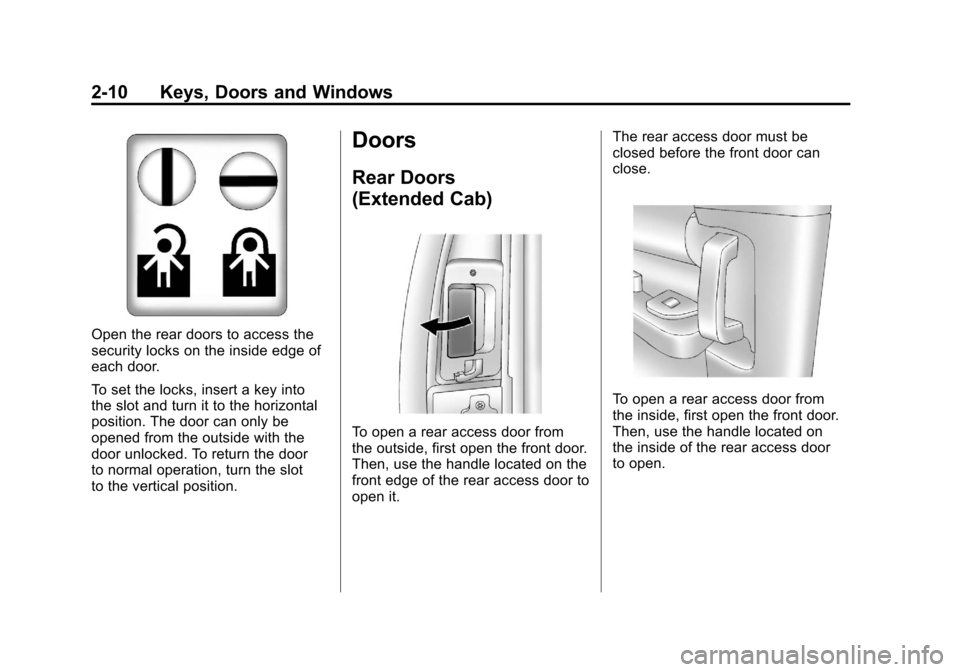
Open the rear doors to access the
security locks on the inside edge of
each door.
To set the locks, insert a key into
the slot and turn it to the horizontal
position. The door can only be
opened from the outside with the
door unlocked. To return the door
to normal operation, turn the slot
to the vertical position.
Doors
Rear Doors
(Extended Cab)
To open a rear access door from
the outside, first open the front door.
Then, use the handle located on the
front edge of the rear access door to
open it.The rear access door must be
closed before the front door can
close.
To open a rear access door from
the inside, first open the front door.
Then, use the handle located on
the inside of the rear access door
to open.
Page 55 of 588

Black plate (11,1)Chevrolet Silverado Owner Manual - 2011
Keys, Doors and Windows 2-11
Tailgate
{WARNING
It is extremely dangerous to ride
on the tailgate, even when the
vehicle is operated at low speeds.
People riding on the tailgate
can easily lose their balance
and fall in response to vehicle
maneuvers. Falling from a moving
vehicle may result in serious
injuries or death. Do not allow
people to ride on the tailgate.
Be sure everyone in your vehicle
is in a seat and using a safety
belt properly.
On vehicles with a lock on the
tailgate, use the key to lock or
unlock the tailgate. Open the tailgate by lifting up on
its handle while pulling the tailgate
toward you.
To shut the tailgate, firmly push it
upward until it latches.
After you put the tailgate back up,
pull it back towards you to be sure it
latches securely.
Tailgate Removal
The tailgate can be removed to
allow for different loading situations.
Someone may need to assist with
removal to avoid damage to the
vehicle.
On vehicles with a Rear Vision
Camera, it must be disconnected
before removing the tailgate. See
Rear Vision Camera (RVC)
on
page 9‑78for more information. To remove the tailgate:
1. Raise the tailgate slightly and
release both retaining cable
clips. To release the retaining
cable clips, lift the cable so it
points straight out. Lift the clip
over the bolt, and push the cable
forward then rotate down.
Page 56 of 588

Black plate (12,1)Chevrolet Silverado Owner Manual - 2011
2-12 Keys, Doors and Windows
2. With the tailgate about halfwayopen, lift the right edge of the
tailgate from the lower pivot.
On vehicles with the tailgate
assist feature, raise the tailgate
nearly all the way to the closed
position prior to removing the
left edge.
3. Move the tailgate to the right to release the left edge.
Reverse this procedure to reinstall
the tailgate. Make sure the tailgate
is secure.Vehicle Security
This vehicle has theft-deterrent
features; however, they do not make
it impossible to steal.
Anti-Theft Alarm System
This vehicle may have a content
theft-deterrent alarm system.
This is the security light. To arm the theft-deterrent system:
1. Open the door.
2. Lock the door with the Remote
Keyless Entry (RKE) transmitter.
The security light should flash.
If the delayed locking feature
is active, the alarm will not be
activated until all doors are
closed and the security light
goes off.
3. Close all doors. The security light will stop flashing and go off
after approximately 30 seconds.
The system is armed when the
security light goes off.