2011 CHEVROLET SILVERADO remote start
[x] Cancel search: remote startPage 51 of 588

Black plate (7,1)Chevrolet Silverado Owner Manual - 2011
Keys, Doors and Windows 2-7
To manually shut off a remote start,
do any of the following:
.Aim the RKE transmitter at the
vehicle and press the remote
start button until the parking
lamps turn off.
.Turn on the hazard warning
flashers.
.Turn the ignition switch on and
then off.
The vehicle can be remote started
two separate times between driving
sequences. The engine will run for
10 minutes after each remote start.
Or, you can extend the engine run
time by another 10 minutes within
the first 10 minute remote start time
frame, and before the engine stops. For example, if the lock button and
then the remote start buttons are
pressed again after the vehicle
has been running for 5 minutes,
10 minutes are added, allowing
the engine to run for 15 minutes.
The additional 10 minutes are
considered a second remote vehicle
start.
Once two remote starts, or a single
remote start with one time extension
has been done, the vehicle must be
started with the key. After the key
is removed from the ignition, the
vehicle can be remote started again.
The vehicle cannot be remote
started if the key is in the ignition,
the hood is not closed, or if there
is an emission control system
malfunction and the check engine
light comes on.Also, the engine will turn off during
a remote vehicle start if the coolant
temperature gets too high or if the
oil pressure gets low.
Remote Start Ready
If the vehicle does not have the
remote vehicle start feature, it may
have the remote start ready feature.
This feature allows your dealer to
add the manufacturer's remote
vehicle start feature.
See your dealer to add the
manufacturer's remote vehicle
start feature to the vehicle.
Page 111 of 588

Black plate (43,1)Chevrolet Silverado Owner Manual - 2011
Seats and Restraints 3-43
In addition, if the vehicle has a
passenger sensing system for the
right front passenger position, the
label on the vehicle's sun visors
refers to“ADVANCED AIRBAGS”.
United States
Canada and Mexico
The words ON and OFF, or the
symbol for on and off, will be
visible during the system check. If you are using remote start to
start the vehicle from a distance,
if equipped, you may not see the
system check. When the system
check is complete, either the word
ON or OFF, or the symbol for on or
off, will be visible. See
Passenger
Airbag Status Indicator
on
page 5‑25.
The passenger sensing system
will turn off the right front passenger
frontal airbag under certain
conditions. The driver airbag,
seat‐mounted side impact airbags
(if equipped), and the roof-rail
airbags (if equipped) are not
affected by the passenger sensing
system. The passenger sensing system
works with sensors that are part
of the right front passenger seat
and safety belt. The sensors are
designed to detect the presence
of a properly-seated occupant
and determine if the right front
passenger frontal airbag should
be enabled (may inflate) or not.
According to accident statistics,
children are safer when properly
secured in a rear seat in the correct
child restraint for their weight
and size.
We recommend that children be
secured in a rear seat, including:
an infant or a child riding in a
rear-facing child restraint; a child
riding in a forward-facing child seat;
an older child riding in a booster
seat; and children, who are large
enough, using safety belts.
Page 198 of 588

Black plate (48,1)Chevrolet Silverado Owner Manual - 2011
5-48 Instruments and Controls
Fuel System Messages
FUEL LEVEL LOW
This message displays and a chime
may sound if the fuel level is low.
Refuel as soon as possible. See
Fuel Gauge
on page 5‑17andFuelon page 9‑83for more information.
TIGHTEN GAS CAP
This message may display along
with the check engine light on
the instrument panel cluster if the
vehicle's fuel cap is not tightened
properly. See Malfunction Indicator
Lamp
on page 5‑27. Reinstall the
fuel cap fully. See Filling the Tank
on page 9‑88. The diagnostic
system can determine if the fuel
cap has been left off or improperly
installed. A loose or missing fuel
cap allows fuel to evaporate into the
atmosphere. A few driving trips with
the cap properly installed should
turn this light and message off.
Key and Lock Messages
REPLACE BATTERY IN
REMOTE KEY
This message displays if a Remote
Keyless Entry (RKE) transmitter
battery is low. The battery needs
to be replaced in the transmitter.
See “Battery Replacement” under
Remote Keyless Entry (RKE)
System Operation on page 2‑3.
Lamp Messages
TURN SIGNAL ON
This message displays and a chime
sounds if a turn signal is left on for
1.2 km (0.75 mile). Move the turn
signal/multifunction lever to the off
position.
Object Detection System
Messages
PARK ASST BLOCKED SEE
OWNERS MANUAL
If the vehicle has the Ultrasonic
Rear Parking Assist (URPA) system,
this message displays if there is
something interfering with the park
assist system. See Ultrasonic
Parking Assist
on page 9‑76for more information.
PARK ASSIST OFF
If the vehicle has the Ultrasonic
Rear Parking Assist (URPA) system,
after the vehicle has been started,
this message displays to remind the
driver that the URPA system has
been turned off. Press the set/reset
button or the trip odometer reset
stem to acknowledge this message
and clear it from the DIC display.
To turn the URPA system back on,
see Ultrasonic Parking Assist
on
page 9‑76.
Page 212 of 588
Black plate (62,1)Chevrolet Silverado Owner Manual - 2011
5-62 Instruments and Controls
The programmed buttons should
be erased when the vehicle is sold
or the lease ends. See“Erasing
Universal Home Remote Buttons”
in this section.
Park the vehicle outside of the
garage when programming a garage
door. Be sure that people and
objects are clear of the garage door
or gate that is being programmed.
Programming Universal Home
Remote —Rolling Code
For questions or help programming
the Universal Home Remote
System, call 1-866-572-2728
or go to www.learcar2u.com.
Most garage door openers sold
after 1996 are Rolling Code units. Programming a garage door opener
involves time-sensitive actions, so
read the entire procedure before
starting. Otherwise, the device will
time out and the procedure will have
to be repeated.
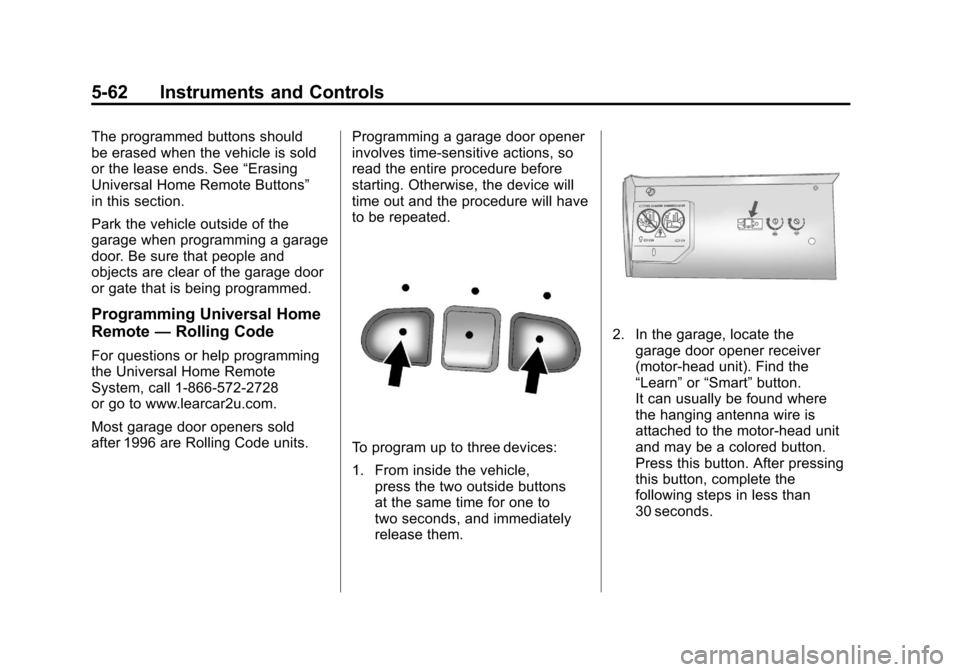
To program up to three devices:
1. From inside the vehicle,
press the two outside buttons
at the same time for one to
two seconds, and immediately
release them.
2. In the garage, locate thegarage door opener receiver
(motor-head unit). Find the
“Learn” or“Smart” button.
It can usually be found where
the hanging antenna wire is
attached to the motor-head unit
and may be a colored button.
Press this button. After pressing
this button, complete the
following steps in less than
30 seconds.
Page 213 of 588
Black plate (63,1)Chevrolet Silverado Owner Manual - 2011
Instruments and Controls 5-63
3. Immediately return to thevehicle. Press and hold the
Universal Home Remote button
that will be used to control the
garage door until the garage
door moves. The indicator light,
above the selected button,
should slowly blink. This button
may need to be held for up to
20 seconds.
4. Immediately, within one second, release the button when
the garage door moves.
The indicator light will blink
rapidly until programming is
complete.
5. Press and release the same button again. The garage door
should move, confirming that
programming is successful and
complete.
To program another Rolling Code
device such as an additional garage
door opener, a security device,
or home automation device, repeat
Steps 1 through 5, choosing a different function button in Step 3
than what was used for the garage
door opener.
If these instructions do not work,
the garage door opener is probably
a Fixed Code unit. Follow the
programming instructions that
follow for a Fixed Code garage
door opener.
Programming Universal Home
Remote
—Fixed Code
For questions or help programming
the Universal Home Remote
System, call 1-866-572-2728
or go to www.learcar2u.com.
Most garage door openers sold
before 1996 are Fixed Code units.
Programming a garage door opener
involves time-sensitive actions, so
read the entire procedure before
starting. Otherwise, the device will
time out and the procedure will have
to be repeated.To program up to three devices:
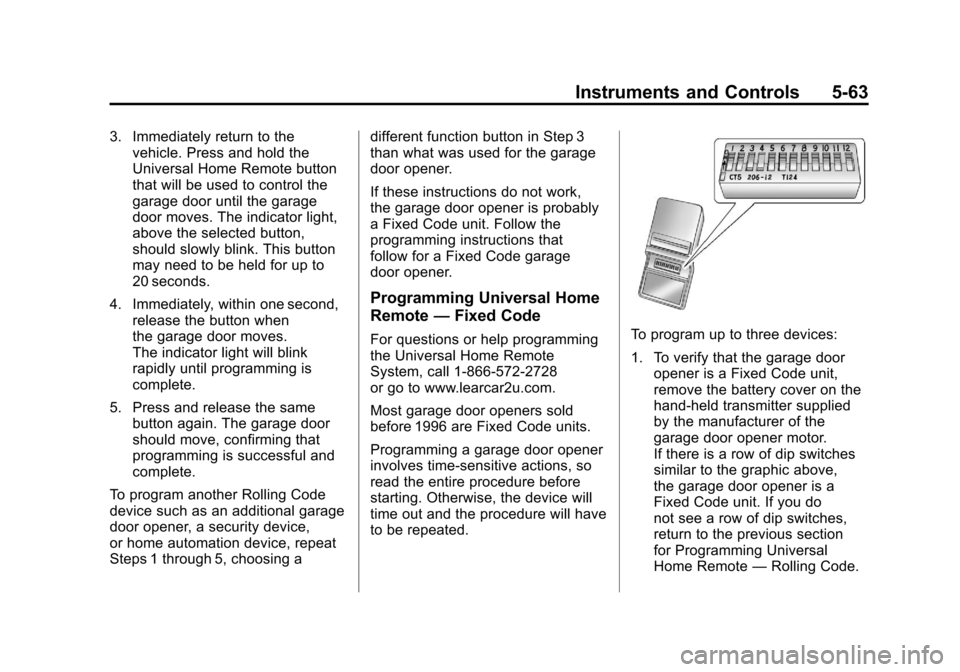
1. To verify that the garage door
opener is a Fixed Code unit,
remove the battery cover on the
hand-held transmitter supplied
by the manufacturer of the
garage door opener motor.
If there is a row of dip switches
similar to the graphic above,
the garage door opener is a
Fixed Code unit. If you do
not see a row of dip switches,
return to the previous section
for Programming Universal
Home Remote —Rolling Code.
Page 250 of 588

Black plate (24,1)Chevrolet Silverado Owner Manual - 2011
7-24 Infotainment System
If a front auxiliary device is
connected, the DVD/CD AUX
button cycles through all available
options, such as: DVD slot, CD slot,
Front Auxiliary, and Rear Auxiliary
(if available). See“Using the
Auxiliary Input Jack” inAuxiliary
Devices
on page 7‑33or “Audio/
Video (A/V) Jacks” underRear Seat
Entertainment (RSE) System
on
page 7‑38for more information.
If a disc is inserted into the top DVD
slot, the rear seat operator can turn
on the video screen and use the
remote control to navigate the CD
(tracks only) through the remote
control.
4(Information): Press to display
additional text information related
to the current song. If information is
available, the song title information
displays on the top line of the
display and artist information
displays on the bottom line.
When information is not available,
“NO INFO” displays.
f(Tune):Turn to select tracks on
the disc that is currently playing.
©SEEK: Press to go to the start
of the current track, if more than
five seconds on the CD have
played.
Press to go to the previous track if
less than five seconds on the CD
have played.
Press and hold, or press multiple
times, to continue moving backward
through the tracks on the CD.
¨SEEK: Press to go to the next
track.
Press and hold, or press multiple
times, to continue moving forward
through the tracks on the CD.
sREV (Fast Reverse): Press
and hold to reverse playback quickly
within a track.
\FWD (Fast Forward): Press
and hold to advance playback
quickly within a track.
RDM (Random): Press to listen
to tracks in random, rather than
sequential order. To use random:
1. Press the softkey under the RDM tab until Random Current
Disc displays.
2. Press the softkey again to turn off random play.
MP3‐and WMA‐Supported Files
Format
The radio can play .mp3 or .wma
files that were recorded onto a
CD-R or CD-RW disc.
Page 253 of 588

Black plate (27,1)Chevrolet Silverado Owner Manual - 2011
Infotainment System 7-27
Playing an MP3 or WMA
(in Either the DVD or CD Slot)
If a disc is inserted into the top DVD
slot, the rear seat operator can turn
on the video screen and use the
remote control to navigate the CD
(tracks only).
f(Tune):Turn to select MP3/WMA
files.
©SEEK: Press to go to the start of
the track, if more than five seconds
have played. Press and hold or
press multiple times, if less than
five seconds have played, to
continue moving backward through
tracks.
¨SEEK: Press to go to the next
track.
Press and hold, or press multiple
times, to continue moving forward
through tracks.
sREV (Reverse): Press and hold
to reverse playback quickly.
\FWD (Fast Forward): Press
and hold to advance playback
quickly.
S c(Previous Folder): Press
the softkey below the
S ctab to
go to the first track in the previous
folder.
c T(Next Folder): Press the
softkey below the
c Ttab to go
to the first track in the next folder.
RDM (Random): Press to listen
to tracks in random, rather than
sequential order.
To use random:
1. Press the softkey under the RDM tab until Random Current
Disc displays
2. Press the same softkey again to turn off random play.
h(Music Navigator): Press the
softkey below the
htab to play
files in order by artist or album.
The player scans the disc to sort
the files by artist and album ID3 tag
information. It can take several
minutes to scan the disc depending
on the number of files on the disc.
The radio may begin playing while
it is scanning in the background.
When the scan is finished, the disc
begins playing files in order by
artist. The current artist playing is
shown on the second line of the
display. Once all songs by that artist
are played, the player moves to the
next artist in alphabetical order and
begins playing files by that artist.
To listen to files by another artist,
press the softkey located below
either arrow tab. The disc goes
to the next or previous artist in
alphabetical order. Continue
pressing either softkey below the
arrow tab until the artist displays.
Page 255 of 588
Black plate (29,1)Chevrolet Silverado Owner Manual - 2011
Infotainment System 7-29
Ejecting a Disc
ZDVD (Eject):Press and
release to eject the disc currently
playing in the top slot. A beep
sounds and Ejecting Disc displays.
If loading and reading of a disc
cannot be completed, due to
unknown format, etc., and the
disc fails to eject, press and hold
for more than five seconds to force
the disc to eject.
Playing a DVD
DVD/CD AUX (Auxiliary): Press
to cycle through DVD, CD,
or Auxiliary when listening to the
radio. The DVD/CD text tab and
a message showing the track or
chapter number will display when
a disc is in either slot. Press the
DVD/CD AUX button again and
the system automatically searches
for an auxiliary input device; see
Auxiliary Devices
on page 7‑33for more information. If a portable audio
player is not connected,
“No Aux
Input Device” displays. If a disc is in
both the DVD slot and the CD slot,
the DVD/CD AUX button cycles
between the two sources and does
not indicate “No Aux Input Device.”
If a front auxiliary device is
connected, the DVD/CD AUX
button cycles through all available
options, such as: DVD slot, CD slot,
front auxiliary, and rear auxiliary
(if available). See “Using the
Auxiliary Input Jack” inAuxiliary
Devices
on page 7‑33or “Audio/
Video (A/V) Jacks” underRear Seat
Entertainment (RSE) System
on
page 7‑38for more information.
If a disc is inserted into the top DVD
slot, the rear seat operator can turn
on the video screen and use the
remote control to navigate the CD
(tracks only) through the remote
control.
O(Power): Press to turn the
radio on or off. Turn clockwise or
counterclockwise to increase or
decrease the volume. Press and
hold for more than two seconds to
turn off the entire radio and Rear
Seat Entertainment (RSE) system
and to start the Parental Control
feature. Parental Control prevents
the rear seat occupant from
operating the Rear Seat Audio
(RSA) system or remote control.
A lock symbol displays next to the
clock display. The Parental Control
feature remains on until the knob
is pressed and held for more than
two seconds again, or until the
driver turns the ignition off and
exits the vehicle.
f(Tune): Turn to select tracks on
a CD or DVD.