2011 CHEVROLET HHR power steering
[x] Cancel search: power steeringPage 5 of 430
Black plate (5,1)Chevrolet HHR Owner Manual - 2011
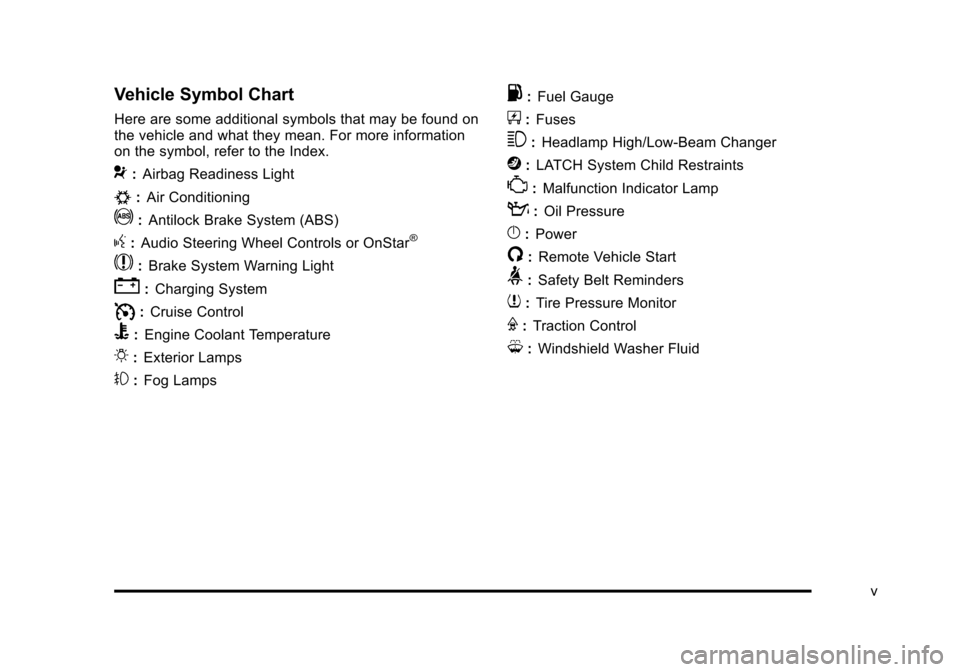
Vehicle Symbol Chart
Here are some additional symbols that may be found on
the vehicle and what they mean. For more information
on the symbol, refer to the Index.
9:Airbag Readiness Light
#:Air Conditioning
!:Antilock Brake System (ABS)
g:Audio Steering Wheel Controls or OnStar®
$: Brake System Warning Light
":Charging System
I:Cruise Control
B: Engine Coolant Temperature
O:Exterior Lamps
#:Fog Lamps
.: Fuel Gauge
+:Fuses
3: Headlamp High/Low-Beam Changer
j:LATCH System Child Restraints
*: Malfunction Indicator Lamp
::Oil Pressure
}:Power
/:Remote Vehicle Start
>:Safety Belt Reminders
7:Tire Pressure Monitor
F:Traction Control
M:Windshield Washer Fluid
v
Page 7 of 430

Black plate (1,1)Chevrolet HHR Owner Manual - 2011
Section 1 In Brief
Instrument Panel. . . . . . . . . . . . . . . . . . . . . . . . . . . . . . . . . . . 1-2
Initial Drive Information . . . . . . . . . . . . . . . . . . . . . . . . . . . 1-4
Remote Keyless Entry (RKE) System . . . . . . . . . . . 1-4
Remote Vehicle Start . . . . . . . . . . . . . . . . . . . . . . . . . . . 1-4
Door Locks . . . . . . . . . . . . . . . . . . . . . . . . . . . . . . . . . . . . . 1-5
Liftgate . . . . . . . . . . . . . . . . . . . . . . . . . . . . . . . . . . . . . . . . . . 1-5
Windows . . . . . . . . . . . . . . . . . . . . . . . . . . . . . . . . . . . . . . . . 1-6
Seat Adjustment . . . . . . . . . . . . . . . . . . . . . . . . . . . . . . . . 1-6
Second Row Seats . . . . . . . . . . . . . . . . . . . . . . . . . . . . . 1-8
Heated Seats . . . . . . . . . . . . . . . . . . . . . . . . . . . . . . . . . . . 1-9
Head Restraint Adjustment . . . . . . . . . . . . . . . . . . . . . . 1-9
Safety Belt . . . . . . . . . . . . . . . . . . . . . . . . . . . . . . . . . . . . . . 1-9
Sensing System for Passenger Airbag . . . . . . . . . 1-10
Mirror Adjustment . . . . . . . . . . . . . . . . . . . . . . . . . . . . . . 1-10
Steering Wheel Adjustment . . . . . . . . . . . . . . . . . . . . 1-11
Interior Lighting . . . . . . . . . . . . . . . . . . . . . . . . . . . . . . . . 1-12
Exterior Lighting . . . . . . . . . . . . . . . . . . . . . . . . . . . . . . . 1-12
Windshield Wiper/Washer . . . . . . . . . . . . . . . . . . . . . . 1-13
Climate Controls . . . . . . . . . . . . . . . . . . . . . . . . . . . . . . . 1-14
Vehicle Features . . . . . . . . . . . . . . . . . . . . . . . . . . . . . . . . . . 1-15
Radio(s) . . . . . . . . . . . . . . . . . . . . . . . . . . . . . . . . . . . . . . . 1-15
Satellite Radio . . . . . . . . . . . . . . . . . . . . . . . . . . . . . . . . . 1-16 Portable Audio Devices (Auxiliary Input or
USB Port) . . . . . . . . . . . . . . . . . . . . . . . . . . . . . . . . . . . 1-16
Steering Wheel Controls . . . . . . . . . . . . . . . . . . . . . . . 1-17
Bluetooth
®. . . . . . . . . . . . . . . . . . . . . . . . . . . . . . . . . . . . . 1-17
Driver Information Center (DIC) . . . . . . . . . . . . . . . . 1-17
Cruise Control . . . . . . . . . . . . . . . . . . . . . . . . . . . . . . . . . 1-18
Storage Compartments . . . . . . . . . . . . . . . . . . . . . . . . 1-19
Power Outlets . . . . . . . . . . . . . . . . . . . . . . . . . . . . . . . . . 1-20
Performance and Maintenance . . . . . . . . . . . . . . . . . .1-20
Traction Control System (TCS) . . . . . . . . . . . . . . . . 1-20
Electronic Stability Control (ESC) . . . . . . . . . . . . . . 1-20
Tire Pressure Monitor . . . . . . . . . . . . . . . . . . . . . . . . . . 1-21
Tire Sealant and Compressor Kit . . . . . . . . . . . . . . 1-21
Engine Oil Life System . . . . . . . . . . . . . . . . . . . . . . . . 1-21
Fuel E85 (85% Ethanol) . . . . . . . . . . . . . . . . . . . . . . . 1-22
Driving for Better Fuel Economy . . . . . . . . . . . . . . . 1-22
Battery . . . . . . . . . . . . . . . . . . . . . . . . . . . . . . . . . . . . . . . . . 1-23
Roadside Assistance Program . . . . . . . . . . . . . . . . . 1-23
OnStar
®. . . . . . . . . . . . . . . . . . . . . . . . . . . . . . . . . . . . . . . 1-23
1-1
Page 9 of 430

Black plate (3,1)Chevrolet HHR Owner Manual - 2011
A.Outlet Adjustment on page 4‑20.
B. Cruise Control
on page 4‑8(If Equipped).
C. Turn Signal/Multifunction Lever on page 4‑4.
D. Instrument Panel Cluster on page 4‑23.
E. Windshield Wipers on page 4‑5.
Windshield Washer on page 4‑6.
F. Instrument Panel Storage on page 3‑42.
G. Traction Control System (TCS)
on page 5‑8(If Equipped).
Electronic Stability Control (ESC). See Electronic
Stability Control (ESC) on page 5‑6.
H. Passenger Airbag Status Indicator on page 4‑27.
I. Rear Side Cargo Door Buttons (If Equipped). See Rear Side Cargo Door on page 3‑11.
J. Hood Release on page 6‑13.
K. Driver Information Center (DIC) Buttons. See Driver Information Center (DIC) on page 4‑38.
L. Data Link Connector (DLC). See Malfunction
Indicator Lamp on page 4‑33. M.
Horn on page 4‑3.
N. Audio Steering Wheel Controls
on page 4‑79(If Equipped).
O. Instrument Panel Brightness on page 4‑14.
P. Audio System(s) on page 4‑50.
Q. Climate Control System on page 4‑18.
R. Rear Window Wiper/Washer on page 4‑7.
S. Shift Lever (Manual Shown). See Manual
Transmission Operation
on page 3‑29and
Automatic Transmission Operation on page 3‑26.
T. Accessory Power Outlet(s)
on page 4‑15(If Equipped).
Cigarette Lighter (If Equipped). See Ashtray(s)
and Cigarette Lighter on page 4‑17.
U. Fog Lamps
on page 4‑13(If Equipped).
V. Hazard Warning Flashers on page 4‑3.
W. Glove Box on page 3‑42.
1-3
Page 109 of 430
Black plate (3,1)Chevrolet HHR Owner Manual - 2011
Keys
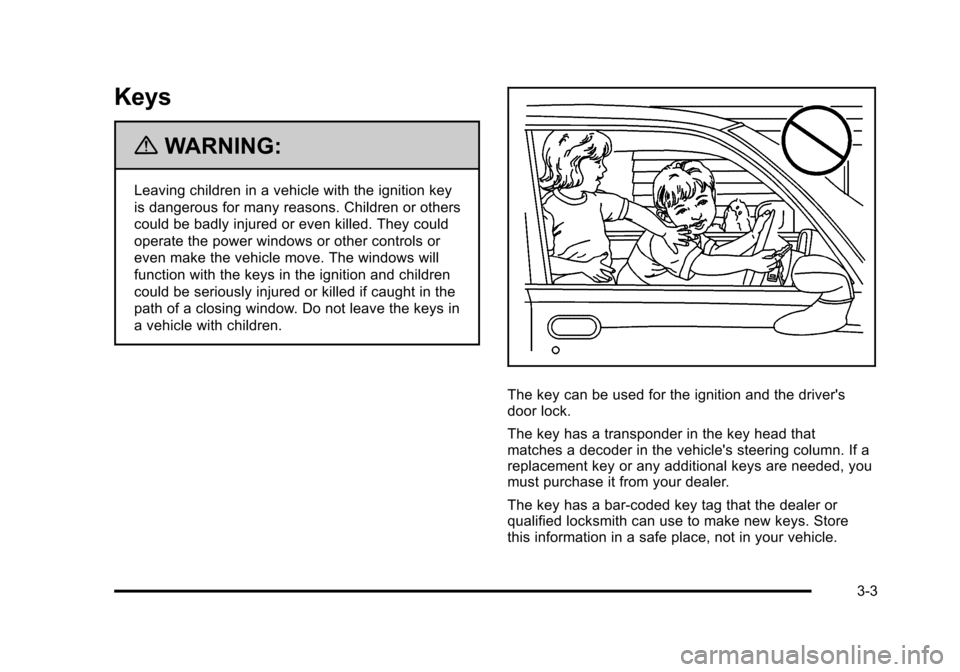
{WARNING:
Leaving children in a vehicle with the ignition key
is dangerous for many reasons. Children or others
could be badly injured or even killed. They could
operate the power windows or other controls or
even make the vehicle move. The windows will
function with the keys in the ignition and children
could be seriously injured or killed if caught in the
path of a closing window. Do not leave the keys in
a vehicle with children.
The key can be used for the ignition and the driver's
door lock.
The key has a transponder in the key head that
matches a decoder in the vehicle's steering column. If a
replacement key or any additional keys are needed, you
must purchase it from your dealer.
The key has a bar-coded key tag that the dealer or
qualified locksmith can use to make new keys. Store
this information in a safe place, not in your vehicle.
3-3
Page 127 of 430
Black plate (21,1)Chevrolet HHR Owner Manual - 2011
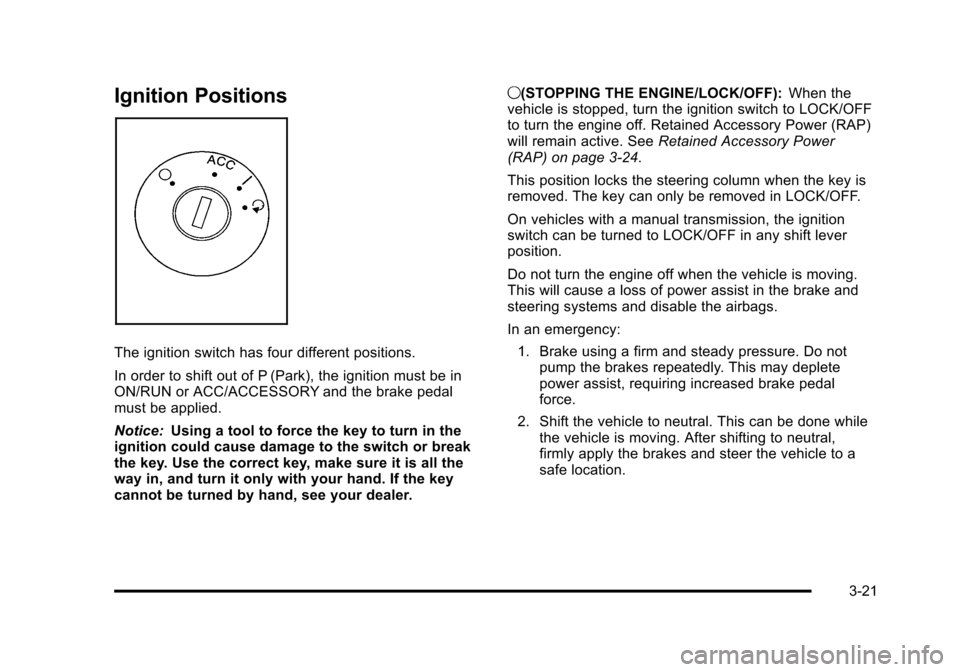
Ignition Positions
The ignition switch has four different positions.
In order to shift out of P (Park), the ignition must be in
ON/RUN or ACC/ACCESSORY and the brake pedal
must be applied.
Notice:Using a tool to force the key to turn in the
ignition could cause damage to the switch or break
the key. Use the correct key, make sure it is all the
way in, and turn it only with your hand. If the key
cannot be turned by hand, see your dealer. 9(STOPPING THE ENGINE/LOCK/OFF):
When the
vehicle is stopped, turn the ignition switch to LOCK/OFF
to turn the engine off. Retained Accessory Power (RAP)
will remain active. See Retained Accessory Power
(RAP) on page 3‑24.
This position locks the steering column when the key is
removed. The key can only be removed in LOCK/OFF.
On vehicles with a manual transmission, the ignition
switch can be turned to LOCK/OFF in any shift lever
position.
Do not turn the engine off when the vehicle is moving.
This will cause a loss of power assist in the brake and
steering systems and disable the airbags.
In an emergency:
1. Brake using a firm and steady pressure. Do not pump the brakes repeatedly. This may deplete
power assist, requiring increased brake pedal
force.
2. Shift the vehicle to neutral. This can be done while the vehicle is moving. After shifting to neutral,
firmly apply the brakes and steer the vehicle to a
safe location.
3-21
Page 199 of 430
Black plate (43,1)Chevrolet HHR Owner Manual - 2011
ICE POSSIBLE
This message displays when the outside air
temperature is cold enough to create icy road
conditions. Adjust your driving accordingly.
KEY FOB BATT (Battery) LOW
This message displays if the Remote Keyless Entry
(RKE) transmitter battery is low. Replace the battery in
the transmitter. See“Battery Replacement” under
Remote Keyless Entry (RKE) System Operation
on
page 3‑4.
LOW FUEL
This message displays when your vehicle is low on fuel.
Refill the fuel tank as soon as possible. See Fuel
Gauge
on page 4‑37, Fuelon page 6‑5, and Filling
the Tankon page 6‑9for more information.
LOW TRACTION
If your vehicle has the Enhanced Traction System
(ETS) or Traction Control System (TCS), this message
displays and the ETS light or the ESC/TCS light on the
instrument panel cluster flashes when the system is
actively limiting wheel spin. Slippery road conditions may exist if this message is displayed, so adjust your
driving accordingly. This message stays on for a few
seconds after the system stops limiting wheel spin. See
Enhanced Traction System (ETS)
on page 5‑10or
Traction Control System (TCS)on page 5‑8and
Enhanced Traction System (ETS) Indicator/Warning
Light
on page 4‑30or Electronic Stability Control
(ESC)/Traction Control System (TCS) Indicator/Warning
Light
on page 4‑31for more information.
PARKING BRAKE
This message displays if the parking brake is left
engaged. See Parking Brakeon page 3‑30for more
information.
POWER STEERING
This message displays if a problem has been detected
with the electric power steering. Have your vehicle
serviced by your dealer immediately.
SERVICE AIR BAG
This message displays when there is a problem with the
airbag system. Have your vehicle serviced by your
dealer immediately.
4-43
Page 243 of 430
Black plate (5,1)Chevrolet HHR Owner Manual - 2011
ABS can change the brake pressure to each wheel, as
required, faster than any driver could. This can help the
driver steer around the obstacle while braking hard.
As the brakes are applied, the computer keeps
receiving updates on wheel speed and controls braking
pressure accordingly.
Remember: ABS does not change the time needed to
get a foot up to the brake pedal or always decrease
stopping distance. If you get too close to the vehicle in
front of you, there will not be enough time to apply the
brakes if that vehicle suddenly slows or stops. Always
leave enough room up ahead to stop, even with ABS.
Using ABS
Do not pump the brakes. Just hold the brake pedal
down firmly and let antilock work. A slight brake pedal
pulsation might be felt or some noise noticed, but this is
normal.
Braking in Emergencies
At some time, nearly every driver gets into a situation
that requires hard braking.
If the vehicle has Electronic Stability Control (ESC) with
Antilock Brake System (ABS), it allows the driver to
steer and brake at the same time. However, if the
vehicle does not have ESC with ABS, the first
reaction—to hit the brake pedal hard and hold it
down —might be the wrong thing to do. The wheels can stop rolling. Once they do, the vehicle cannot respond
to the driver's steering. Momentum will carry it in
whatever direction it was headed when the wheels
stopped rolling. That could be off the road, into the very
thing the driver was trying to avoid, or into traffic.
If the vehicle does not have ABS, use a
“squeeze”
braking technique. This gives maximum braking while
maintaining steering control. Do this by pushing on the
brake pedal with steadily increasing pressure.
In an emergency, you will probably want to squeeze the
brakes hard without locking the wheels. If you hear or
feel the wheels sliding, ease off the brake pedal. This
helps retain steering control. Without ABS, it is different.
See Antilock Brake System (ABS) on page 5‑4.
In many emergencies, steering can help more than
even the very best braking.
Brake Assist
If this vehicle has ESC with ABS, it also has a Brake
Assist feature designed to assist the driver in stopping
or decreasing vehicle speed in emergency driving
conditions. This feature uses the stability system
hydraulic brake control module to supplement the power
brake system under conditions where the driver has
quickly and forcefully applied the brake pedal in an
attempt to quickly stop or slow down the vehicle. The
stability system hydraulic brake control module
increases brake pressure at each corner of the vehicle
5-5
Page 250 of 430
Black plate (12,1)Chevrolet HHR Owner Manual - 2011
Steering
Electric Power Steering
If the engine stalls while driving, the power steering
assist system will continue to operate until you are able
to stop the vehicle. If power steering assist is lost
because the electric power steering system is not
functioning, the vehicle can be steered but it will take
more effort.
If you turn the steering wheel in either direction several
times until it stops, or hold the steering wheel in the
stopped position for an extended amount of time, you
may notice a reduced amount of power steering assist.
The normal amount of power steering assist should
return shortly after a few normal steering movements.
The electric power steering system does not require
regular maintenance. If you suspect steering system
problems and/or the POWER STEERING message
comes on, contact your dealer for service repairs. See
DIC Warnings and Messages on page 4‑40.
Steering Tips
It is important to take curves at a reasonable speed.
Traction in a curve depends on the condition of the tires
and the road surface, the angle at which the curve is
banked, and vehicle speed. While in a curve, speed is
the one factor that can be controlled.If there is a need to reduce speed, do it before entering
the curve, while the front wheels are straight.
Try to adjust the speed so you can drive through the
curve. Maintain a reasonable, steady speed. Wait to
accelerate until out of the curve, and then accelerate
gently into the straightaway.
Steering in Emergencies
There are times when steering can be more effective
than braking. For example, you come over a hill and
find a truck stopped in your lane, or a car suddenly pulls
out from nowhere, or a child darts out from between
parked cars and stops right in front of you. These
problems can be avoided by braking
—if you can stop
in time. But sometimes you cannot stop in time because
there is no room. That is the time for evasive
action —steering around the problem.
The vehicle can perform very well in emergencies like
these. First apply the brakes —but, unless the vehicle
has antilock brakes, not enough to lock the wheels. See
Braking
on page 5‑3. It is better to remove as much
speed as possible from a collision. Then steer around
the problem, to the left or right depending on the space
available.
5-12