Page 22 of 430
Black plate (16,1)Chevrolet HHR Owner Manual - 2011
Setting the Clock
To set the time and date for the Radio with CD (MP3)
and USB port or Radio with a Single CD (MP3) player:1. Turn the ignition key to ACC/ACCESSORY or ON/RUN.
2. Press
Oto turn the radio on.
3. Press
Hand the HR, MIN, MM, DD, YYYY
(hour, minute, month, day, and year) displays.
4. Press the softkey located below any one of the tabs that you want to change.
5. Increase or decrease the time or date by turning
fclockwise or counterclockwise.
For detailed instructions on setting the clock for your
specific audio system, see Setting the Clock
on
page 4‑51.
Satellite Radio
XM is a satellite radio service that is based in the
48 contiguous United States and 10 Canadian
provinces. XM satellite radio has a wide variety of
programming and commercial-free music,
coast-to-coast, and in digital-quality sound. A fee is required to receive the XM service.
For more information, refer to:
.www.xmradio.com or call 1-800-929-2100 (U.S.)
.www.xmradio.ca or call 1-877-438-9677 (Canada)
See “XM Satellite Radio Service” underRadio(s)
on
page 4‑53.
Portable Audio Devices (Auxiliary
Input or USB Port)
This vehicle may have an auxiliary input jack and a
USB port, located on the audio faceplate. External
devices such as iPods
®, laptop computers,
MP3 players, CD changers, USB storage devices, etc.
can be connected to the auxiliary input jack using a
3.5 mm (1/8 in) cable or the USB port depending on the
audio system.
Press the CD/AUX button to play audio from the
portable player.
See “Using the Auxiliary Input Jack” and“Using the
USB Port” underRadio(s) on page 4‑53.
1-16
Page 24 of 430
Black plate (18,1)Chevrolet HHR Owner Manual - 2011
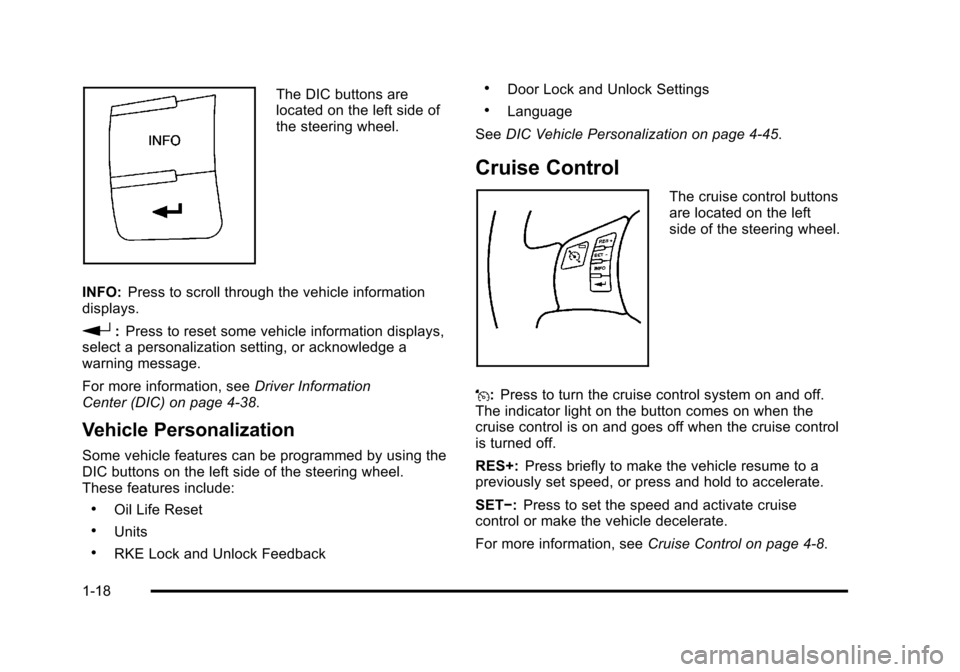
The DIC buttons are
located on the left side of
the steering wheel.
INFO: Press to scroll through the vehicle information
displays.
r: Press to reset some vehicle information displays,
select a personalization setting, or acknowledge a
warning message.
For more information, see Driver Information
Center (DIC) on page 4‑38.
Vehicle Personalization
Some vehicle features can be programmed by using the
DIC buttons on the left side of the steering wheel.
These features include:
.Oil Life Reset
.Units
.RKE Lock and Unlock Feedback
.Door Lock and Unlock Settings
.Language
See DIC Vehicle Personalization on page 4‑45.
Cruise Control
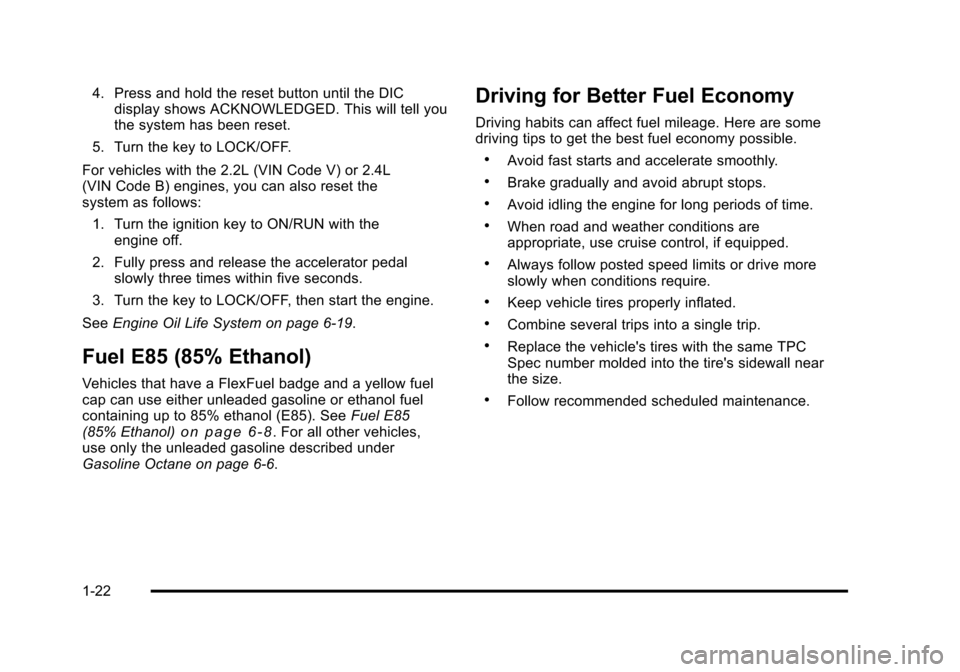
The cruise control buttons
are located on the left
side of the steering wheel.
J: Press to turn the cruise control system on and off.
The indicator light on the button comes on when the
cruise control is on and goes off when the cruise control
is turned off.
RES+: Press briefly to make the vehicle resume to a
previously set speed, or press and hold to accelerate.
SET−: Press to set the speed and activate cruise
control or make the vehicle decelerate.
For more information, see Cruise Control on page 4‑8.
1-18
Page 28 of 430
Black plate (22,1)Chevrolet HHR Owner Manual - 2011
4. Press and hold the reset button until the DICdisplay shows ACKNOWLEDGED. This will tell you
the system has been reset.
5. Turn the key to LOCK/OFF.
For vehicles with the 2.2L (VIN Code V) or 2.4L
(VIN Code B) engines, you can also reset the
system as follows: 1. Turn the ignition key to ON/RUN with the engine off.
2. Fully press and release the accelerator pedal slowly three times within five seconds.
3. Turn the key to LOCK/OFF, then start the engine.
See Engine Oil Life System on page 6‑19.
Fuel E85 (85% Ethanol)
Vehicles that have a FlexFuel badge and a yellow fuel
cap can use either unleaded gasoline or ethanol fuel
containing up to 85% ethanol (E85). See Fuel E85
(85% Ethanol)
on page 6‑8. For all other vehicles,
use only the unleaded gasoline described under
Gasoline Octane on page 6‑6.
Driving for Better Fuel Economy
Driving habits can affect fuel mileage. Here are some
driving tips to get the best fuel economy possible.
.Avoid fast starts and accelerate smoothly.
.Brake gradually and avoid abrupt stops.
.Avoid idling the engine for long periods of time.
.When road and weather conditions are
appropriate, use cruise control, if equipped.
.Always follow posted speed limits or drive more
slowly when conditions require.
.Keep vehicle tires properly inflated.
.Combine several trips into a single trip.
.Replace the vehicle's tires with the same TPC
Spec number molded into the tire's sidewall near
the size.
.Follow recommended scheduled maintenance.
1-22
Page 30 of 430
Black plate (24,1)Chevrolet HHR Owner Manual - 2011
How OnStar Service Works
Q
:Push this blue button to connect to a specially
trained OnStar advisor to verify your account
information and to answer questions.
]: Push this red emergency button to get priority help
from specially trained OnStar emergency advisors.
X: Push this button for hands‐free, voice‐activated
calling and to give voice commands for Hands‐Free
Calling and Turn‐by‐Turn Navigation.
Automatic Crash Response, Emergency Services,
Crisis Assist, Stolen Vehicle Assistance, Vehicle
Diagnostics, Remote Door Unlock, Roadside
Assistance, Turn‐by‐Turn Navigation, and Hands‐Free
Calling are available on most vehicles. Not all OnStar
services are available on all vehicles. For more
information, see the OnStar Owner's Guide; visit
www.onstar.com (U.S.) or www.onstar.ca (Canada);
contact OnStar at 1-888-4-ONSTAR (1‐888‐466‐7827)
or TTY 1‐877‐248‐2080; or press
Qto speak with an
OnStar advisor 24 hours a day, 7 days a week.
For a full description of OnStar services and system
limitations, see the OnStar Owner's Guide in the
glove box.
OnStar service is subject to the OnStar terms and
conditions included in the OnStar Subscriber
Information. OnStar service requires wireless communication
networks and the Global Positioning System (GPS)
satellite network. Not all OnStar services are available
everywhere or on all vehicles at all times.
OnStar service can’t work unless your vehicle is in a
place where OnStar has an agreement with a wireless
service provider for service in that area, and the
wireless service provider has coverage, network
capacity, reception, and technology compatible with
OnStar's service. Service involving location information
about your vehicle can’t work unless GPS signals are
available, unobstructed, and compatible with the OnStar
hardware. The vehicle has to have a working electrical
system and adequate battery power for the OnStar
equipment to operate. OnStar service may not work if
the OnStar equipment isn’t properly installed or you
haven’t maintained it and your vehicle is in good
working order and in compliance with all government
regulations. If you try to add, connect, or modify any
equipment or software in your vehicle, OnStar service
may not work. Other problems OnStar can’t control may
prevent service to you, such as hills, tall buildings,
tunnels, weather, electrical system design and
architecture of your vehicle, damage to important parts
of your vehicle in a crash, or wireless phone network
congestion or jamming.
1-24
Page 35 of 430
Black plate (3,1)Chevrolet HHR Owner Manual - 2011
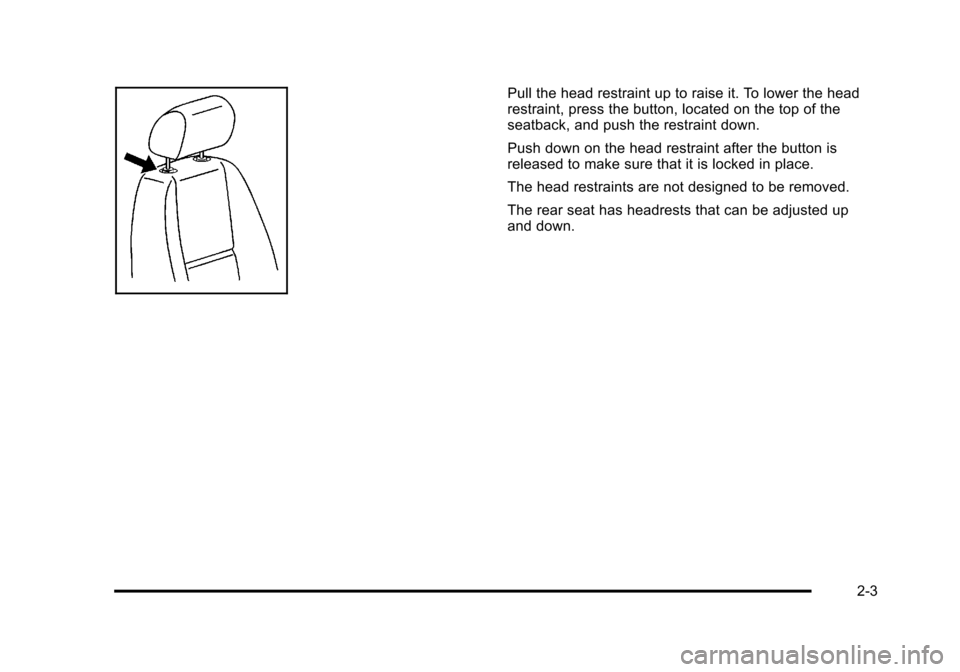
Pull the head restraint up to raise it. To lower the head
restraint, press the button, located on the top of the
seatback, and push the restraint down.
Push down on the head restraint after the button is
released to make sure that it is locked in place.
The head restraints are not designed to be removed.
The rear seat has headrests that can be adjusted up
and down.
2-3
Page 36 of 430
Black plate (4,1)Chevrolet HHR Owner Manual - 2011
Front Seats
Manual Seats
{WARNING:
You can lose control of the vehicle if you try to
adjust a manual driver seat while the vehicle is
moving. The sudden movement could startle and
confuse you, or make you push a pedal when you
do not want to. Adjust the driver seat only when
the vehicle is not moving.
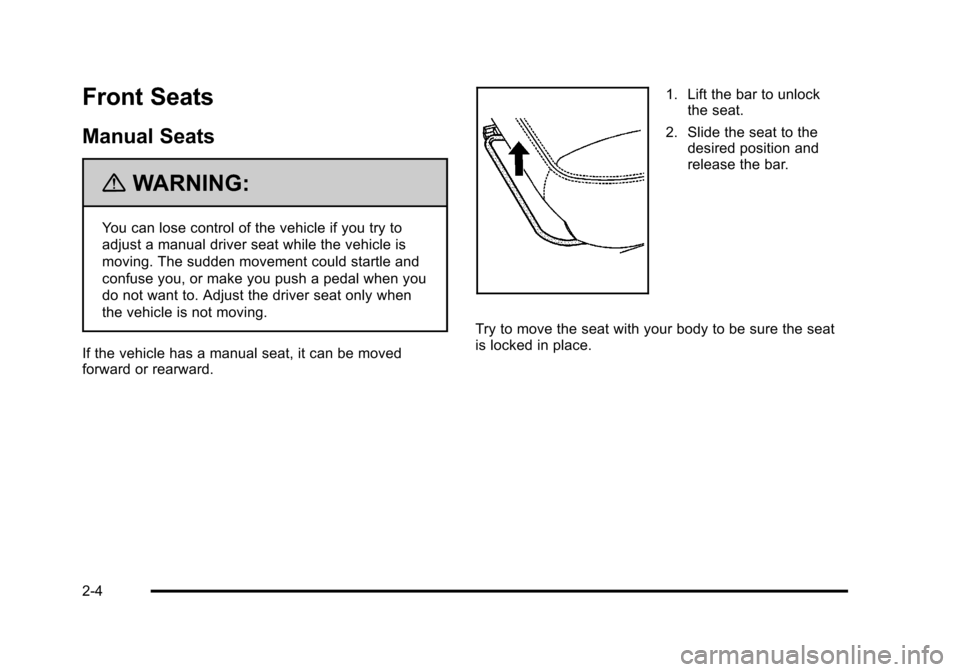
If the vehicle has a manual seat, it can be moved
forward or rearward.
1. Lift the bar to unlock the seat.
2. Slide the seat to the desired position and
release the bar.
Try to move the seat with your body to be sure the seat
is locked in place.
2-4
Page 40 of 430
Black plate (8,1)Chevrolet HHR Owner Manual - 2011
Reclining Seatbacks
{WARNING:
You can lose control of the vehicle if you try to
adjust the seat while the vehicle is moving. The
sudden movement could startle and confuse you,
or make you push a pedal when you do not want
to. Adjust the driver seat only when the vehicle is
not moving.
{WARNING:
If either seatback is not locked, it could move
forward in a sudden stop or crash. That could
cause injury to the person sitting there. Always
push and pull on the seatbacks to be sure they
are locked.
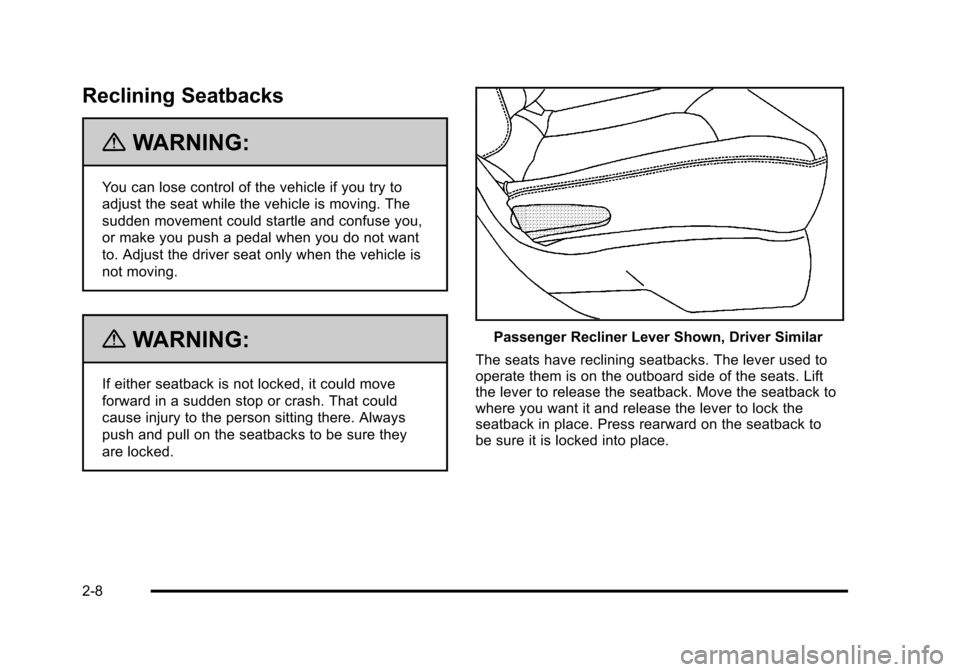
Passenger Recliner Lever Shown, Driver Similar
The seats have reclining seatbacks. The lever used to
operate them is on the outboard side of the seats. Lift
the lever to release the seatback. Move the seatback to
where you want it and release the lever to lock the
seatback in place. Press rearward on the seatback to
be sure it is locked into place.
2-8
Page 43 of 430
Black plate (11,1)Chevrolet HHR Owner Manual - 2011
3. To fold the seat flat, pull up on either lever locatedtoward the rear of the seatback. Fold the seat
forward until the seatback disengages.
4. Continue to fold the seat forward until it locks in the folded position. Pull up on the seatback to be
sure it is locked. To raise the seatback to an upright position:
1. Pull up on either lever.
2. Push the seatback up until it is in a locked position.
{WARNING:
If either seatback is not locked, it could move
forward in a sudden stop or crash. That could
cause injury to the person sitting there. Always
push and pull on the seatbacks to be sure they
are locked.
3. Push and pull on the seatback to make sure it is locked.
2-11