2011 CHEVROLET EQUINOX sensor
[x] Cancel search: sensorPage 237 of 446
Black plate (5,1)Chevrolet Equinox Owner Manual - 2011
Climate Controls 8-5
Rear Window Defogger
<(Rear Defogger):Press to turn
the rear window defogger on or off.
The rear window defogger turns off
after about 10 minutes. It can also
be turned off by turning the ignition
to ACC/ACCESSORY or LOCK/
OFF. If turned on again, it runs for
about five minutes before
turning off.
Do not drive the vehicle until all the
windows are clear.
Notice: Do not use a razor blade
or sharp object to clear the inside
rear window. Do not adhere
anything to the defogger grid
lines in the rear glass. These
actions may damage the rear
defogger. Repairs would not be
covered by your warranty.
L/M(Driver and Passenger
Heated Seats): For vehicles with
heated seats, see Heated Front
Seats on page 3‑9. Remote Start Climate Control
Operation:
For vehicles with the
remote vehicle start feature, the
climate control system may run
when the vehicle is started remotely.
The system uses the driver's
previous settings to heat or cool the
inside of the vehicle. The front
heated seats will turn on if it is cold
outside. The heated seat indicator
lights do not come on during a
remote start. See Remote Vehicle
Start on page 2‑5.
Sensors
The solar sensor, located on
top of the instrument panel near the
windshield, monitors the solar heat.
The climate control system
uses the information to adjust
the temperature, fan speed,
recirculation, and air delivery mode.
Do not cover the solar sensor or the
system will not work properly.
Air Vents
Use the air outlets, located in the
center and on the side of the
instrument panel, to direct the
airflow. Use the thumbwheels
located near the center air outlets,
to open or close off the airflow.
Operation Tips
.Clear away any ice, snow,
or leaves from air inlets at the
base of the windshield that could
block the flow of air into the
vehicle.
.Keep the path under the front
seats clear of objects to help
circulate the air inside of the
vehicle more effectively.
.Use of non‐GM approved hood
deflectors can adversely affect
the performance of the system.
Check with your dealer before
adding equipment to the outside
of the vehicle.
Page 284 of 446
Black plate (46,1)Chevrolet Equinox Owner Manual - 2011
9-46 Driving and Operating
Reducing Speed While Using
Cruise Control
If the cruise control system is
already activated,
.Move the thumbwheel toward
SET/−and hold until the desired
lower speed is reached, then
release it.
.To slow down in small amounts,
move the thumbwheel toward
SET/− briefly. Each time this is
done, the vehicle goes about
1.6 km/h (1 mph) slower.
Passing Another Vehicle While
Using Cruise Control
Use the accelerator pedal to
increase the vehicle speed. When
you take your foot off the pedal, the
vehicle will slow down to the
previous set cruise speed.
Using Cruise Control on Hills
How well the cruise control works
on hills depends upon the vehicle
speed, load, and the steepness of
the hills. When going up steep hills, you might have to step on the
accelerator pedal to maintain the
vehicle speed. When going
downhill, you might have to brake or
shift to a lower gear to maintain the
vehicle's speed. When the brakes
are applied the cruise control is
disengaged.
Ending Cruise Control
There are three ways to end cruise
control:
.To disengage cruise control;
step lightly on the brake pedal.
The indicator light will go off.
.Press\.
.To turn off the cruise control,
press
1. The cruise control
cannot be resumed.
Erasing Speed Memory
The cruise control set speed is
erased from memory by pressing
the
1button or if the ignition is
turned off.
Object Detection
Systems
Ultrasonic Parking Assist
For vehicles with the Ultrasonic
Rear Parking Assist (URPA) system,
it assists the driver with parking
and avoiding objects while in
R (Reverse). URPA operates at
speeds less than 8 km/h (5 mph),
and the sensors on the rear bumper
detect objects up to 2.5 m (8 ft)
behind the vehicle, and at least
20 cm (8 in) off the ground.
Page 286 of 446
Black plate (48,1)Chevrolet Equinox Owner Manual - 2011
9-48 Driving and Operating
When the System Does Not
Seem to Work Properly
If the URPA system does not
activate due to a temporary
condition, the message PARK
ASSIST OFF displays on the DIC.
SeeDriver Information Center (DIC)
on page 5‑22 for more information.
This can occur under the following
conditions:
.The driver has disabled the
system.
.The ultrasonic sensors are not
clean. Keep the vehicle's rear
bumper free of mud, dirt, snow,
ice, and slush. For cleaning
instructions, see Exterior Care
on page 10‑86.
.The park assist sensors are
covered by frost or ice, which
can occur after washing the
vehicle in cold weather. Keep
the sensors free of frost or ice.
.A trailer was attached to the
vehicle, or an object was
hanging out of the trunk during
the last drive cycle. Once the
object is removed, URPA will
return to normal operation.
.The vehicle's bumper is
damaged. Take the vehicle to
your dealer to repair the system.
.Other conditions may affect
system performance, such as
vibrations from a jackhammer or
the compression of air brakes on
a very large truck.
Rear Vision
Camera (RVC)
The vehicle may have a Rear Vision
Camera (RVC) system. Read this
entire section before using it.
The RVC can assist the driver when
backing up by displaying a view of
the area behind the vehicle.
{WARNING
The Rear Vision Camera (RVC)
system does not replace driver
vision. RVC does not:
.Detect objects that are
outside the camera's field of
view, below the bumper,
or underneath the vehicle.
.Detect children, pedestrians,
bicyclists, or pets.
(Continued)
Page 347 of 446
Black plate (41,1)Chevrolet Equinox Owner Manual - 2011
Vehicle Care 10-41
J-CaseFuses Usage
4 Power
Windows
–Right
5 Memory Seat
Module
6 Power Seat –Left
7 Instrument Panel
Fuse Block 1
8 Rear Defogger
9 Starter
10 AIR Pump Motor
11 Instrument Panel
Fuse Block 2
12 Sunroof
13 Antilock Brake
System Pump J-Case
Fuses Usage
14 Instrument Panel
Fuse Block 3
15 Power
Windows
–Left
16 Antilock Brake
System Module
Mini Fuses Usage
17 Transmission
Control Module
Battery
18 Trailer Parking Light
19 AIR Pump Solenoid
20 Engine Control
Module Battery
21 Canister Vent Mini Fuses Usage
22 Trailer Left Side
(If Equipped)
23 Lift Gate Module
24 Power Lumbar
25 Trailer Right Side
(If Equipped)
26 Rear Accessory
Power Outlet
27 Memory Mirror
Module
28 Regulated Voltage
Control Battery
Sensor
29 Front Wiper
30 Rear Wiper
31 Air Conditioning
Compressor
Page 348 of 446
Black plate (42,1)Chevrolet Equinox Owner Manual - 2011
10-42 Vehicle Care
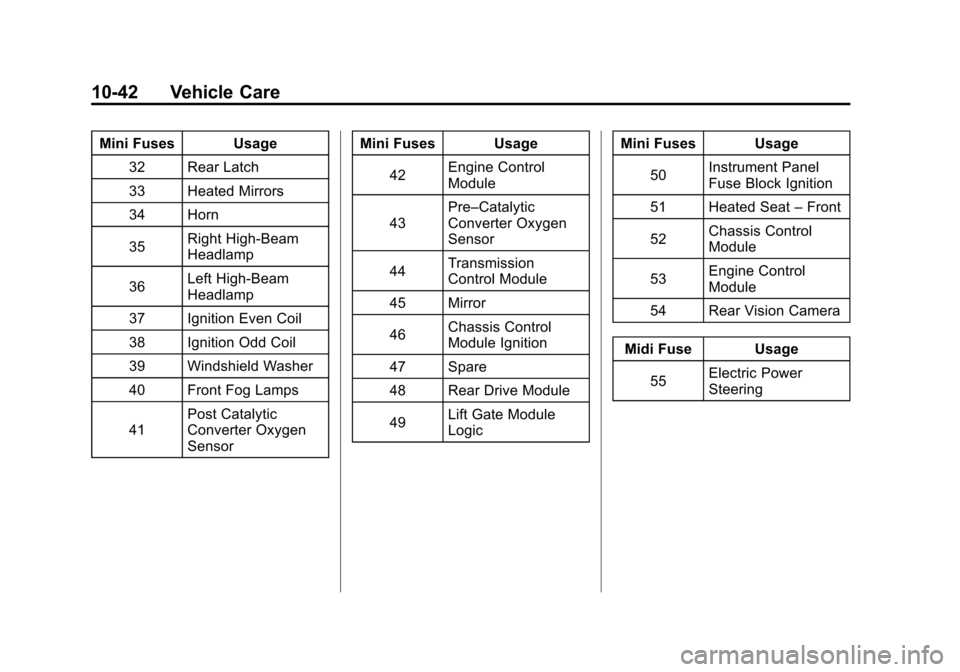
Mini Fuses Usage32 Rear Latch
33 Heated Mirrors
34 Horn
35 Right High‐Beam
Headlamp
36 Left High‐Beam
Headlamp
37 Ignition Even Coil
38 Ignition Odd Coil
39 Windshield Washer
40 Front Fog Lamps
41 Post Catalytic
Converter Oxygen
Sensor Mini Fuses Usage
42 Engine Control
Module
43 Pre–Catalytic
Converter Oxygen
Sensor
44 Transmission
Control Module
45 Mirror
46 Chassis Control
Module Ignition
47 Spare
48 Rear Drive Module
49 Lift Gate Module
Logic Mini Fuses Usage
50 Instrument Panel
Fuse Block Ignition
51 Heated Seat –Front
52 Chassis Control
Module
53 Engine Control
Module
54 Rear Vision Camera
Midi Fuse Usage 55 Electric Power
Steering
Page 360 of 446
Black plate (54,1)Chevrolet Equinox Owner Manual - 2011
10-54 Vehicle Care
How to Check
Use a good quality pocket-type
gauge to check tire pressure.
You cannot tell if your tires are
properly inflated simply by
looking at them. Radial tires may
look properly inflated even when
they are under‐inflated. Check
the tire's inflation pressure when
the tires are cold. Cold means
your vehicle has been sitting for
at least three hours or driven no
more than 1.6 km (1 mile).
Remove the valve cap from the
tire valve stem. Press the tire
gauge firmly onto the valve to
get a pressure measurement.
If the cold tire inflation pressure
matches the recommended
pressure on the Tire andLoading Information label, no
further adjustment is necessary.
If the inflation pressure is low,
add air until you reach the
recommended amount.
If you overfill the tire, release
air by pushing on the metal stem
in the center of the tire valve.
Re‐check the tire pressure with
the tire gauge.
Be sure to put the valve caps
back on the valve stems. They
help prevent leaks by keeping
out dirt and moisture.Tire Pressure Monitor
System
The Tire Pressure Monitor System
(TPMS) uses radio and sensor
technology to check tire pressure
levels. The TPMS sensors monitor
the air pressure in your tires and
transmit tire pressure readings to a
receiver located in the vehicle.
Each tire, including the spare
(if provided), should be checked
monthly when cold and inflated to
the inflation pressure recommended
by the vehicle manufacturer on the
vehicle placard or tire inflation
pressure label. (If your vehicle has
tires of a different size than the size
indicated on the vehicle placard or
tire inflation pressure label, you
should determine the proper tire
inflation pressure for those tires.)
Page 362 of 446
Black plate (56,1)Chevrolet Equinox Owner Manual - 2011
10-56 Vehicle Care
Tire Pressure Monitor
Operation
This vehicle may have a Tire
Pressure Monitor System (TPMS).
The TPMS is designed to warn the
driver when a low tire pressure
condition exists. TPMS sensors are
mounted onto each tire and wheel
assembly, excluding the spare tire
and wheel assembly. The TPMS
sensors monitor the air pressure in
the vehicle's tires and transmits the
tire pressure readings to a receiver
located in the vehicle.
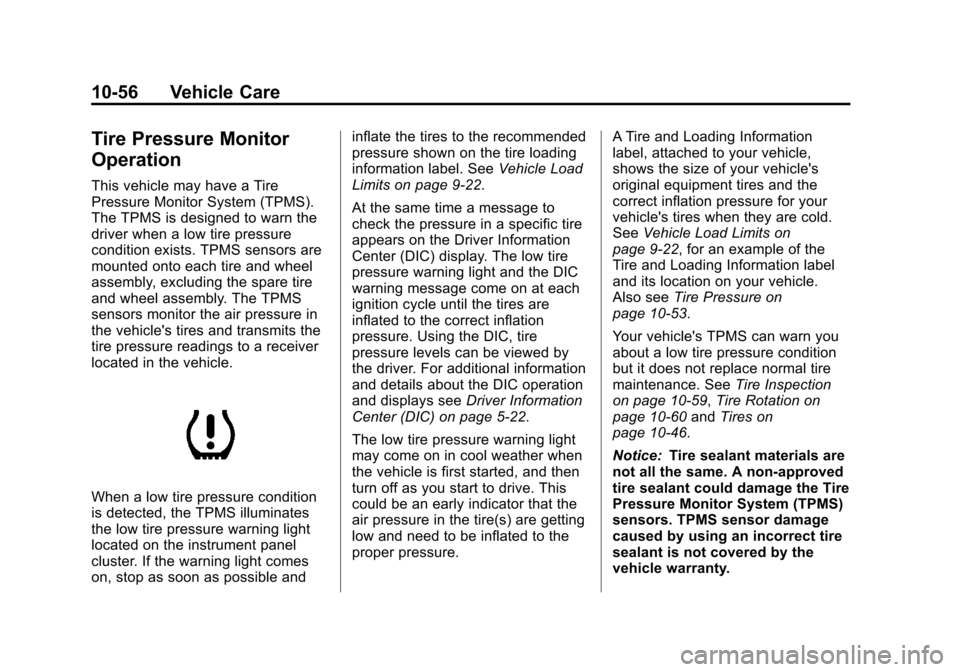
When a low tire pressure condition
is detected, the TPMS illuminates
the low tire pressure warning light
located on the instrument panel
cluster. If the warning light comes
on, stop as soon as possible andinflate the tires to the recommended
pressure shown on the tire loading
information label. See
Vehicle Load
Limits on page 9‑22.
At the same time a message to
check the pressure in a specific tire
appears on the Driver Information
Center (DIC) display. The low tire
pressure warning light and the DIC
warning message come on at each
ignition cycle until the tires are
inflated to the correct inflation
pressure. Using the DIC, tire
pressure levels can be viewed by
the driver. For additional information
and details about the DIC operation
and displays see Driver Information
Center (DIC) on page 5‑22.
The low tire pressure warning light
may come on in cool weather when
the vehicle is first started, and then
turn off as you start to drive. This
could be an early indicator that the
air pressure in the tire(s) are getting
low and need to be inflated to the
proper pressure. A Tire and Loading Information
label, attached to your vehicle,
shows the size of your vehicle's
original equipment tires and the
correct inflation pressure for your
vehicle's tires when they are cold.
See
Vehicle Load Limits on
page 9‑22, for an example of the
Tire and Loading Information label
and its location on your vehicle.
Also see Tire Pressure on
page 10‑53.
Your vehicle's TPMS can warn you
about a low tire pressure condition
but it does not replace normal tire
maintenance. See Tire Inspection
on page 10‑59, Tire Rotation on
page 10‑60 andTires on
page 10‑46.
Notice: Tire sealant materials are
not all the same. A non-approved
tire sealant could damage the Tire
Pressure Monitor System (TPMS)
sensors. TPMS sensor damage
caused by using an incorrect tire
sealant is not covered by the
vehicle warranty.
Page 363 of 446
Black plate (57,1)Chevrolet Equinox Owner Manual - 2011
Vehicle Care 10-57
Always use only the GM approved
tire sealant available through
your dealer or included in the
vehicle.
TPMS Malfunction Light and
Message
The TPMS will not function properly
if one or more of the TPMS sensors
are missing or inoperable. When the
system detects a malfunction, the
low tire pressure warning light
flashes for about one minute and
then stays on for the remainder of
the ignition cycle. A DIC warning
message is also displayed. The low
tire pressure warning light and DIC
warning message come on at each
ignition cycle until the problem is
corrected. Some of the conditions
that can cause the malfunction light
and DIC message to come on are:
.One of the road tires has been
replaced with the spare tire.
The spare tire does not have a
TPMS sensor. The TPMS
malfunction light and DICmessage should go off once you
re‐install the road tire containing
the TPMS sensor.
.The TPMS sensor matching
process was started but not
completed or not completed
successfully after rotating the
vehicle's tires. The DIC message
and TPMS malfunction light
should go off once the TPMS
sensor matching process is
performed successfully. See
“TPMS Sensor Matching
Process”
later in this section.
.One or more TPMS sensors are
missing or damaged. The DIC
message and the TPMS
malfunction light should go off
when the TPMS sensors are
installed and the sensor
matching process is performed
successfully. See your dealer
for service.
.Replacement tires or wheels do
not match your vehicle's original
equipment tires or wheels. Tires
and wheels other than those
recommended for your vehicle
could prevent the TPMS from
functioning properly. See Buying
New Tires on page 10‑62.
.Operating electronic devices or
being near facilities using radio
wave frequencies similar to the
TPMS could cause the TPMS
sensors to malfunction.
If the TPMS is not functioning it
cannot detect or signal a low tire
condition. See your dealer for
service if the TPMS malfunction
light and DIC message comes on
and stays on.