2011 CHEVROLET EQUINOX remote start
[x] Cancel search: remote startPage 42 of 446
Black plate (6,1)Chevrolet Equinox Owner Manual - 2011
2-6 Keys, Doors and Windows
Shutting the Engine Off After a
Remote Start
To shut off the engine:
.Press/until the parking lamps
turn off.
.Turn on the hazard warning
flashers.
.Insert the key and turn it to
ON/RUN and then back to
LOCK/OFF.
Conditions in Which Remote Start
Will Not Work
The remote vehicle start feature will
not operate if:
.The key is in the ignition.
.The hood or doors are not
closed.
.The hazard warning flashers
are on.
.There is an emission control
system malfunction.
.The engine coolant temperature
is too high.
.The oil pressure is low.
.Two remote vehicle starts have
already been used.
.The vehicle is not in P (Park).
Remote Start Ready
If the vehicle does not have the
remote vehicle start feature, it may
have the remote start ready feature.
This feature allows your dealer to
add the manufacturer's remote
vehicle start feature. See your
dealer to add the manufacturer's
remote vehicle start feature to
the vehicle.
Door Locks
{WARNING
Unlocked doors can be
dangerous.
.Passengers, especially
children, can easily open the
doors and fall out of a moving
vehicle. The chance of being
thrown out of the vehicle in a
crash is increased if the
doors are not locked. So, all
passengers should wear
safety belts properly and the
doors should be locked
whenever the vehicle is
driven.
.Young children who get into
unlocked vehicles may be
unable to get out. A child can
be overcome by extreme heat
and can suffer permanent
injuries or even death from
heat stroke. Always lock the
vehicle whenever leaving it. (Continued)
Page 46 of 446
Black plate (10,1)Chevrolet Equinox Owner Manual - 2011
2-10 Keys, Doors and Windows
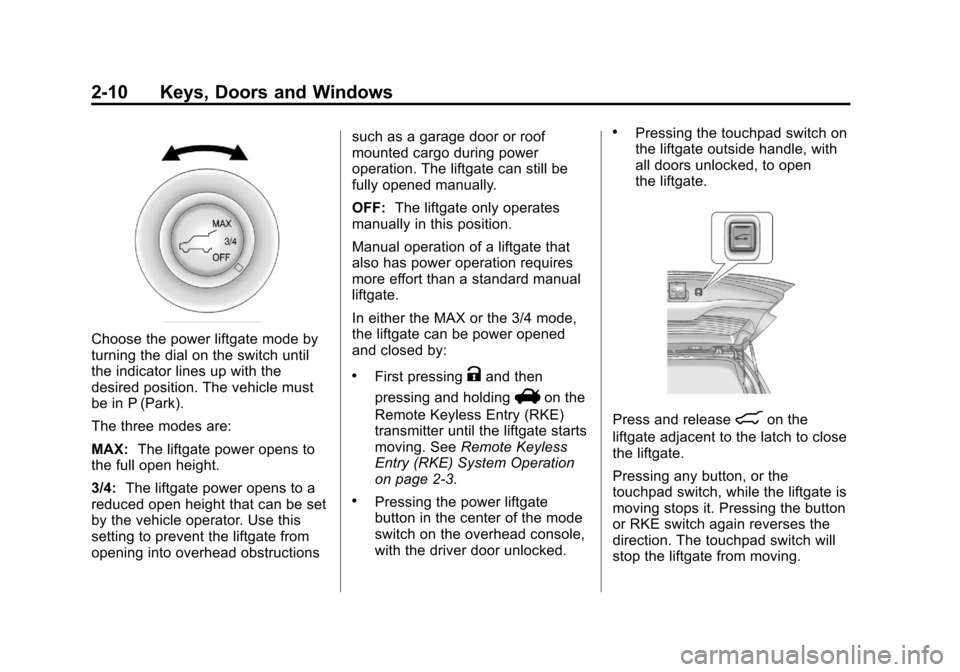
Choose the power liftgate mode by
turning the dial on the switch until
the indicator lines up with the
desired position. The vehicle must
be in P (Park).
The three modes are:
MAX:The liftgate power opens to
the full open height.
3/4: The liftgate power opens to a
reduced open height that can be set
by the vehicle operator. Use this
setting to prevent the liftgate from
opening into overhead obstructions such as a garage door or roof
mounted cargo during power
operation. The liftgate can still be
fully opened manually.
OFF:
The liftgate only operates
manually in this position.
Manual operation of a liftgate that
also has power operation requires
more effort than a standard manual
liftgate.
In either the MAX or the 3/4 mode,
the liftgate can be power opened
and closed by:
.First pressingKand then
pressing and holding
Von the
Remote Keyless Entry (RKE)
transmitter until the liftgate starts
moving. See Remote Keyless
Entry (RKE) System Operation
on page 2‑3.
.Pressing the power liftgate
button in the center of the mode
switch on the overhead console,
with the driver door unlocked.
.Pressing the touchpad switch on
the liftgate outside handle, with
all doors unlocked, to open
the liftgate.
Press and release&on the
liftgate adjacent to the latch to close
the liftgate.
Pressing any button, or the
touchpad switch, while the liftgate is
moving stops it. Pressing the button
or RKE switch again reverses the
direction. The touchpad switch will
stop the liftgate from moving.
Page 61 of 446
Black plate (5,1)Chevrolet Equinox Owner Manual - 2011
Seats and Restraints 3-5
Recalling Button Memory
Positions
To recall the manually saved Button
Memory positions, press and hold
“1”or“2.” The driver seat and
outside mirrors move to the
positions stored to those buttons
when pressed. Releasing “1”or“2”
before the stored positions are
reached stops the recall.
If something has blocked the driver
seat while recalling a memory
position, the recall may stop.
Remove the obstruction; then press
and hold the appropriate manual
control for the memory item that is
not recalling for two seconds. Try
recalling the memory position again
by pressing the appropriate memory
button. If the memory position is still
not recalling, see your dealer for
service. Recalling RKE Memory Positions
(Memory Remote Recall)
The Memory Remote Recall feature
can recall the driver seat and
outside mirrors to previously stored
RKE Memory positions when
entering the vehicle.
Every time the ignition is turned off,
the positions of the driver seat and
outside mirrors are automatically
stored to the RKE transmitter that
was used to start the vehicle. These
positions are called RKE Memory
positions and may be different than
the previously mentioned Button
Memory positions saved to the
“1”
or“2” buttons. To automatically
recall RKE Memory positions,
unlock the driver door with the
RKE transmitter and open the driver
door. If the driver door is already
open, pressing the RKE transmitter
K button will also activate the
RKE Memory recall. The driver seat
and outside mirrors will move to the
previously saved RKE Memory
positions. This feature is turned on or off using
the vehicle personalization menu.
See
“Memory Remote Recall” under
Vehicle Personalization on
page 5‑32 for more information.
To stop recall movement, press any
of the memory, power mirror,
or power seat controls.
If something has blocked the driver
seat while recalling a memory
position, the recall may stop.
Remove the obstruction; then press
and hold the appropriate manual
control for the memory item that is
not recalling for two seconds. Try
recalling the memory position again
by opening the driver door and
pressing the RKE Kbutton. If the
memory position is still not recalling,
see your dealer for service.
Page 65 of 446
Black plate (9,1)Chevrolet Equinox Owner Manual - 2011
Seats and Restraints 3-9
Heated Front Seats
{WARNING
If you cannot feel temperature
change or pain to the skin, the
seat heater may cause burns
even at low temperatures. To
reduce the risk of burns, people
with such a condition should use
care when using the seat heater,
especially for long periods of
time. Do not place anything on
the seat that insulates against
heat, such as a blanket, cushion,
cover or similar item. This may
cause the seat heater to
overheat. An overheated seat
heater may cause a burn or may
damage the seat.
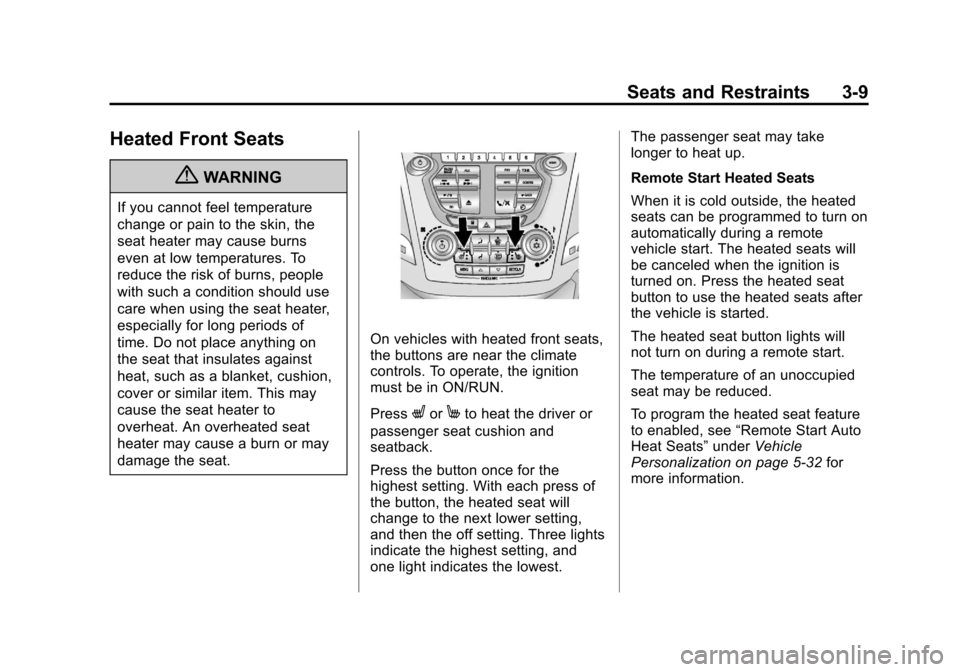
On vehicles with heated front seats,
the buttons are near the climate
controls. To operate, the ignition
must be in ON/RUN.
Press
LorMto heat the driver or
passenger seat cushion and
seatback.
Press the button once for the
highest setting. With each press of
the button, the heated seat will
change to the next lower setting,
and then the off setting. Three lights
indicate the highest setting, and
one light indicates the lowest. The passenger seat may take
longer to heat up.
Remote Start Heated Seats
When it is cold outside, the heated
seats can be programmed to turn on
automatically during a remote
vehicle start. The heated seats will
be canceled when the ignition is
turned on. Press the heated seat
button to use the heated seats after
the vehicle is started.
The heated seat button lights will
not turn on during a remote start.
The temperature of an unoccupied
seat may be reduced.
To program the heated seat feature
to enabled, see
“Remote Start Auto
Heat Seats” underVehicle
Personalization on page 5‑32 for
more information.
Page 91 of 446
Black plate (35,1)Chevrolet Equinox Owner Manual - 2011
Seats and Restraints 3-35
Additional windshield breakage may
also occur from the right front
passenger airbag.
.Airbags are designed to inflate
only once. After an airbag
inflates, you will need some
new parts for the airbag system.
If you do not get them, the
airbag system will not be there
to help protect you in another
crash. A new system will include
airbag modules and possibly
other parts. The service manual
for your vehicle covers the need
to replace other parts.
.The vehicle has a crash sensing
and diagnostic module which
records information after a
crash. SeeVehicle Data
Recording and Privacy on
page 13‑15 andEvent Data
Recorders on page 13‑16.
.Let only qualified technicians
work on the airbag systems.
Improper service can mean that
an airbag system will not work
properly. See your dealer for
service.
Passenger Sensing
System
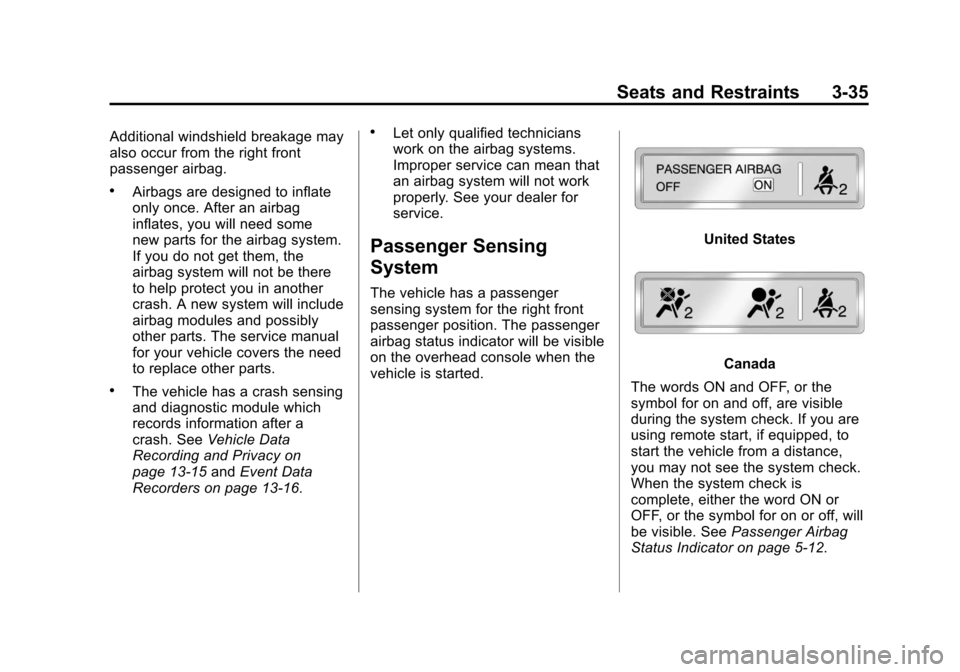
The vehicle has a passenger
sensing system for the right front
passenger position. The passenger
airbag status indicator will be visible
on the overhead console when the
vehicle is started.
United States
Canada
The words ON and OFF, or the
symbol for on and off, are visible
during the system check. If you are
using remote start, if equipped, to
start the vehicle from a distance,
you may not see the system check.
When the system check is
complete, either the word ON or
OFF, or the symbol for on or off, will
be visible. See Passenger Airbag
Status Indicator on page 5‑12.
Page 137 of 446
Black plate (13,1)Chevrolet Equinox Owner Manual - 2011
Instruments and Controls 5-13
as a system check. If you are using
remote start to start the vehicle from
a distance, if equipped, you may not
see the system check. Then, after
several more seconds, the status
indicator will light either ON or OFF,
or either the on or off symbol to let
you know the status of the right front
passenger frontal airbag.
If the word ON or the on symbol is
lit on the passenger airbag status
indicator, it means that the right
front passenger frontal airbag is
enabled (may inflate).
If the word OFF or the off symbol is
lit on the passenger airbag status
indicator, it means that the
passenger sensing system has
turned off the right front passenger
frontal airbag.
If, after several seconds, both status
indicator lights remain on, or if there
are no lights at all, there may be a
problem with the lights or the
passenger sensing system.
See your dealer for service.{WARNING
If the airbag readiness light ever
comes on and stays on, it means
that something may be wrong
with the airbag system. To help
avoid injury to yourself or others,
have the vehicle serviced right
away. SeeAirbag Readiness
Light on page 5‑12 for more
information, including important
safety information.
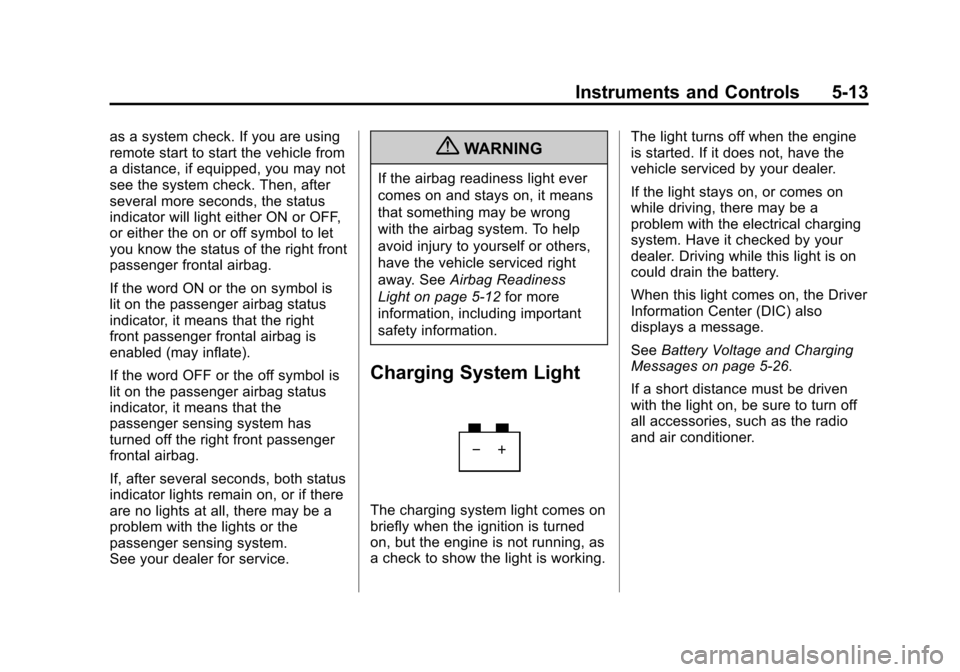
Charging System Light
The charging system light comes on
briefly when the ignition is turned
on, but the engine is not running, as
a check to show the light is working. The light turns off when the engine
is started. If it does not, have the
vehicle serviced by your dealer.
If the light stays on, or comes on
while driving, there may be a
problem with the electrical charging
system. Have it checked by your
dealer. Driving while this light is on
could drain the battery.
When this light comes on, the Driver
Information Center (DIC) also
displays a message.
See
Battery Voltage and Charging
Messages on page 5‑26.
If a short distance must be driven
with the light on, be sure to turn off
all accessories, such as the radio
and air conditioner.
Page 157 of 446
Black plate (33,1)Chevrolet Equinox Owner Manual - 2011
Instruments and Controls 5-33
3. Press the center of the MENU/SELECT knob to select the
Vehicle Settings menu.
The following list of menu items will
be available:
.Climate and Air Quality
.Comfort and Convenience
.Collision/Detection Systems
.Languages
.Lighting
.Power Door Locks
.Remote Lock/Unlock/Start
.Return to Factory Settings
Turn the MENU/SELECT knob to
highlight the menu. Press the knob
to select it. Each of the menus is
detailed in the following information.
All of the menus may not be
available. Only those tied to the
features on your vehicle will be
shown.
Climate and Air Quality
Select the Climate and Air Quality
menu and the following will be
displayed:
.Auto Fan Speed
.Air Conditioning Mode
.Remote Start Auto Heat Seats
Auto Fan Speed
This selection is available on
vehicles with the Automatic Climate
Control System. Choose from the
following blower speed settings:
High: Increased speed.
Low: Reduced speed.
Normal: Moderate speed.
Press the MENU/SELECT knob
when Auto Fan Speed is
highlighted. Turn the knob to
highlight “High,” “Normal,” or“Low.”
Press the knob to confirm the
selection and go back to the
last menu. Air Conditioning Mode
This will allow you to select whether
or not the air conditioning comes on
automatically the next time the
vehicle is started.
“On”means that
the air conditioning will be on at
start up, regardless of whether it
was on or off the last time the
vehicle was turned off. “Off”means
the air conditioning will be off at the
next start up, regardless of whether
it was on or off the last time the
vehicle was turned off. “Last
Setting” means that when the
vehicle is started, the air
conditioning will resume whichever
setting it was at the last time the
vehicle was turned off.
Press the MENU/SELECT knob
when Air Conditioning Mode is
highlighted. Turn the knob to
highlight “On,” “Off,” or“Last
Setting.” Press the knob to confirm
the selection and go back to the
last menu.
Page 158 of 446
Black plate (34,1)Chevrolet Equinox Owner Manual - 2011
5-34 Instruments and Controls
Remote Start Auto Heat Seats
When on, this feature will turn the
heated seats on when using remote
start on cold days.
Press the MENU/SELECT knob
when“Remote Start Auto Heat
Seats” is highlighted to toggle
between “On”or“Off.”
Press
}BACK to confirm the
selection and go back to the
last menu.
Comfort and Convenience
Select the Comfort and
Convenience menu and the
following will be displayed:
.Easy Exit Driver Seat
.Chime Volume
.Reverse Tilt Mirror Easy Exit Driver Seat
When on, this feature will move the
driver seat rearward upon turning
the ignition off and the driver door
opening. This may be performed to
make it easier to exit the vehicle.
See the
“Easy Exit Driver Seat”
information under Power Seat
Adjustment on page 3‑3 for more
information.
This allows you to turn the easy exit
seat feature on or off.
Press the MENU/SELECT knob
when “Easy Exit Driver Seat” is
highlighted. Turn the knob to select
“On” or“Off.” Press the knob to
confirm and go back to the
last menu.
Chime Volume
This allows the selection of the
chime volume level.
Press the MENU/SELECT knob
when “Chime Volume” is
highlighted. Turn the knob to select
“Normal”or
“High.” Press the knob to confirm
and go back to the last menu.
Reverse Tilt Mirror
When on, both the driver and
passenger mirrors will tilt downward
when vehicle is shifted to
R (Reverse) to improve visibility of
the ground near the rear wheels.
They will return to their previous
driving position when the vehicle is
shifted out of R (Reverse), the
ignition is turned to OFF, or the
vehicle is left in reverse. See Park
Tilt Mirrors on page 2‑15 for more
information.
This allows you to turn the park tilt
mirrors feature on or off.
Press the MENU/SELECT knob
when “Reverse Tilt Mirror” is
highlighted. Turn the knob to select
“On” or“Off.” Press the knob to
confirm and go back to the
last menu.