2011 CHEVROLET CRUZE steering wheel
[x] Cancel search: steering wheelPage 127 of 394
Black plate (15,1)Chevrolet Cruze Owner Manual - 2011
Instruments and Controls 5-15
.Make sure the electrical system
is not wet. The system could be
wet if the vehicle was driven
through a deep puddle of water.
The condition is usually
corrected when the electrical
system dries out. A few driving
trips should turn the light off.
.Make sure to fuel the vehicle
with quality fuel. Poor fuel quality
causes the engine not to run as
efficiently as designed and can
cause: stalling after start-up,
stalling when the vehicle is
changed into gear, misfiring,
hesitation on acceleration,
or stumbling on acceleration.
These conditions might go away
once the engine is warmed up.
If one or more of these
conditions occurs, change the
fuel brand used. It will require at
least one full tank of the proper
fuel to turn the light off.
SeeRecommended Fuel on
page 9‑40. If none of the above have made the
light turn off, your dealer can check
the vehicle. The dealer has the
proper test equipment and
diagnostic tools to fix any
mechanical or electrical problems
that might have developed.Emissions Inspection and
Maintenance Programs
Some state/provincial and local
governments may have programs to
inspect the on-vehicle emission
control equipment. For the
inspection, the emission system test
equipment is connected to the
vehicle’s Data Link
Connector (DLC).
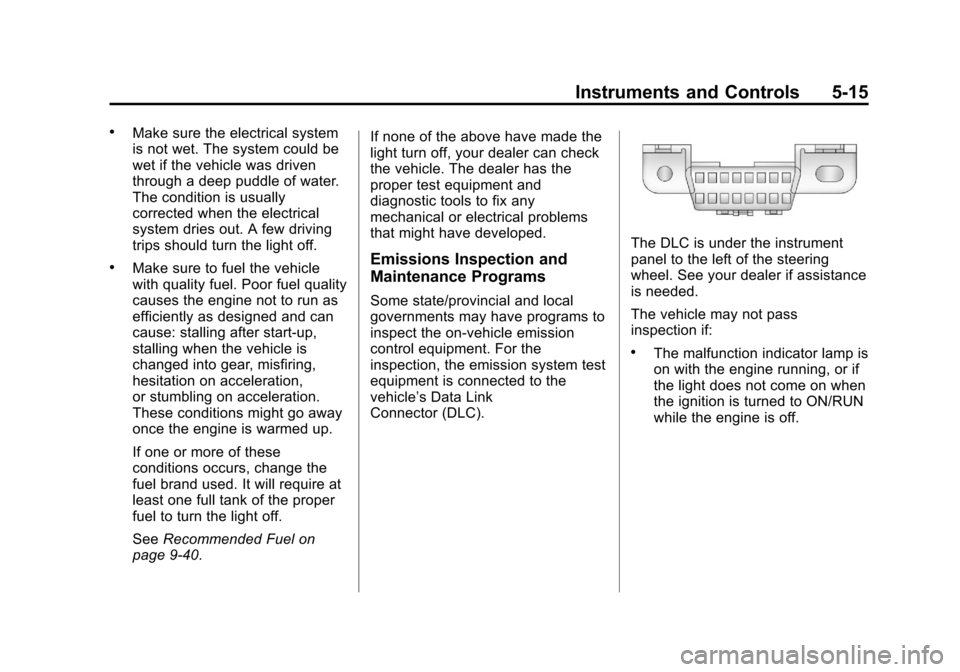
The DLC is under the instrument
panel to the left of the steering
wheel. See your dealer if assistance
is needed.
The vehicle may not pass
inspection if:
.The malfunction indicator lamp is
on with the engine running, or if
the light does not come on when
the ignition is turned to ON/RUN
while the engine is off.
Page 136 of 394
Black plate (24,1)Chevrolet Cruze Owner Manual - 2011
5-24 Instruments and Controls
Door Ajar Light
For vehicles equipped with this light,
it comes on when a door is open or
not secured. Vehicles not equipped
with a light display a DIC message.
SeeDoor Ajar Messages on
page 5‑29 for more information.
Information Displays
Driver Information
Center (DIC)
The vehicle may have a Driver
Information Center (DIC). The DIC
displays information about your
vehicle. It also displays warning
messages if a system problem is
detected. See Vehicle Messages
(Canada Base Level) on page 5‑27
or Vehicle Messages (Canada
Uplevel and United States) on
page 5‑28 for more information. All
messages appear in the DIC display
located in the center of the
instrument panel cluster.
DIC Operation and Displays
The DIC has different displays
which can be accessed by using the
DIC buttons located on the turn
signal lever located on the left side
of the steering wheel. The DIC
displays trip, fuel, and warning
messages if a system problem is
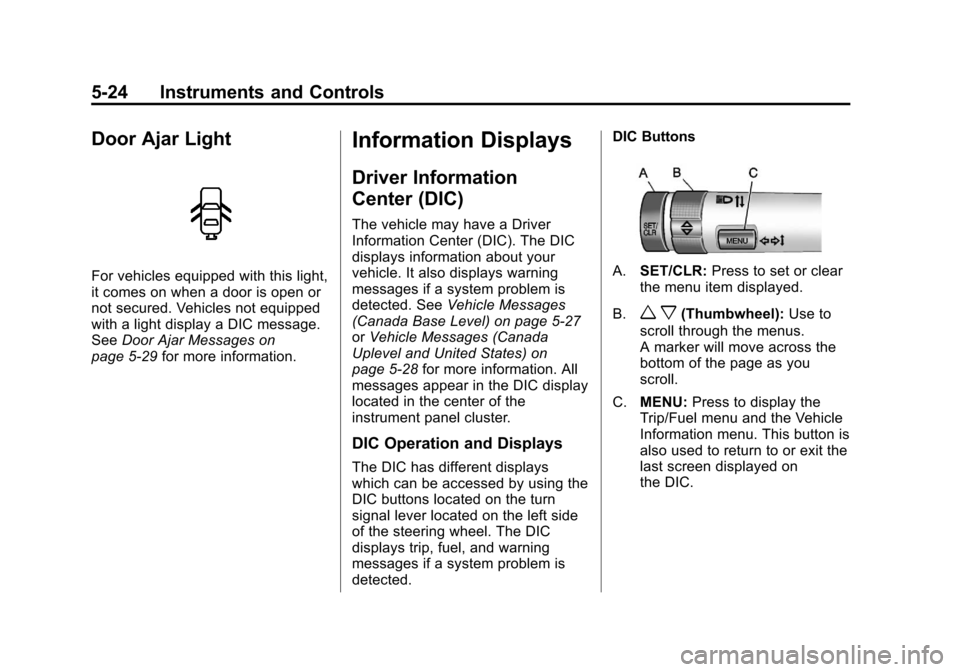
detected. DIC Buttons
A.
SET/CLR: Press to set or clear
the menu item displayed.
B.
w x(Thumbwheel): Use to
scroll through the menus.
A marker will move across the
bottom of the page as you
scroll.
C. MENU: Press to display the
Trip/Fuel menu and the Vehicle
Information menu. This button is
also used to return to or exit the
last screen displayed on
the DIC.
Page 145 of 394
Black plate (33,1)Chevrolet Cruze Owner Manual - 2011
Instruments and Controls 5-33
Starting the Vehicle
Messages
TURN STEERING WHEEL
TURN KEY OFF THEN ON
This message is displays when the
steering column is locked. Try
turning the steering wheel while
turning the vehicle off and then back
on to unlock the steering column.
TURN STEERING WHEEL
START VEHICLE AGAIN
This message is displays when the
steering column is locked. Try
turning the steering wheel while
starting the vehicle to unlock the
steering column.
Tire Messages
SERVICE TIRE MONITOR
SYSTEM
This message displays if there is a
problem with the Tire Pressure
Monitor System (TPMS). SeeTire
Pressure Monitor Operation on
page 10‑53 for more information.
TIRE LEARNING ACTIVE
This message displays when the
system is learning new tires. See
Tire Pressure Monitor Operation on
page 10‑53for more information.
TIRE PRESSURE LOW ADD
AIR TO TIRE
On vehicles with the Tire Pressure
Monitor System (TPMS), this
message displays when the
pressure in one or more of the
vehicle's tires is low. There is also an icon with the
warning that will indicate the
location of the low tire
The low tire pressure warning light
will also come on. See
Tire
Pressure Light on page 5‑20.
If a tire pressure message appears
on the DIC, stop as soon as you
can. Inflate the tires by adding air
until the tire pressure is equal to the
values shown on the Tire and
Loading Information label. See Tires
on page 10‑42, Vehicle Load Limits
on page 9‑12, and Tire Pressure on
page 10‑50.
You can receive more than one tire
pressure message at a time. To
read the other messages that may
have been sent at the same time,
press the set/reset button. The DIC
also shows the tire pressure values.
See Driver Information Center (DIC)
on page 5‑24.
Page 157 of 394
Black plate (5,1)Chevrolet Cruze Owner Manual - 2011
Lighting 6-5
Interior Lighting
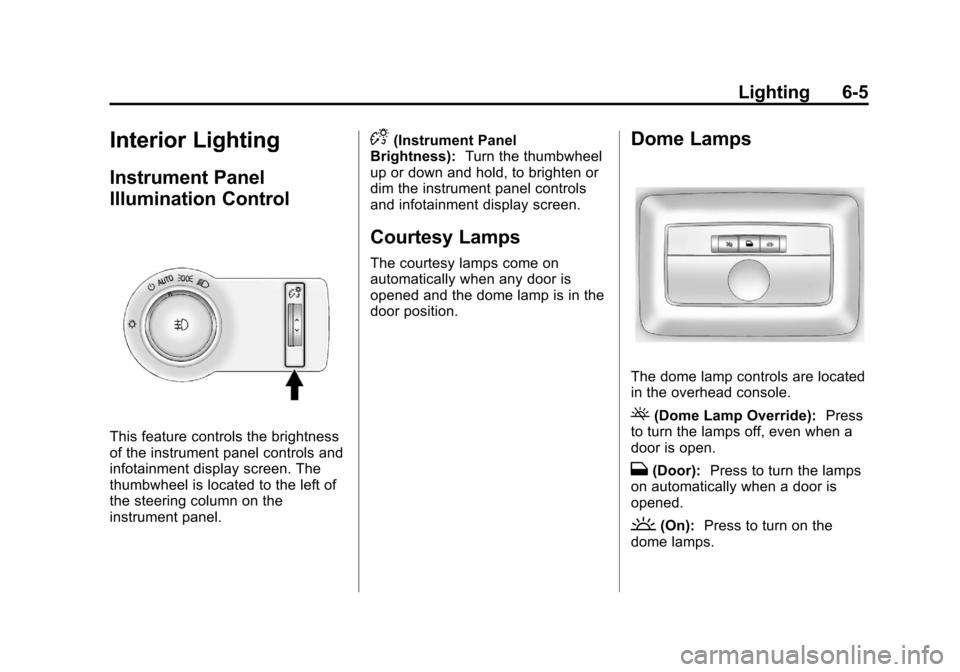
Instrument Panel
Illumination Control
This feature controls the brightness
of the instrument panel controls and
infotainment display screen. The
thumbwheel is located to the left of
the steering column on the
instrument panel.
D(Instrument Panel
Brightness): Turn the thumbwheel
up or down and hold, to brighten or
dim the instrument panel controls
and infotainment display screen.
Courtesy Lamps
The courtesy lamps come on
automatically when any door is
opened and the dome lamp is in the
door position.
Dome Lamps
The dome lamp controls are located
in the overhead console.
((Dome Lamp Override): Press
to turn the lamps off, even when a
door is open.
H(Door): Press to turn the lamps
on automatically when a door is
opened.
'(On): Press to turn on the
dome lamps.
Page 164 of 394
Black plate (6,1)Chevrolet Cruze Owner Manual - 2011
7-6 Infotainment System
Operation
Controls
The infotainment system is operated
by using the pushbuttons,
multifunction knobs, menus shown
on the display, and steering wheel
controls, if equipped.
Turning the System On or Off
O(Volume/Power):Press to turn
the system on and off.
Automatic Switch‐Off
If the infotainment system has been
turned on after the ignition is turned
off, the system will turn off
automatically after 10 minutes.
Volume Control
O(Volume/Power): Turn to adjust
the volume.
5/>(Phone/Mute): Press5/>to mute the infotainment system.
Press
5/>again, or turn theO
knob to cancel mute.
MENU System (Base Level)
The menu system for the base level
infotainment system appears on the
top half of the display screen.
Menu Icons
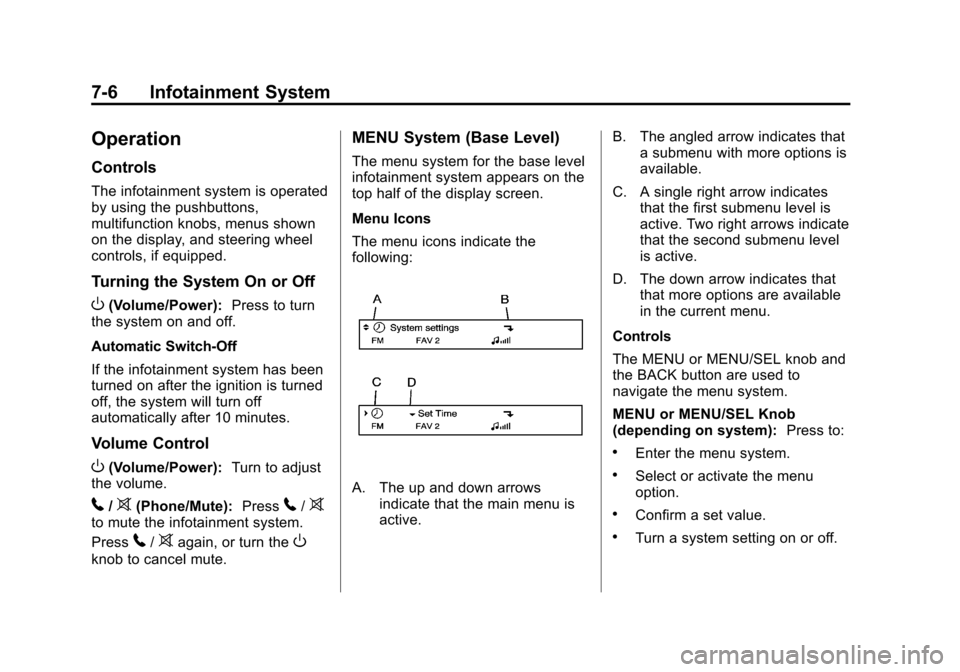
The menu icons indicate the
following:
A. The up and down arrows
indicate that the main menu is
active. B. The angled arrow indicates that
a submenu with more options is
available.
C. A single right arrow indicates that the first submenu level is
active. Two right arrows indicate
that the second submenu level
is active.
D. The down arrow indicates that that more options are available
in the current menu.
Controls
The MENU or MENU/SEL knob and
the BACK button are used to
navigate the menu system.
MENU or MENU/SEL Knob
(depending on system): Press to:
.Enter the menu system.
.Select or activate the menu
option.
.Confirm a set value.
.Turn a system setting on or off.
Page 181 of 394
Black plate (23,1)Chevrolet Cruze Owner Manual - 2011
Infotainment System 7-23
Shuffle Functionality
Turn the MENU or MENU/SEL knob
and set Shuffle Songs (Random) to
On or Off.
On:Plays current tracks in random
order.
Off: Plays current tracks in
sequential order.
Repeat Functionality
Turn the MENU or MENU/SEL knob
and set Repeat to On or Off.
Repeat On: Repeats the current
track.
Repeat Off: Starts playback from
the beginning of the current track
after the last track finishes.Phone
Bluetooth (Overview)
Vehicles with a Bluetooth system
can use a Bluetooth capable cell
phone with a Hands‐Free Profile to
make and receive phone calls. The
infotainment system and voice
recognition are used to control the
system. The system can be used
while the ignition is in ON/RUN or
ACC/ACCESSORY. The range of
the Bluetooth system can be up to
9.1 m (30 ft). Not all phones support
all functions and not all phones work
with the Bluetooth system. See
www.gm.com/bluetooth for more
information about compatible
phones.
Bluetooth Controls
Use the buttons located on the
infotainment system and the
steering wheel to operate the
Bluetooth system. Steering Wheel Controls
b
g(Push To Talk): Press to
answer incoming calls, to confirm
system information, and to start
voice recognition.
$ i(End Call/Mute): Press to
end a call, reject a call, or cancel an
operation.
Infotainment System Controls
For information about how to
navigate the menu system using the
infotainment controls, see Operation
on page 7‑6.
5/>(Phone): Press to enter the
Phone main menu.
Voice Recognition
The voice recognition system uses
commands to control the system
and dial phone numbers.
Noise: The system may not
recognize voice commands if there
is too much background noise.
Page 186 of 394
Black plate (28,1)Chevrolet Cruze Owner Manual - 2011
7-28 Infotainment System
Bluetooth (Voice
Recognition)
Using Voice Recognition
To use voice recognition, press thebgbutton located on the steering
wheel. The system responds
differently depending on what kind
of infotainment system the vehicle
has installed.
For vehicles without a navigation
system, the system responds
“Ready,” followed by a tone. After
the tone, say a command.
For vehicles with a navigation
system, the system responds with a
tone. After the tone say “Hands
Free” to use the Bluetooth voice
recognition system. The system
then responds with “Ready,”
followed by a tone. After the tone,
say a command.
For additional information say “Help”
while you are in a voice
recognition menu.
Pairing
A Bluetooth cell phone must be
paired to the Bluetooth system and
then connected to the vehicle before
it can be used. See your cell phone
manufacturer's user guide for
Bluetooth functions before pairing
the cell phone. If a Bluetooth phone
is not connected, calls will be made
using OnStar Hands‐Free Calling,
if available. Refer to the OnStar
owner's guide for more information.
Pairing Information
.Up to five cell phones can be
paired to the Bluetooth system.
.The pairing process is disabled
when the vehicle is moving.
.Pairing only needs to be
completed once, unless the
pairing information on the cell
phone changes or the cell phone
is deleted from the system.
.Only one paired cell phone can
be connected to the Bluetooth
system at a time.
.If multiple paired cell phones are
within range of the system, the
system connects to the first
available paired cell phone in the
order that they were first paired
to the system. To link to a
different paired phone, see
“Connecting to a Different
Phone” later in this section.
Pairing a Phone
1. Press
b g. For vehicles with a
navigation system, say “Hands
Free,” after the tone.
2. Say “Bluetooth.”
3. Say “Pair.”The system responds
with instructions and a four‐digit
Personal Identification Number
(PIN). The PIN is used in Step 5.
4. Start the pairing process on the cell phone that you want to pair.
For help with this process, see
your cell phone manufacturer's
user guide.
Page 204 of 394
Black plate (4,1)Chevrolet Cruze Owner Manual - 2011
9-4 Driving and Operating
Avoid needless heavy
braking. Some people drive in
spurts—heavy acceleration
followed by heavy braking —rather
than keeping pace with traffic. This
is a mistake. The brakes might not
have time to cool between hard
stops. The brakes will wear out
much faster with a lot of heavy
braking. Keeping pace with the
traffic and allowing realistic following
distances eliminates a lot of
unnecessary braking. That means
better braking and longer brake life.
If the engine ever stops while the
vehicle is being driven, brake
normally but do not pump the
brakes. If the brakes are pumped,
the pedal could get harder to push
down. If the engine stops, there will
still be some power brake assist but
it will be used when the brake is
applied. Once the power assist is
used up, it can take longer to stop
and the brake pedal will be harder
to push. Adding non‐dealer accessories can
affect vehicle performance. See
Accessories and Modifications on
page 10‑3.
Steering
If the engine stalls while driving, the
power steering assist system will
continue to operate until you are
able to stop the vehicle. If power
steering assist is lost because the
electric power steering system is not
functioning, the vehicle can be
steered but it will take more effort.
If you turn the steering wheel in
either direction several times until it
stops, or hold the steering wheel in
the stopped position for an
extended amount of time, you may
notice a reduced amount of power
steering assist. The normal amount
of power steering assist should
return shortly after a few normal
steering movements.
The electric power steering system
does not require regular
maintenance. If you suspectsteering system problems, such as
abnormally high steering effort for a
prolonged period of time, contact
your dealer for service repairs.
Steering Tips
It is important to take curves at a
reasonable speed.
Traction in a curve depends on the
condition of the tires and the road
surface, the angle at which the
curve is banked, and vehicle speed.
While in a curve, speed is the one
factor that can be controlled.
If there is a need to reduce speed,
do it before entering the curve, while
the front wheels are straight.
Try to adjust the speed so you can
drive through the curve. Maintain a
reasonable, steady speed. Wait to
accelerate until out of the curve, and
then accelerate gently into the
straightaway.