2011 CHEVROLET CORVETTE ignition
[x] Cancel search: ignitionPage 194 of 428
Black plate (4,1)Chevrolet Corvette Owner Manual - 2011
6-4 Lighting
Once you leave the dimly lit area,
it may take about one minute
before the Twilight Sentinel turns
off. During this brief delay, the
instrument cluster may not be as
bright as usual. Make sure the
instrument panel dimmer is set to
full brightness. SeeInstrument
Panel Illumination Control on
page 6‑5.
To temporarily disable Twilight
Sentinel, turn the band to
O.
To turn Twilight Sentinel back on,
turn the band to
Oagain, then
release it.
If the Twilight Sentinel has the
headlamps turned on and you turn
the ignition off, the headlamps will
stay on for a period of time while
you leave the vehicle.
Use the Driver Information Center to
turn Twilight Sentinel on or off and
to increase or decrease the length
of the delayed illumination period. See
“Personal Options” under
Vehicle Personalization on
page 5‑55.
The regular headlamp system
should be turned on when needed.
Hazard Warning Flashers
The hazard warning flashers warns
others that you have a problem.
The button is located near the
center of the instrument panel.
|: Press to make the front and
rear turn signal lamps flash on
and off. Press again to turn the
flashers off.
The hazard warning flashers work
no matter what mode the ignition is
in, even if the ignition is turned off.
When the hazard warning flashers
are on, the turn signals will
not work.
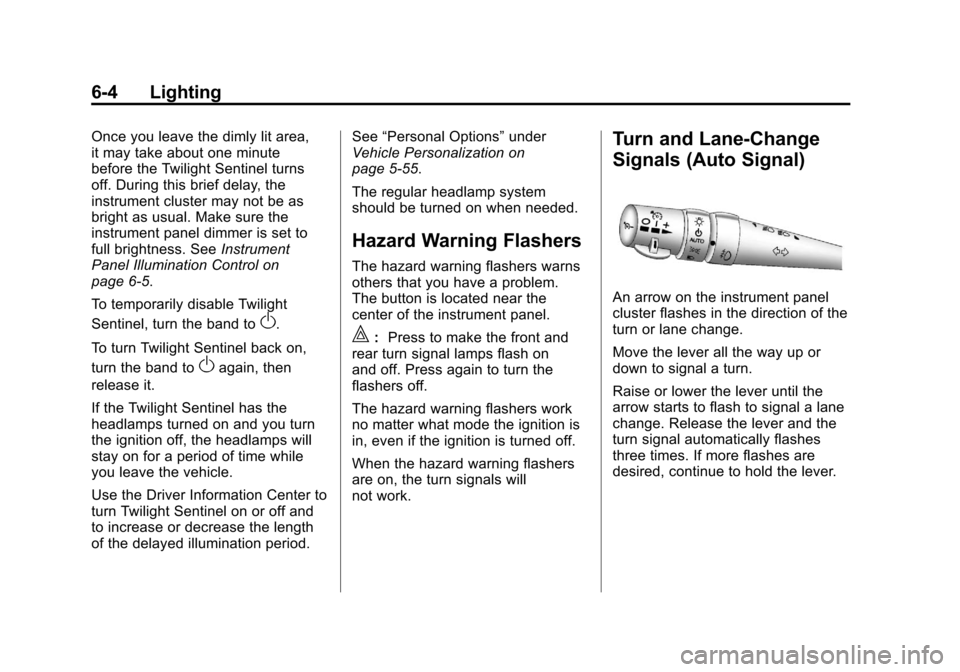
Turn and Lane-Change
Signals (Auto Signal)
An arrow on the instrument panel
cluster flashes in the direction of the
turn or lane change.
Move the lever all the way up or
down to signal a turn.
Raise or lower the lever until the
arrow starts to flash to signal a lane
change. Release the lever and the
turn signal automatically flashes
three times. If more flashes are
desired, continue to hold the lever.
Page 195 of 428
Black plate (5,1)Chevrolet Corvette Owner Manual - 2011
Lighting 6-5
The lever returns to its starting
position when it is released.
If after signaling a turn or lane
change the arrows flash rapidly or
do not come on, a signal bulb may
be burned out.
Have the bulbs replaced. If the bulb
is not burned out, check the fuse.
SeeFuses and Circuit Breakers on
page 10‑51.
Turn Signal on Chime
A chime sounds if the turn signal
has been on for more than 1.2 km
(0.75 miles) of driving.
If you need to leave the turn
signal on for more than 1.2 km
(0.75 miles), turn off the signal
and then turn it back on.Fog Lamps
Use fog lamps for better vision in
foggy or misty conditions.
The fog lamps control is located on
the multifunction lever next to the
exterior lamp control.
#(Fog Lamps): Turning the band
to this position will turn the fog
lamps on.
When you turn the fog lamps on,
the fog lamp light will appear on the
instrument panel cluster to indicate
that the fog lamps and the parking
lamps are on.
If you turn the high-beam
headlamps on, the fog lamps will
turn off. They will turn on again
when you switch to low-beam
headlamps.
The ignition must be on for the fog
lamps to operate.
Some localities have laws that
require the headlamps to be on
along with the fog lamps.
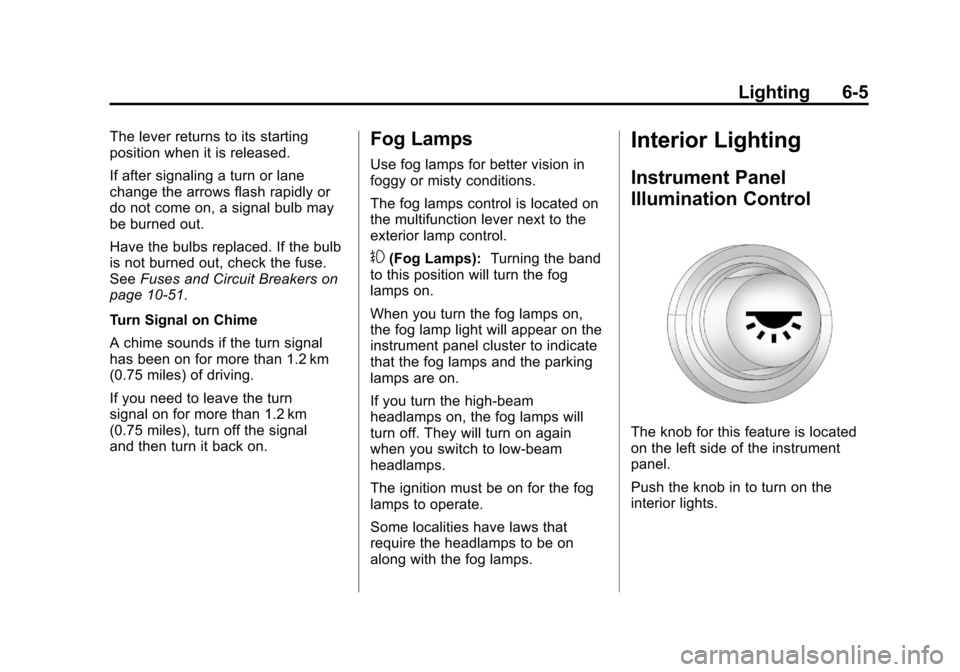
Interior Lighting
Instrument Panel
Illumination Control
The knob for this feature is located
on the left side of the instrument
panel.
Push the knob in to turn on the
interior lights.
Page 197 of 428
Black plate (7,1)Chevrolet Corvette Owner Manual - 2011
Lighting 6-7
Battery Power Protection
This vehicle has a feature to help
prevent the battery from being
drained in case any of the following
lamps are left on; the underhood
lamp, if your vehicle has this
feature, vanity mirror lamps, cargo
lamps, reading lamps, console
or glove box lamps. If any of
these lamps are left on, they will
automatically time-out after about
10 minutes. To reset it, all of the
above lamps must be turned off
or the ignition key on.
Exterior Lighting Battery
Saver
If the manual parking lamps or
headlamps have been left on,
the exterior lamps will turn off as
soon as the ignition is turned off or
Retained Accessory Power (RAP)
is active. This protects against
draining the battery in case you
have accidentally left the headlamps
or parking lamps on. The battery
saver does not work if the
headlamps are turned on after the
ignition switch is turned to off.
If you need to leave the lamps on,
use the exterior lamp control to turn
the lamps back on.
Page 199 of 428

Black plate (1,1)Chevrolet Corvette Owner Manual - 2011
Infotainment System 7-1
Infotainment
System
Introduction
Introduction . . . . . . . . . . . . . . . . . . . 7-1
Theft-Deterrent Feature . . . . . . . 7-2
Operation . . . . . . . . . . . . . . . . . . . . . 7-2
Radio
AM-FM Radio . . . . . . . . . . . . . . . . . 7-5
Satellite Radio . . . . . . . . . . . . . . . . 7-8
Radio Reception . . . . . . . . . . . . . 7-10
Diversity Antenna System . . . . 7-11
Satellite Radio Antenna . . . . . . 7-11
Audio Players
CD Player . . . . . . . . . . . . . . . . . . . . 7-11
Auxiliary Devices . . . . . . . . . . . . 7-17
Phone
Bluetooth . . . . . . . . . . . . . . . . . . . . 7-18
Introduction
Determine which radio the vehicle
has and read the following pages to
become familiar with its features.
{WARNING
Taking your eyes off the road
for extended periods could
cause a crash resulting in
injury or death to you or others.
Do not give extended attention to
entertainment tasks while driving.
This system provides access to
many audio and non‐audio listings.
To minimize taking your eyes off the
road while driving, do the following
while the vehicle is parked:
.Become familiar with the
operation and controls of the
audio system.
.Set up the tone, speaker
adjustments, and preset radio
stations. For more information, see
Defensive
Driving on page 9‑2.
Notice: Contact your dealer
before adding any equipment.
Adding audio or communication
equipment could interfere with
the operation of the vehicle's
engine, radio, or other systems,
and could damage them. Follow
federal rules covering mobile
radio and telephone equipment.
The vehicle has Retained
Accessory Power (RAP). With RAP,
the audio system can be played
even after the ignition is turned off.
See Retained Accessory Power
(RAP) on page 9‑21 for more
information.
Navigation/Radio System
For vehicles with a navigation radio
system, see the separate Navigation
System Manual.
Page 200 of 428
Black plate (2,1)Chevrolet Corvette Owner Manual - 2011
7-2 Infotainment System
Theft-Deterrent Feature
THEFTLOCK®is designed to
discourage theft of the vehicle's
radio by learning a portion of the
Vehicle Identification Number (VIN).
The radio does not operate and
LOCKED displays if the radio is
stolen or moved to a different
vehicle.
When the when the ignition is in the
off position, a blinking red light on
the upper left side of the radio
indicates that THEFTLOCK
®is
armed.
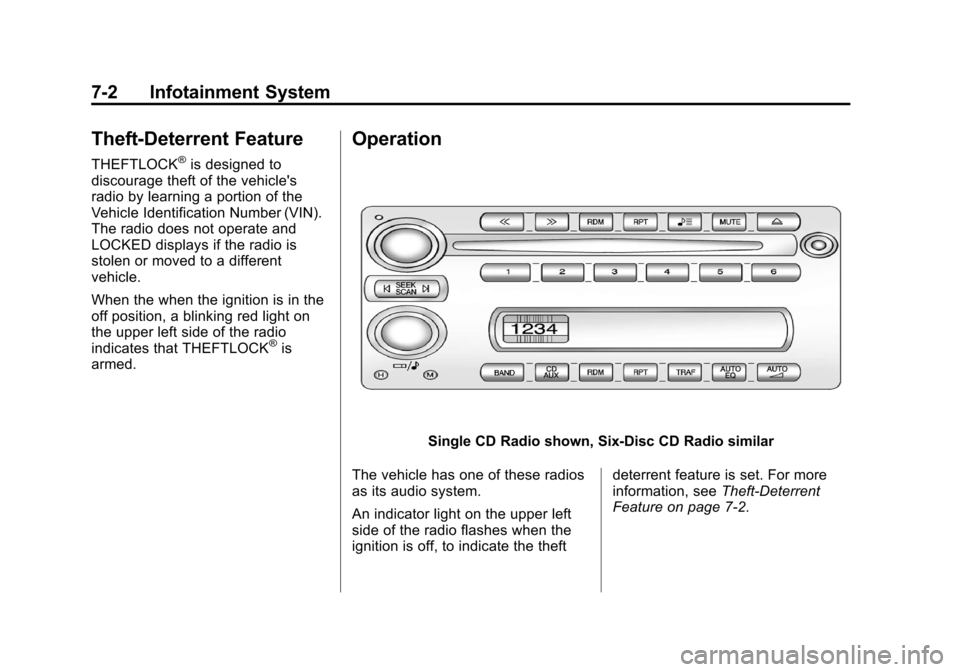
Operation
Single CD Radio shown, Six-Disc CD Radio similar
The vehicle has one of these radios
as its audio system.
An indicator light on the upper left
side of the radio flashes when the
ignition is off, to indicate the theft deterrent feature is set. For more
information, see
Theft-Deterrent
Feature on page 7‑2.
Page 210 of 428
Black plate (12,1)Chevrolet Corvette Owner Manual - 2011
7-12 Infotainment System
Care of CDs
Store CD(s) in their original cases
or other protective cases and
away from direct sunlight and dust.
The CD player scans the bottom of
the disc. If the bottom of a CD is
damaged it may not play properly or
at all. Do not touch the bottom of a
CD while handling it. Pick up CDs
by grasping the outer edges or the
edge of the hole and the outer edge.
If the surface of a CD is dirty, take
a soft, lint free cloth or dampen a
clean, soft cloth in a mild, neutral
detergent solution mixed with water,
and clean it. Make sure the wiping
process starts from the center to
the edge.
Using the CD Player
The CD player can play smaller
8 cm (3 inch) single CDs with an
adapter ring.
A CD in the player it stays in the
player when the ignition is turned
off. When the ignition or radio is
turned on, the CD starts to play
where it stopped, if it was the last
selected audio source.
Loading a CD
Single CD Radio:
Insert the CD partway into the slot,
label side up, until the player pulls
the CD in. The CD begins playing
automatically.
The CD symbol displays when a CD
is inserted, and the track number
displays when each new track starts
to play.Six-Disc CD Radio:
If more than one CD has been
loaded, a number for each CD
displays.
M(Load):
Press to load CDs into
the CD player.
To insert one CD:
1. Press
M.
2. Load a CD and insert the CD partway into the slot, label side
up when INSERT CD # displays.
The player pulls the CD in.
To insert multiple CDs:
1. Press and hold
Mfor 2 seconds.
Two beeps sound and LOAD
ALL DISCS displays.
2. Load a CD and insert the CD partway into the slot, label side
up when INSERT CD # displays.
The player pulls the CD in.
3. Wait for INSERT CD # to display after the previous CD is loaded,
then load the next CD. The CD
player takes up to 6 CDs.
Page 214 of 428
Black plate (16,1)Chevrolet Corvette Owner Manual - 2011
7-16 Infotainment System
Supported Bit Rates
The following bit rates are
supported: 32 kbps, 40 kbps,
56 kbps, 64 kbps, 80 kbps, 96 kbps,
112 kbps, 128 kbps, 160 kbps,
192 kbps, 224 kbps, 256 kbps, and
320 kbps or a variable bit rate.
File Naming
ID3v1 and ID3v2 tags are
supported. The track name
contained in the ID3 tag is shown
on the display. The display only
shows up to 32 characters for track
and file names.
If the track name is not contained in
the ID3 tag, the display shows the
file name without the file extension.
Playlists
Playlists that do not have a .m3u or
.wpl extension may not work.
Preprogrammed playlists created by
WinAmp™, MusicMatch™, or Real
Jukebox™software are supported
and they cannot be edited using the
radio.Playing an MP3
Insert a CD partway into the slot,
label side up. The player pulls it in,
and READING displays. The CD
should begin playing and the CD
symbol displays.
If the ignition or radio is turned off
with a CD-R in the player, it stays
in the player. When the ignition or
radio is turned on, the CD-R starts
to play where it stopped, if it was
the last selected audio source.
As each new track starts to play,
the track number displays.
Order of Play
Tracks are played sequentially in
the following order:
1. Playlists.
2. Files contained in the root directory.
3. Files contained in folders.
O/e(Tune): Turn to go to the
next or previous track.
{(Previous Folder): Press to
go to the first track in the previous
folder. Press and hold to reverse
through the current track.
|(Next Folder): Press to go to
the first track in the next folder.
Press and hold to fast forward the
current track.
RDM (Random): Press to hear
the tracks in random, rather than
sequential order, on one CD, one
folder, or all of the loaded CDs.
Press and release RDM until:
.RANDOM DISC PLAY displays
to play the tracks on the CD in
random order.
.RANDOM FOLDER displays to
play the tracks in the folder in
random order.
.RANDOM ALL DISCS displays
to play the tracks on all of the
CDs that are loaded in random
order.
.RANDOM OFF displays to turn
off random play.
Page 221 of 428
Black plate (23,1)Chevrolet Corvette Owner Manual - 2011
Infotainment System 7-23
Three‐Way Calling
Three‐way calling must be
supported on the cell phone and
enabled by the wireless service
carrier.
1. While on a call, press
bg.
2. Say “Three‐way call”.
3. Use the dial or call command to dial the number of the third party
to be called.
4. Once the call is connected, press
bgto link all the callers
together.
Ending a Call
Presscto end a call.
Muting a Call
During a call, all sounds from inside
the vehicle can be muted so that the
person on the other end of the call
cannot hear them. To mute a call, press
b
g, and then
say “Mute Call”.
To cancel mute, press
b g, and
then say “Un‐mute Call”.
Transferring a Call
Audio can be transferred between
the Bluetooth system and the cell
phone.
The cell phone must be paired
and connected with the Bluetooth
system before a call can be
transferred. The connection process
can take up to two minutes after the
ignition is turned to ON/RUN.
To Transfer Audio From the
Bluetooth System to a Cell Phone
During a call with the audio in the
vehicle:
1. Press
bg.
2. Say “Transfer Call”. To Transfer Audio to the Bluetooth
System From a Cell Phone
During a call with the audio on the
cell phone, press
b
g. The audio
transfers to the vehicle. If the audio
does not transfer to the vehicle,
use the audio transfer feature on
the cell phone. See your cell phone
manufacturers user guide for more
information.
Voice Pass-Thru
Voice pass‐thru allows access to
the voice recognition commands on
the cell phone. See your cell phone
manufacturers user guide to see if
the cell phone supports this feature.
To access contacts stored in the cell
phone:
1. Press and hold
b gfor
two seconds.
2. Say “Bluetooth”. The system
responds “Bluetooth ready”,
followed by a tone.