2011 CHEVROLET CORVETTE air condition
[x] Cancel search: air conditionPage 171 of 428
Black plate (51,1)Chevrolet Corvette Owner Manual - 2011
Instruments and Controls 5-51
Tire Messages
HIGH TIRE PRESSURE
This message may be displayed
when one or more of the tires is
over-inflated. This message also
displays LEFT FRONT, RIGHT
FRONT, LEFT REAR, or RIGHT
REAR to indicate which tire is
affected. You can receive more
than one tire pressure message
at a time. To read other messages
that may have been sent at the
same time, press the RESET
button. If a tire pressure message
appears on the DIC, stop as soon
as you can. Have the tire pressures
checked and set to those shown on
the Tire Loading Information label.
SeeRun-Flat Tires on page 10‑59,
Vehicle Load Limits on page 9‑14,
Tire Pressure on page 10‑66, and
Tire Pressure Monitor System on
page 10‑68. The DIC also shows
the tire pressure values. See Driver
Information Center (DIC) on
page 5‑25. To acknowledge the message, press
the RESET button. A message
reappears every 10 minutes until
the condition is corrected.
LOW TIRE PRESSURE or TIRE
LOW ADD AIR TO TIRE
{WARNING
When the LOW TIRE
PRESSURE or TIRE FLAT
message is displayed on the
Driver Information Center, your
vehicle's handling capabilities
will be reduced during severe
maneuvers. The active handling
system will be affected. See
Active Handling System on
page 9‑37. If you drive too fast,
you could lose control of your
vehicle. You or others could be
injured. Do not drive over 90 km/h
(55 mph) when the LOW TIRE
PRESSURE or TIRE FLAT
(Continued)
WARNING (Continued)
message is displayed. Drive
cautiously and check your tire
pressures as soon as you can.
This message displays when one or
more of the tires is under-inflated.
This message also displays LEFT
FRONT, RIGHT FRONT, LEFT
REAR, or RIGHT REAR to indicate
which tire is affected. Multiple
chimes sound and the tire pressure
light on the instrument panel cluster
turns on when this message is
displayed. See Tire Pressure Light
on page 5‑24. You can receive more
than one tire pressure message at a
time. To read other messages that
may have been sent at the same
time, press the RESET button. If a
tire pressure message appears on
the DIC, stop as soon as you can.
Have the tire pressures checked
and set to those shown on the
Tire Loading Information label.
Page 174 of 428
Black plate (54,1)Chevrolet Corvette Owner Manual - 2011
5-54 Instruments and Controls
If this message is displayed during
normal vehicle operation on flat
roads, the vehicle may need
service. See your dealer for an
inspection.
If driving in a performance or
competitive manner, the use of
(S) Sport Automatic Mode or
(S) Sport Manual Paddle Shift
gear selection is recommended.
SeeAutomatic Transmission on
page 9‑28 for more information.
To acknowledge the message, press
the RESET button. The message
reappears every 10 minutes until
this condition changes. If you do
not press the RESET button, the
message remains on the display
until the condition changes.
UPSHIFT NOW
See Manual Transmission on
page 9‑32.
Vehicle Reminder
Messages
ACCESSORY MODE ON
This message displays when the
vehicle is in accessory mode.
ICE POSSIBLE
This message displays when
the outside air temperature is
cold enough to create icy road
conditions. Adjust your driving
accordingly.
OPTIONS UNAVAILABLE
This message displays for a
few seconds if a keyless access
transmitter that is not labelled 1 or 2
is used and you try to personalize
the features on the vehicle by
pressing the OPTION button.
The personalization system will
not recognize the transmitter and
the DIC will not display the current
driver number or the menus
used to set personalizations. The personalization features will
then be set to the default states.
See
Vehicle Personalization on
page 5‑55 for more information.
SET PARK BRAKE FOR SEAT
RECALL
If the vehicle has a manual
transmission, this message
displays if you try to recall the
memory positions when the ignition
is on and the parking brake is not
set. If the vehicle is on, you must
set the parking brake in order for
the memory positions to recall.
See“Memory Seat, Mirrors and
Steering Wheel” underPower Seat
Adjustment on page 3‑3 for more
information.
Washer Fluid Messages
CHECK WASHER FLUID
See Washer Fluid on page 10‑37.
Page 223 of 428
Black plate (1,1)Chevrolet Corvette Owner Manual - 2011
Climate Controls 8-1
Climate Controls
Climate Control Systems
Dual Automatic Climate ControlSystem . . . . . . . . . . . . . . . . . . . . . . 8-1
Air Vents
Air Vents . . . . . . . . . . . . . . . . . . . . . . 8-6
Maintenance
Passenger Compartment AirFilter . . . . . . . . . . . . . . . . . . . . . . . . . 8-7
Climate Control Systems
Dual Automatic Climate Control System
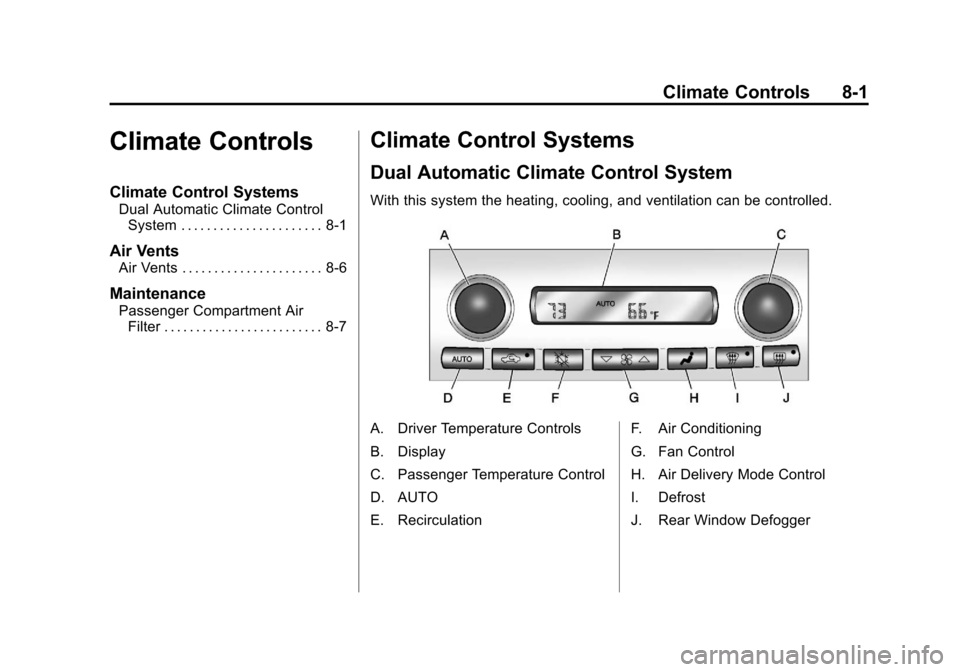
With this system the heating, cooling, and ventilation can be controlled.
A. Driver Temperature Controls
B. Display
C. Passenger Temperature Control
D. AUTO
E. Recirculation F. Air Conditioning
G. Fan Control
H. Air Delivery Mode Control
I. Defrost
J. Rear Window Defogger
Page 225 of 428

Black plate (3,1)Chevrolet Corvette Owner Manual - 2011
Climate Controls 8-3
Manual Operation
Driver Power/Temperature:Press
the driver temperature knob to
turn the climate control system
off. This is the only setting that
completely shuts off the fan.
The digital display shows only
the outside temperature. The driver
and the passenger set temperature
and the air intake mode can still be
adjusted when the climate control
is off.
Passenger Power/Temperature:
Press the passenger temperature
knob to turn the passenger's climate
control system on or off. Turn the
knob to increase or decrease the
temperature for the passenger. If the
passenger's climate control system
is off, the driver's temperature knob
will control the temperature for the
entire vehicle.
x 9 w(Fan): Press to increase
or decrease the fan speed. The fan
speed setting will appear in the
display. Pressing the arrows will delete
AUTO from the digital display.
The fan graphics with the fan speed
bars will be shown. The AUTO
button must be pressed to return
to the automatic fan control.
If the airflow seems low when the
fan speed is at the highest setting,
the passenger compartment air
filter may need to be replaced. For
more information, see
Passenger
Compartment Air Filter on page 8‑7.
N(Air Delivery Mode Control):
Press this button to manually lock in
the current air delivery setting and
to stop the automatic mode control.
Pressing
Ndeletes AUTO from
the digital display and the mode
graphics will be shown. To change
the setting, press
Nagain. The
AUTO button must be pressed to
return to the automatic mode
selection. To change the current mode, select
one of the following:
H(Vent):
Air is directed to the
instrument panel outlets, with some
air directed to the floor outlets.
%(Bi-Level): Air is divided
between the instrument panel and
floor outlets.
6(Floor): Air is directed to the
floor outlets, with some air directed
to the windshield and side window
defogger outlets.
-(Floor/Defog): This mode clears
the windows of fog or moisture.
Air is directed to the windshield
and the floor outlets, with a
small amount to the side window
outlets. In this mode, the system
automatically turns off the
recirculation and runs the
air-conditioning compressor
unless the outside temperature
is at or below freezing. The
recirculation mode cannot be
selected while in the defog mode.
Page 226 of 428
Black plate (4,1)Chevrolet Corvette Owner Manual - 2011
8-4 Climate Controls
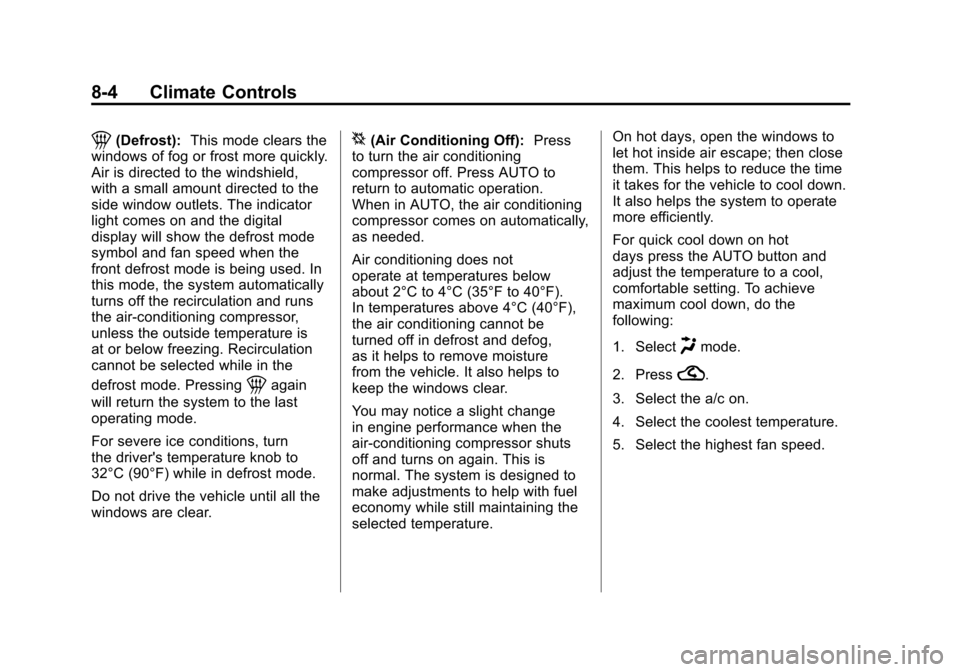
1(Defrost):This mode clears the
windows of fog or frost more quickly.
Air is directed to the windshield,
with a small amount directed to the
side window outlets. The indicator
light comes on and the digital
display will show the defrost mode
symbol and fan speed when the
front defrost mode is being used. In
this mode, the system automatically
turns off the recirculation and runs
the air-conditioning compressor,
unless the outside temperature is
at or below freezing. Recirculation
cannot be selected while in the
defrost mode. Pressing
1again
will return the system to the last
operating mode.
For severe ice conditions, turn
the driver's temperature knob to
32°C (90°F) while in defrost mode.
Do not drive the vehicle until all the
windows are clear.
^(Air Conditioning Off): Press
to turn the air conditioning
compressor off. Press AUTO to
return to automatic operation.
When in AUTO, the air conditioning
compressor comes on automatically,
as needed.
Air conditioning does not
operate at temperatures below
about 2°C to 4°C (35°F to 40°F).
In temperatures above 4°C (40°F),
the air conditioning cannot be
turned off in defrost and defog,
as it helps to remove moisture
from the vehicle. It also helps to
keep the windows clear.
You may notice a slight change
in engine performance when the
air-conditioning compressor shuts
off and turns on again. This is
normal. The system is designed to
make adjustments to help with fuel
economy while still maintaining the
selected temperature. On hot days, open the windows to
let hot inside air escape; then close
them. This helps to reduce the time
it takes for the vehicle to cool down.
It also helps the system to operate
more efficiently.
For quick cool down on hot
days press the AUTO button and
adjust the temperature to a cool,
comfortable setting. To achieve
maximum cool down, do the
following:
1. Select
Hmode.
2. Press
?.
3. Select the a/c on.
4. Select the coolest temperature.
5. Select the highest fan speed.
Page 227 of 428

Black plate (5,1)Chevrolet Corvette Owner Manual - 2011
Climate Controls 8-5
Using these settings together for
long periods of time may cause
the air inside of your vehicle to
become too dry. To prevent this
from happening, after the air in
the vehicle has cooled, turn the
recirculation mode off.
The air conditioning system
removes moisture from the air,
so a small amount of water might
drip under the vehicle while idling
or after turning off the engine.
This is normal.
?(Recirculation):Press to
turn the recirculation mode on or off.
An indicator light comes on to show
that recirculation is on. This mode
prevents outside air from entering
your vehicle. It can be used to
prevent outside air and odors from
entering your vehicle and to help
cool the air inside your vehicle more
quickly. Recirculation mode is not
available in defrost or defog mode.
Sensors
The solar sensor on the vehicle
monitors the solar heat and
uses the information to maintain
the selected temperature when
operating in AUTO mode by
automatically adjusting the
temperature, fan speed and air
delivery system. The system
may also supply cooler air to the
side of the vehicle facing the sun.
The recirculation mode will also
be activated, as necessary. Do not
cover the solar sensor located on
the top of the instrument panel near
the windshield or the system will
not work properly.
There is also a sensor located
behind the front bumper.
This sensor reads the outside
air temperature and helps to
maintain the temperature inside
the vehicle. Any cover on the front
of the vehicle could give a false
reading in the temperature. If the outside temperature goes up,
the displayed temperature will not
change until:
.The vehicle's speed is above
19 km/h (12 mph) for 5 minutes.
.The vehicle's speed is above
52 km/h (32 mph) for
2.5 minutes.
These delays prevent false
readings. If the temperature goes
down, the outside temperature
will be shown when you start the
vehicle. If it has been turned off
for less than three hours, the
temperature will be recalled from
the previous vehicle operation.
There is also an inside temperature
sensor located to the left of the
ignition switch. The automatic
climate control system uses this
sensor to receive information, so
if you block or cover it, the system
will not function properly.
Page 242 of 428
Black plate (12,1)Chevrolet Corvette Owner Manual - 2011
9-12 Driving and Operating
Blizzard Conditions
Being stuck in snow can be in a
serious situation. Stay with the
vehicle unless there is help nearby.
If possible, use theRoadside
Assistance Program (United States
and Canada) on page 13‑8 or
Roadside Assistance Program
(Mexico) on page 13‑10. To get
help and keep everyone in the
vehicle safe:
.Turn on the hazard warning
flashers.
.Tie a red cloth to an outside
mirror.
{WARNING
Snow can trap engine exhaust
under the vehicle. This may
cause exhaust gases to get
inside. Engine exhaust contains
Carbon Monoxide (CO) which
(Continued)
WARNING (Continued)
cannot be seen or smelled. It can
cause unconsciousness and even
death.
If the vehicle is stuck in the snow:
.Clear away snow from around
the base of your vehicle,
especially any that is blocking
the exhaust pipe.
.Check again from time to
time to be sure snow does
not collect there.
.Open a window about 5 cm
(2 in) on the side of the
vehicle that is away from the
wind to bring in fresh air.
.Fully open the air outlets
on or under the instrument
panel.(Continued)
WARNING (Continued)
.Adjust the climate control
system to a setting that
circulates the air inside
the vehicle and set the fan
speed to the highest setting.
See Climate Control System
in the Index.
For more information about
carbon monoxide, see Engine
Exhaust on page 9‑26.
Snow can trap exhaust gases
under your vehicle. This can
cause deadly CO (Carbon
Monoxide) gas to get inside.
CO could overcome you and kill
you. You cannot see it or smell it,
so you might not know it is in your
vehicle. Clear away snow from
around the base of your vehicle,
especially any that is blocking the
exhaust.
Page 259 of 428
Black plate (29,1)Chevrolet Corvette Owner Manual - 2011
Driving and Operating 9-29
N (Neutral) only. If the vehicle needs
towing, seeTowing the Vehicle on
page 10‑86.
{WARNING
Shifting into a drive gear while the
engine is running at high speed is
dangerous. Unless your foot is
firmly on the brake pedal, the
vehicle could move very rapidly.
You could lose control and hit
people or objects. Do not shift
into a drive gear while the engine
is running at high speed.
Notice: Shifting out of P (Park)
or N (Neutral) with the engine
running at high speed may
damage the transmission.
The repairs would not be covered
by the vehicle warranty. Be sure
the engine is not running at high
speed when shifting the vehicle.
D (Drive): This position is for
normal driving. It provides the best
fuel economy. If you need more power for passing, push the pedal
down to achieve the desired level
of acceleration.
Downshifting the transmission in
slippery road conditions could result
in skidding. See
“Skidding”under
Loss of Control on page 9‑6.
S (Sport Mode): When in
S (Sport Mode), the transmission
will work as an automatic until
you use the Manual Paddle Shift
Controls, which activates driver
manual gear selection. See “Manual
Paddle Shift” in this section. While
in S (Sport Mode), the transmission
will have more noticeable upshifts
for sportier vehicle performance.
Manual Mode
Manual Paddle Shift
While in S (Sport Mode), the paddles
located on the steering wheel can
be used to manually up-shift or
down-shift the transmission.
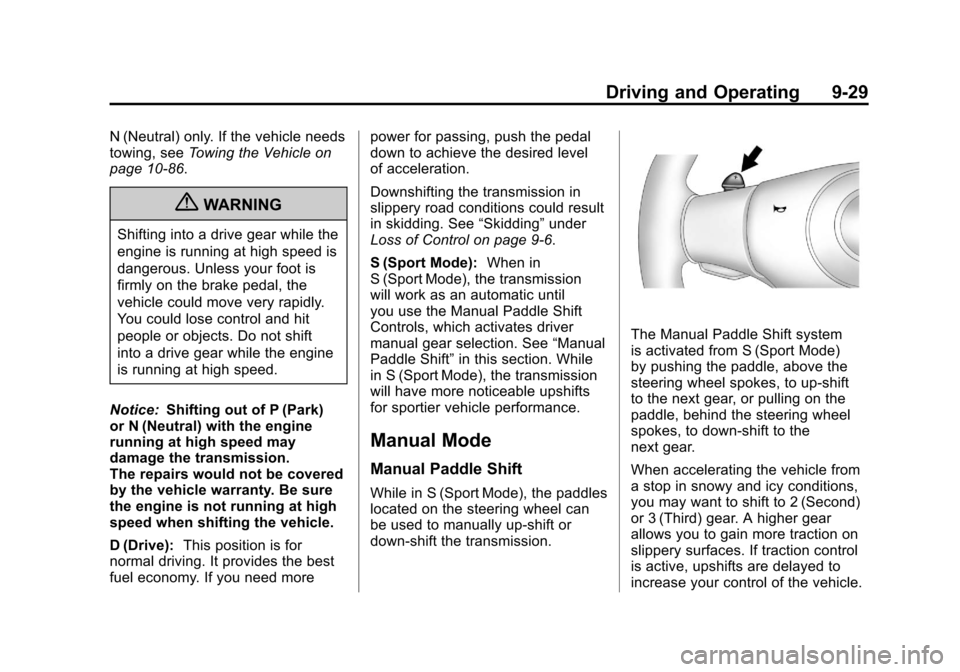
The Manual Paddle Shift system
is activated from S (Sport Mode)
by pushing the paddle, above the
steering wheel spokes, to up-shift
to the next gear, or pulling on the
paddle, behind the steering wheel
spokes, to down-shift to the
next gear.
When accelerating the vehicle from
a stop in snowy and icy conditions,
you may want to shift to 2 (Second)
or 3 (Third) gear. A higher gear
allows you to gain more traction on
slippery surfaces. If traction control
is active, upshifts are delayed to
increase your control of the vehicle.