2011 CHEVROLET CORVETTE sport mode
[x] Cancel search: sport modePage 259 of 428
Black plate (29,1)Chevrolet Corvette Owner Manual - 2011
Driving and Operating 9-29
N (Neutral) only. If the vehicle needs
towing, seeTowing the Vehicle on
page 10‑86.
{WARNING
Shifting into a drive gear while the
engine is running at high speed is
dangerous. Unless your foot is
firmly on the brake pedal, the
vehicle could move very rapidly.
You could lose control and hit
people or objects. Do not shift
into a drive gear while the engine
is running at high speed.
Notice: Shifting out of P (Park)
or N (Neutral) with the engine
running at high speed may
damage the transmission.
The repairs would not be covered
by the vehicle warranty. Be sure
the engine is not running at high
speed when shifting the vehicle.
D (Drive): This position is for
normal driving. It provides the best
fuel economy. If you need more power for passing, push the pedal
down to achieve the desired level
of acceleration.
Downshifting the transmission in
slippery road conditions could result
in skidding. See
“Skidding”under
Loss of Control on page 9‑6.
S (Sport Mode): When in
S (Sport Mode), the transmission
will work as an automatic until
you use the Manual Paddle Shift
Controls, which activates driver
manual gear selection. See “Manual
Paddle Shift” in this section. While
in S (Sport Mode), the transmission
will have more noticeable upshifts
for sportier vehicle performance.
Manual Mode
Manual Paddle Shift
While in S (Sport Mode), the paddles
located on the steering wheel can
be used to manually up-shift or
down-shift the transmission.
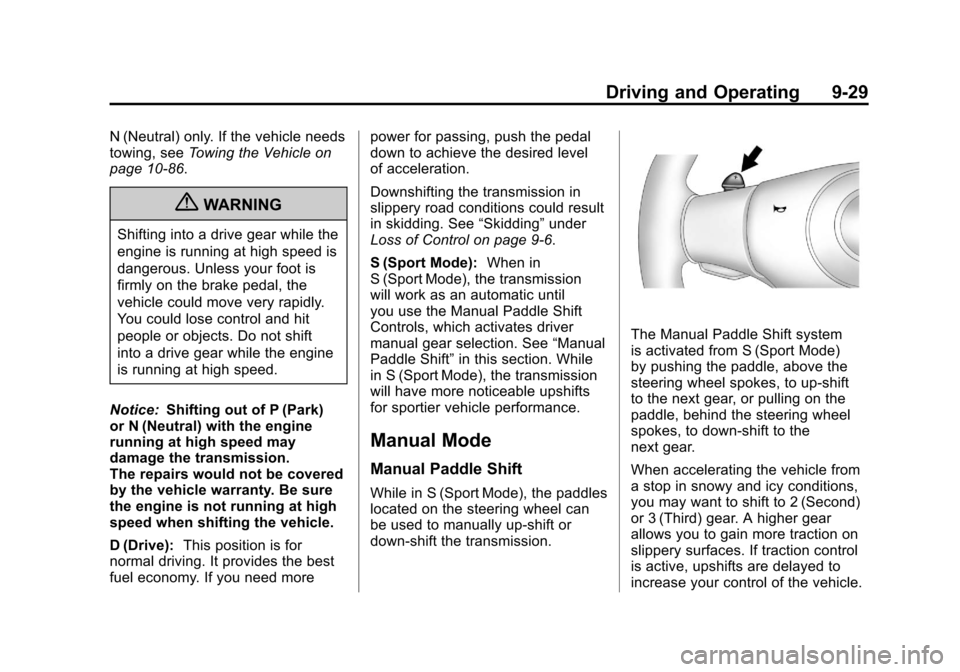
The Manual Paddle Shift system
is activated from S (Sport Mode)
by pushing the paddle, above the
steering wheel spokes, to up-shift
to the next gear, or pulling on the
paddle, behind the steering wheel
spokes, to down-shift to the
next gear.
When accelerating the vehicle from
a stop in snowy and icy conditions,
you may want to shift to 2 (Second)
or 3 (Third) gear. A higher gear
allows you to gain more traction on
slippery surfaces. If traction control
is active, upshifts are delayed to
increase your control of the vehicle.
Page 260 of 428

Black plate (30,1)Chevrolet Corvette Owner Manual - 2011
9-30 Driving and Operating
SeeTraction Control System (TCS)
on page 9‑36 Traction Control
System (TCS).
The Manual Paddle Shift system
can be deactivated by moving the
shifter from S (Sport Mode) back to
D (Drive), or by holding either
up‐shift button for more than
one second.
The driver may choose to briefly
activate the Manual Paddle Shift
system while in D (Drive). Tapping
either the upshift or downshift
controls will place the transmission
in Manual Paddle Shift mode. The
driver may then exit Manual Paddle
Shift mode by holding either upshift
control for two seconds. The system
will return to automatic shifting after
10 seconds of cruising at a steady
speed, or when the vehicle comes
to a stop.
While the Manual Paddle Shift
gear selection system is active,
the transmission will automatically
downshift through the gears as the
vehicle slows. The transmission will select 2 (Second) gear as the
vehicle stops. From a stop, the
vehicle will start from and hold
2 (Second) gear unless the driver
manually paddle shifts into a
different gear or selects D (Drive).
The driver can select 1 (First) gear
for maximum acceleration from
a stop.
When using the Manual Paddle
Shift feature while in S (Sport Mode),
the current gear will be displayed in
the Driver Information (DIC), or the
Head-Up Display (HUD), if the
vehicle has either of these features.
If the vehicle has a Navigation
system, see
“Head-Up
Display (HUD)” in the Index
of the navigation manual. The Manual Paddle Shift system
will not allow either an up-shift or a
down-shift if the vehicle speed is too
fast or too slow, nor will it allow a
start from 4 (Fourth) or higher gear.
If up-shifting does not occur when
needed, vehicle speed will be
limited to protect the engine.
When the transmission gear does
not respond to a shift change, the
DIC will show an X over the gear
display.
When a requested shift is denied
due to the speed restrictions shown,
the DIC will momentarily show an X
over the gear display and a chime
will sound.
Page 271 of 428
Black plate (41,1)Chevrolet Corvette Owner Manual - 2011
Driving and Operating 9-41
PERF TRAC 3–SPORT
ACTIVE HANDLING ON
.For use by drivers who are
familiar with the track
.Dry conditions only
.Requires more driving skill than
mode 2
.Active Handling is on and more
engine power is available than in
mode 2
PERF TRAC 4 –SPORT
ACTIVE HANDLING OFF
.For use by drivers who are
familiar with the track
.Dry conditions only
.Requires more driving skill than
modes 2 or 3
.Active Handling is off and
available engine power is the
same as mode 3
PERF TRAC 5 –RACE ACTIVE
HANDLING OFF
.For use by experienced drivers
who are familiar with the track
.Dry conditions only
.Requires more driving skill than
in other modes
.Active Handling is off and engine
power is available for maximum
cornering speed
Press and release the ACTIVE
HANDLING button to turn off
Performance Traction Management
and return to the Active Handling
and Traction Control Systems.
The TRACTION SYSTEM AND
ACTIVE HANDLING-ON message
displays briefly in the DIC and a
chime is heard.
Launch Control
A Launch Control feature is
available, within Competitive
Driving Mode (except ZR1) or
Performance Traction Management
(ZR1), on vehicles with a manual
transmission to allow the driver
to achieve high levels of vehicle
acceleration in a straight line.
Launch Control is a form of traction
control that manages tire spin
while launching the vehicle. This
feature is intended for use during
closed course race events where
consistent zero to sixty and quarter
mile times are desirable.
Page 273 of 428

Black plate (43,1)Chevrolet Corvette Owner Manual - 2011
Driving and Operating 9-43
Except ZR1
This knob is located on the center
console. Turn it to select the
suspension of your choice.
TOUR:Use for normal city and
highway driving. This setting
provides a smooth, soft ride.
SPORT: Use where road conditions
or personal preference demand
more control. This setting provides
more “feel”, or response to the road
conditions. The setting can be changed
at any time. Based on road
conditions, steering wheel angle
and the vehicle speed, the system
automatically adjusts to provide
the best handling while providing
a smooth ride. The Tour and Sport
modes will feel similar on a smooth
road. Select a new setting whenever
driving conditions change.
Three Driver Information
Center (DIC) messages (SERVICE
RIDE CONTROL, SHOCKS
INOPERATIVE and MAXIMUM
SPEED 80 MPH (129 KM/H) display
when a malfunction occurs with
the Selective Ride Control system.
Refer to
Ride Control System
Messages on page 5‑44 for more
information.
ZR1
This knob is located on the
center console. Turn it to select
the suspension of your choice.
The knob will return to the center
position when released. The switch
will illuminate the current
suspension setting.
TOUR: Use for normal city and
highway driving. This setting
provides a smooth, soft ride.
Page 274 of 428

Black plate (44,1)Chevrolet Corvette Owner Manual - 2011
9-44 Driving and Operating
SPORT:Use where road conditions
or personal preference demand
more control. This setting provides
more “feel”, or response to the road
conditions.
The setting can be changed
at any time. Based on road
conditions, steering wheel angle
and the vehicle speed, the system
automatically adjusts to provide
the best handling while providing a
smooth ride. The Tour and Sport
modes will feel similar on a smooth
road. Select a new setting whenever
driving conditions change.
The Selective Ride knob will not
display the Tour or Sport setting
when the Performance Traction
Management mode is selected. When this mode is selected,
turning the Selective Ride knob
will change the Performance
Traction Management mode
and the suspension setting
will be determined automatically.
See
Competitive Driving Mode on
page 9‑38 for more information.
Three Driver Information Center
(DIC) messages (SERVICE
RIDE CONTROL, SHOCKS
INOPERATIVE and MAXIMUM
SPEED 80 MPH (129 KM/H) display
when a malfunction occurs with
the Selective Ride Control system.
Refer to Ride Control System
Messages on page 5‑44 for more
information.Cruise Control
With cruise control, a speed of
about 40 km/h (25 mph) or more can
be maintained without keeping your
foot on the accelerator. Cruise
control does not work at speeds
below about 40 km/h (25 mph).
Cruise control will not work if the
parking brake is set, or if the master
cylinder brake fluid level is low.
{WARNING
Cruise control can be dangerous
where you cannot drive safely at
a steady speed. So, do not use
the cruise control on winding
roads or in heavy traffic.
Cruise control can be dangerous
on slippery roads. On such roads,
fast changes in tire traction can
cause excessive wheel slip, and
you could lose control. Do not use
cruise control on slippery roads.
Page 306 of 428
Black plate (22,1)Chevrolet Corvette Owner Manual - 2011
10-22 Vehicle Care
Engine Oil Life System
When to Change Engine Oil
This vehicle has a computer that
indicates when to change the
engine oil and filter. This is based
on engine revolutions and engine
temperature, and not on mileage.
Based on driving conditions, the
mileage at which an oil change is
indicated can vary considerably.
For the oil life system to work
properly, the system must be reset
every time the oil is changed.
Z06, ZR1, and Grand Sport models
have a racetrack‐ready dry sump
engine lubrication system. This
high‐performance system operates
differently than a standard engine
lubrication system and requires a
special procedure when changing
the engine oil and filter. SeeEngine
Oil on page 10‑15. When the system has calculated
that oil life has been diminished,
it indicates that an oil change is
necessary. A CHANGE ENGINE
OIL message comes on. Change
the oil as soon as possible within
the next 1 000 km (600 miles). It is
possible that, if driving under the
best conditions, the oil life system
might indicate that an oil change
is not necessary for up to a year.
The engine oil and filter must be
changed at least once a year and,
at this time, the system must be
reset. Your dealer has trained
service people who will perform this
work and reset the system. It is also
important to check the oil regularly
over the course of an oil drain
interval and keep it at the proper
level.
If the system is ever reset
accidentally, the oil must be
changed at 5 000 km (3,000 miles)
since the last oil change.
Remember to reset the oil life
system whenever the oil is changed.
How to Reset the Engine Oil
Life System
Reset the system whenever the
engine oil is changed so that the
system can calculate the next
engine oil change. To reset the
system:
1. Press the TRIP button so
the OIL LIFE percentage is
displayed.
2. Press RESET and hold for two seconds. OIL LIFE
REMAINING 100% will appear.
If the CHANGE ENGINE OIL
message comes back on when the
vehicle is started, the engine oil life
system has not reset. Repeat the
procedure.
Page 348 of 428

Black plate (64,1)Chevrolet Corvette Owner Manual - 2011
10-64 Vehicle Care
DOT Markings:A code molded
into the sidewall of a tire
signifying that the tire is in
compliance with the U.S.
Department of Transportation
(DOT) motor vehicle safety
standards. The DOT code
includes the Tire Identification
Number (TIN), an alphanumeric
designator which can also
identify the tire manufacturer,
production plant, brand, and
date of production.
GVWR
:Gross Vehicle Weight
Rating. See Vehicle Load Limits
on page 9‑14.
GAWR FRT
:Gross Axle
Weight Rating for the front axle.
See Vehicle Load Limits on
page 9‑14.
GAWR RR
:Gross Axle
Weight Rating for the rear axle.
See Vehicle Load Limits on
page 9‑14. Intended Outboard Sidewall
:
The side of an asymmetrical tire,
that must always face outward
when mounted on a vehicle.
Kilopascal (kPa)
:The metric
unit for air pressure.
Light Truck (LT‐Metric) Tire
:A
tire used on light duty trucks and
some multipurpose passenger
vehicles.
Load Index
:An assigned
number ranging from 1 to 279
that corresponds to the load
carrying capacity of a tire.
Maximum Inflation Pressure
:
The maximum air pressure to
which a cold tire can be inflated.
The maximum air pressure is
molded onto the sidewall.
Maximum Load Rating
:
The load rating for a tire at the
maximum permissible inflation
pressure for that tire. Maximum Loaded Vehicle
Weight
:The sum of curb
weight, accessory weight,
vehicle capacity weight, and
production options weight.
Normal Occupant Weight
:The
number of occupants a vehicle
is designed to seat multiplied by
68 kg (150 lbs). See Vehicle
Load Limits on page 9‑14.
Occupant Distribution
:
Designated seating positions.
Outward Facing Sidewall
:The
side of an asymmetrical tire that
has a particular side that faces
outward when mounted on a
vehicle. The side of the tire
that contains a whitewall,
bears white lettering, or bears
manufacturer, brand, and/or
model name molding that is
higher or deeper than the same
moldings on the other sidewall
of the tire.
Page 419 of 428

Black plate (3,1)Chevrolet Corvette Owner Manual - 2011
INDEX i-3
Clock . . . . . . . . . . . . . . . . . . . . . . . . . . . 5-6
Cluster, IP . . . . . . . . . . . . . . . . . . . . . . 5-9
Clutch, Hydraulic . . . . . . . . . . . . . 10-24
Collision Damage Repair . . . . . 13-12
Compass . . . . . . . . . . . . . . . . . . . . . . . 5-5
Competitive Driving Mode . . . . . 9-38
Competitive Driving, Racingor Other . . . . . . . . . . . . . . . . . . . . . . . 9-7
Control of a Vehicle . . . . . . . . . . . . . 9-3
Convenience Net . . . . . . . . . . . . . . . 4-3
Convertible Top . . . . . . . . . . . . . . . . 2-22 Messages . . . . . . . . . . . . . . . . . . . . 5-37
Convex Mirrors . . . . . . . . . . . . . . . . 2-15
Coolant Engine . . . . . . . . . . . . . . . . . . . . . . 10-29
Engine TemperatureGauge . . . . . . . . . . . . . . . . . . . . . . 5-15
Cooling System . . . . . . . .10-28, 10-29 Engine Messages . . . . . . . . . . . . 5-39
Courtesy Lamps . . . . . . . . . . . . . . . . 6-6
Courtesy Transportation Program . . . . . . . . . . . . . . . . . . . . . 13-10
Covers Cargo . . . . . . . . . . . . . . . . . . . . . . . . . . 4-2 Cruise Control . . . . . . . . . . . . . . . . . 9-44
Messages . . . . . . . . . . . . . . . . . . . . 5-38
Cupholders . . . . . . . . . . . . . . . . . . . . . 4-1
Customer Assistance . . . . . . . . . . 13-6 Offices . . . . . . . . . . . . . . . . . . . . . . . . 13-5
Text Telephone (TTY)Users . . . . . . . . . . . . . . . . . . . . . . . 13-6
Customer Information Service PublicationsOrdering Information . . . . . . 13-15
Customer Satisfaction
Procedure . . . . . . . . . . . . . . 13-1, 13-3
D
Damage Repair, Collision . . . . . 13-12
Danger, Warnings, andCautions . . . . . . . . . . . . . . . . . . . . . . . . iv
Data Recorders, Event . . . . . . . 13-17
Daytime Running
Lamps (DRL) . . . . . . . . . . . . . . . . . . 6-2
Defensive Driving . . . . . . . . . . . . . . . 9-2
Devices, Auxiliary . . . . . . . . . . . . . 7-17
Displays Head-Up . . . . . . . . . . . . . . . . . . . . . . 5-31 Door
Ajar Messages . . . . . . . . . . . . . . . 5-39
Locks . . . . . . . . . . . . . . . . . . . . . . . . . . 2-8
Power Locks . . . . . . . . . . . . . . . . . . . 2-9
Driver Information Center (DIC) . . . . . . . . . . . . . . . . . 5-25
Driving
Competitive . . . . . . . . . . . . . . . . . . . 9-38
Defensive . . . . . . . . . . . . . . . . . . . . . . 9-2
Drunk . . . . . . . . . . . . . . . . . . . . . . . . . . 9-2
Highway Hypnosis . . . . . . . . . . . . 9-10
Hill and Mountain Roads . . . . . . 9-10
If the Vehicle is Stuck . . . . . . . . . 9-13
Loss of Control . . . . . . . . . . . . . . . . 9-6
Off-Road Recovery . . . . . . . . . . . . 9-5
Vehicle Load Limits . . . . . . . . . . . 9-14
Winter . . . . . . . . . . . . . . . . . . . . . . . . 9-11
Driving for Better Fuel Economy . . . . . . . . . . . . . . . 1-22, 1-23
Dual Automatic Climate Control System . . . . . . . . . . . . . . . . 8-1