2011 CHEVROLET CORVETTE lock
[x] Cancel search: lockPage 17 of 428

Black plate (11,1)Chevrolet Corvette Owner Manual - 2011
In Brief 1-11
Mirror Adjustment
Exterior Mirrors
Controls for the outside power
mirrors are located on the
driver door.
1. Move the top control to the leftor right to select either the driver
or passenger mirror.
2. Use the arrows located on the four-way control pad to move the
mirror in the desired direction. Keep the control in the center
position when not adjusting either
outside mirror.
See
Power Mirrors on page 2‑15.
Manually fold the mirrors inward
to prevent damage when going
through an automatic car wash.
To fold, pull the mirror toward the
vehicle. Push the mirror outward,
to return it to the original position.
See Folding Mirrors on page 2‑16.
Interior Mirror
Vehicles with an automatic dimming
rearview mirror will automatically
reduce headlamp glare coming
from vehicles that are traveling
behind you.
SeeAutomatic Dimming Rearview
Mirror on page 2‑16.
Steering Wheel
Adjustment
The lever is located on the left side
of the steering column.
To adjust the steering wheel:
1. Pull the lever toward you.
2. Move the steering wheel up
or down.
3. Release the lever to lock the steering wheel in place.
Page 23 of 428

Black plate (17,1)Chevrolet Corvette Owner Manual - 2011
In Brief 1-17
5. Press and hold one of the sixnumbered pushbuttons until the
radio beeps once.
6. Repeat the steps for each pushbutton.
See Operation on page 7‑2.
Setting the Clock
To set the clock:
1. Press and hold H until the
correct hour displays.
2. Press and hold M until the correct minute displays.
See Clock on page 5‑6.
Satellite Radio
XM is a satellite radio service
that is based in the 48 contiguous
United States and 10 Canadian
provinces. XM satellite radio has a
wide variety of programming and
commercial-free music, coast to
coast, and in digital-quality sound.
A fee is required to receive the
XM service.
For more information, refer to:
.www.xmradio.com or call
1-800-929-2100 (U.S.)
.www.xmradio.ca or call
1-877-438-9677 (Canada)
See “XM Satellite Radio Service”
under Satellite Radio on page 7‑8.
Portable Audio Devices
This vehicle may have an auxiliary
input jack, located on the audio
faceplate. External devices such
as iPod
®, MP3 players, etc. can
be connected to the auxiliary input
jack using a 3.5 mm (1/8 in) input
jack cable.
See “Using the Auxiliary Input
Jack” under Auxiliary Devices on
page 7‑17.
Page 26 of 428

Black plate (20,1)Chevrolet Corvette Owner Manual - 2011
1-20 In Brief
TRIP:Press to display your total
and trip distance driven, the elapsed
time function, your average speed,
and the engine oil life.
OPTION: Press to choose personal
options that are available on your
vehicle, depending on the options
your vehicle is equipped with, such
as door locks, easy entry seats, and
language.
RESET: Press, along with the other
buttons, to reset system functions,
select personal options, and turn
off or acknowledge messages on
the DIC.
For more information, see Driver
Information Center (DIC) on
page 5‑25.Vehicle Personalization
Some vehicle features can be
programmed by using the DIC
buttons on the left side of the
steering wheel. The features that
can be programmed include:
.Units
.Memory Features
.Lighting Features
.Lock and Unlock Feedback
.Door Lock and Unlock Settings
.Language
.Personalization Name
See Vehicle Personalization on
page 5‑55.
Power Outlets
The accessory power outlet can be
used to plug in electrical equipment,
such as a cell phone or MP3 player.
The accessory power outlet is
located inside the center console
storage compartment, on the
forward left side.
Remove the cover to access and
replace when not in use.
See Power Outlets on page 5‑6.
Roof Panel
On vehicles with a removable
roof panel, there are three release
latches. Two are located on the front
of the roof panel and the other is
located on the back of the roof
panel. See “Removing the Roof
Panel” underRoof Panel on
page 2‑18.
Page 31 of 428

Black plate (25,1)Chevrolet Corvette Owner Manual - 2011
In Brief 1-25
OnStar®
OnStar®uses several innovative
technologies and live advisors to
provide a wide range of safety,
security, navigation, diagnostics,
and calling services.
Automatic Crash Response
In a crash, built in sensors can
automatically alert an OnStar
advisor who is immediately
connected to the vehicle to
see if you need help.
How OnStar Service Works
Q: This blue button connects you
to a specially trained OnStar advisor
to verify your account information
and to answer questions.
]: Push this red emergency
button to get priority help from
specially trained OnStar emergency
advisors.
X: Push this button for hands‐free,
voice‐activated calling and to give
voice commands for turn‐by‐turn
navigation.
Crisis Assist, Stolen Vehicle
Assistance, Vehicle Diagnostics,
Remote Door Unlock, Roadside
Assistance, Turn‐by‐Turn
Navigation and Hands‐Free
Calling are available on most
vehicles. Not all OnStar services
are available on all vehicles.
For more information see the
OnStar Owner's Guide or visit
www.onstar.com (U.S.) or
www.onstar.ca (Canada), contact
OnStar at 1-888-4-ONSTAR
(1‐888‐466‐7827) or TTY
1‐877‐248‐2080, or press
Qto
speak with an OnStar advisor
24 hours a day, 7 days a week. For a full description of OnStar
services and system limitations,
see the OnStar Owner's Guide in
the glove box.
OnStar service is subject to the
OnStar terms and conditions
included in the OnStar Subscriber
Information.
OnStar service cannot work unless
the vehicle is in a place where
OnStar has an agreement with a
wireless service provider for service
in that area. OnStar service also
cannot work unless the vehicle is
in a place where the wireless
service provider OnStar has hired
for that area has coverage, network
capacity and reception when the
service is needed, and technology
that is compatible with the OnStar
service. Not all services are
available everywhere, particularly
in remote or enclosed areas, or at
all times.
Page 33 of 428
Black plate (1,1)Chevrolet Corvette Owner Manual - 2011
Keys, Doors and Windows 2-1
Keys, Doors and
Windows
Keys and Locks
Keys . . . . . . . . . . . . . . . . . . . . . . . . . . 2-2
Remote Keyless Entry (RKE)System . . . . . . . . . . . . . . . . . . . . . . 2-3
Remote Keyless Entry (RKE) System Operation . . . . . . . . . . . 2-3
Door Locks . . . . . . . . . . . . . . . . . . . 2-8
Power Door Locks . . . . . . . . . . . . 2-9
Automatic Door Locks . . . . . . . 2-10
Lockout Protection . . . . . . . . . . . 2-10
Doors
Hatch . . . . . . . . . . . . . . . . . . . . . . . . 2-10
Vehicle Security
Vehicle Security . . . . . . . . . . . . . . 2-12
Anti-Theft Alarm System . . . . . 2-12
Immobilizer . . . . . . . . . . . . . . . . . . 2-14
Immobilizer Operation . . . . . . . 2-14
Exterior Mirrors
Convex Mirrors . . . . . . . . . . . . . . 2-15
Power Mirrors . . . . . . . . . . . . . . . . 2-15
Folding Mirrors . . . . . . . . . . . . . . . 2-16
Heated Mirrors . . . . . . . . . . . . . . . 2-16
Automatic Dimming Mirror . . . 2-16
Interior Mirrors
Automatic Dimming Rearview Mirror . . . . . . . . . . . . . . . . . . . . . . . 2-16
Windows
Windows . . . . . . . . . . . . . . . . . . . . . 2-17
Power Windows . . . . . . . . . . . . . 2-17
Sun Visors . . . . . . . . . . . . . . . . . . . 2-18
Roof
Roof Panel . . . . . . . . . . . . . . . . . . 2-18
Convertible Top . . . . . . . . . . . . . . 2-22
Page 34 of 428
Black plate (2,1)Chevrolet Corvette Owner Manual - 2011
2-2 Keys, Doors and Windows
Keys and Locks
Keys
{WARNING
Leaving children in a vehicle with
the keyless access transmitter is
dangerous for many reasons,
children or others could be badly
injured or even killed. They could
operate the power windows or
other controls or even make the
vehicle move. The windows will
function with the keyless access
transmitter in the vehicle and they
could be seriously injured or killed
if caught in the path of a closing
window. Do not leave the keyless
access transmitter in a vehicle
with children.
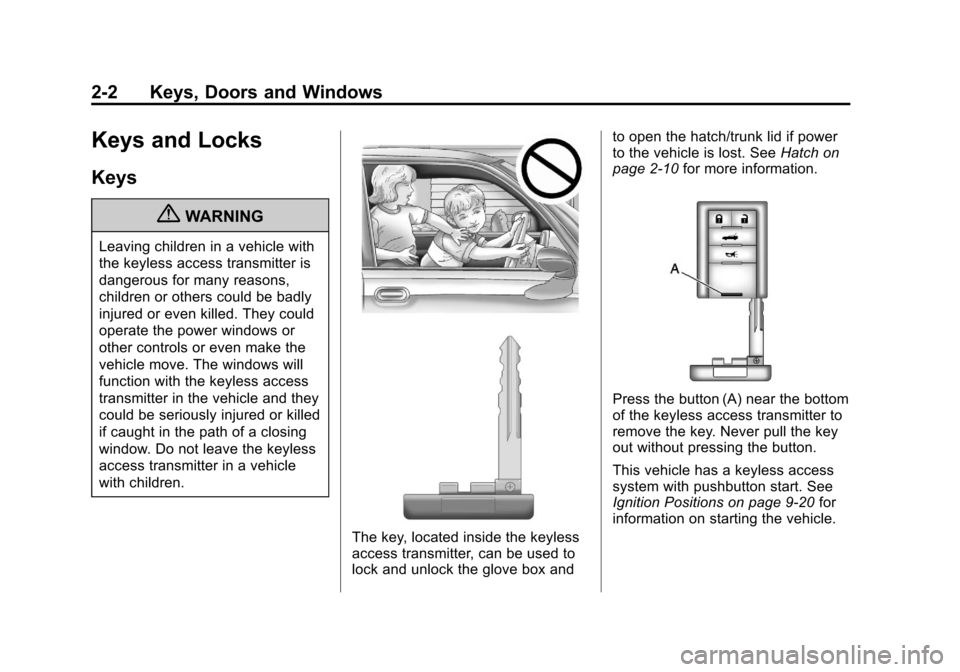
The key, located inside the keyless
access transmitter, can be used to
lock and unlock the glove box andto open the hatch/trunk lid if power
to the vehicle is lost. See
Hatch on
page 2‑10 for more information.
Press the button (A) near the bottom
of the keyless access transmitter to
remove the key. Never pull the key
out without pressing the button.
This vehicle has a keyless access
system with pushbutton start. See
Ignition Positions on page 9‑20 for
information on starting the vehicle.
Page 35 of 428
Black plate (3,1)Chevrolet Corvette Owner Manual - 2011
Keys, Doors and Windows 2-3
Notice:If you ever lose your
transmitter(s) and/or key, it
could be difficult to get into your
vehicle. You may even have to
damage your vehicle to get in.
Be sure you have a spare
transmitter and/or key.
If you are locked out of the vehicle,
contact Roadside Assistance.
See Roadside Assistance Program
(United States and Canada) on
page 13‑8 orRoadside Assistance
Program (Mexico) on page 13‑10.
Remote Keyless Entry
(RKE) System
See Radio Frequency Statement on
page 13‑19 for information
regarding Part 15 of the Federal
Communications Commission
(FCC) rules and Industry Canada
Standards RSS-210/220/310. If there is a decrease in the RKE
operating range:
.Check the distance.
The transmitter may be
too far from the vehicle.
.Check the location. Other
vehicles or objects may be
blocking the signal.
.Check the transmitter's battery.
See
“Battery Replacement” later
in this section.
.If the transmitter is still not
working correctly, see your
dealer or a qualified technician
for service.
Remote Keyless Entry
(RKE) System Operation
The Keyless Access System
transmitter functions work up to
30 m (100 feet) away from the
vehicle.
Keyless Unlocking
Press the door handle sensor to
unlock and open the doors if the
keyless access transmitter is within
range. See Door Locks on page 2‑8
and “Passive Door Unlock” under
Vehicle Personalization on
page 5‑55 for additional information.
Page 36 of 428

Black plate (4,1)Chevrolet Corvette Owner Manual - 2011
2-4 Keys, Doors and Windows
Keyless Locking
The doors lock after
several seconds if all doors
are closed and at least one
keyless access transmitter
has been removed from the
interior of the vehicle. To customize
whether the doors automatically
lock when exiting the vehicle,
see“Passive Door Locking”
under Vehicle Personalization on
page 5‑55 for additional information.
Keyless Trunk Opening
Press the hatch/trunk release
button located on the rear of
the hatch/trunk lid above the
license plate to open the trunk
if the keyless access transmitter
is within range. See Hatch on
page 2‑10 for additional information. There are other conditions that
can affect the performance of the
transmitter. See
Remote Keyless
Entry (RKE) System on page 2‑3.
This vehicle comes with two
transmitters.
Q(Lock): Press once to lock the
doors. When
Qis pressed twice,
the lights flash and the horn sounds
to confirm locking.
K(Unlock): Press once to unlock
only the driver door. Press
Ktwice
within five seconds to unlock both
doors. The interior lamps may
come on.
Pressing
Kalso recalls the memory
settings. See “Memory Seat, Mirrors
and Steering Wheel” underPower
Seat Adjustment on page 3‑3 for
more information.
}(Hatch/Trunk): Press and
hold for about one second to
unlock the hatch/trunk. If the
engine is running, the shift lever
must be in P (Park) for an automatic
transmission. For a manual
transmission, the shift lever must
be in NEUTRAL with the parking
brake set.