2011 CHEVROLET CAMARO warning
[x] Cancel search: warningPage 238 of 414

Black plate (36,1)Chevrolet Camaro Owner Manual - 2011
9-36 Driving and Operating
Brakes
Antilock Brake
System (ABS)
This vehicle has the Antilock Brake
System (ABS), an advanced
electronic braking system that
helps prevent a braking skid.
When the engine is started and the
vehicle begins to drive away, ABS
checks itself. A momentary motor or
clicking noise might be heard while
this test is going on, and it might
even be noticed that the brake
pedal moves a little. This is normal.If there is a problem with ABS, this
warning light stays on. SeeAntilock
Brake System (ABS) Warning Light
on page 5‑21.
If driving safely on a wet road
and it becomes necessary to slam
on the brakes and continue braking
to avoid a sudden obstacle, a
computer senses that the wheels
are slowing down. If one of the
wheels is about to stop rolling,
the computer will separately work
the brakes at each wheel.
ABS can change the brake pressure
to each wheel, as required, faster
than any driver could. This can help
the driver steer around the obstacle
while braking hard. As the brakes are applied, the
computer keeps receiving updates
on wheel speed and controls
braking pressure accordingly.
Remember: ABS does not change
the time needed to get a foot up to
the brake pedal or always decrease
stopping distance. If you get too
close to the vehicle in front of you,
there will not be enough time to
apply the brakes if that vehicle
suddenly slows or stops. Always
leave enough room up ahead to
stop, even with ABS.
Using ABS
Do not pump the brakes. Just hold
the brake pedal down firmly and let
ABS work. You might hear the ABS
pump or motor operating and feel
the brake pedal pulsate, but this is
normal.
Page 239 of 414

Black plate (37,1)Chevrolet Camaro Owner Manual - 2011
Driving and Operating 9-37
Braking in Emergencies
ABS allows the driver to steer and
brake at the same time. In many
emergencies, steering can help
more than even the very best
braking.
Parking Brake
To apply the parking brake, pull up
on the parking brake handle. It is
not necessary to push in on therelease button while applying the
parking brake. If the ignition is in
the ON/RUN position, the brake
system warning light will come on.
See
Brake System Warning Light on
page 5‑20.
To release the parking brake:
1. Hold the brake pedal down.
2. Pull the parking brake handle up
until you can press the release
button.
3. Hold the release button in as you move the brake handle all
the way down.
Notice: Driving with the parking
brake on can overheat the brake
system and cause premature
wear or damage to brake system
parts. Make sure that the parking
brake is fully released and the
brake warning light is off before
driving. Driving with the parking brake
applied will cause a warning
chime to sound and the RELEASE
PARKING BRAKE message to
appear in the DIC. The message
will remain on until:
.the parking brake is released
.the vehicle comes to a stop.
If you are towing a trailer and you
are parking on a hill, see Driving
Characteristics and Towing Tips on
page 9‑54.
Page 240 of 414

Black plate (38,1)Chevrolet Camaro Owner Manual - 2011
9-38 Driving and Operating
Brake Assist
This vehicle has a brake assist
feature designed to assist the
driver in stopping or decreasing
vehicle speed in emergency driving
conditions. This feature uses the
stability system hydraulic brake
control module to supplement
the power brake system under
conditions where the driver has
quickly and forcefully applied the
brake pedal in an attempt to quickly
stop or slow down the vehicle.
The stability system hydraulic brake
control module increases brake
pressure at each corner of the
vehicle until the ABS activates.
Minor brake pedal pulsation or
pedal movement during this time
is normal and the driver should
continue to apply the brake pedal
as the driving situation dictates.
The brake assist feature will
automatically disengage when
the brake pedal is released or
brake pedal pressure is quickly
decreased.
Ride Control Systems
Traction Control
System (TCS)
The vehicle has a Traction Control
System (TCS) that limits wheel spin.
The system utilizes engine and
braking controls to control wheel
spin during acceleration at all
driving speeds for maximum driver
control regardless of conditions.
When the system senses impending
wheel slip during acceleration, it
signals the throttle control to reduce
drive wheel torque. Under extreme
situations, such as going from
pavement to ice during acceleration,
the system will selectively apply
the brakes to maintain control.
The system may be heard or felt
while it is working, but this is
normal.The TCS/StabiliTrak warning light
flashes when the traction control
system is limiting wheel spin.
The TCS/StabiliTrak warning light
comes on solid if there is a problem
with the traction control system.
SeeTraction Control System (TCS)/
StabiliTrak
®Light on page 5‑22 for
more information. If the light stays
on, see your dealer for service.
When the TCS/StabiliTrak warning
light is on, the system will not limit
wheel spin. Adjust your driving
accordingly.
Page 241 of 414

Black plate (39,1)Chevrolet Camaro Owner Manual - 2011
Driving and Operating 9-39
TCS automatically comes on
whenever the vehicle is started.
To limit wheel spin, especially in
slippery road conditions, the system
should always be left on, but it may
be necessary to turn the system off
if the vehicle is stuck in sand, mud,
or snow and rocking the vehicle is
required. Also, turn TCS off while
in deep snow or on loose gravel,
to assist vehicle motion at lower
speeds. SeeIf the Vehicle is Stuck
on page 9‑12 for more information.
See also Winter Driving on
page 9‑10 for information on using
TCS when driving in snowy or icy
conditions.
To turn the system off, press and
release the TCS/StabiliTrak button
located on the console in front of the
shift lever.
Press and release the TCS/
StabiliTrak button and the traction
control system turns off and the
TCS warning light comes on. Press
and release the button again to turn
the system back on. For information
on turning StabiliTrak off and on,
see StabiliTrak System following.
StabiliTrak®System
The vehicle has an electronic
stability control system called
StabiliTrak. It is an advanced
computer controlled system that
assists with directional control of the
vehicle in difficult driving conditions.
StabiliTrak activates when the
computer senses a discrepancy
between the intended path and the
direction the vehicle is actually
traveling. StabiliTrak selectively
applies braking pressure at any
one of the vehicle's brakes to help
steer the vehicle in the direction
which you are steering.
If cruise control is being used when
StabiliTrak activates, the cruise
control will automatically disengage.
Press the cruise control button to
reengage when road conditions
allow. See Cruise Control on
page 9‑43 for more information.
Page 242 of 414

Black plate (40,1)Chevrolet Camaro Owner Manual - 2011
9-40 Driving and Operating
The Traction Control System (TCS)/
StabiliTrak button is located in front
of the shift lever.
When the system activates, the
TCS/StabiliTrak warning light
flashes on the instrument panel
cluster. You may also hear a noise
or feel vibration in the brake pedal.
This is normal. Continue to steer the
vehicle in the intended direction.
If there is a problem detected
with StabiliTrak, a SERVICE
STABILITRAK message displays
on the DIC and the StabiliTrak/TCS
warning light on the instrument
panel cluster comes on. When
this message and warning light
display, the system is not
operational. Driving should be
adjusted accordingly. SeeRide
Control System Messages on
page 5‑38 andTraction Control
System (TCS)/StabiliTrak
®Light on
page 5‑22 for more information.
StabiliTrak comes on automatically
whenever the vehicle is started.
The system should be left on to help
assist with directional control of the
vehicle. If StabiliTrak needs to be
turned off, press and hold the TCS/
StabiliTrak button until the Traction
Control Off light and the StabiliTrak
Off light come on in the instrument
panel cluster. If the system has
been turned off, press and release
the TCS/StabiliTrak button to turn
the system back on.
Page 245 of 414
Black plate (43,1)Chevrolet Camaro Owner Manual - 2011
Driving and Operating 9-43
Limited-Slip Rear Axle
Vehicles with a limited-slip rear
axle can give more traction on
snow, mud, ice, sand, or gravel.
When traction is low, this feature
allows the drive wheel with the
most traction to move the vehicle.
The limited-slip rear axle also gives
the driver enhanced control when
cornering hard or completing a
maneuver, such as a lane change.
Cruise Control
With cruise control, the vehicle can
maintain a speed of about 40 km/h
(25 mph) or more without keeping
your foot on the accelerator. Cruise
control does not work at speeds
below 40 km/h (25 mph).
{WARNING
Cruise control can be dangerous
where you cannot drive safely at
a steady speed. So, do not use
the cruise control on winding
roads or in heavy traffic.
Cruise control can be dangerous
on slippery roads. On such roads,
fast changes in tire traction can
cause excessive wheel slip, and
you could lose control. Do not use
cruise control on slippery roads.
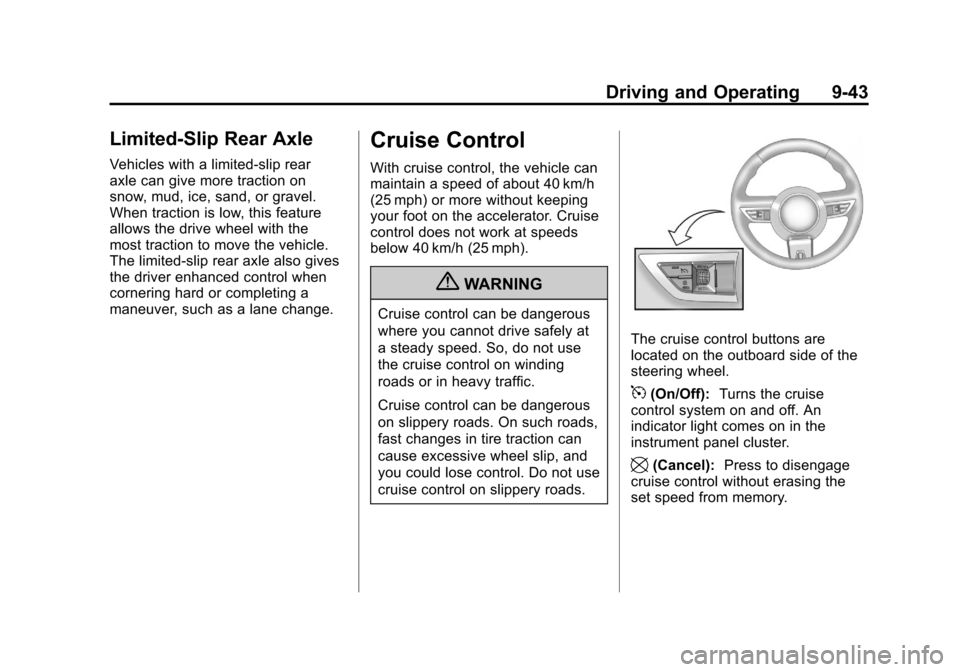
The cruise control buttons are
located on the outboard side of the
steering wheel.
5(On/Off):Turns the cruise
control system on and off. An
indicator light comes on in the
instrument panel cluster.
\(Cancel): Press to disengage
cruise control without erasing the
set speed from memory.
Page 248 of 414

Black plate (46,1)Chevrolet Camaro Owner Manual - 2011
9-46 Driving and Operating
Object Detection
Systems
Ultrasonic Parking Assist
The Ultrasonic Rear Parking Assist
(URPA) system assists the driver
with parking and avoiding objects
while in R (Reverse). URPA
operates at speeds less than 8 km/h
(5 mph), and the sensors on the rear
bumper detect objects up to 2.5 m
(8 ft) behind the vehicle, and at least
20 cm (8 in) off the ground.
{WARNING
The Ultrasonic Rear Parking
Assist (URPA) system does not
replace driver vision. It cannot
detect:
.Objects that are below the
bumper, underneath the
vehicle, or too close or far
from the vehicle.
.Children, pedestrians,
bicyclists, or pets.
If you do not use proper care
before and while backing, vehicle
damage, injury, or death could
occur. Even with URPA, always
check behind the vehicle before
backing up. While backing, be
sure to look for objects and check
the vehicle's mirrors.
How the System Works
URPA comes on automatically
when the shift lever is moved into
R (Reverse). A single tone sounds
to indicate the system is working.
URPA operates only at speeds less
than 8 km/h (5 mph).
An obstacle is indicated by audible
beeps. The interval between the
beeps becomes shorter as the
vehicle gets closer to the obstacle.
When the distance is less than
30 cm (12 in) the beeping is
continuous for 5 seconds.
To be detected, objects must be at
least 20 cm (8 in) off the ground and
below trunk level. Objects must also
be within 2.5 m (8 ft) from the rear
bumper. The distance objects can
be detected may be less during
warmer or humid weather.
Page 253 of 414

Black plate (51,1)Chevrolet Camaro Owner Manual - 2011
Driving and Operating 9-51
Some gasolines that are
not reformulated for low
emissions can contain an
octane-enhancing additive called
methylcyclopentadienyl manganese
tricarbonyl (MMT); ask the attendant
where you buy gasoline whether the
fuel contains MMT. We recommend
against the use of such gasolines.
Fuels containing MMT can reduce
spark plug life and affect emission
control system performance.
The malfunction indicator lamp
might turn on. If this occurs, return
to your dealer for service.Filling the Tank
{WARNING
Fuel vapor burns violently and a
fuel fire can cause bad injuries.
To help avoid injuries to you and
others, read and follow all the
instructions on the fuel pump
island. Turn off the engine when
refueling. Do not smoke near fuel
or when refueling the vehicle.
Do not use cellular phones. Keep
sparks, flames, and smoking
materials away from fuel. Do not
leave the fuel pump unattended
when refueling the vehicle. This is
against the law in some places.
Do not re-enter the vehicle while
pumping fuel. Keep children away
from the fuel pump; never let
children pump fuel.
The fuel cap is located behind a
hinged fuel door on the passenger
side of the vehicle. On vehicles with
a locking fuel door, the fuel door is
locked when the vehicle is locked
and unlocked when the vehicle is
unlocked.
To open the fuel door, push the
rearward center edge in and release
and it will open.