2011 CHEVROLET AVEO buttons
[x] Cancel search: buttonsPage 145 of 328
Black plate (5,1)Chevrolet Aveo Owner Manual - 2011
Infotainment System 7-5
Press and hold SCAN/AST to use
Automatic Store. The radio only
scans stations with a strong signal
in the selected band.
AST (Automatic Store):Twelve
preset stations with the strongest
reception in the area can be
automatically stored. The radio will
only scan stations with a strong
signal that are in the selected AM or
FM band. If the Automatic Store
function is started in the FM band,
only FM stations are stored in
preset pages A1 and A2. If the
Automatic Store function is started
in the AM band, only AM stations
are stored in A1 and A2.
A combination of AM, FM, and XM
(if equipped) stations can be stored
manually into the other four favorite
pages. To use Automatic Store:
1. Press and hold SCAN/AST to
use Automatic Store mode.
2. Press the pushbutton below the ON tab on the radio display.
3. Automatic Store searches for radio stations with a strong
signal and automatically sets
presets A1 and A2 with new
stations.
4. After all stations are set, press the pushbutton below the arrow
tab on the radio display to return
to the main radio screen.
To reset the automatically stored
radio stations, press and hold
SCAN/AST. Then press the
pushbutton below the RESE tab on
the radio display. If no stations are
stored on preset pages A1 and A2,
the RESE option does not appear
in the radio display. When the
Automatic Store function is used,
any stations that were previously set
will be deleted and replaced with
new stations.Storing a Radio Station
Drivers are encouraged to set up
radio station favorites while the
vehicle is in P (Park). Tune to
favorite stations using the
pushbuttons, favorites button, and
steering wheel controls. See
Defensive Driving on page 9‑2.
A maximum of 36 stations can be
programmed as favorites using the
6 pushbuttons positioned below the
radio station frequency labels and
by using the radio favorites page
button (FAV button). Press the FAV
button to go through up to six pages
of favorites, each having six favorite
stations available per page.
If Automatic Store is used, then four
pages of favorites are available.
Each page of favorites can contain
any combination of AM, FM, or XM
(if equipped) stations. To store a
station as a favorite:
1. Tune in the desired station.
2. Press and release the FAV button to display the page where
the station is to be stored.
Page 146 of 328
Black plate (6,1)Chevrolet Aveo Owner Manual - 2011
7-6 Infotainment System
3. Press and hold one of the sixnumbered pushbuttons until
a beep sounds. When the
pushbutton is pressed and
released, the station that was
set will return.
4. Repeat the Steps 1 through 3 for each radio station to be stored
as a favorite.
To set up the number of favorites
pages:
1. Press and hold FAV until the radio setup menu displays.
2. Select the desired number of favorites pages by pressing the
pushbutton located below the
displayed page numbers.
3. Press FAV to return to the original main radio screen
showing the radio station
frequency tabs and to begin
the process of programming
favorites for the chosen number
of numbered pages.Satellite Radio
XM™ Satelite Radio Service
XM is a satellite radio service based
in the 48 contiguous United States
and 10 Canadian provinces. XM
Satellite Radio has a wide variety of
programming and commercial-free
music, coast-to-coast, and in
digital-quality sound. A service fee
is required to receive the XM
service. For more information,
contact XM at www.xmradio.com or
call 1-800-929-2100 in the U.S. and
www.xmradio.ca or call
1-877-438-9677 in Canada.
Finding a Channel
BAND: Press to choose FM, AM,
or XM. The display will show the
selection.
uSEEK: Press to seek the next
XM channel.
tSEEK: Press to seek the
previous XM channel.
[TUNE: Press to go to the next
XM channel.
rTUNE: Press to go to the
previous XM channel.
SCAN/AST: Press to scan XM
channels. The radio goes to a
channel, plays for a few seconds,
then goes to the next channel.
Press SCAN/AST again to stop
scanning.
SCAN: Press to scan XM
channels. The radio goes to a
channel, plays for a few seconds,
then goes to the next channel.
Press this button again to stop
scanning.
Page 147 of 328
Black plate (7,1)Chevrolet Aveo Owner Manual - 2011
Infotainment System 7-7
Storing an XM Channel
Drivers are encouraged to set up
XM Channel favorites while the
vehicle is in P (Park). Tune to
favorite stations using the
pushbuttons, favorites button, and
steering wheel controls. See
Defensive Driving on page 9‑2.
A maximum of 36 stations can be
programmed as favorites using the
6 pushbuttons positioned below the
radio station frequency labels and
by using the radio favorites page
button (FAV button). Press the FAV
button to go through up to six pages
of favorites, each having six favorite
stations available per page.
If Automatic Store is used, then four
pages of favorites are available.
Each page of favorites can contain
any combination of AM, FM, or XM
channels. To store an XM channel
as a favorite:
1. Tune in the desired channel.
2. Press and release the FAVbutton to display the page where
the channel is to be stored. 3. Press and hold one of the six
numbered pushbuttons until
a beep sounds. When the
pushbutton is pressed and
released, the channel that was
set will return.
4. Repeat Steps 1 through 3 for each XM channel to be stored
as a favorite.
To set up the number of favorites
pages:
1. Press and hold FAV until the radio setup menu displays.
2. Select the desired number of favorites pages by pressing the
pushbutton located below the
displayed page numbers.
3. Press FAV to return to the original main radio screen
showing the radio frequency
tabs and to begin the process of
programming favorites for the
chosen number of numbered
pages.
XM Radio Messages
UPDATING: The encryption code
in the receiver is being updated, and
no action is required. This process
should take no longer than
30 seconds.
NO SIGNAL: The system is
functioning correctly, but the vehicle
is in a location that is blocking the
XM signal. When the vehicle is
moved into an open area, the signal
should return.
LOADING: The audio system is
acquiring and processing audio and
text data. No action is needed. This
message should disappear shortly.
OFF AIR: This channel is not
currently in service. Tune in to
another channel.
CH UNAVAILABLE: This
previously assigned channel is no
longer assigned. Tune to another
station. If this station was one of the
presets, choose another station for
that preset button.
Page 194 of 328
Black plate (32,1)Chevrolet Aveo Owner Manual - 2011
9-32 Driving and Operating
To release the parking brake, hold
the brake pedal down. Pull the
parking brake lever up until you can
press the release button. Hold the
release button in as you move the
brake lever all the way down.
Notice:Driving with the parking
brake on can overheat the brake
system and cause premature
wear or damage to brake system
parts. Make sure that the parking
brake is fully released and the
brake warning light is off before
driving.Cruise Control
For vehicles with cruise control, a
speed of about 39 km/h (24 mph)
or more can be maintained
without keeping your foot on the
accelerator. Cruise control does not
work at speeds below 39 km/h
(24 mph).
When the brakes are applied, or the
clutch pedal if you have a manual
transmission, the cruise control
turns off.
{WARNING
Cruise control can be dangerous
where you cannot drive safely at
a steady speed. So, do not use
the cruise control on winding
roads or in heavy traffic.
Cruise control can be dangerous
on slippery roads. On such roads,
fast changes in tire traction can
cause excessive wheel slip, and
you could lose control. Do not use
cruise control on slippery roads.
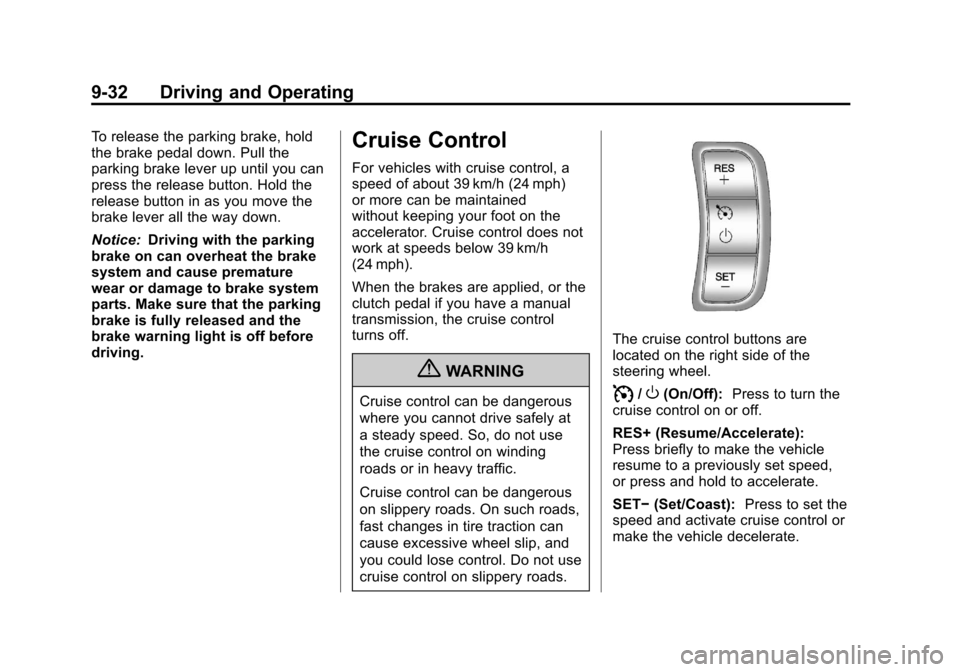
The cruise control buttons are
located on the right side of the
steering wheel.
I/O(On/Off): Press to turn the
cruise control on or off.
RES+ (Resume/Accelerate):
Press briefly to make the vehicle
resume to a previously set speed,
or press and hold to accelerate.
SET− (Set/Coast): Press to set the
speed and activate cruise control or
make the vehicle decelerate.
Page 282 of 328
Black plate (80,1)Chevrolet Aveo Owner Manual - 2011
10-80 Vehicle Care
Chemical Paint Spotting
Some weather and atmospheric
conditions can create a chemical
fallout. Airborne pollutants can fall
upon and attack painted surfaces on
the vehicle. This damage can take
two forms: blotchy, ring-shaped
discolorations, and small, irregular
dark spots etched into the paint
surface.
Although no defect in the paint job
causes this, we will repair, at no
charge to the owner, the surfaces
of new vehicles damaged by this
fallout condition within 12 months
or 20 000 km (12,000 miles) of
purchase, whichever occurs first.
Interior Care
The interior will continue to look its
best if it is cleaned often. Dust and
dirt can accumulate on the
upholstery and cause damage to
the carpet, fabric, leather, and
plastic surfaces. Stains should be
removed quickly as extreme heat
could cause them to set rapidly.Lighter colored interiors may
require more frequent cleaning.
Newspapers and garments that can
transfer color to home furnishings
can also transfer color to the
interior.
Remove dust from small buttons
and knobs with a small brush with
soft bristles.
Your dealer has products for
cleaning the interior. When cleaning
the interior, only use cleaners
specifically designed for the
surfaces that are being cleaned.
Permanent damage can result from
using cleaners on surfaces for
which they were not intended. Apply
the cleaner directly to the cleaning
cloth to prevent over-spray. Remove
any accidental over-spray from
other surfaces immediately.
Notice:
Using abrasive cleaners
when cleaning glass surfaces on
the vehicle, could scratch the
glass and/or cause damage to the
rear window defogger. When cleaning the glass on the vehicle,
use only a soft cloth and glass
cleaner.
Cleaners can contain solvents that
can become concentrated in the
interior. Before using cleaners, read
and adhere to all safety instructions
on the label. While cleaning the
interior, maintain adequate
ventilation by opening the doors
and windows.
Do not clean the interior using the
following cleaners or techniques:
.Never use a knife or any other
sharp object to remove a soil
from any interior surface.
.Never use a stiff brush. It can
cause damage to the interior
surfaces.
.Never apply heavy pressure or
rub aggressively with a cleaning
cloth. Use of heavy pressure can
damage the interior and does
not improve the effectiveness of
soil removal.