2011 CADILLAC STS lock
[x] Cancel search: lockPage 222 of 528

Black plate (36,1)Cadillac STS Owner Manual - 2011
Entry Lighting
The entry lighting system turns on the reading and
dome lamps and the backlighting to the exterior lamp
control when a door is opened or if you press the
remote keyless entry transmitter unlock button.
If activated by the transmitter, the lighting will remain
active for about 25 seconds. The entry lighting system
uses the light sensor; it must be dark outside in order
for the lamps to turn on. The lamps turn off about
25 seconds after the last door is closed. They will dim
to off if the ignition is on, or immediately deactivate if
the power locks are activated.
Parade Dimming
This feature prohibits dimming of the instrument panel
displays and backlighting during daylight hours when
the key is in the ignition and the headlamps are on.
This feature operates with the light sensor and is fully
automatic. When the light sensor reads darkness
outside and the parking lamps are active, the
instrument panel displays can be adjusted by turning
the instrument panel brightness knob. SeeInstrument
Panel Brightness
on page 4‑35for additional
information.
Reading Lamps
The reading lamps are located on the overhead
console. These lamps come on automatically when any
door is opened.
For manual operation, press the button next to each
lamp to turn it on or off.
If the reading lamps are left on, they automatically shut
off 10 minutes after the ignition has been turned off.
Battery Load Management
The battery load management feature is designed to
monitor the vehicle's electrical load and determine when
the battery is in a heavy discharge condition. During
times of high electrical loading, the engine may idle at a
higher revolutions per minute (rpm) setting than normal
to make sure the battery charges. High electrical loads
may occur when several of the following are on:
headlamps, high beams, fog lamps, rear window
defogger, the climate control fan at high speeds, heated
seats and engine cooling fans.
If the battery continues to discharge, even with the
engine idling at a higher rpm setting, some electrical
loads will automatically be reduced. When this occurs,
the rear window defogger may take slightly longer to
clear the glass and the fan may cut back to a lower
4-36
Page 225 of 528
Black plate (39,1)Cadillac STS Owner Manual - 2011
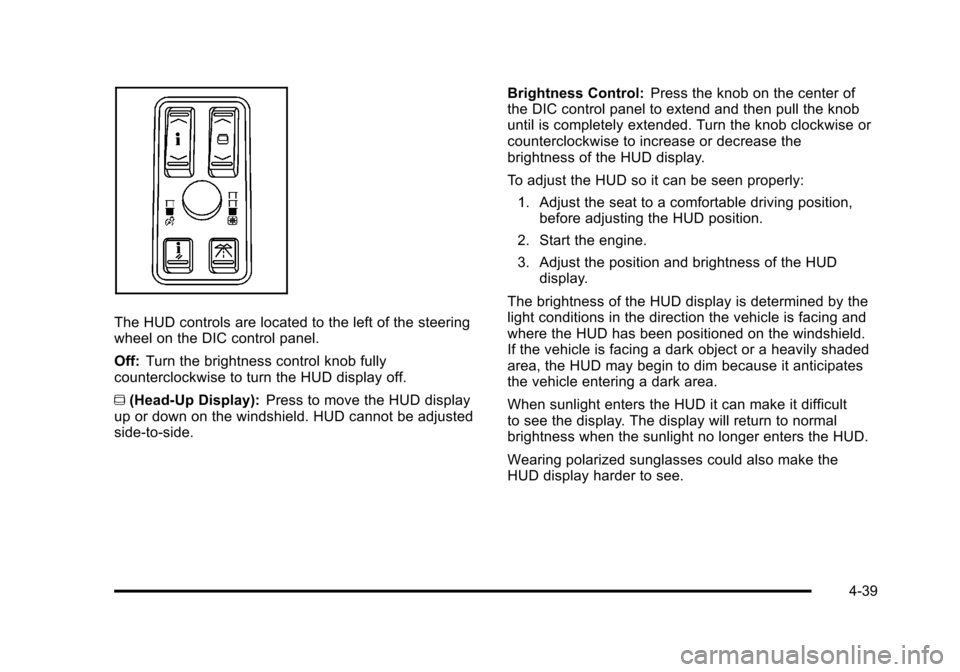
The HUD controls are located to the left of the steering
wheel on the DIC control panel.
Off:Turn the brightness control knob fully
counterclockwise to turn the HUD display off.
~ (Head-Up Display): Press to move the HUD display
up or down on the windshield. HUD cannot be adjusted
side‐to‐side. Brightness Control:
Press the knob on the center of
the DIC control panel to extend and then pull the knob
until is completely extended. Turn the knob clockwise or
counterclockwise to increase or decrease the
brightness of the HUD display.
To adjust the HUD so it can be seen properly:
1. Adjust the seat to a comfortable driving position, before adjusting the HUD position.
2. Start the engine.
3. Adjust the position and brightness of the HUD display.
The brightness of the HUD display is determined by the
light conditions in the direction the vehicle is facing and
where the HUD has been positioned on the windshield.
If the vehicle is facing a dark object or a heavily shaded
area, the HUD may begin to dim because it anticipates
the vehicle entering a dark area.
When sunlight enters the HUD it can make it difficult
to see the display. The display will return to normal
brightness when the sunlight no longer enters the HUD.
Wearing polarized sunglasses could also make the
HUD display harder to see.
4-39
Page 234 of 528

Black plate (48,1)Cadillac STS Owner Manual - 2011
Outlet Adjustment
Use the lever located in the center of each outlet to
change the direction of the airflow, either side-to-side or
up and down. Use the thumbwheels to open or close
the outlets to adjust the airflow.
Turn the thumbwheel towards the vehicle door to open
the outlets and allow the maximum amount of air to
enter your vehicle. Turn the thumbwheel towards the
center console to close the outlets and minimize the
amount of air entering the vehicle.
Operation Tips
.Clear away any ice, snow or leaves from the air
inlets at the base of the windshield that may block
the flow of air into your vehicle.
.Use of non-GM approved hood deflectors may
adversely affect the performance of the system.
.Keep the path under the front seats clear of
objects to help circulate the air inside of your
vehicle more effectively.
.If the airflow seems low when the fan speed is at
the highest setting, the passenger compartment
air filter may need to be replaced. For more
information, seePassenger Compartment Air
Filter on page 4‑50.
4-48
Page 235 of 528

Black plate (49,1)Cadillac STS Owner Manual - 2011
Rear Climate Control System
The vehicle has a rear climate control system. The
base model includes air outlets in the rear of the center
console for cooling and under-seat air outlets for
heating. The temperature, amount of airflow, and the
air delivery mode is controlled automatically by the front
climate control system.
Some vehicles may have an optional climate control
panel for the rear passenger, located on the back of the
center console.
A. Temperature Control
B. Air Delivery Mode ControlC. Heated Seat
D. Heated Seat
Indicator
9(Off) : Turns off the airflow to the rear seat
passengers. With the air delivery off there may be an
increase in the air rush sound of the front system.
Temperature Control: Turn clockwise or
counterclockwise to increase or decrease the
temperature.
Air Delivery Mode Control: Turn to change the
direction of the airflow for the rear seat passengers.
To change the current mode, select one of the following:
Y (Vent): Air is directed to the console outlets.
\ (Bi-Level): Air is directed to the console and the
floor outlets.
[ (Floor): Air is directed to the floor outlets.
The front climate control system automatically controls
the amount of airflow to the rear seat passengers,
regardless of optional equipment. Airflow to the rear
system turns off when defrost is selected on the front
climate control panel, in order to direct air to clear the
windshield.
z(Heated Seat): Press to turn on rear heated seats.
There are two buttons, each with three indicator lights,
located between the climate control knobs on the rear
climate control panel.
Keep the area under the front seats clear of any objects
so the air in the vehicle can circulate effectively.
4-49
Page 245 of 528

Black plate (59,1)Cadillac STS Owner Manual - 2011
Antilock Brake System (ABS)
Warning Light
For vehicles with the
Antilock Brake System
(ABS), this light comes on
briefly when the engine is
started.
If it does not, have the vehicle serviced by your dealer.
If the system is working normally the indicator light then
goes off. If the ABS light stays on, turn the ignition off. If the light
comes on while driving, stop as soon as it is safely
possible and turn the ignition off. Then start the engine
again to reset the system. If the ABS light stays on,
or comes on again while driving, the vehicle needs
service. If the regular brake system warning light is not
on, the vehicle still has brakes, but not antilock brakes.
If the regular brake system warning light is also on, the
vehicle does not have antilock brakes and there is a
problem with the regular brakes. See
Brake System
Warning Light on page 4‑58.
For vehicles with a Driver Information Center (DIC),
see DIC Warnings and Messages
on page 4‑76for
all brake related DIC messages.
4-59
Page 265 of 528

Black plate (79,1)Cadillac STS Owner Manual - 2011
CHECK TIRE PRESSURE or TIRE LOW
ADD AIR TO TIRE
This message displays when the pressure in one or
more of the vehicle's tires Is low. It also gives the
location of the tire. The low tire pressure warning light
will also comes on. SeeTire Pressure Light
on
page 4‑62. If a tire pressure message appears on the
DIC, stop as soon as you can. Have the tire pressures
checked and set to those shown on the Tire Loading
Information label. See Tires
on page 6‑50,Loading the
Vehicleon page 5‑23, and Inflation - Tire Pressureon
page 6‑58. The DIC also shows the tire pressure
values. See DIC Operation and Displayson page 4‑70.
CHECK WASHER FLUID
This symbol appears
with this message.
This message displays when the windshield washer
fluid is low. Fill the windshield washer fluid reservoir as
soon as possible. See Windshield Washer Fluid
on
page 6‑34for more information.
CLEAN RADAR
This message displays when the Adaptive Cruise
Control system is disabled because the radar is blocked
and cannot detect vehicles in your path. It may also
activate during heavy rain or due to road spray. To
clean the system, see “Cleaning the System” under
Adaptive Cruise Control on page 4‑15.
DRIVER DOOR AJAR
This symbol appears
with this message.
This message displays when the driver door is not
closed completely. Make sure that the door is closed
completely.
4-79
Page 275 of 528

Black plate (89,1)Cadillac STS Owner Manual - 2011
SIDE BLIND ZONE ALERT
SYSTEM OFF
If your vehicle has the Side Blind Zone Alert (SBZA)
system, this message displays when the SBZA system
has been turned off. SeeSide Blind Zone Alert (SBZA)
on page 3‑44andDIC Operation and Displayson
page 4‑70for more information.
SIDE BLIND ZONE SYSTEM
UNAVAILABLE
If your vehicle has the Side Blind Zone Alert (SBZA)
system, this message displays when the SBZA system
is disabled because the sensor is blocked and cannot
detect vehicles in your blind zone. The sensor may be
blocked by mud, dirt, snow, ice, or slush. This message
may also display during heavy rain or due to road spray.
Your vehicle does not need service. For cleaning
instructions, see Washing Your Vehicle
on page 6‑109.
See Side Blind Zone Alert (SBZA)on page 3‑44for
more information.
SPEED LIMIT: XXX MPH (KM/H)
This message displays when the Speed Alert has
been turned on through the DIC Information Menu
and the vehicle is at or above the speed limit. See
DIC Operation and Displays
on page 4‑70for more
information.
SPEED LIMITED TO XXX
This message displays when the vehicle speed is
limited to XXX, mph in English mode and km/h in Metric
mode, because the vehicle detects a problem in the
steering, stability control, or suspension system. Have
your vehicle serviced by your dealer.
STABILITY SECURE MODE
If your All-Wheel Drive (AWD) vehicle has the Active
Steering with Enhanced StabiliTrak option, this
message displays when the stability control system
is in the secure mode. Stability Secure Mode is set
automatically when certain system faults or vehicle
conditions are detected. When the Stability Secure
Mode is activated, the stability control system will not
respond to driver requests to change the stability mode
until the next ignition cycle or until the vehicle condition
or fault is returned to normal. See Enhanced
StabiliTrak
®on page 5‑7for more information.
4-89
Page 281 of 528

Black plate (95,1)Cadillac STS Owner Manual - 2011
Setting the Clock
To adjust the time:1. Press
w,located on the radio, to enter the
main menu.
2. Turn
wuntil SET CLOCK displays.
3. Press
wto select SET CLOCK.
4. Turn
wto adjust the time.
5. Press
wto update the time and VEHICLE TIME
UPDATED displays.
To adjust the date:
1. Press
wto enter the main menu.
2. Turn
wuntil SET DATE displays.
3. Press
wto select SET DATE.
4. Turn
wto adjust the date.
5. Press
wto update the date and VEHICLE DATE
UPDATED displays.
Radio(s)
Radio with CD shown, Radio with Six-Disc CD similar
Playing the Radio
O
(Power): Press to turn the system on and off.
n(Volume): Turn to increase or to decrease the
volume.
SRCE (Source): Press to select between the radio or
the CD player.
4-95