2011 CADILLAC SRX fog light
[x] Cancel search: fog lightPage 198 of 498

Black plate (2,1)Cadillac SRX Owner Manual - 2011
6-2 Lighting
It controls the following systems:
.Headlamps
.Taillamps
.Parking Lamps
.License Plate Lamps
.Instrument Panel Lights
.Fog Lamps
The exterior lamps control has four
positions:
O(Off): Briefly turn to this position
to turn the automatic light control off
or on again.
AUTO (Automatic): Turns the
headlamps on automatically at
normal brightness, together with
the following:
.Parking Lamps
.Taillamps
.License Plate Lamps
.Instrument Panel Lights
;(Parking Lamps): Turns the
parking lamps on together with the
following:
.Taillamps
.License Plate Lamps
.Instrument Panel Lights
2(Headlamps): Turns the
headlamps on together with the
following lamps listed below.
A warning chime sounds if the
driver's door is opened when
the ignition switch is off and the
headlamps are on.
.Parking Lamps
.Taillamps
.License Plate Lamps
.Instrument Panel Lights
#(Front Fog Lamps): For
vehicles with fog lamps, press to
turn the lamps on or off.
See Front Fog Lamps on page 6‑6.
Headlamp High/
Low-Beam Changer
2 3
Headlamp High/Low Beam
Changer: Push the turn signal/lane
change lever away from you to turn
the high beams on.
Pull the lever toward you to return to
low beams.
This indicator light turns on in the
instrument panel cluster when the
high beam headlamps are on.
Flash-to-Pass
The flash‐to‐pass feature works with
the low beams or Daytime Running
Lamps (DRL) on or off.
To flash the high beams, pull the
turn signal/lane change lever all the
way toward you, then release it.
Page 202 of 498

Black plate (6,1)Cadillac SRX Owner Manual - 2011
6-6 Lighting
Front Fog Lamps
For vehicles with front fog lamps,
the button is located on the exterior
lamp control, on the outboard side
of the steering wheel.
The ignition and the low‐beam
headlamps must be on to turn on
the fog lamps.
#:Press to turn the fog lamps
on or off. An indicator light on the
instrument panel cluster comes on
when the fog lamps are on.
The fog lamps come on together
with the parking lamps.
If the high‐beam headlamps are
turned on, the fog lamps will turn off.
If the high‐beam headlamps are
turned off, the fog lamps will turn
back on again.
Some localities have laws that
require the headlamps to be on
along with the fog lamps.
Interior Lighting
Instrument Panel
Illumination Control
This feature controls the brightness
of the instrument panel lights.
D(Instrument Panel
Brightness): Turn the thumbwheel
up or down to brighten or dim the
instrument panel lights.
Cargo Lamp
The cargo lamp is located over the
rear compartment and is controlled
by the dome lamp. See Dome
Lamps on page 6‑6.
Courtesy Lamps
The courtesy lamps come on
automatically when any door is
opened and the dome lamp is in
the door position.
Dome Lamps
The dome lamp controls are located
in the overhead console.
To change the dome lamp settings,
press the following:
*(Dome Lamp Override): Turns
the lamp off, even when a door
is open.
1(Door): The lamp comes on
automatically when a door is
opened.
+(On): Turns the dome lamp on.
Page 204 of 498

Black plate (8,1)Cadillac SRX Owner Manual - 2011
6-8 Lighting
Battery Load
Management
The vehicle has Electric Power
Management (EPM) that estimates
the battery's temperature and state
of charge. It then adjusts the voltage
for best performance and extended
life of the battery.
When the battery's state of charge
is low, the voltage is raised slightly
to quickly bring the charge back up.
When the state of charge is high,
the voltage is lowered slightly to
prevent overcharging. If the vehicle
has a voltmeter gauge or a voltage
display on the Driver Information
Center (DIC), you may see the
voltage move up or down. This is
normal. If there is a problem, an
alert will be displayed.The battery can be discharged at
idle if the electrical loads are very
high. This is true for all vehicles.
This is because the generator
(alternator) may not be spinning
fast enough at idle to produce all
the power that is needed for very
high electrical loads.
A high electrical load occurs when
several of the following are on,
such as: headlamps, high beams,
fog lamps, rear window defogger,
climate control fan at high speed,
heated seats, engine cooling fans,
trailer loads, and loads plugged into
accessory power outlets.
EPM works to prevent excessive
discharge of the battery. It does this
by balancing the generator's output
and the vehicle's electrical needs.
It can increase engine idle speed to
generate more power, whenever
needed. It can temporarily reduce
the power demands of some
accessories.Normally, these actions occur in
steps or levels, without being
noticeable. In rare cases at the
highest levels of corrective action,
this action may be noticeable to the
driver. If so, a Driver Information
Center (DIC) message might be
displayed, such as BATTERY
SAVER ACTIVE, BATTERY
VOLTAGE LOW, or LOW BATTERY.
If one of these messages displays,
it is recommended that the driver
reduce the electrical loads as much
as possible. See
Driver Information
Center (DIC) on page 5‑28.
Page 270 of 498

Black plate (2,1)Cadillac SRX Owner Manual - 2011
8-2 Climate Controls
K. Outside Air
L. Rear Window Defogger
Automatic Operation
The system automatically controls
the fan speed, air delivery, air
conditioning and recirculation in
order to heat or cool the vehicle
to the desired temperature.
When the indicator light is on, the
system is in full automatic operation.
If the air delivery mode or fan
setting is manually adjusted, the
auto indicator turns off and displays
will show the selected settings.
To place the system in automatic
mode do the following:
1. Press AUTO.
2. Set the temperature. Allowthe system time to stabilize.
Then adjust the temperature
as needed for best comfort. English units can be changed
to metric units through the
Driver Information Center (DIC).
See
Vehicle Personalization on
page 5‑40.
Q/R(Driver and Passenger
Temperature Control): The
temperature can be adjusted
separately for the driver and the
passenger. Press to increase or
decrease the temperature.
ZONE: Press to link all climate
zone settings to the driver settings.
The ZONE indicator light turns off.
When the passenger settings are
adjusted, the ZONE indicator light
is on. Manual Operation
O(Power):
Press to turn the
climate control system on or off.
D C(Fan Control): Press to
increase or decrease the fan speed.
Pressing either button cancels
automatic operation and the system
goes into manual mode. Press
AUTO to return to automatic
operation.
H G(Air Delivery Mode Control):
Press to change the direction of the
airflow. The current mode appears
in the display screen. Changing
the mode cancels the automatic
operation and the system goes into
manual mode. Press AUTO to
return to automatic operation.
Page 271 of 498

Black plate (3,1)Cadillac SRX Owner Manual - 2011
Climate Controls 8-3
To change the current mode, select
one of the following:
Y(Vent):Air is directed to the
instrument panel outlets.
\(Bi-Level): Air is divided
between the instrument panel
outlets and the floor outlets.
C(Tri‐Level): Air is divided
between the windshield, instrument
panel, and floor outlets.
[(Floor): Air is directed to the
floor outlets.
-(Defog): Clears the windows of
fog or moisture. Air is directed to the
windshield and floor outlets.
8(Upper): Air is directed to the
windshield outlets.
7(Hi-Level): Air is divided
between the windshield and
instrument panel outlets.
0(Defrost): Clears the
windshield of fog or frost more
quickly. Air is directed to the
windshield.
#(Air Conditioning): Press to
turn the automatic air conditioning
on or off. If the fan is turned off or
the outside temperature falls below
freezing, the air conditioner will
not run.
Press AUTO to return to automatic
operation and the air conditioner
runs as needed. When the indicator
light is on, the air conditioner runs
automatically to cool the air inside
the vehicle or to dry the air needed
to defog the windshield faster.
h(Recirculation): Press to turn
on recirculation. An indicator light
comes on. Air is recirculated to
quickly cool the inside of the vehicle
or prevent outside air and odors
from entering.
Automatic Air Recirculation:
When the AUTO indicator light
is on, the air is automatically
recirculated as needed to help
quickly cool the inside of the
vehicle. The climate control system may
have a sensor to detect air pollution.
In auto recirculation control, the Air
Quality Control system may operate.
To adjust the sensitivity of the
Air Quality Control, see Climate
and Air Quality under
Vehicle
Personalization on page 5‑40.
Auto Defog: The climate control
system may have a sensor to
automatically detect high humidity
inside the vehicle. When high
humidity is detected, the climate
control system may adjust to
outside air supply and turn on the
air conditioner. If the climate control
system does not detect possible
window fogging, it returns to normal
operation. To turn Auto Defog off
or on, see Climate and Air Quality
under Vehicle Personalization on
page 5‑40.
%(Outside Air): Press to turn
on outside air. An indicator light
comes on. Outside air is circulated
through the vehicle.
Page 339 of 498

Black plate (1,1)Cadillac SRX Owner Manual - 2011
Vehicle Care 10-1
Vehicle Care
General Information
General Information . . . . . . . . . . 10-2
California Proposition65 Warning . . . . . . . . . . . . . . . . . 10-2
California Perchlorate Materials Requirements . . . . 10-3
Accessories and Modifications . . . . . . . . . . . . . . . 10-3
Vehicle Checks
Doing Your OwnService Work . . . . . . . . . . . . . . . 10-4
Hood . . . . . . . . . . . . . . . . . . . . . . . . 10-5
Engine Compartment Overview . . . . . . . . . . . . . . . . . . . 10-6
Engine Cover . . . . . . . . . . . . . . . . 10-9
Engine Oil . . . . . . . . . . . . . . . . . . 10-10
Engine Oil Life System . . . . . 10-14
Automatic Transmission Fluid . . . . . . . . . . . . . . . . . . . . . . 10-15
Engine Air Cleaner/Filter . . . . 10-16
Cooling System . . . . . . . . . . . . 10-18
Engine Coolant . . . . . . . . . . . . . 10-19
Engine Overheating . . . . . . . . 10-22
Power Steering Fluid . . . . . . . 10-24
Washer Fluid . . . . . . . . . . . . . . . 10-24 Brakes . . . . . . . . . . . . . . . . . . . . . 10-25
Brake Fluid . . . . . . . . . . . . . . . . . 10-26
Battery . . . . . . . . . . . . . . . . . . . . . 10-28
All-Wheel Drive . . . . . . . . . . . . . 10-28
Starter Switch Check . . . . . . . 10-29
Automatic Transmission Shift
Lock Control Function
Check . . . . . . . . . . . . . . . . . . . . . 10-29
Ignition Transmission Lock Check . . . . . . . . . . . . . . . . . . . . . 10-30
Park Brake and P (Park) Mechanism Check . . . . . . . . 10-30
Wiper Blade Replacement . . . . . . . . . . . . . . 10-31
Headlamp Aiming
Headlamp Aiming . . . . . . . . . . 10-32
Bulb Replacement
Bulb Replacement . . . . . . . . . . 10-36
Halogen Bulbs . . . . . . . . . . . . . . 10-36
High Intensity Discharge(HID) Lighting . . . . . . . . . . . . . 10-36
Headlamps . . . . . . . . . . . . . . . . . 10-36
Fog Lamps . . . . . . . . . . . . . . . . . 10-41
Turn Signal Lamps . . . . . . . . . 10-41
Back-Up Lamps . . . . . . . . . . . . 10-43
License Plate Lamp . . . . . . . . 10-44
Replacement Bulbs . . . . . . . . . 10-45
Electrical System
Electrical System Overload . . . . . . . . . . . . . . . . . . 10-45
Fuses and Circuit Breakers . . . . . . . . . . . . . . . . . . 10-46
Engine Compartment Fuse
Block . . . . . . . . . . . . . . . . . . . . . 10-46
Instrument Panel Fuse Block . . . . . . . . . . . . . . . . . . . . . 10-49
Rear Compartment Fuse Block . . . . . . . . . . . . . . . . . . . . . 10-51
Wheels and Tires
Tires . . . . . . . . . . . . . . . . . . . . . . . . 10-54
Tire Sidewall Labeling . . . . . . 10-55
Tire Designations . . . . . . . . . . . 10-57
Tire Terminology andDefinitions . . . . . . . . . . . . . . . . 10-58
Tire Pressure . . . . . . . . . . . . . . . 10-61
Tire Pressure for High-Speed Operation . . . . . . . . . . . . . . . . . 10-62
Tire Pressure Monitor System . . . . . . . . . . . . . . . . . . . 10-63
Tire Pressure Monitor Operation . . . . . . . . . . . . . . . . . 10-64
Tire Inspection . . . . . . . . . . . . . . 10-68
Tire Rotation . . . . . . . . . . . . . . . 10-68
When It Is Time for New Tires . . . . . . . . . . . . . . . . . . . . . . 10-69
Page 386 of 498
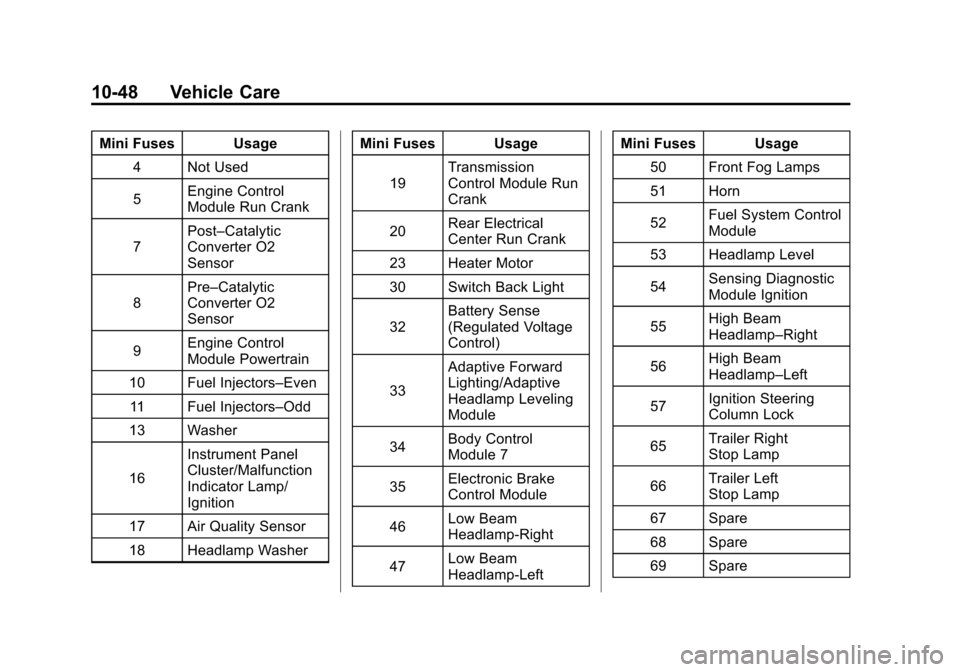
Black plate (48,1)Cadillac SRX Owner Manual - 2011
10-48 Vehicle Care
Mini Fuses Usage4 Not Used
5 Engine Control
Module Run Crank
7 Post–Catalytic
Converter O2
Sensor
8 Pre–Catalytic
Converter O2
Sensor
9 Engine Control
Module Powertrain
10 Fuel Injectors–Even 11 Fuel Injectors–Odd
13 Washer
16 Instrument Panel
Cluster/Malfunction
Indicator Lamp/
Ignition
17 Air Quality Sensor
18 Headlamp Washer Mini Fuses Usage
19 Transmission
Control Module Run
Crank
20 Rear Electrical
Center Run Crank
23 Heater Motor
30 Switch Back Light
32 Battery Sense
(Regulated Voltage
Control)
33 Adaptive Forward
Lighting/Adaptive
Headlamp Leveling
Module
34 Body Control
Module 7
35 Electronic Brake
Control Module
46 Low Beam
Headlamp‐Right
47 Low Beam
Headlamp‐Left Mini Fuses Usage
50 Front Fog Lamps
51 Horn
52 Fuel System Control
Module
53 Headlamp Level
54 Sensing Diagnostic
Module Ignition
55 High Beam
Headlamp–Right
56 High Beam
Headlamp–Left
57 Ignition Steering
Column Lock
65 Trailer Right
Stop Lamp
66 Trailer Left
Stop Lamp
67 Spare
68 Spare
69 Spare
Page 444 of 498

Black plate (106,1)Cadillac SRX Owner Manual - 2011
10-106 Vehicle Care
Interior Care
The vehicle's interior will continue
to look its best if it is cleaned often.
Dust and dirt can accumulate on
the upholstery and cause damage
to the carpet, fabric, leather, and
plastic surfaces. Stains should be
removed quickly as extreme heat
could cause them to set rapidly.
Lighter colored interiors may
require more frequent cleaning.
Newspapers and garments that can
transfer color to home furnishings
can also transfer color to the
vehicle's interior.
Remove dust from small buttons
and knobs with a small brush with
soft bristles.
Your dealer has products for
cleaning the vehicle's interior.
When cleaning the vehicle's interior,
only use cleaners specifically
designed for the surfaces that are
being cleaned. Permanent damage
can result from using cleaners on
surfaces for which they were not
intended. Apply the cleaner directlyto the cleaning cloth to prevent
over-spray. Remove any accidental
over-spray from other surfaces
immediately.
Notice:
Using abrasive cleaners
when cleaning glass surfaces on
the vehicle, could scratch the
glass and/or cause damage to
the rear window defogger. When
cleaning the glass on the vehicle,
use only a soft cloth and glass
cleaner.
Cleaners can contain solvents that
can become concentrated in the
vehicle's interior. Before using
cleaners, read and adhere to all
safety instructions on the label.
While cleaning the vehicle's interior,
maintain adequate ventilation by
opening the vehicle's doors and
windows.
Do not clean the interior using the
following cleaners or techniques:
.Never use a knife or any other
sharp object to remove a soil
from any interior surface.
.Never use a stiff brush. It can
cause damage to the vehicle's
interior surfaces.
.Never apply heavy pressure or
rub aggressively with a cleaning
cloth. Use of heavy pressure can
damage the interior and does
not improve the effectiveness of
soil removal.
.Use only mild, neutral-pH
soaps. Avoid laundry detergents
or dishwashing soaps with
degreasers. Using too much
soap will leave a residue that
leaves streaks and attracts
dirt. For liquid cleaners, about
20 drops per 3.78 L (1 gal) of
water is a good guide.
.Do not heavily saturate the
upholstery while cleaning.
.Cleaners that contain solvents
can damage the vehicle's
interior.