Page 137 of 498

Black plate (3,1)Cadillac SRX Owner Manual - 2011
Storage 4-3
button to access the storage tray.
Push the passenger side button to
access the main storage.
There is an accessory power outlet
and input jacks for auxiliary audio
devices. SeePower Outlets on
page 5‑9 andAuxiliary Devices
(Radio with CD ) on page 7‑30
or Auxiliary Devices (Radio with
CD/DVD and MEM) on page 7‑36.
Push the button to open the storage
area located at the rear of the
center console.
Additional Storage
Features
Cargo Cover
For vehicles with the dual position
cargo cover, it can be used to cover
items in the cargo area of the
vehicle.
The shade can be set in two
positions. It can be set in a half way
open (A) position for loading objects into the rear compartment, or the
lower (B) position to conceal objects
in the rear compartment.
Install the cargo cover
1. Hold the cartridge so that the
pull‐out shade faces the rear of
the vehicle.
2. Align the cartridge over the pinson the trim panels of the vehicle.
3. Push down on the cartridge to snap it into place.
4. Unroll the shade towards the rear of the vehicle.
Page 148 of 498

Black plate (2,1)Cadillac SRX Owner Manual - 2011
5-2 Instruments and Controls
Airbag System Messages . . . . 5-38
Safety Belt Messages . . . . . . . 5-38
Anti-Theft Alarm SystemMessages . . . . . . . . . . . . . . . . . . 5-38
Service Vehicle Messages . . . 5-38
Starting the Vehicle
Messages . . . . . . . . . . . . . . . . . . 5-38
Tire Messages . . . . . . . . . . . . . . . 5-39
Transmission Messages . . . . . 5-39
Vehicle Reminder Messages . . . . . . . . . . . . . . . . . . 5-40
Washer Fluid Messages . . . . . 5-40
Vehicle Personalization
Vehicle Personalization . . . . . . 5-40
Universal Remote System
Universal Remote System . . . 5-46
Universal Remote System Programming . . . . . . . . . . . . . . . 5-46
Universal Remote System Operation . . . . . . . . . . . . . . . . . . 5-49
Controls
Steering Wheel
Adjustment
To adjust the steering wheel:
1. Pull the lever down.
2. Move the steering wheel up
or down. 3. Pull or push the steering wheel
closer or away from you.
4. Pull the lever up to lock the steering wheel in place.
Do not adjust the steering wheel
while driving.
Steering Wheel Controls
Use these controls, if equipped, to
make audio adjustments at the
steering wheel.
Page 149 of 498

Black plate (3,1)Cadillac SRX Owner Manual - 2011
Instruments and Controls 5-3
y/z:Press theybutton to
select the next favorite radio station
or next CD, DVD, if equipped,
or MP3 track.
Press the
zbutton to select the
previous favorite radio station or
previous CD, DVD, if equipped,
or MP3 track.
+
x− (Volume): Press + to
increase the volume, press −to
decrease the volume.
b/g(Push to Talk): For vehicles
with an OnStar®, Bluetooth®,
or navigation system, press
to interact with those systems.
See Bluetooth (Overview ) on
page 7‑51 orBluetooth
(Infotainment Controls) on
page 7‑52 orBluetooth (Voice Recognition) on page 7‑57,
the OnStar Owner's guide,
or the separate navigation
manual for more information.
/
c(End Call / Mute):
Press to
silence the vehicle speakers only.
Press again to turn the sound
on. For vehicles with OnStar
or Bluetooth systems, press to
reject an incoming call, or end
a current call.
SRCE: Press to select an audio
source.
Horn
Press near the horn symbols or
press on the steering wheel pad to
sound the horn.
Windshield Wiper/Washer
The windshield wiper/washer lever
is located on the right side of the
steering column. With the ignition
in ACC/ACCESSORY or ON/RUN/
START, move the windshield wiper
lever to select the wiper speed.
2: Fast wipes.
1: Slow wipes.
Page 186 of 498

Black plate (40,1)Cadillac SRX Owner Manual - 2011
5-40 Instruments and Controls
Vehicle Reminder
Messages
ICE POSSIBLE DRIVE
WITH CARE
This message is displayed when ice
conditions are possible.
TURN WIPER CONTROL TO
INTERMITTENT FIRST
This message is displayed when
attempting to adjust the intermittent
wiper speed without intermittent
selected on the wiper control.
SeeWindshield Wiper/Washer on
page 5‑3.
Washer Fluid Messages
WASHER FLUID LOW ADD
FLUID
This message will be displayed
when the washer fluid level is
low. For information on filling the
washer fluid, see Washer Fluid on
page 10‑24.
Vehicle
Personalization
The audio system controls are
used to access the personalization
menus for customizing vehicle
features. Not all features are
available on every vehicle. Only the
features available on a particular
vehicle will be displayed on that
vehicle.
CONFIG (Configuration): Press
to access the Configuration
Settings Menu.
MENU / SELECT Knob: Press
the center of this knob to enter
the menus and select menu items.
Turn the knob to scroll through the
menus.
0BACK: Press to exit or move
backwards in a menu. Entering the Personalization
Menus
1. Press CONFIG to access the
Configuration Settings menu.
2. Turn the MENU / SELECT knob to highlight Vehicle Settings.
3. Press the center of the MENU / SELECT knob to select
the Vehicle Settings menu.
The following list of menu items will
be available:
.Climate and Air Quality
.Comfort and Convenience
.Language
.Lighting
.Power Door Locks
.Remote Locking, Unlocking,
Starting
.Return to Factory Settings
Turn the MENU / SELECT knob to
highlight the menu. Press the knob
to select it. Each of the menus is
detailed in the following information.
Page 201 of 498
Black plate (5,1)Cadillac SRX Owner Manual - 2011
Lighting 6-5
Twilight Sentinel also provides
exterior illumination as you leave
the vehicle. If Twilight Sentinel has
turned on the lamps when the
ignition is turned off, the lamps
remain on until:
.The exterior lamp control is
moved from
Oto the parking
lamp position, or
.the delay time selected has
elapsed.
See Vehicle Personalization on
page 5‑40 to select the delay time.
You can also select no delay time.
If the ignition is turned off with the
exterior lamp control in the parking
lamp or headlamp position, the
Twilight Sentinel delay will not
occur. The lamps will turn off as
soon as the control is turned off.
The regular headlamp system
should be turned on when needed.
Hazard Warning Flashers
|
Hazard Warning Flasher:
Press this button located on the
instrument panel near the audio
system, to make the front and rear
turn signal lamps flash on and off.
This warns others that you are
having trouble. Press again to turn
the flashers off.
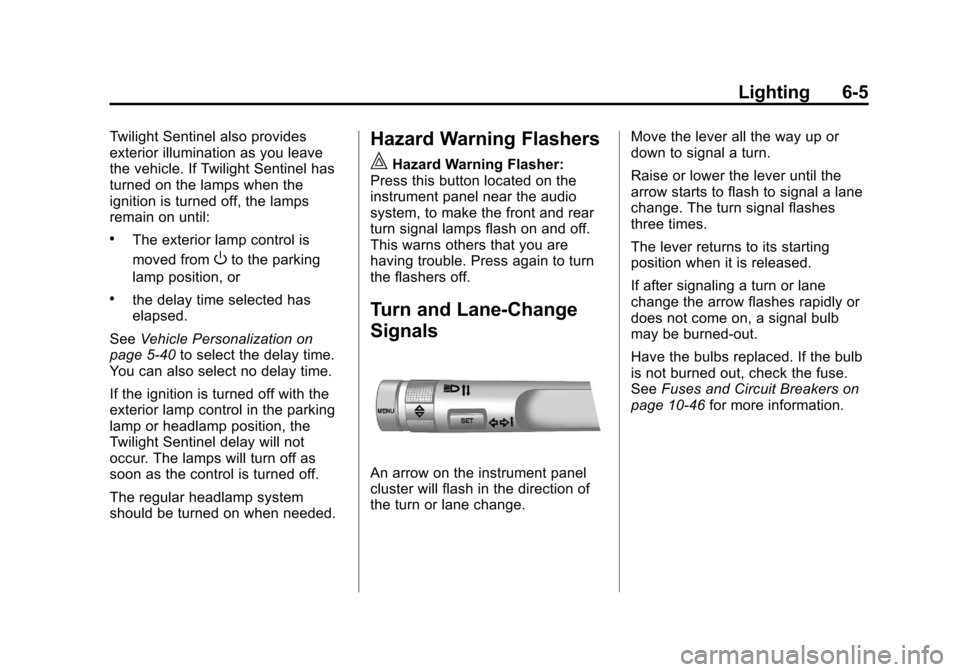
Turn and Lane-Change
Signals
An arrow on the instrument panel
cluster will flash in the direction of
the turn or lane change. Move the lever all the way up or
down to signal a turn.
Raise or lower the lever until the
arrow starts to flash to signal a lane
change. The turn signal flashes
three times.
The lever returns to its starting
position when it is released.
If after signaling a turn or lane
change the arrow flashes rapidly or
does not come on, a signal bulb
may be burned-out.
Have the bulbs replaced. If the bulb
is not burned out, check the fuse.
See
Fuses and Circuit Breakers on
page 10‑46 for more information.
Page 205 of 498

Black plate (1,1)Cadillac SRX Owner Manual - 2011
Infotainment System 7-1
Infotainment
System
Introduction
Introduction . . . . . . . . . . . . . . . . . . . 7-1
Theft-Deterrent Feature . . . . . . . 7-2
Overview (Radio with CD) . . . . . 7-3
Overview (Radio with CD/DVDand MEM) . . . . . . . . . . . . . . . . . . . 7-5
Operation . . . . . . . . . . . . . . . . . . . . . 7-7
Radio
AM-FM Radio . . . . . . . . . . . . . . . . 7-12
Satellite Radio . . . . . . . . . . . . . . . 7-15
Radio Reception . . . . . . . . . . . . . 7-19
Multi-Band Antenna . . . . . . . . . . 7-19
Audio Players
CD Player (Radio with CD) . . . . . . . . . . . . . . . . . . . . 7-20
CD/DVD Player . . . . . . . . . . . . . . 7-22
Mass Storage Media (MEM) . . . . . . . . . . . . . . . 7-27
Auxiliary Devices (Radio with CD) . . . . . . . . . . . . . . . . . . . . 7-30
Auxiliary Devices (Radio with CD/DVD and MEM) . . . . . . . . 7-36
Rear Seat Infotainment
Rear Seat Entertainment(RSE) System . . . . . . . . . . . . . . 7-38
Rear Seat Audio (RSA) System . . . . . . . . . . . . . . . . . . . . . 7-49
Phone
Bluetooth (Overview) . . . . . . . . 7-51
Bluetooth (InfotainmentControls) . . . . . . . . . . . . . . . . . . . 7-52
Bluetooth (Voice Recognition) . . . . . . . . . . . . . . . 7-57
Introduction
Read the following pages to
become familiar with the audio
system's features.
{WARNING
Taking your eyes off the road
for extended periods could
cause a crash resulting in injury
or death to you or others. Do not
give extended attention to
entertainment tasks while driving.
This system provides access to
many audio and non‐audio listings.
Page 206 of 498

Black plate (2,1)Cadillac SRX Owner Manual - 2011
7-2 Infotainment System
To minimize taking your eyes off the
road while driving, do the following
while the vehicle is parked:
.Become familiar with the
operation and controls of the
audio system.
.Set up the tone, speaker
adjustments, and preset radio
stations.
For more information, see Defensive
Driving on page 9‑2.
This vehicle's infotainment system
may be equipped with a noise
reduction system which can work
improperly if the audio amplifier,
engine calibrations, exhaust system,
microphones, radio, or speakers are
modified or replaced. This could
result in more noticeable engine
noise at certain speeds. Notice:
Contact your dealer
before adding any equipment.
Adding audio or communication
equipment could interfere with
the operation of the vehicle's
engine, radio, or other systems,
and could damage them. Follow
federal rules covering mobile
radio and telephone equipment.
The vehicle has Retained
Accessory Power (RAP). With RAP,
the audio system can be played
even after the ignition is turned off.
See Retained Accessory Power
(RAP) on page 9‑22 for more
information.
Navigation System
For vehicles with a navigation
system, see the separate Navigation
System Manual.
Theft-Deterrent Feature
The theft-deterrent feature works
by learning a portion of the Vehicle
Identification Number (VIN)
to the infotainment system.
The infotainment system does
not operate if it is stolen or moved
to a different vehicle.
Page 208 of 498

Black plate (4,1)Cadillac SRX Owner Manual - 2011
7-4 Infotainment System
F.lSEEK
.Radio: Seeks the next
station.
.CD: Selects the next track
or fast forwards within a
track.
G.
YCD Eject
.Removes a disc from the
CD slot.
H. CD
.Selects the CD player
when listening to a
different audio source.
I. RADIO/BAND
.Changes the band while
listening to the radio.
.Selects the radio when
listening to a different
audio source. J.
k
.CD: Pauses the CD.
K. CD Slot
.Insert a CD.
L. MENU/SELECT
.Press: Selects menu items.
.Turn: Opens menus,
highlights menu items,
or sets numeric values
while in a menu.
M. BACK
0
.Menu: Moves one
level back.
.Character Input: Deletes
the last character.
N. CONFIG
.Open the settings menu. O. PHONE
.Opens the phone
main menu.
.Mutes the audio system.
P. TONE
.Opens the tone menu.
Q. AUX
.Selects a connected
external audio source.
R. INFO
.Radio: Shows available
information about the
current station.
.CD: Shows available
information about the
current track.