2011 CADILLAC ESCALADE reset
[x] Cancel search: resetPage 215 of 558

Black plate (9,1)Cadillac Escalade/Escalade ESV Owner Manual - 2011
Infotainment System 7-9
Using Your Stored Preset
Destinations
These destinations are available for
selection while driving.
1. Press
Oto turn the system on.
2. A caution may appear. Press OK to proceed.
3. Press the DEST control button.
4. Select one of the available preset destination screen
buttons. A map screen, with the
destination marked appears.
5. Select the route preference (Fastest, Shortest, or Other).
The system calculates and
highlights the route.
6. Select Start Guidance. The route is now ready to be started.
See “Preset Destination” under
Destination on page 7‑69 for more
information.
Canceling Guidance
Guidance is canceled once the final
destination is reached. To cancel
guidance prior to arrival at the final
destination:
1. Press the DEST control button.
2. Press Cancel Guidance.
3. Press OK to confirm.
Guidance Volume
Adjust the volume of voice guidance
prompts:
1. Press the CONFIG control button to enter the menu
options, then press CONFIG
again, repeatedly until Nav
is selected or press the Nav
screen button. 2. Press Voice Prompt.
3. Press + or
–screen buttons to
increase or to decrease the
volume of the voice prompts.
The system responds with the
adjusted voice level.
See “Voice Prompt ”under
Configure Menu on page 7‑83 for
more information.
Cleaning the Display Screen
Use a soft clean cotton cloth
dampened with clean water.
Page 218 of 558

Black plate (12,1)Cadillac Escalade/Escalade ESV Owner Manual - 2011
7-12 Infotainment System
XM (if equipped) lists also contain a
category to select and the stations
or channels that have broadcasts
that relate to that category. For XM
(if equipped), press the left and right
arrow screen buttons to change
categories. The station information
appears on the display. See“Radio
Menu” in this section to add and
remove XM categories from the
category list. Removed categories
do not appear on the category list
screen or when the right and left
arrow category screen buttons
are used.
FM lists may also contain a
category to select if stations in
the broadcast area support Radio
Data Systems (RDS).2Refresh List: Press to refresh
the list of AM or FM stations.
When viewing a map screen, the
name of the station or channel
displays.
y © ¨ z(Seek):
1. To seek stations, press the up or down arrows to go to the next or
previous station.
2. To scan stations, press and hold either arrow for more
than two seconds. The radio
goes to a station, plays for a
few seconds, then goes to the
next station.
3. To stop scanning, press either arrow again.
Storing Radio Station Presets
This feature stores a mix of up to
30 AM, FM, and XM (if equipped)
preset stations. To store presets:
1. Press
Oto turn the system on.
2. If viewing a map screen, press the source screen button, press
the AUDIO control button,
or press the FAV (favorite)
control button.
3. Select the band.
4. Seek, scan, or tune to the desired station, to select the
station.
5. Press and hold one of the preset screen buttons for more than
two seconds or until a beep is
heard.
6. Repeat the steps for each preset.
Page 220 of 558

Black plate (14,1)Cadillac Escalade/Escalade ESV Owner Manual - 2011
7-14 Infotainment System
Driver:Adjusts the audio to give
the driver the best possible sound
quality.
Rear: Adjusts the audio to give
the rear seat occupants the best
possible sound quality.
2 CH. (Channel): Enhances
surround sound.
5.1 CH. (Channel): Gives a full
affect of surround sound listening.
This button is only available when
playing DVD video discs that
support 5.1 audio and if the RSA
is off.Radio Menu
Press the CONFIG control button to
enter the configure menu screen,
then press CONFIG repeatedly until
Radio is selected or press the Radio
screen button to make changes for
radio information displayed or to
limit features while driving, number
of preset pages, XM (if equipped)
categories, and Bose
®AudioPilot®. Limit Features While Driving
Press the Limit Features While
Driving screen button to turn on and
off the ability to limit functions while
driving. When this screen button is
highlighted, the following functions
are limited while driving:
.Music Navigator Scrolling
.Radio Category Scrolling
.Navigation Menu Scrolling and
some functions
Number of Preset Pages
Press the Number of Preset Pages
screen button to change the number
of preset pages, 1 through 6.
Each preset page can contain five
preset stations. Press the desired
numbered screen button.
Page 255 of 558

Black plate (49,1)Cadillac Escalade/Escalade ESV Owner Manual - 2011
Infotainment System 7-49
SOUND AROUND SELECT:Press
to select an FM transmitter channel.
The SOUND AROUND SELECT
lets the DVD audio play over the
vehicle’s sound system by tuning
the radio to one of the six FM
frequencies listed below.
.CH1 : 88.3MHz
.CH2 : 88.7MHz
.CH3 : 89.1MHz
.CH4 : 89.5MHz
.CH5 : 89.9MHz
.CH6 : 90.3MHz
MENU: Press to enter the DVD
disc menu while the disc is playing.
Q,R,q,r(Navigation
Arrows): Press to navigate through
menus.
ENTER: Press to enter a selected
function or to begin playback of
the disc. REPEAT
7:
Press to repeat part
or all of a chapter, title, track, or
the entire disc after using the A‐B
button to setup repeat preset
sections.
RETURN
8: This button is not
used with the system.
A‐B: This button is used to setup
repeat preset sections. Press this
button once while the disc is playing
to select the starting position. Press
a second time to select the end
position. Press a third time to turn
the function off. To view the preset
section, press
7.
AUTO MEMORY: This button is not
used with the system.
SEARCH/SKIP: This button is not
used with the system.
ERASE/ADD: This button is not
used with the system.
R-S: This button is not used with
the system. TITLE:
Press to enter the disc
title mode. The title feature is
disc-specific, and may not be
available on all discs.
SUBTITLE: Press to change
the subtitle language to another
available language or to turn
subtitles off.
ANGLE: Press to select a different
viewing angle for discs that are
recorded with different camera
angles.
AUDIO: Press to select a different
language for discs that are recorded
with different languages.
0‐9 (Numbers): The numbers
located on the lower left side of the
remote control can be used to enter
numbered menu options, channels,
or track numbers.
GOTO: Press to enter the GOTO
menu to choose a desired title,
chapter, track, or song inside
the disc.
Page 258 of 558
Black plate (52,1)Cadillac Escalade/Escalade ESV Owner Manual - 2011
7-52 Infotainment System
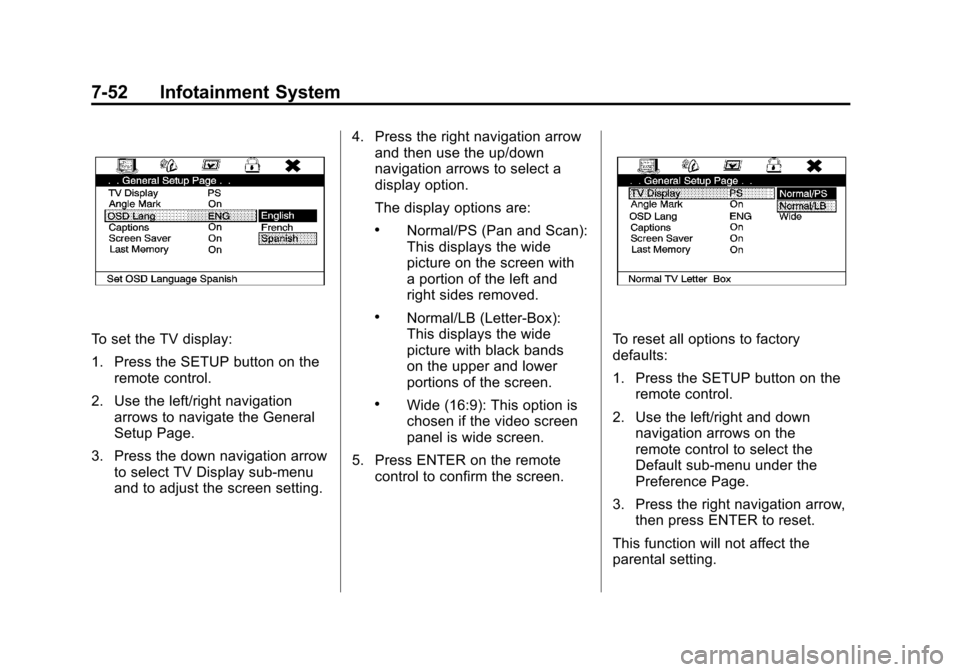
To set the TV display:
1. Press the SETUP button on theremote control.
2. Use the left/right navigation arrows to navigate the General
Setup Page.
3. Press the down navigation arrow to select TV Display sub-menu
and to adjust the screen setting. 4. Press the right navigation arrow
and then use the up/down
navigation arrows to select a
display option.
The display options are:
.Normal/PS (Pan and Scan):
This displays the wide
picture on the screen with
a portion of the left and
right sides removed.
.Normal/LB (Letter-Box):
This displays the wide
picture with black bands
on the upper and lower
portions of the screen.
.Wide (16:9): This option is
chosen if the video screen
panel is wide screen.
5. Press ENTER on the remote control to confirm the screen.
To reset all options to factory
defaults:
1. Press the SETUP button on the
remote control.
2. Use the left/right and down navigation arrows on the
remote control to select the
Default sub-menu under the
Preference Page.
3. Press the right navigation arrow, then press ENTER to reset.
This function will not affect the
parental setting.
Page 265 of 558

Black plate (59,1)Cadillac Escalade/Escalade ESV Owner Manual - 2011
Infotainment System 7-59
P(Power):Press thePbutton to
turn RSA on and off.
Volume: Turn this knob to increase
or to decrease the volume of the
wired headphones. The left knob
controls the left headphones and
the right knob controls the right
headphones.
SRCE (Source): Press this
button to switch between the radio
(AM/FM), XM™ (if equipped),
CD, and if the vehicle has these
features, DVD, USB, auxiliary
jack, and rear auxiliary.
© ¨(Seek): When listening to FM,
AM, or XM (if equipped), press
either the left
©or right¨seek
arrow to go to the previous or to the
next station or channels and stay
there. This function is inactive, with some radios, if the front seat
passengers are listening to the
radio.
Press and hold either the left
©or
right
¨seek arrow until the display
flashes, to tune to an individual
station. The display stops flashing
after the buttons have not been
pushed for more than two seconds.
This function is inactive, with some
radios, if the front seat passengers
are listening to the radio.
While listening to a disc, press the
right
¨seek arrow to go to the next
track or chapter on the disc. Press
the left
©seek arrow to go back to
the start of the current track or
chapter (if more than ten seconds
have played). This function is
inactive, with some radios, if the
front seat passengers are listening
to the disc.
When a DVD video menu is being
displayed, press either the left
©or
right
¨seek arrow to perform a cursor up or down on the menu.
Hold the left
©or right¨seek arrow
to perform a cursor left or right on
the menu.
When a USB device is playing, the
right or left seek button can be used
to control the device.
PROG (Program): Press this
button to go to the next preset radio
station or channel set on the main
radio. This function is inactive,
with some radios, if the front seat
passengers are listening to the
radio.
When a CD or DVD audio disc is
playing, press this button to go to
the beginning of the CD or DVD
audio. This function is inactive,
with some radios, if the front seat
passengers are listening to the disc.
When a DVD video menu is being
displayed, press the PROG button
to perform the menu function, enter.
Page 266 of 558

Black plate (60,1)Cadillac Escalade/Escalade ESV Owner Manual - 2011
7-60 Infotainment System
Navigation
Using the Navigation
System
This section presents basic
information needed to operate the
navigation system.
Use the control buttons located on
the navigation system along with the
available touch-sensitive screen
buttons on the navigation screen to
operate the system. SeeOverview
on page 7‑3 for more information.
Once the vehicle is moving, various
functions are disabled to reduce
driver distractions.
Control Buttons
The following control buttons are
located on the navigation system:
O/n(Power/Volume):
1. Press to turn the system on and off.
2. Turn to increase or decrease the volume to the audio system.
3. Press and hold for more than two seconds to turn off the
navigation system, the Rear
Seat Entertainment (RSE), and
Rear Seat Audio (RSA). If the
vehicle has not been tuned off,
the RSE and the RSA can be
turned back on by pressing this
knob and continues play of the
last active source.
Z(Eject): Press to eject the
CD/DVD Disc. See CD/DVD Player
on page 7‑19.
w(Tune): Turn to go to the next
or previous frequency or disc track
or chapter. See CD/DVD Player on
page 7‑19 orMP3 on page 7‑28 for
more information.
AUDIO: Press to display the audio
screen. Press to switch between
AM, FM, or XM, if equipped, DISC,
or AUX (Auxiliary), or press on the
screen button. See CD/DVD Player
on page 7‑19, MP3 on page 7‑28,
and Auxiliary Devices on page 7‑31
for more information.
FAV (Favorite): Press to access
the preset stations. See “Storing
Radio Station Presets” under,
Overview on page 7‑3.
5(Phone): See the OnStar
(if equipped) owner guide and
Bluetooth (if equipped) for more
information.
Page 282 of 558

Black plate (76,1)Cadillac Escalade/Escalade ESV Owner Manual - 2011
7-76 Infotainment System
To use the coordinates destination
entry method:
1. Press the DEST control button.
2. Select From Map.
3. Select Map Coordinates.
4. Select Latitude and select eitherN (north) or S (south) to enter
the direction of the latitude
coordinate. Enter the numeric
portion of the latitude coordinate.
5. Select Longitude and select either E (east) or W (west) next
to enter the direction of the
longitude coordinate. Enter the
numeric portion of the longitude
coordinate.
6. Once both coordinates are entered, select GO. The map
screen, with the destination
marked displays. 7. Select the route preference
(Fastest, Shortest, or Other).
The system calculates and
highlights the route.
8. Select Start Guidance. The route is now ready to be started.
See “Getting Started on Your
Route” in this section for more
information.
Preset Destination
The preset destination entry
method lets you set a destination by
selecting from one of five previously
stored destinations. Besides voice
tagged destinations, these are the
only destinations available to set
while the vehicle is moving. If a
destination is not set for one of
the screen buttons, the button is
dimmed and not available for use.
See “Adding or Changing Preset
Destinations” in this section for
information on how to add a preset
destination.
To use the preset destination entry
method:
1. Press the DEST control button.
2. Select the desired preset destination screen button.
The screen buttons are labeled
with the name that was selected
for the destination when it was
stored. The map screen, with the
destination marked displays.