2011 CADILLAC CTS fuel
[x] Cancel search: fuelPage 167 of 496
Black plate (27,1)Cadillac CTS/CTS-V Owner Manual - 2011
Instruments and Controls 5-27
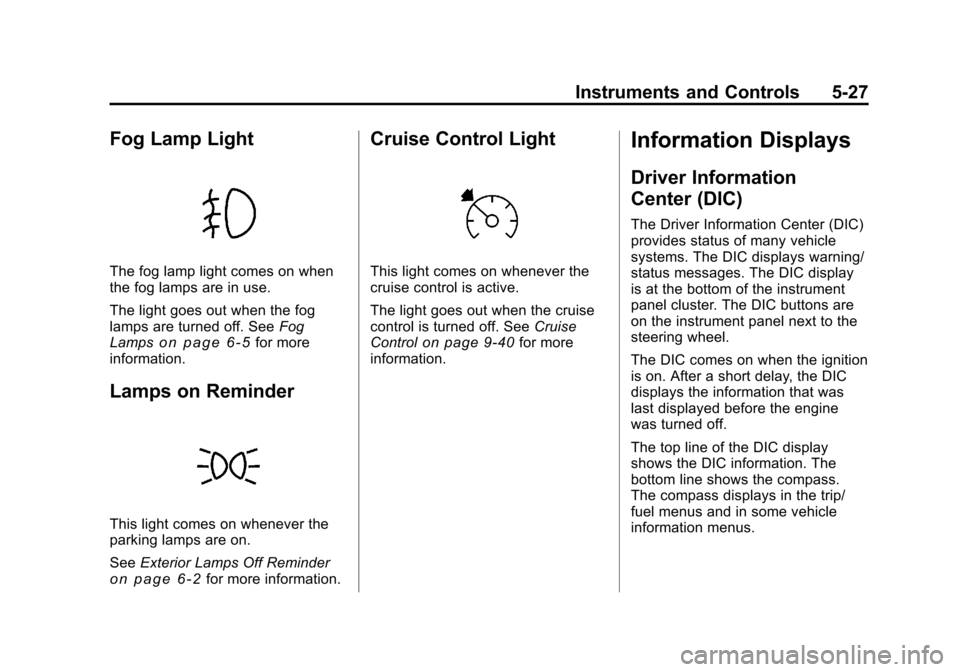
Fog Lamp Light
The fog lamp light comes on when
the fog lamps are in use.
The light goes out when the fog
lamps are turned off. SeeFog
Lamps
on page 6‑5for more
information.
Lamps on Reminder
This light comes on whenever the
parking lamps are on.
See Exterior Lamps Off Reminder
on page 6‑2for more information.
Cruise Control Light
This light comes on whenever the
cruise control is active.
The light goes out when the cruise
control is turned off. See Cruise
Control
on page 9‑40for more
information.
Information Displays
Driver Information
Center (DIC)
The Driver Information Center (DIC)
provides status of many vehicle
systems. The DIC displays warning/
status messages. The DIC display
is at the bottom of the instrument
panel cluster. The DIC buttons are
on the instrument panel next to the
steering wheel.
The DIC comes on when the ignition
is on. After a short delay, the DIC
displays the information that was
last displayed before the engine
was turned off.
The top line of the DIC display
shows the DIC information. The
bottom line shows the compass.
The compass displays in the trip/
fuel menus and in some vehicle
information menus.
Page 168 of 496

Black plate (28,1)Cadillac CTS/CTS-V Owner Manual - 2011
5-28 Instruments and Controls
If a problem is detected, a warning
message appears on the display. All
messages should be taken seriously
and clearing the message does not
correct the problem.
DIC Operation and Displays
Press the DIC buttons to access the
different displays.
3(Trip/Fuel):Press to scroll
through the trip and fuel displays.
See “Trip/Fuel Display Menu Items”
following for more information.
T(Vehicle Information): Press
to scroll through the vehicle
information displays. See “Vehicle
Information Display Menu Items”
following for more information.
U(Customization): Press to scroll
through each of the customization
features. See Vehicle
Personalization
on page 5‑45for
more information.
V(Set/Reset): Press to reset
certain DIC features and to
acknowledge and clear DIC warning
messages.
y z(Menu Up/Down): Press to
scroll up and down the menu items.
Trip/Fuel Display Menu Items
3(Trip/Fuel): Press to display
the following menu items:
Odometer
Displays the distance the vehicle
has been driven in either miles (mi)
or kilometers (km). Trip A or Trip B
Displays the current distance
traveled since the last reset for each
trip odometer in either miles (mi) or
kilometers (km). Both odometers
can be used at the same time.
Reset each trip odometer to zero by
pressing and holding the set/reset
button when Trip A or Trip B is
displayed.
Fuel Range
Displays the approximate remaining
kilometers (km) or miles (mi) you
can drive without refilling the fuel
tank. This estimate is based on the
current driving conditions and
changes if the driving conditions
change. For example, freeway
driving may produce better fuel
economy than city driving with
frequent stops, so the range would
adjust for that.
Once the range drops below about
30 miles (48 km) remaining, the
display shows Low Range.
Page 169 of 496

Black plate (29,1)Cadillac CTS/CTS-V Owner Manual - 2011
Instruments and Controls 5-29
If the fuel is low, the Fuel Level Low
message displays. See“Fuel Level
Low” under Fuel System Messages
on page 5‑36for more information.
AVG (Average) Economy
Displays the approximate average
liters per 100 kilometers (L/100 km)
or miles per gallon (mpg). The
calculation is based on the number
of L/100 km (mpg) recorded since
the last time this display was reset.
Press the set/reset button to reset
to zero.
Timer
Can be used to measure time. For
example, timing how long it takes to
travel from one point to another. To
access the timer, press the trip/fuel
button until Timer 00:00:00 displays.
To turn on the timer, press the set/
reset button.
To turn off the timer, press the set/
reset button again. The timer
displays the end timing value. To reset the timer to zero, press and
hold the set/reset button.
Inst (Instantaneous) Economy
Displays the current fuel economy
in either liters per 100 kilometers
(L/100 km) or miles per
gallon (mpg). This number changes
frequently as driving conditions
change. It cannot be reset.
AVG (Average) Speed
Displays the average speed of the
vehicle in either kilometers per
hour (km/h) or miles per hour (mph).
This calculation is based on the
various vehicle speeds recorded
since the last reset of this display.
Press the set/reset button to reset
to zero.
Speedometer
Displays a digital speedometer in
the DIC. The speed displays in
either miles per hour (mph) or
kilometers per hour (km/h). To
change the units from English to
metric, see “Units”later in this
section. Blank Display
This display shows no information.Vehicle Information Display
Menu Items
T(Vehicle Information):
Press
to display the following menu items:
Oil Life Remaining
If the vehicle has this display, it
shows the estimated oil life
remaining. If you see 99% Oil Life
Remaining on the display, that
means that 99% of the current oil
life remains.
When the oil life is depleted, the
Change Engine Oil Soon message
displays. Change the oil as soon as
possible. Additional maintenance is
also recommended in the
Maintenance Schedule in this
manual. See Scheduled
Maintenance
on page 11‑3and
Engine Oilon page 10‑11.
The Oil Life must be reset after
each oil change. Avoid accidental
resetting of the Oil Life system.
Page 176 of 496

Black plate (36,1)Cadillac CTS/CTS-V Owner Manual - 2011
5-36 Instruments and Controls
This message clears itself after
10 seconds, until the next ignition
cycle. SeeEngine Oil
on page 10‑11for additional information.
Oil Pressure Low Stop Engine
Notice:If you drive your vehicle
while the engine oil pressure is
low, severe engine damage may
occur. If a low oil pressure
warning appears on the
instrument panel cluster and/or
DIC, stop the vehicle as soon as
possible. Do not drive the vehicle
until the cause of the low oil
pressure is corrected. See Engine
Oil
on page 10‑11for more
information.
This message displays when the
vehicle's engine oil pressure is low.
The oil pressure light may also
appear on the instrument panel
cluster. See Engine Oil Pressure
Light
on page 5‑26. See Engine Oilon page 10‑11for more information.
Stop the vehicle immediately, as
engine damage can result from
driving a vehicle with low oil pressure. Have the vehicle serviced
by your dealer as soon as possible
when this message is displayed.
Engine Power Messages
Engine Power Is Reduced
This message displays when the
engine power is being reduced to
protect the engine from damage.
There could be several malfunctions
that might cause this message.
Reduced engine power can affect
the vehicle's ability to accelerate.
If this message is on, but there is no
reduction in performance, proceed
to your destination. The
performance may be reduced the
next time the vehicle is driven. The
vehicle may be driven at a reduced
speed while this message is on, but
acceleration and speed may be
reduced. Anytime this message
stays on, the vehicle should be
taken to your dealer for service as
soon as possible.
Fuel System Messages
Fuel Level Low
This message displays when the
vehicle is low on fuel. Refill the fuel
tank as soon as possible. A chime
may sound when this message
displays. See
Filling the Tank
on
page 9‑50.
Tighten Gas Cap
This message displays when the
fuel cap has not been fully
tightened. Recheck the fuel cap to
ensure that it is on and tightened
properly.
Key and Lock Messages
Accessory Mode Active
If the vehicle has the keyless
access system, this message
displays when the accessory mode
is active. See Ignition Positions (Key
Access)
on page 9‑16or Ignition
Positions (Keyless Access)on
page 9‑18for more information.
Page 193 of 496

Black plate (53,1)Cadillac CTS/CTS-V Owner Manual - 2011
Instruments and Controls 5-53
.Entry/Exit Steering Only:Easy
Exit will automatically move the
steering column to a full up and
full forward position when the
key is removed from the ignition
on Key Access vehicles,
or when the ignition is turned off
and the driver door opened on
Keyless Access vehicles. This
movement will also occur when
the door mounted EXIT button is
pressed.
Easy Entry will automatically
recall the driver seat, outside
mirrors and steering column
memory positions of the current
driver (1 or 2) when the ignition
is turned on.
No Change: No change will be
made to this feature. The current
setting will remain.Exiting the Feature
Settings Menu
The feature settings menu will be
exited when any of the following
occurs:
.The vehicle is no longer in
ON/RUN.
.The trip/fuel or vehicle
information DIC buttons are
pressed.
.The end of the feature settings
menu is reached and exited.
.A 40 second time period has
elapsed with no selection made.
Universal Remote
System
See Radio Frequency Statementon
page 13‑18for information
regarding Part 15 of the Federal
Communications Commission (FCC)
rules and Industry Canada
Standards RSS-210/220/310.
Universal Remote System
Programming
This system provides a way to
replace up to three remote control
transmitters used to activate
devices such as garage door
openers, security systems, and
home automation devices.
Page 262 of 496

Black plate (2,1)Cadillac CTS/CTS-V Owner Manual - 2011
9-2 Driving and Operating
Fuel
Fuel . . . . . . . . . . . . . . . . . . . . . . . . . 9-47
Recommended Fuel . . . . . . . . . 9-47
Gasoline Specifications . . . . . . 9-48
California FuelRequirements . . . . . . . . . . . . . . 9-48
Fuels in Foreign Countries . . . 9-48
Fuel Additives . . . . . . . . . . . . . . . 9-49
Filling the Tank . . . . . . . . . . . . . . 9-50
Filling a Portable Fuel Container . . . . . . . . . . . . . . . . . . . 9-51
Towing
General TowingInformation . . . . . . . . . . . . . . . . . 9-52
Driving Characteristics and Towing Tips . . . . . . . . . . . . . . . . 9-52
Trailer Towing
(Except CTS-V) . . . . . . . . . . . . 9-56
Trailer Towing (CTS-V) . . . . . . 9-57
Towing Equipment . . . . . . . . . . . 9-57
Conversions and Add-Ons
Add-On Electrical Equipment . . . . . . . . . . . . . . . . . 9-58
Driving Information
Defensive Driving
Defensive driving means “always
expect the unexpected.” The first
step in driving defensively is to wear
your safety belt, see Safety Belts
on
page 3‑14.
{WARNING
Assume that other road users
(pedestrians, bicyclists, and other
drivers) are going to be careless
and make mistakes. Anticipate
what they might do and be ready.
In addition:
.Allow enough following
distance between you and
the driver in front of you.
.Focus on the task of driving.
(Continued)
WARNING (Continued)
Driver distraction can cause
collisions resulting in injury or
possible death. These simple
defensive driving techniques
could save your life.
Drunk Driving
{WARNING
Drinking and then driving is very
dangerous. Your reflexes,
perceptions, attentiveness, and
judgment can be affected by even
a small amount of alcohol. You
can have a serious —or even
fatal —collision if you drive after
drinking. Do not drink and drive or
ride with a driver who has been
drinking. Ride home in a cab; or if
you are with a group, designate a
driver who will not drink.
Page 270 of 496

Black plate (10,1)Cadillac CTS/CTS-V Owner Manual - 2011
9-10 Driving and Operating
Blizzard Conditions
Being stuck in snow can be a
serious situation. Stay with the
vehicle unless there is help nearby.
If possible, use theRoadside
Service
on page 13‑7. To get help
and keep everyone in the
vehicle safe:
.Turn on the hazard warning
flashers.
.Tie a red cloth to an outside
mirror.
{WARNING
Snow can trap engine exhaust
under the vehicle. This may
cause exhaust gases to get
inside. Engine exhaust contains
Carbon Monoxide (CO) which
cannot be seen or smelled. It can
cause unconsciousness and even
death.
(Continued)
WARNING (Continued)
If the vehicle is stuck in the snow:
.Clear away snow from around
the base of your vehicle,
especially any that is blocking
the exhaust pipe.
.Check again from time to
time to be sure snow does
not collect there.
.Open a window about 5 cm
(2 in) on the side of the
vehicle that is away from the
wind to bring in fresh air.
.Fully open the air outlets on
or under the instrument
panel.
.Adjust the climate control
system to a setting that
circulates the air inside the
vehicle and set the fan speed
to the highest setting. See
Climate Control System in the
Index.(Continued)
WARNING (Continued)
For more information about
carbon monoxide, see Engine
Exhaust on page 9‑24.
Snow can trap exhaust gases
under your vehicle. This can
cause deadly CO (Carbon
Monoxide) gas to get inside. CO
could overcome you and kill you.
You cannot see it or smell it, so
you might not know it is in your
vehicle. Clear away snow from
around the base of your vehicle,
especially any that is blocking the
exhaust.
Run the engine for short periods
only as needed to keep warm, but
be careful.
To save fuel, run the engine for only
short periods as needed to warm
the vehicle and then shut the engine
off and close the window most of
the way to save heat. Repeat this
until help arrives but only when you
Page 271 of 496

Black plate (11,1)Cadillac CTS/CTS-V Owner Manual - 2011
Driving and Operating 9-11
feel really uncomfortable from the
cold. Moving about to keep warm
also helps.
If it takes some time for help to
arrive, now and then when you run
the engine, push the accelerator
pedal slightly so the engine runs
faster than the idle speed. This
keeps the battery charged to restart
the vehicle and to signal for help
with the headlamps. Do this as little
as possible to save fuel.
If the Vehicle is Stuck
Slowly and cautiously spin the
wheels to free the vehicle when
stuck in sand, mud, ice, or snow.
If stuck too severely for the traction
system to free the vehicle, turn the
traction system off and use the
rocking method.
{WARNING
If the vehicle's tires spin at high
speed, they can explode, and you
or others could be injured. The
vehicle can overheat, causing an
engine compartment fire or other
damage. Spin the wheels as little
as possible and avoid going
above 55 km/h (35 mph) as
shown on the speedometer.
For information about using tire
chains on the vehicle, see Tire
Chains on page 10‑89.
Rocking the Vehicle to Get
it Out
Turn the steering wheel left and
right to clear the area around the
front wheels. Turn off any traction
system. Shift back and forth
between R (Reverse) and a forward
gear, or with a manual transmission,
between 1 (First) or 2 (Second) and
R (Reverse), spinning the wheels as
little as possible. To prevent transmission wear, wait until the
wheels stop spinning before shifting
gears. Release the accelerator
pedal while shifting, and press
lightly on the accelerator pedal
when the transmission is in gear.
Slowly spinning the wheels in the
forward and reverse directions
causes a rocking motion that could
free the vehicle. If that does not get
the vehicle out after a few tries, it
might need to be towed out. If the
vehicle does need to be towed out,
see
Towing the Vehicle
on
page 10‑117.
Vehicle Load Limits
It is very important to know how
much weight the vehicle can
carry. This weight is called the
vehicle capacity weight and
includes the weight of all
occupants, cargo and all
nonfactory‐installed options.