2011 BUICK REGAL DIC
[x] Cancel search: DICPage 216 of 368

Black plate (26,1)Buick Regal Owner Manual - 2011
9-26 Driving and Operating
P (Park):This position locks the
drive wheels. It is the best position
to use when starting the engine
because the vehicle cannot move
easily.
{WARNING
It is dangerous to get out of the
vehicle if the shift lever is not fully
in P (Park) with the parking brake
firmly set. The vehicle can roll.
Do not leave the vehicle when the
engine is running unless you
have to. If you have left the
engine running, the vehicle can
move suddenly. You or others
could be injured. To be sure the
vehicle will not move, even when
you are on level ground, always
set the parking brake and move
the shift lever to P (Park). See
Shifting Into Park (Automatic
Transmission) on page 9‑21. Make sure the shift lever is fully in
P (Park) before starting the engine.
The vehicle has an automatic
transmission shift lock control
system. The regular brake must be
fully applied first and then the shift
lever button pressed before shifting
from P (Park) when the ignition key
is in ON/RUN. If you cannot shift out
of P (Park), ease pressure on the
shift lever, then push the shift lever
all the way into P (Park) as you
maintain brake application. Then
press the shift lever button and
move the shift lever into another
gear. See
Shifting out of Park
(Automatic Transmission) on
page 9‑22.
Without the brake pedal applied, the
control indicator will be on.
If the shift lever is not in P (Park)
when the ignition is turned to OFF,
the control indicator and P will flash.
Page 222 of 368

Black plate (32,1)Buick Regal Owner Manual - 2011
9-32 Driving and Operating
The system has a parking brake
status light and a parking brake
warning light. SeeElectric Parking
Brake Light on page 5‑16. There are
also three Driver Information Center
(DIC) messages. See Brake System
Messages on page 5‑26 for more
information. In case of insufficient
electrical power, the EPB cannot be
applied or released.
Before leaving the vehicle, check
the parking brake status light to
ensure that the parking brake is
applied.
EPB Apply
The EPB can be applied any time
the vehicle is stopped. The EPB is
applied by momentarily lifting up on
the EPB switch. Once fully applied,
the parking brake status light will be
on. While the brake is being applied,
the status light will flash until it is
fully applied. If the light does not
come on, or remains flashing, you
need to have the vehicle serviced.
Do not drive the vehicle if the
parking brake status light is flashing. See your dealer. See
Electric
Parking Brake Light on page 5‑16
for more information.
If the EPB is applied while the
vehicle is in motion, a chime will
sound, and the DIC message
RELEASE PARK BRAKE SWITCH
will be displayed. The vehicle will
decelerate as long as the switch is
held in the up position. Releasing
the EPB switch during deceleration
will release the parking brake. If the
switch is held in the up position until
the vehicle comes to a stop, the
EPB will remain applied.
If the parking brake status light
flashes continuously, then the EPB
is only partially applied or released,
or there is a problem with the EPB.
The DIC message SERVICE
PARKING BRAKE will be displayed.
If this light flashes continuously,
release the EPB, and attempt to
apply it again. If this light continues
to flash, do not drive the vehicle.
See your dealer. If the parking brake warning light is
on, the EPB has detected an error
in another system and is operating
with reduced functionality.
To apply the EPB when this
light is on, lift up on the EPB
switch and hold it in the up position.
Full application of the parking brake
by the EPB system may take a
longer period of time than normal
when this light is on. Continue to
hold the switch until the parking
brake status light remains on. If the
parking brake warning light is on,
see your dealer.
For maximum EPB force when
parking on a hill, pull the EPB
switch twice.
If the EPB fails to apply, the rear
wheels should be blocked to
prevent vehicle movement.
Page 223 of 368

Black plate (33,1)Buick Regal Owner Manual - 2011
Driving and Operating 9-33
EPB Release
To release the EPB, place the
ignition in the ON/RUN position,
apply and hold the brake pedal, and
push down momentarily on the EPB
switch. If you attempt to release
the EPB without the brake pedal
applied, a chime will sound, and
the DIC message PRESS BRAKE
PEDAL TO RELEASE PARK
BRAKE will be displayed. The EPB
is released when the parking brake
status light is off.
If the parking brake warning
light is on, the EPB has detected
an error in another system and is
operating with reduced functionality.
To release the EPB when this light
is on, push down on the EPB switch
and hold it in the down position.
EPB release may take a longer
period of time than normal when
this light is on. Continue to hold the
switch until the parking brake status
light is off. If the light is on, see your
dealer.Notice:
Driving with the parking
brake on can overheat the brake
system and cause premature
wear or damage to brake system
parts. Make sure that the parking
brake is fully released and the
brake warning light is off before
driving.
Automatic EPB Release
The EPB will automatically release if
the vehicle is running, placed into
gear, and an attempt is made to
drive away. Avoid rapid acceleration
when the EPB is applied, to
preserve parking brake lining life.
The EPB can also be used to
prevent roll back for vehicles with a
manual transmission taking off on
a hill. In a situation where no roll
back is desired, an applied EPB will
allow both feet to be used for the
clutch and accelerator pedals in
preparation for starting the vehicle
moving in the intended direction. In this situation, perform the normal
clutch and/or accelerator actions
required to begin moving the
vehicle. There is no need to push
the switch to release the EPB.
Brake Assist
This vehicle has a brake assist
feature designed to assist the driver
in stopping or decreasing vehicle
speed in emergency driving
conditions. This feature uses the
stability system hydraulic brake
control module to supplement
the power brake system under
conditions where the driver has
quickly and forcefully applied the
brake pedal in an attempt to quickly
stop or slow down the vehicle.
Page 224 of 368

Black plate (34,1)Buick Regal Owner Manual - 2011
9-34 Driving and Operating
The stability system hydraulic brake
control module increases brake
pressure at each corner of the
vehicle until the ABS activates.
Minor brake pedal pulsation or
pedal movement during this time
is normal and the driver should
continue to apply the brake pedal
as the driving situation dictates.
The brake assist feature will
automatically disengage when
the brake pedal is released or
brake pedal pressure is quickly
decreased.Hill Start Assist (HSA)
Some vehicles have a Hill Start
Assist (HSA) feature, which may be
useful when the vehicle is stopped
on a grade. This feature is designed
to prevent the vehicle from rolling,
either forward or rearward, during
vehicle drive off. After the driver
completely stops and holds the
vehicle in a complete standstill on a
grade, HSA will be automatically
activated. During the transition
period between when the driver
releases the brake pedal and starts
to accelerate to drive off on a grade,
HSA holds the braking pressure to
ensure that there is no rolling. The
brakes will automatically release
when the accelerator pedal is
applied within the two‐second
window. It will not activate if the
vehicle is in a drive gear and facing
downhill or if the vehicle is facing
uphill and in R (Reverse).
Ride Control Systems
Traction Control
System (TCS)
The vehicle may have a Traction
Control System (TCS) that limits
wheel slip. The system operates if it
senses that one or both of the front
wheels are slipping or beginning to
lose traction. When this happens,
the system reduces engine power
and/or applies brake pressure to the
slipping wheel(s).
The system may be heard or felt
while it is working, but this is
normal.
TCS automatically comes on
whenever the vehicle is started.
To limit wheel slip, especially in
slippery road conditions, the system
should always be left on. But,
TCS can be turned off if needed.
Page 225 of 368

Black plate (35,1)Buick Regal Owner Manual - 2011
Driving and Operating 9-35
dflashes to indicate that TCS is
active. See Traction Control System
(TCS)/StabiliTrak
®Light on
page 5‑18 for more information.
If there is a problem detected
with TCS, SERVICE TRACTION
CONTROL is displayed on the
Driver Information Center (DIC).
See Ride Control System Messages
on page 5‑29. When this message
is displayed and
dcomes on and
stays on, the vehicle is safe to drive
but the system is not operational.
Driving should be adjusted
accordingly.
If
dcomes on and stays on, reset
the system.
To reset:
1. Stop the vehicle.
2. Turn the engine off and waiting 15 seconds.
3. Start the engine. If
dstill comes on and stays on, the
vehicle needs service.
Notice: Do not repeatedly brake
or accelerate heavily when TCS is
off. The vehicle's driveline could
be damaged.
With Interactive Drive Control
System
Without Interactive Drive Control
System
TCS can be turned off by pressing
and releasing the TCS/StabiliTrak
button. When TCS is turned off,
i
comes on, and the appropriate DIC
message also displays. See Ride
Control System Messages on
page 5‑29. With TCS turned off, the
system does not limit wheel slip.
Driving should be adjusted
accordingly. See Traction Off Light
on page 5‑18 for more information.
Page 226 of 368

Black plate (36,1)Buick Regal Owner Manual - 2011
9-36 Driving and Operating
Press and release the
TCS/StabiliTrak button again
to turn the system back on.
It may be necessary to turn the
system off if the vehicle gets stuck
in sand, mud, or snow and rocking
the vehicle is required. SeeIf the
Vehicle Is Stuck on page 9‑11 for
more information. See also Winter
Driving on page 9‑9 for information
on using TCS when driving in snowy
or icy conditions.
Adding non‐GM accessories can
affect the vehicle performance.
See Accessories and Modifications
on page 10‑3 for more information.
StabiliTrak®System
The vehicle may have a vehicle
stability enhancement system called
StabiliTrak. It is an advanced
computer-controlled system that
assists with directional control of the
vehicle in difficult driving conditions. StabiliTrak activates when the
computer senses a difference
between the intended path and the
direction the vehicle is actually
traveling. StabiliTrak selectively
applies braking pressure to the
vehicle brakes to help steer the
vehicle in the intended direction.
StabiliTrak comes on automatically
whenever the vehicle is started.
To assist with directional control
of the vehicle, the system should
always be left on.
When StabiliTrak activates,
d
flashes on the instrument panel.
A noise may be heard or vibration
may be felt in the brake pedal.
This is normal. Continue to steer the
vehicle in the intended direction.
See
Traction Control System (TCS)/
StabiliTrak
®Light on page 5‑18 for
more information. If a problem is detected with
StabiliTrak, SERVICE
STABILITRAK is displayed on the
Driver Information Center (DIC).
See
Ride Control System Messages
on page 5‑29. When this message
is displayed and
dcomes on and
stays on, the vehicle is safe to drive
but the system is not operational.
Driving should be adjusted
accordingly.
If
dcomes on and stays on, reset
the system.
To reset:
1. Stop the vehicle.
2. Turn the engine off and waiting 15 seconds.
3. Start the engine.
If
dstill comes on and stays on, the
vehicle needs service.
Page 227 of 368

Black plate (37,1)Buick Regal Owner Manual - 2011
Driving and Operating 9-37
With Interactive Drive ControlSystemWithout Interactive Drive Control System
.To turn off both StabiliTrak and
TCS, press and hold the TCS/
StabiliTrak button, located on the
instrument panel, until
iandg
illuminate and the appropriate
DIC message is displayed.
SeeRide Control System
Messages on page 5‑29. When StabiliTrak is turned off,
the system will not assist with
directional control of the vehicle
or limit wheel spin. Driving
should be adjusted accordingly.
See
StabiliTrak
®OFF Light on
page 5‑18 for more information.
.Press and release the TCS/
StabiliTrak button again to turn
the system back on.
If cruise control is being used when
StabiliTrak activates, cruise control
will automatically disengage.
Press the cruise control button to
reengage when road conditions
allow. See Cruise Control on
page 9‑39 for more information.
Page 228 of 368
Black plate (38,1)Buick Regal Owner Manual - 2011
9-38 Driving and Operating
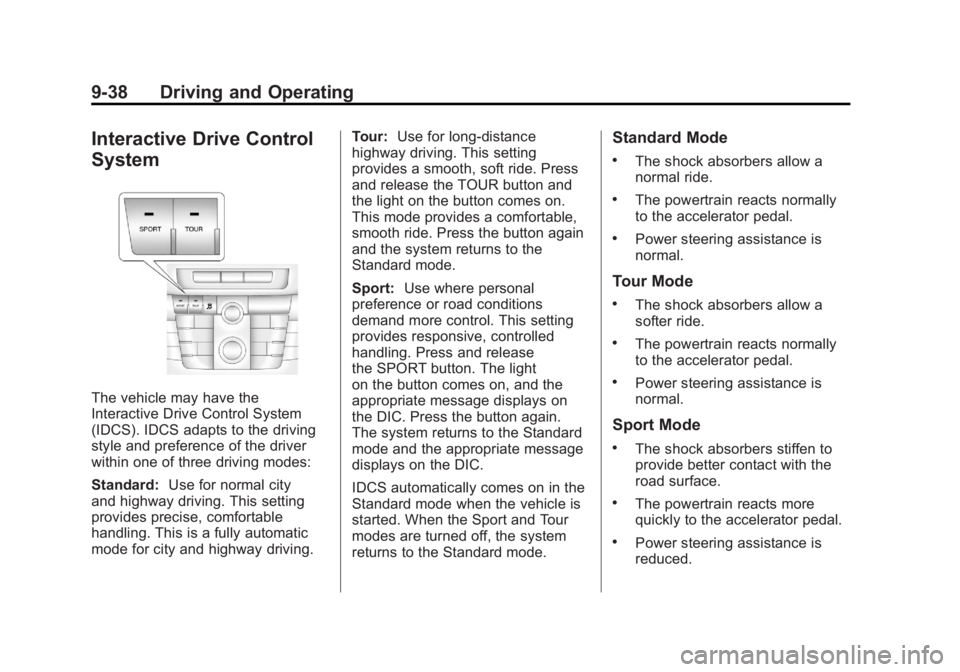
Interactive Drive Control
System
The vehicle may have the
Interactive Drive Control System
(IDCS). IDCS adapts to the driving
style and preference of the driver
within one of three driving modes:
Standard:Use for normal city
and highway driving. This setting
provides precise, comfortable
handling. This is a fully automatic
mode for city and highway driving. Tour:
Use for long-distance
highway driving. This setting
provides a smooth, soft ride. Press
and release the TOUR button and
the light on the button comes on.
This mode provides a comfortable,
smooth ride. Press the button again
and the system returns to the
Standard mode.
Sport: Use where personal
preference or road conditions
demand more control. This setting
provides responsive, controlled
handling. Press and release
the SPORT button. The light
on the button comes on, and the
appropriate message displays on
the DIC. Press the button again.
The system returns to the Standard
mode and the appropriate message
displays on the DIC.
IDCS automatically comes on in the
Standard mode when the vehicle is
started. When the Sport and Tour
modes are turned off, the system
returns to the Standard mode.
Standard Mode
.The shock absorbers allow a
normal ride.
.The powertrain reacts normally
to the accelerator pedal.
.Power steering assistance is
normal.
Tour Mode
.The shock absorbers allow a
softer ride.
.The powertrain reacts normally
to the accelerator pedal.
.Power steering assistance is
normal.
Sport Mode
.The shock absorbers stiffen to
provide better contact with the
road surface.
.The powertrain reacts more
quickly to the accelerator pedal.
.Power steering assistance is
reduced.