2011 BUICK LUCERNE change wheel
[x] Cancel search: change wheelPage 195 of 450
Black plate (39,1)Buick Lucerne Owner Manual - 2011
.Make sure the electrical system is not wet. The
system could be wet if the vehicle was driven
through a deep puddle of water.
.Make sure to fuel the vehicle with quality fuel.
Poor fuel quality causes the engine not to run as
efficiently as designed and can cause: stalling
after start-up, stalling when the vehicle is changed
into gear, misfiring, hesitation on acceleration,
or stumbling on acceleration. These conditions
might go away once the engine is warmed up.
If one or more of these conditions occurs, change
the fuel brand used. It will require at least one full
tank of the proper fuel to turn the light off.
SeeGasoline Octane on page 6‑6.
If none of the above have made the light turn off,
your dealer can check the vehicle. The dealer has the
proper test equipment and diagnostic tools to fix any
mechanical or electrical problems that might have
developed.
Emissions Inspection and Maintenance
Programs
Some state/provincial and local governments may have
programs to inspect the on-vehicle emission control
equipment For the inspection, the emission system test
equipment is connected to the vehicle’s Data Link
Connector (DLC).
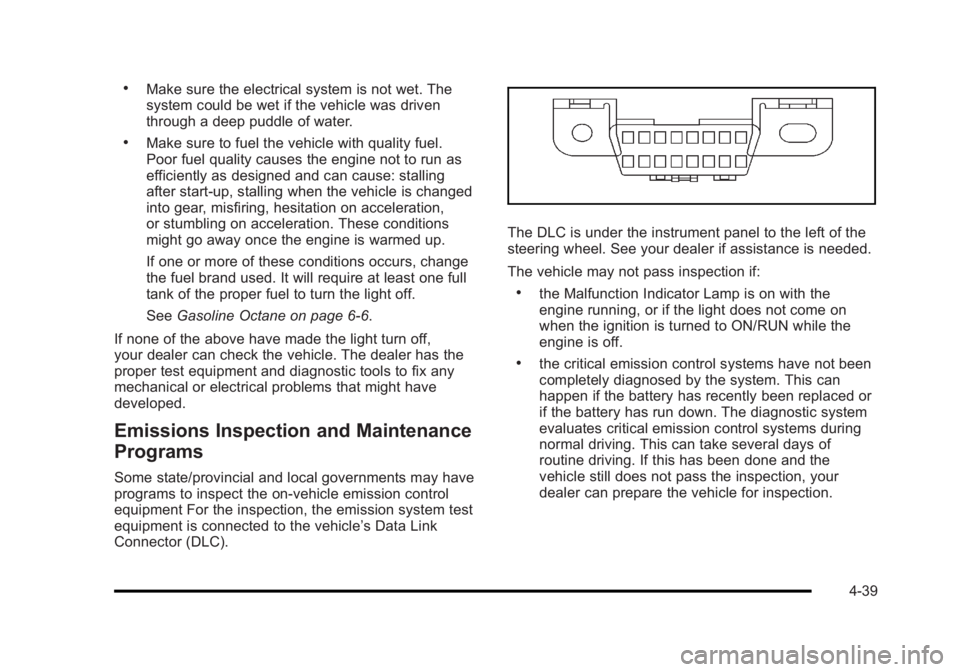
The DLC is under the instrument panel to the left of the
steering wheel. See your dealer if assistance is needed.
The vehicle may not pass inspection if:
.the Malfunction Indicator Lamp is on with the
engine running, or if the light does not come on
when the ignition is turned to ON/RUN while the
engine is off.
.the critical emission control systems have not been
completely diagnosed by the system. This can
happen if the battery has recently been replaced or
if the battery has run down. The diagnostic system
evaluates critical emission control systems during
normal driving. This can take several days of
routine driving. If this has been done and the
vehicle still does not pass the inspection, your
dealer can prepare the vehicle for inspection.
4-39
Page 220 of 450

Black plate (64,1)Buick Lucerne Owner Manual - 2011
Press the customization button until PARK TILT
MIRRORS appears on the DIC display. Press the
set/reset button once to access the settings for this
feature. Then press the customization button to scroll
through the following settings:
OFF (default):Neither outside mirror will be tilted down
when the vehicle is shifted into R (Reverse).
DRIVER MIRROR: The driver's outside mirror will be
tilted down when the vehicle is shifted into R (Reverse).
PASSENGER MIRROR: The passenger's outside
mirror will be tilted down when the vehicle is shifted into
R (Reverse).
BOTH MIRRORS: The driver's and passenger's outside
mirrors will be tilted down when the vehicle is shifted
into R (Reverse).
NO CHANGE: No change will be made to this feature.
The current setting will remain.
To select a setting, press the set/reset button while the
desired setting is displayed on the DIC.
EASY EXIT RECALL
If your vehicle has this feature, it allows you to select
your preference for the automatic easy exit seat feature.
See Memory Seat and Mirrors
on page 2‑7for more
information. Press the customization button until EASY EXIT
RECALL appears on the DIC display. Press the
set/reset button once to access the settings for this
feature. Then press the menu up/down button to scroll
through the following settings:
DOOR BUTTON ONLY:
No automatic seat exit recall
will occur. The recall will only occur after pressing the
easy exit seat button.
BUTTON AND KEY OUT (default): If the features are
enabled through the EASY EXIT SETUP menu, the
driver's seat will move back, and if the vehicle has the
power tilt wheel and telescopic steering feature, the
power steering column will move up and forward when
the key is removed from the ignition or after pressing
the easy exit seat button. The automatic easy exit seat
movement will only occur one time after the key is
removed from the ignition. If the automatic movement
has already occurred, and you put the key back in the
ignition and remove it again, the seat and steering
column will stay in the original exit position, unless a
memory recall took place prior to removing the key
again.
NO CHANGE: No change will be made to this feature.
The current setting will remain.
To select a setting, press the set/reset button while the
desired setting is displayed on the DIC.
4-64
Page 221 of 450

Black plate (65,1)Buick Lucerne Owner Manual - 2011
EASY EXIT SETUP
If your vehicle has this feature, it allows you to select
which areas will recall with the automatic easy exit
seat feature. It also allows you to turn off the automatic
easy exit feature. SeeMemory Seat and Mirrors
on
page 2‑7and “EASY EXIT RECALL” earlier for more
information.
Press the customization button until EASY EXIT SETUP
appears on the DIC display. Press the set/reset button
once to access the settings for this feature. Then press
the menu up/down button to scroll through the following
settings:
OFF: No automatic seat exit will recall.
SEAT ONLY: The driver's seat will recall.
TILT ONLY: The steering wheel tilt feature will recall.
TELESCOPE ONLY: The steering column telescope
feature will recall.
SEAT/TILT: The driver's seat and the steering wheel tilt
feature will recall.
SEAT/TELESCOPE: The driver's seat and the steering
column telescope feature will recall.
TILT/TELESCOPE: The steering wheel tilt and steering
column telescope features will recall.
ALL (default): The driver's seat and the steering wheel
tilt and steering column telescope features will recall,
if your vehicle has this option. NO CHANGE:
No change will be made to this feature.
The current setting will remain.
To select a setting, press the set/reset button while the
desired setting is displayed on the DIC.MEMORY SEAT RECALL
If your vehicle has this feature, it allows you to select
your preference for the remote memory seat recall
feature. See Memory Seat and Mirrors
on page 2‑7for more information.
Press the customization button until MEMORY SEAT
RECALL appears on the DIC display. Press the
set/reset button once to access the settings for this
feature. Then press the customization button to scroll
through the following settings:
OFF (default): No remote memory seat recall will
occur.
ON: The driver's seat and outside mirrors will
automatically move to the stored driving position when
the unlock button on the Remote Keyless Entry (RKE)
transmitter is pressed. The steering column will also
move on vehicles with the power tilt and telescopic
steering feature. See Power Tilt Wheel and Telescopic
Steering Column
on page 4‑4for more information.
See “Relearn Remote Key” underDIC Operation and
Displays
on page 4‑42for more information on
matching transmitters to driver ID numbers.
4-65
Page 243 of 450

Black plate (87,1)Buick Lucerne Owner Manual - 2011
Voice Recognition
The Bluetooth system uses voice recognition to
interpret voice commands to dial phone numbers and
name tags.
For additional information say“Help”while you are in a
voice recognition menu.
Noise: Keep interior noise levels to a minimum. The
system may not recognize voice commands if there is
too much background noise.
When to Speak: A short tone sounds after the system
responds indicating when it is waiting for a voice
command. Wait until the tone and then speak.
How to Speak: Speak clearly in a calm and natural
voice.
Audio System
When using the in‐vehicle Bluetooth system, sound
comes through the vehicle's front audio system
speakers and overrides the audio system. Use the
audio system volume knob, during a call, to change the
volume level. The adjusted volume level remains in
memory for later calls. To prevent missed calls, a
minimum volume level is used if the volume is turned
down too low.
Bluetooth Controls
Use the buttons located on the steering wheel to
operate the in‐vehicle Bluetooth system. See Audio
Steering Wheel Controls
on page 4‑94for more
information.
b g(Push To Talk): Press to answer incoming calls,
to confirm system information, and to start speech
recognition.
c x(Phone On Hook): Press to end a call, reject a
call, or to cancel an operation.
Pairing
A Bluetooth cell phone must be paired to the Bluetooth
system and then connected to the vehicle before it can
be used. See your cell phone manufacturers user guide
for Bluetooth functions before pairing the cell phone. If a
Bluetooth phone is not connected, calls will be made
using OnStar
®Hands‐Free Calling, if available. Refer to
the OnStar owner's guide for more information.
4-87
Page 259 of 450

Black plate (5,1)Buick Lucerne Owner Manual - 2011
ABS can change the brake pressure to each wheel, as
required, faster than any driver could. This can help the
driver steer around the obstacle while braking hard.
As the brakes are applied, the computer keeps
receiving updates on wheel speed and controls
braking pressure accordingly.
Remember: ABS does not change the time needed to
get a foot up to the brake pedal or always decrease
stopping distance. If you get too close to the vehicle in
front of you, there will not be enough time to apply the
brakes if that vehicle suddenly slows or stops. Always
leave enough room up ahead to stop, even with ABS.
Using ABS
Do not pump the brakes. Just hold the brake pedal
down firmly and let antilock work. The antilock pump or
motor operating might be heard and the brake pedal
might be felt to pulsate, but this is normal.
Braking in Emergencies
ABS allows the driver to steer and brake at the same
time. In many emergencies, steering can help more
than even the very best braking.
Brake Assist
This vehicle has a Brake Assist feature designed to
assist the driver in stopping or decreasing vehicle
speed in emergency driving conditions. This feature
uses the stability system hydraulic brake control module
to supplement the power brake system under conditions
where the driver has quickly and forcefully applied the
brake pedal in an attempt to quickly stop or slow down
the vehicle. The stability system hydraulic brake control
module increases brake pressure at each corner of
the vehicle until the ABS activates. Minor brake pedal
pulsations or pedal movement during this time is normal
and the driver should continue to apply the brake pedal
as the driving situation dictates The Brake Assist
feature will automatically disengage when the brake
pedal is released or brake pedal pressure is quickly
decreased.
StabiliTrak®System
The vehicle has a StabiliTrak system which combines
antilock brake, traction and stability control systems
and helps the driver maintain directional control of the
vehicle in most driving conditions. This is accomplished
by selectively applying any one of the vehicle's brakes
and reducing engine power.
The StabiliTrak system comes on automatically
whenever the vehicle is started. The system cannot be
turned off.
5-5
Page 279 of 450

Black plate (25,1)Buick Lucerne Owner Manual - 2011
5. Remove the key from the ignition.
6. Secure the vehicle to the dolly.
7. Release the parking brake.
Towing a Trailer
{WARNING:
The driver can lose control when pulling a trailer if
the correct equipment is not used or the vehicle is
not driven properly. For example, if the trailer is
too heavy, the brakes may not work well—or
even at all. The driver and passengers could
be seriously injured. The vehicle may also be
damaged; the resulting repairs would not be
covered by the vehicle warranty. Pull a trailer only
if all the steps in this section have been followed.
Ask your dealer for advice and information about
towing a trailer with the vehicle.
Notice: Pulling a trailer improperly can damage the
vehicle and result in costly repairs not covered by
the vehicle warranty. To pull a trailer correctly,
follow the advice in this section and see your dealer
for important information about towing a trailer with
the vehicle. The vehicle can tow a trailer if it is equipped with
the proper trailer towing equipment. To identify the
trailering capacity of the vehicle, read the information
in
“Weight of the Trailer” that appears later in this
section. Trailering is different than just driving the
vehicle by itself. Trailering means changes in handling,
acceleration, braking, durability and fuel economy.
Successful, safe trailering takes correct equipment,
and it has to be used properly.
The following information has many time-tested,
important trailering tips and safety rules. Many of
these are important for the safety of the driver and
the passengers. So please read this section carefully
before pulling a trailer.
Load-pulling components such as the engine,
transmission, axles, wheel assemblies and tires are
forced to work harder against the drag of the added
weight. The engine is required to operate at relatively
higher speeds and under greater loads, generating
extra heat. The trailer also adds considerably to wind
resistance, increasing the pulling requirements.
5-25
Page 284 of 450

Black plate (30,1)Buick Lucerne Owner Manual - 2011
Turn Signals When Towing a Trailer
The arrows on the instrument panel flash whenever
signaling a turn or lane change. Properly hooked up,
the trailer lamps also flash, telling other drivers the
vehicle is turning, changing lanes or stopping.
When towing a trailer, the arrows on the instrument
panel flash for turns even if the bulbs on the trailer are
burned out. For this reason you may think other drivers
are seeing the signal when they are not. It is important
to check occasionally to be sure the trailer bulbs are still
working.
Driving on Grades
Notice:Do not tow on steep continuous grades
exceeding 9.6 km (6 miles). Extended, higher than
normal engine and transmission temperatures may
result and damage the vehicle. Frequent stops are
very important to allow the engine and transmission
to cool.
Reduce speed and shift to a lower gear beforestarting
down a long or steep downgrade. If the transmission is
not shifted down, the brakes might have to be used so
much that they would get hot and no longer work well.
On a long uphill grade, shift down and reduce the
vehicle's speed to around 45 mph (70 km/h) to reduce
the possibility of the engine and the transmission
overheating. If the engine does overheat, see Engine
Overheating on page 6‑35.
Parking on Hills
{WARNING:
Parking the vehicle on a hill with the trailer
attached can be dangerous. If something goes
wrong, the rig could start to move. People can be
injured, and both the vehicle and the trailer can be
damaged. When possible, always park the rig on
a flat surface.
If parking the rig on a hill: 1. Press the brake pedal, but do not shift into P (Park) yet. Turn the wheels into the curb if facing downhill
or into traffic if facing uphill.
2. Have someone place chocks under the trailer wheels.
3. When the wheel chocks are in place, release the brake pedal until the chocks absorb the load.
4. Reapply the brake pedal. Then apply the parking brake and shift the transmission into P (Park).
5. Release the brake pedal.
5-30
Page 357 of 450
Black plate (71,1)Buick Lucerne Owner Manual - 2011
After the tires have been rotated, adjust the front
and rear inflation pressures as shown on the Tire
and Loading Information label. SeeInflation - Tire
Pressure
on page 6‑64and Loading the Vehicleon
page 5‑18
.
Reset the Tire Pressure Monitor System. See Tire
Pressure Monitor Operation
on page 6‑66.
Make certain that all wheel nuts are properly
tightened. See “Wheel Nut Torque” under
Capacities and Specifications
on page 6‑116.
{WARNING:
Rust or dirt on a wheel, or on the parts to
which it is fastened, can make wheel nuts
become loose after time. The wheel could
come off and cause an accident. When you
change a wheel, remove any rust or dirt from
places where the wheel attaches to the
vehicle. In an emergency, you can use a
cloth or a paper towel to do this; but be
sure to use a scraper or wire brush later,
if needed, to get all the rust or dirt off. See
Changing a Flat Tire
on page 6‑88. Lightly coat the center of the wheel hub with
wheel bearing grease after a wheel change or tire
rotation to prevent corrosion or rust build-up. Do
not get grease on the flat wheel mounting surface
or on the wheel nuts or bolts.
When It Is Time for New Tires
Various factors, such as maintenance, temperatures,
driving speeds, vehicle loading, and road conditions
influence when you need new tires.
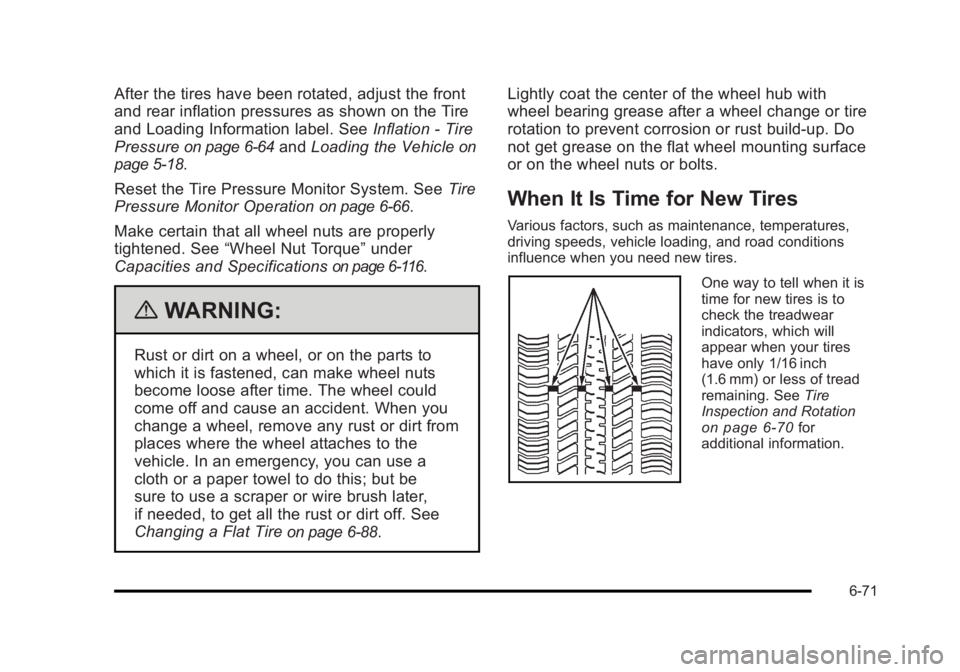
One way to tell when it is
time for new tires is to
check the treadwear
indicators, which will
appear when your tires
have only 1/16 inch
(1.6 mm) or less of tread
remaining. See
Tire
Inspection and Rotation
on page 6‑70for
additional information.
6-71