2011 BUICK LACROSSE center
[x] Cancel search: centerPage 7 of 462

Black plate (1,1)Buick LaCrosse Owner Manual - 2011
In Brief 1-1
In Brief
Instrument Panel
Instrument Panel . . . . . . . . . . . . . . 1-2
Initial Drive Information
Initial Drive Information . . . . . . . . 1-4
Remote Keyless Entry (RKE)System . . . . . . . . . . . . . . . . . . . . . . 1-4
Remote Vehicle Start . . . . . . . . . 1-4
Door Locks . . . . . . . . . . . . . . . . . . . 1-5
Trunk Release . . . . . . . . . . . . . . . . 1-5
Windows . . . . . . . . . . . . . . . . . . . . . . 1-5
Seat Adjustment . . . . . . . . . . . . . . 1-6
Memory Features . . . . . . . . . . . . . 1-7
Heated and Ventilated Seats . . . . . . . . . . . . . . . . . . . . . . . . 1-9
Head Restraint Adjustment . . . . 1-9
Safety Belts . . . . . . . . . . . . . . . . . . 1-10
Sensing System for Passenger Airbag . . . . . . . . . . 1-10 Mirror Adjustment . . . . . . . . . . . . 1-10
Steering Wheel
Adjustment . . . . . . . . . . . . . . . . . 1-11
Interior Lighting . . . . . . . . . . . . . . 1-12
Exterior Lighting . . . . . . . . . . . . . 1-12
Windshield Wiper/Washer . . . . 1-13
Climate Controls . . . . . . . . . . . . . 1-14
Transmission . . . . . . . . . . . . . . . . 1-15
Vehicle Features
Radio(s) . . . . . . . . . . . . . . . . . . . . . 1-16
Satellite Radio . . . . . . . . . . . . . . . 1-17
Portable Audio Devices . . . . . . 1-17
Bluetooth
®. . . . . . . . . . . . . . . . . . . 1-17
Steering Wheel Controls . . . . . 1-18
Cruise Control . . . . . . . . . . . . . . . 1-18
Navigation System . . . . . . . . . . . 1-19
Driver Information Center (DIC) . . . . . . . . . . . . . . . 1-19
Vehicle Personalization . . . . . . 1-20
Power Outlets . . . . . . . . . . . . . . . 1-20
Universal Remote System . . . 1-20
Sunroof . . . . . . . . . . . . . . . . . . . . . . 1-21
Performance and Maintenance
Traction Control System (TCS) . . . . . . . . . . . . . . 1-22
Electronic Stability Control (ESC) . . . . . . . . . . . . . . 1-22
Tire Pressure Monitor . . . . . . . . 1-22
Tire Sealant and
Compressor Kit . . . . . . . . . . . . . 1-23
Engine Oil Life System . . . . . . 1-23
Driving for Better Fuel Economy . . . . . . . . . . . . . . . . . . . 1-23
Roadside Assistance Program . . . . . . . . . . . . . . . . . . . . 1-24
OnStar
®. . . . . . . . . . . . . . . . . . . . . 1-24
Page 9 of 462

Black plate (3,1)Buick LaCrosse Owner Manual - 2011
In Brief 1-3
A.Air Vents on page 8‑8.
B. Head-Up Display (HUD) on
page 5‑29 (If Equipped).
C. Turn and Lane‐Change Lever. See Turn and Lane-Change
Signals on page 6‑4.
Driver Information Center
Buttons. See Driver Information
Center (DIC) on page 5‑25.
D. Instrument Cluster on
page 5‑10.
Driver Information Center
Display. See Driver Information
Center (DIC) on page 5‑25.
E. Windshield Wiper/Washer on
page 5‑3.
F. Infotainment Display Screen.
G. Infotainment on page 7‑1.
H. Exterior Lamp Controls on
page 6‑1.
Fog Lamps on page 6‑5
(If Equipped).
Instrument Panel Illumination
Control on page 6‑5. I.
Front Storage on page 4‑1.
J. Data Link Connector (DLC) (Out of View). See Malfunction
Indicator Lamp on page 5‑17.
K. Cruise Control on page 9‑39.
L. Steering Wheel Adjustment on
page 5‑2.
M. Horn on page 5‑3.
N. Steering Wheel Controls on
page 5‑2 (If Equipped).
O. Ignition Positions (Key Access)
on page 9‑17 orIgnition
Positions (Keyless Access) on
page 9‑19.
P. Heated and Ventilated Front
Seats on page 3‑10.
Q. Automatic Climate Control
System on page 8‑1
(If Equipped).
Dual Automatic Climate
Control System on page 8‑4
(If Equipped). R.
Power Door Locks on
page 2‑11.
Hazard Warning Flashers on
page 6‑4.
Passenger Sensing System on
page 3‑37.
S. Parking Brake on page 9‑33.
T. Shift Lever Position Indicator. See Automatic Transmission on
page 9‑28.
U. Shift Lever. See Shifting Into
Park on page 9‑25.
V. Traction Control System (TCS)
on page 9‑36.
Electronic Stability Control
(ESC) on page 9‑37.
Ultrasonic Parking Assist on
page 9‑42.
Rear Window Sunshade
(If Equipped). See Rear
Window Sunshade on
page 2‑20.
W. Glove Box on page 4‑1.
Page 11 of 462

Black plate (5,1)Buick LaCrosse Owner Manual - 2011
In Brief 1-5
When the vehicle starts, the parking
lamps will turn on and remain on
as long as the engine is running.
The doors will be locked and
the climate control system may
come on.
The engine will continue to run for
10 minutes. Repeat the steps for a
10-minute time extension. Remote
start can be extended only once.
Canceling a Remote Start
To cancel a remote start:
.Aim the RKE transmitter at
the vehicle and press and
hold
/until the parking
lamps turn off.
.Turn on the hazard warning
flashers.
.Turn the vehicle on and then off.
See Remote Vehicle Start on
page 2‑8.
Door Locks
To lock or unlock the doors:
.From inside the vehicle, use
the door lock knob or the power
door lock controls, pull once on
the door handle to unlock it, and
a second time to open it.
.From outside, use the key,
or press
QorKon the Remote
Keyless Entry (RKE) transmitter.
See Remote Keyless Entry
(RKE) System Operation on
page 2‑4.
See Door Locks on page 2‑10.
Power Door Locks
On vehicles with power door locks,
the controls are located on the
center of the instrument panel.
K:Press to unlock the doors.
Q:Press to lock the doors.
See Power Door Locks on
page 2‑11.
Trunk Release
The trunk may be opened by
pressing
Von the Remote
Keyless Entry (RKE) transmitter or
the touchpad located on the rear of
the trunk above the license plate.
See Trunk on page 2‑12 for more
information.
Windows
On vehicles with power windows,
the switches are on the driver door
armrest. Each passenger door has
a switch that controls only that
window.
Press the switch to lower the
window. Pull the switch up to
raise it.
For more information, see Power
Windows on page 2‑19.
Page 17 of 462
Black plate (11,1)Buick LaCrosse Owner Manual - 2011
In Brief 1-11
Vehicles with the memory feature
can store a preferred mirror position.
See“Memory Seats” underPower
Seat Adjustment on page 3‑5 for
more information.
See Power Mirrors on page 2‑16.
Manual Foldaway Mirrors
Vehicles with manual folded
mirrors are folded inward to
prevent damage when going
through an automatic car wash.
To fold, pull the mirror toward the
vehicle. Push the mirror outward,
to return it to the original position.
Automatic Dimming Feature
The driver outside mirror
automatically adjusts for the glare
of the headlamps behind you.
SeePower Mirrors on page 2‑16.
See Folding Mirrors on page 2‑17.
Interior
Adjust this mirror for a clear view of
the area behind the vehicle. Hold
the mirror in the center to move it
up, down, or side-to-side. To reduce
headlamp glare from behind, push
the tab forward for daytime and pull
it for nighttime use.
Vehicles with OnStar
®have three
control buttons at the bottom of the
mirror. See your dealer for more
information on the system and how
to subscribe to OnStar. See the
OnStar
®owner's guide for more
information about the services
OnStar provides.
See Manual Rearview Mirror on
page 2‑18.
Steering Wheel
Adjustment
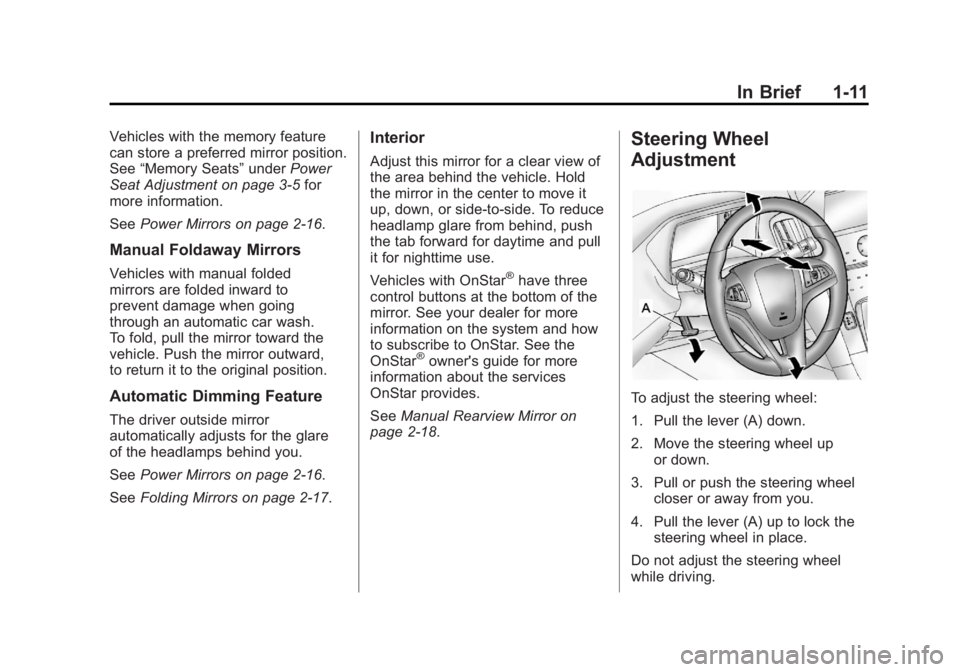
To adjust the steering wheel:
1. Pull the lever (A) down.
2. Move the steering wheel up or down.
3. Pull or push the steering wheel closer or away from you.
4. Pull the lever (A) up to lock the steering wheel in place.
Do not adjust the steering wheel
while driving.
Page 19 of 462

Black plate (13,1)Buick LaCrosse Owner Manual - 2011
In Brief 1-13
The current status of the AUTO
system is displayed in the Driver
Information Center (DIC) uplevel
display. SeeDriver Information
Center (DIC) on page 5‑25.
;: Turns on the parking lamps,
together with the sidemarker lamps,
taillamps, license plate lamps, and
instrument panel lights.
2: Turns on the headlamps,
together with the parking lamps,
sidemarker lamps, taillamps, license
plate lamps, and instrument panel
lights.
For more information, see:
.Exterior Lamp Controls on
page 6‑1.
.Daytime Running Lamps (DRL)
on page 6‑3.
.Fog Lamps on page 6‑5.
Windshield Wiper/Washer
The windshield wiper lever
is on the side of the steering
column. With the ignition in
ACC/ACCESSORY or ON/RUN,
move the windshield wiper lever
to select the wiper speed.
2: Fast wipes.
1: Slow wipes.
&:Turn the band up for more
frequent wipes or down for less
frequent wipes.
9: Turns the windshield
wipers off.
3: Briefly move the wiper lever
down for a single wipe or hold down
for several wipes.
Windshield Washer
Pull the windshield wiper lever to
spray windshield washer fluid and
activate the wipers.
See Windshield Wiper/Washer on
page 5‑3.
Page 23 of 462
Black plate (17,1)Buick LaCrosse Owner Manual - 2011
In Brief 1-17
Satellite Radio
Vehicles with an XM™Satellite
Radio tuner and a valid XM Satellite
Radio subscription can receive XM
programming.
XM Satellite Radio Service
XM is a satellite radio service
based in the 48 contiguous
United States and 10 Canadian
provinces. XM Satellite Radio has
a wide variety of programming and
commercial-free music, coast to
coast, and in digital-quality sound.
A fee is required to receive the XM
service.
For more information refer to:
.www.xmradio.com or call
1-800-929-2100 (U.S.).
.www.xmradio.ca or call
1-877-438-9677 (Canada).
For more information, see Satellite
Radio on page 7‑15.
Portable Audio Devices
This vehicle has a 3.5 mm (1/8 in)
auxiliary input and a USB port
located in the center console.
External devices such as iPods
®,
laptop computers, MP3 players,
CD changers, and USB storage
devices may be connected,
depending on the audio system.
For more information, see Auxiliary
Devices (Radio with CD) on
page 7‑31 orAuxiliary Devices
(Radio with CD/DVD and MEM) on
page 7‑34.
Bluetooth®
The Bluetooth®system allows
users with a Bluetooth-enabled
cell phone to make and receive
hands-free calls using the vehicle
audio system, microphone, and
controls.
The Bluetooth-enabled cell phone
must be paired with the in-vehicle
Bluetooth system before it can be
used in the vehicle. Not all phones
will support all functions.
See Bluetooth (Overview) on
page 7‑46 orBluetooth
(Infotainment Controls) on
page 7‑48 orBluetooth (Voice
Recognition) on page 7‑53.
Page 25 of 462

Black plate (19,1)Buick LaCrosse Owner Manual - 2011
In Brief 1-19
\:Press to disengage cruise
control without erasing the set
speed from memory.
RES/+ : Move the thumbwheel
up to make the vehicle resume
to a previously set speed or to
accelerate.
SET/− :Move the thumbwheel
down to set the speed and activate
cruise control or make the vehicle
decelerate.
See Cruise Control on page 9‑39.
Navigation System
If the vehicle has a navigation
system, there is a separate
Navigation System Manual that
includes information on the radio,
audio players, and navigation
system. The navigation system provides
detailed maps of most major
freeways and roads. After a
destination has been set, the
system provides turn-by-turn
instructions for reaching the
destination. In addition, the system
can help locate a variety of points
of interest (POIs), such as banks,
airports, restaurants, and more.
See the Navigation System Manual
for more information.
Driver Information
Center (DIC)
The DIC display is located in the
center of the instrument panel
cluster. It shows the status of many
vehicle systems. The controls for
the DIC are located on the turn
signal lever.
A.
SET/CLR: Press to set or
clear the menu item when
it is displayed.
B.
w x: Use the thumbwheel
to scroll through the items in
each menu.
C. MENU: Press to get to the
Trip/Fuel Menu and the Vehicle
Information Menu. This button
is also used to return to or exit
the last screen displayed on
the DIC.
For more information, see Driver
Information Center (DIC) on
page 5‑25.
Page 26 of 462

Black plate (20,1)Buick LaCrosse Owner Manual - 2011
1-20 In Brief
Vehicle Personalization
Some vehicle features can be
programmed by using the audio
system controls. These features
include:
.Climate and Air Quality
.Comfort and Convenience
.Collision/Detection Systems
.Language
.Lighting
.Power Door Locks
.Remote Lock/Unlock/Start
See Vehicle Personalization on
page 5‑39.
Power Outlets
The accessory power outlets can be
used to plug in electrical equipment,
such as a cell phone or MP3 player.
There are two accessory power
outlets. One is located under the
armrest inside the center console
storage and the other is on the rear
of the center floor console.
Remove the cover to access and
replace when not in use.
See Power Outlets on page 5‑7.
Universal Remote System
This system provides a way
to replace up to three remote
control transmitters used to
activate devices such as garage
door openers, security systems,
and home automation devices.
Read the instructions completely
before attempting to program
the Universal Home Remote.
Because of the steps involved,
it may be helpful to have another
person available to assist you with
programming the Universal Home
Remote.
SeeUniversal Remote System on
page 5‑45.