2011 BUICK LACROSSE lock
[x] Cancel search: lockPage 158 of 462

Black plate (36,1)Buick LaCrosse Owner Manual - 2011
5-36 Instruments and Controls
ENGINE OIL HOT, IDLE
ENGINE
This message displays when the
engine oil temperature is too hot.
Stop and allow the vehicle to idle
until it cools down.
ENGINE OIL LOW—ADD OIL
This message displays when the
engine oil level is too low. Check
the oil level. See Engine Oil on
page 10‑9.
OIL PRESSURE LOW —STOP
ENGINE
This message displays if low oil
pressure levels occur. Stop the
vehicle as soon as safely possible
and do not operate it until the cause
of the low oil pressure has been
corrected. Check the oil as soon
as possible and have the vehicle
serviced by your dealer.
Engine Power Messages
ENGINE POWER IS REDUCED
This message displays when the
vehicle's engine power is reduced.
Reduced engine power can affect
the vehicle's ability to accelerate.
If this message is on, but there
is no reduction in performance,
proceed to your destination.
The performance may be reduced
the next time the vehicle is driven.
The vehicle may be driven at a
reduced speed while this message
is on, but maximum acceleration
and speed may be reduced.
Anytime this message stays on,
the vehicle should be taken to
your dealer for service as soon
as possible.
Fuel System Messages
FUEL LEVEL LOW
This message displays when the
vehicle is low on fuel. Refuel as
soon as possible.
TIGHTEN GAS CAP
This message displays when the
fuel cap is not on tight. Tighten the
fuel cap.
Key and Lock Messages
NO REMOTE DETECTED
This message displays when the
transmitter battery is weak on
vehicles with keyless access.
See “Starting the Vehicle with
a Low Transmitter Battery” under
Remote Keyless Entry (RKE)
System Operation on page 2‑4
for more information.
REPLACE BATTERY IN
REMOTE KEY
This message displays when the
battery in the Remote Keyless
Entry (RKE) transmitter needs
to be replaced.
Page 161 of 462

Black plate (39,1)Buick LaCrosse Owner Manual - 2011
Instruments and Controls 5-39
Window Messages
OPEN, THEN CLOSE DRIVER
WINDOW
This message is displayed when the
window needs to be reprogrammed.
If the vehicle's battery has been
recharged or disconnected, you
will need to reprogram each front
window for the express-up feature
to work. SeePower Windows on
page 2‑19 for more information.
OPEN, THEN CLOSE
PASSENGER WINDOW
This message is displayed when the
window needs to be reprogrammed.
If the vehicle's battery has been
recharged or disconnected, you
will need to reprogram each front
window for the express-up feature
to work. See Power Windows on
page 2‑19 for more information.
Vehicle
Personalization
The audio system controls are
used to access the personalization
menus for customizing vehicle
features.
CONFIG (Configuration):
Press to access the Configuration
Settings Menu.
MENU/SELECT Knob: Press
the center of this knob to enter
the menus and select menu items.
Turn the knob to scroll through the
menus.
0BACK: Press to exit or move
backward in a menu.
Entering the Personalization
Menus
1. Press CONFIG to access the Configuration Settings menu.
2. Turn the MENU/SELECT knob to highlight Vehicle Settings. 3. Press the center of the
MENU/SELECT knob to select
the Vehicle Settings menu.
The following list of menu items will
be available:
.Climate and Air Quality
.Comfort and Convenience
.Collision/Detection Systems
.Language
.Lighting
.Power Door Locks
.Remote Lock/Unlock/Start
.Return to Factory Settings
Turn the MENU/SELECT knob to
highlight the menu. Press the knob
to select it. Each of the menus is
detailed in the following information.
Page 164 of 462

Black plate (42,1)Buick LaCrosse Owner Manual - 2011
5-42 Instruments and Controls
Collision/Detection Systems
Select the Collision/Detection
Systems menu and the following
will be displayed:
.Side Blind Zone Alert System
Side Blind Zone Alert System
This allows the Side Blind Zone
Alert System feature to be turned
on or off.
Press the MENU/SELECT knob
when Park Assist is highlighted.
Turn the knob to select On or Off.
Press the knob to confirm and go
back to the last menu.
Language
Select the Language menu and the
following will be displayed:
.English
.French
.Spanish Turn the MENU/SELECT knob
to select the language. Press the
knob to confirm and go back to the
last menu.
Lighting
Select the Lighting menu and the
following will be displayed:
.Exit Lighting
.Vehicle Locator Lights
Exit Lighting
This allows the selection of how
long the exterior lamps stay on
when leaving the vehicle when
it is dark outside.
Press the MENU/SELECT knob
when Exit Lighting is highlighted.
Turn the knob to select Off,
30 Seconds, 1 Minute, or 2 Minutes.
Press the knob to confirm and go
back to the last menu. Vehicle Locator Lights
This allows the vehicle locator
lights to be turned on or off. The
vehicle locator lights come on when
unlocking the vehicle with the RKE
transmitter.
Press the MENU/SELECT knob
when Vehicle Locator Lights is
highlighted. Turn the knob to select
On or Off. Press the knob to confirm
and go back to the last menu.
Power Door Locks
Select Power Door Locks and the
following will be displayed:
.Unlocked Door Anti Lock Out
.Delayed Door Lock
.Auto Door Unlock
Page 165 of 462

Black plate (43,1)Buick LaCrosse Owner Manual - 2011
Instruments and Controls 5-43
Unlocked Door Anti Lock Out
When on, this feature will keep the
driver door from locking when the
door is open. If off is selected, the
Delayed Door Lock menu will be
available and the door will lock as
programmed through this menu.
Press the MENU/SELECT
knob when Auto Door Unlock is
highlighted. Turn the knob to select
On or Off. Press the knob to confirm
and go back to the last menu.
Delayed Door Lock
When on, this feature will delay
the locking of the doors until
five seconds after the last door is
closed. You will hear three chimes
to signal delayed locking is in use.Pressing either the power lock
button or the lock button on the
RKE transmitter twice will override
the delayed locking feature and
immediately lock all of the doors.
Press the MENU/SELECT knob
when Delayed Door Lock is
highlighted. Turn the knob to select
On or Off. Press the knob to confirm
and go back to the last menu.
Auto Door Unlock
This allows selection of which of the
doors will automatically unlock when
the vehicle is shifted into P (Park).
Press the MENU/SELECT
knob when Auto Door Unlock
is highlighted. Turn the knob to
select All Doors, Driver Door, or Off.
Press the knob to confirm and go
back to the last menu.Remote Lock/Unlock/Start
Select Remote Lock/Unlock/Start
and the following will be displayed:
.Unlock Feedback (Lights)
.Locking Feedback
.Door Unlock Options
.Remote Recall
.Passive Entry
.Remote Left In Vehicle
Unlock Feedback (Lights)
When on, the exterior lamps will
flash when unlocking the vehicle
with the RKE transmitter.
Press the MENU/SELECT knob
when Unlock Feedback (Lights) is
highlighted. Turn the knob to select
On or Off. Press the knob to confirm
and go back to the last menu.
Page 166 of 462

Black plate (44,1)Buick LaCrosse Owner Manual - 2011
5-44 Instruments and Controls
Locking Feedback
This allows selection of what type of
feedback is given when locking the
vehicle with the RKE transmitter.
Press the MENU/SELECT
knob when Locking Feedback
is highlighted. Turn the knob to
select Lights and Horn, Lights Only,
Horn Only, or Off. Press the knob
to confirm and go back to the
last menu.
Door Unlock Options
This allows selection of which doors
will unlock when pressing the unlock
button on the RKE transmitter.
Press the MENU/SELECT knob
when Door Unlock Options is
highlighted. Turn the knob to
select All Doors or Driver Door Only.
When set to Driver Door Only, thedriver door will unlock the first time
the unlock button is pressed and all
doors will unlock when the button is
pressed a second time. When set
to All Doors, all of the doors will
unlock at the first press of the
unlock button. Press the knob
to confirm and go back to the
last menu.
Remote Recall
When on, this feature will recall the
current driver's last seat and outside
mirror positions upon unlocking
the driver door with the RKE, and
opening that door. The current driver
is identified when the RKE is used
to unlock the driver door. If keyless
access equipped, the recall will
occur upon opening the driver door.
See
“Memory Remote Recall” under
Power Seat Adjustment on page 3‑5
for more information. This allows the Remote Recall
feature to be turned on or off.
Remote Recall is when the
memorized settings will be
recalled as you unlock and
enter the vehicle.
Press the MENU/SELECT knob
when Remote Recall is highlighted.
Turn the knob to select On or Off.
Press the knob to confirm and go
back to the last menu.
Passive Entry
This allows the Passive Entry
feature to be turned on or off.
Press the MENU/SELECT knob
when Passive Entry is highlighted.
Turn the knob to select On or Off.
Press the knob to confirm and go
back to the last menu.
Page 184 of 462

Black plate (4,1)Buick LaCrosse Owner Manual - 2011
7-4 Infotainment System
F. CD/AUX
.Selects the CD player or
an external audio source.
G.
g
.Radio: Seeks the previous
station.
.CD: Select the previous
track or rewinds within a
track.
H.
XCD Eject
.Removes a disc from the
CD slot.
I.
l
.Radio: Seeks the next
station.
.CD: Select the next track
or fast forwards within a
track. J. RADIO/BAND
.Changes the band while
listening to the radio.
.Selects the radio when
listening to a different
audio source.
K. Menu Knob
.Opens menus, highlights
menu items, or sets
numeric values while
in a menu.
L. SELECT
.Selects menu items.
M. CONFIG
.Opens the Settings menu. N.
0BACK
.Menu: Moves one
level back.
.Character Input: Deletes
the last character.
O.
H
.Opens the Clock menu.
P. TONE
.Opens the Tone menu.
Q.
5
.Opens the Phone
main menu.
.Mutes the audio system.
Page 186 of 462
Black plate (6,1)Buick LaCrosse Owner Manual - 2011
7-6 Infotainment System
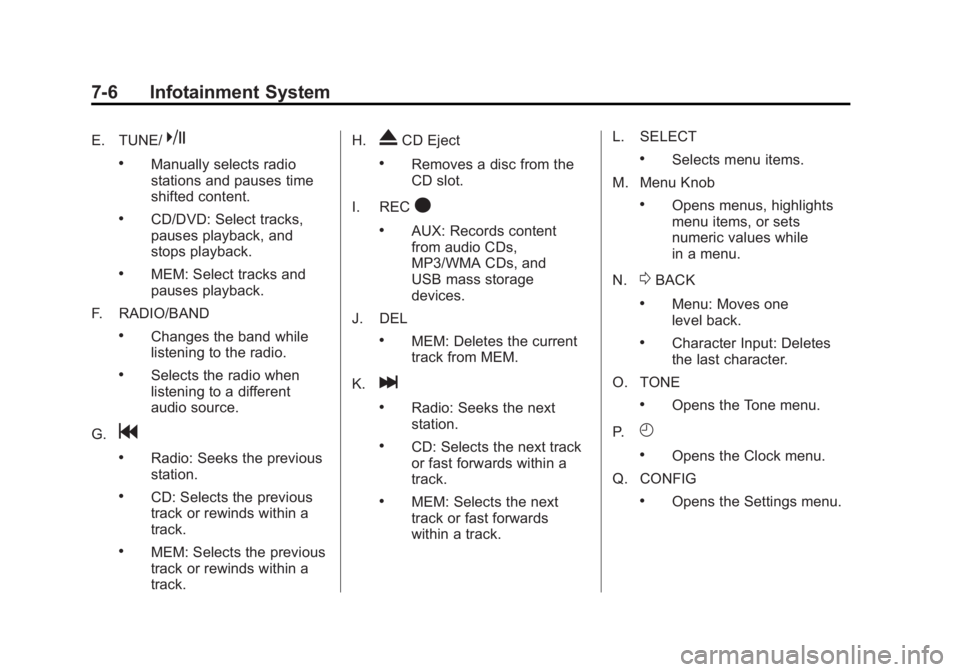
E. TUNE/k
.Manually selects radio
stations and pauses time
shifted content.
.CD/DVD: Select tracks,
pauses playback, and
stops playback.
.MEM: Select tracks and
pauses playback.
F. RADIO/BAND
.Changes the band while
listening to the radio.
.Selects the radio when
listening to a different
audio source.
G.
g
.Radio: Seeks the previous
station.
.CD: Selects the previous
track or rewinds within a
track.
.MEM: Selects the previous
track or rewinds within a
track. H.
XCD Eject
.Removes a disc from the
CD slot.
I. REC
O
.AUX: Records content
from audio CDs,
MP3/WMA CDs, and
USB mass storage
devices.
J. DEL
.MEM: Deletes the current
track from MEM.
K.
l
.Radio: Seeks the next
station.
.CD: Selects the next track
or fast forwards within a
track.
.MEM: Selects the next
track or fast forwards
within a track. L. SELECT
.Selects menu items.
M. Menu Knob
.Opens menus, highlights
menu items, or sets
numeric values while
in a menu.
N.
0BACK
.Menu: Moves one
level back.
.Character Input: Deletes
the last character.
O. TONE
.Opens the Tone menu.
P.
H
.Opens the Clock menu.
Q. CONFIG
.Opens the Settings menu.
Page 197 of 462

Black plate (17,1)Buick LaCrosse Owner Manual - 2011
Infotainment System 7-17
Time Shifting (Radio with
CD/DVD and MEM)
The radio with MEM time shift
feature can rewind 20 minutes of
XM content. While listening to the
radio, the content from the current
channel is always being buffered.
Press
kto pause the radio.
The radio displays the time shift
status bar. The status bar shows
the amount of content stored in the
buffer and the current pause point.
To resume playback from the
current pause point, press
kagain.
The radio is no longer live, but
played from the time shift buffer.
A status bar displays below the
channel number.
Press and hold
lorgto fast
forward or rewind through the time
shift buffer. Hold
luntil the end
of the recorded buffer resumes
live playback. Press and release
lorgto go to
the next or previous song in the time
shift buffer.
When the channel is changed, the
buffer is cleared and automatically
restarted for the current channel.
Content from a previously tuned
station is no longer available.
The time shift feature is not
available while recording or
with other sources of playback.
Pausing XM with the Vehicle
Turned Off
If XM is paused when the vehicle is
turned off, the radio continues to
buffer the current radio station for
up to 20 minutes. If the vehicle is
turned back on within 20 minutes,
the radio resumes playback from
the paused point.XM Messages
XL (Explicit Language
Channels): These channels, or any
others, can be blocked by request,
by calling 1-800-929-2100 in the
U.S. and 1-877-438-9677 in
Canada.
XM Updating: The encryption code
in the receiver is being updated.
No action is required. This process
should take no longer than
30 seconds.
Loading XM: The audio system is
acquiring and processing audio and
text data. No action is needed. This
message should disappear shortly.
Channel Off Air: This channel is
not currently in service. Tune in to
another channel.