Page 243 of 262
Short commands of the voice activation
system*General information
Instructions for voice activation system, refer to
page 25.To have the available spoken instructions read
out loud: ›Voice commands‹
Adjusting
Vehicle
FunctionCommandOpen the main menu.›Main menu‹Open the options.›Options‹Open the settings.›Settings‹Info display of the instrument cluster.›Info Display‹Settings on the Control Display.›Control display‹Open the time and date.›Time and date‹Open the language and units.›Language and units‹Open the speed limit.›Speed‹Open the light.›Lighting‹Open the door lock.›Door locks‹Open the profiles.›Profiles‹
Equipment*
FunctionCommandOpen the air conditioning settings.›Climate‹Open the Head-up Display.›head up display‹Seite 243243
Online Edition for Part no. 01 40 2 606 190 - 12 10 500
ReferenceMobilityCommunicationEntertainmentNavigationDriving tipsControlsAt a glance
Page 244 of 262
Vehicle information
Owner's Manual
FunctionCommandOpen the Owner's Manual.›Display Owner's Manual‹Open the Quick Reference Guide.›Quick reference‹Open the index.›Owner's Manual‹Open the search by pictures.›Search by pictures‹
Computer
FunctionCommandOpen the computer.›Onboard info‹Open the trip computer.›Trip computer‹
Vehicle
FunctionCommandOpen the vehicle information.›Vehicle info‹Open the vehicle status.›Vehicle status‹
Navigation*
General information
FunctionCommandNavigation menu.›Navigation‹Open the destination entry.›Enter address‹Enter the address.›Enter address‹Open destination guidance.›Guidance‹Start destination guidance.›Start guidance‹Terminate destination guidance.›Stop guidance‹Open the home address.›Home address‹Open the route criteria.›Route preference‹Seite 244244
Online Edition for Part no. 01 40 2 606 190 - 12 10 500Short commands of the voice activation system
Page 245 of 262

FunctionCommandOpen the route.›Route information‹Switch on the spoken instruction.›Switch on voice instructions‹Repeat the spoken instruction.›Repeat voice instructions‹Switch off the spoken instruction.›Switch off voice instructions‹Display the address book.›Address book‹Display the most recent destinations.›Last destinations‹Open the traffic bulletins.›Traffic Info‹Special destinations.›Points of interest‹
Map
FunctionCommandDisplay the map.›Map‹Map facing north.›Map facing north‹Map facing the direction of travel.›Map in direction of travel‹Perspective map.›Map perspective view‹Automatic scaling of the map.›Map with automatic scaling‹Scale...feet.›Map scale ... feet‹Scale...meters.› Map scale ... meters ‹ e.g., map scale 100 metersScale...kilometers.›Map scale ... kilometers‹ e.g., map scale 5 kilo‐
metersScale...miles.›Map scale ... miles‹ e.g., map scale 5 miles
Split screen settings
FunctionCommandSplit screen.›Switch on splitscreen‹Switch off the split screen.›Turn off split screen‹Adjust the split screen.›Split screen content‹Split screen, map facing north.›Split screen map facing north‹Split screen, current position.›Split screen current position‹Seite 245245
Online Edition for Part no. 01 40 2 606 190 - 12 10 500
ReferenceMobilityCommunicationEntertainmentNavigationDriving tipsControlsAt a glance
Page 246 of 262
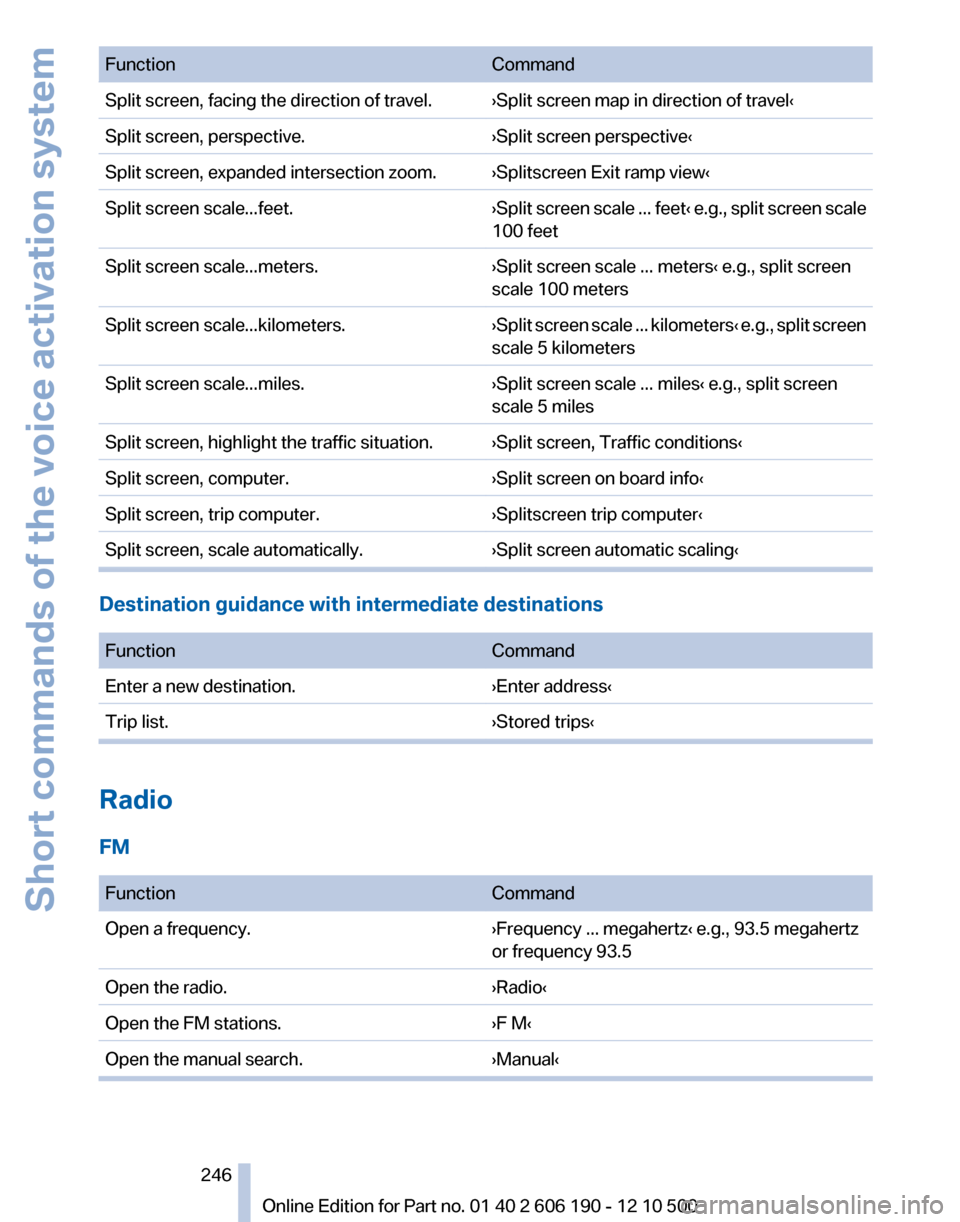
FunctionCommandSplit screen, facing the direction of travel.›Split screen map in direction of travel‹Split screen, perspective.›Split screen perspective‹Split screen, expanded intersection zoom.›Splitscreen Exit ramp view‹Split screen scale...feet.›Split screen scale ... feet ‹ e.g., split screen scale
100 feetSplit screen scale...meters.›Split screen scale ... meters‹ e.g., split screen
scale 100 metersSplit screen scale...kilometers.› Split screen scale ... kilometers ‹ e.g., split screen
scale 5 kilometersSplit screen scale...miles.›Split screen scale ... miles‹ e.g., split screen
scale 5 milesSplit screen, highlight the traffic situation.›Split screen, Traffic conditions‹Split screen, computer.›Split screen on board info‹Split screen, trip computer.›Splitscreen trip computer‹Split screen, scale automatically.›Split screen automatic scaling‹
Destination guidance with intermediate destinations
FunctionCommandEnter a new destination.›Enter address‹Trip list.›Stored trips‹
Radio
FM
FunctionCommandOpen a frequency.›Frequency ... megahertz‹ e.g., 93.5 megahertz
or frequency 93.5Open the radio.›Radio‹Open the FM stations.›F M‹Open the manual search.›Manual‹Seite 246246
Online Edition for Part no. 01 40 2 606 190 - 12 10 500Short commands of the voice activation system
Page 248 of 262
CD/Multimedia*
CD/DVD drive
FunctionCommandSelect a track.›Track ...‹ e.g., track 5
or
›C D track ...‹ e.g., CD track 5Play back a CD.›C D on‹Select a CD.›Select C D‹Select a CD and track.›C D ... track ...‹ e.g., CD 3 track 5Open the CD and Multimedia menu.›C D and multimedia‹CD and DVD.›C D‹Select a DVD.›D V D ...‹ e.g. DVD 3Display the entertainment details on a split
screen.›Entertainment details‹
Music collection
FunctionCommandSearch for music, open a menu.›Music search‹Open the current playback.›Current playback‹Open the music collection.›Music collection‹Play back the music collection.›Music collection on‹Play back the most frequently played tracks.›Top fifty‹
External devices
FunctionCommandOpen the external devices.›External devices‹Open the Bluetooth devices.›Bluetooth‹AUX at front.›AUX front‹Seite 248248
Online Edition for Part no. 01 40 2 606 190 - 12 10 500Short commands of the voice activation system
Page 250 of 262
Contacts*
FunctionCommandSelect a name.›Choose name‹My contacts.›My contacts‹Open the contacts.›Contacts‹New contact.›New contact‹
BMW Assist*
FunctionCommandOpen BMW Assist.›B M W Assist‹Open BMW Search.›B M W Search‹Open the Internet.›Internet‹Seite 250250
Online Edition for Part no. 01 40 2 606 190 - 12 10 500Short commands of the voice activation system
Page 259 of 262

Technical data 238
TeleService 195
Temperature, automatic cli‐ mate control 102, 104
Temperature display, external temperature 69
Temperature, engine oil 68
Terminal, starting aid 230
Text messages 187
Text messages, supplemen‐ tary 75
Theft alarm system, refer to Alarm system 42
Theft protection, lug bolts 226
Theft protection, refer to Cen‐ tral locking system 35
Thigh support 49
Tilt alarm sensor 43
Tilt, seats 47
Time of arrival 71
Tire age 212
Tire damage 211
Tire identification marks 210
Tire inflation pressure 207
Tire Pressure Monitor TPM 82
Tires, changing 212
Tires, everything on wheels and tires 207
Tires, run-flat tires 213
Tire tread 211
Toll roads, route 136
Tone 146
Tool kit 221
Tools 221
Top View 97
Torque, engine 240
Total vehicle weight 241
Tow fitting 231
Towing 230
Town/city, navigation 128
Tow-starting 230
TPM Tire Pressure Moni‐ tor 82
Traction control 86
TRACTION program, Dynamic Driving Control 87 Traffic bulletins, naviga‐
tion 139
Traffic situation/gray card 140
Transmission, automatic 64
Transporting children safely 55
Tread, tires 211
Treble, tone 146
Trip computer 71
Triple turn signal activa‐ tion 62
Trip odometer 68
Trunk cover 110
Trunk lid 39
Turning circle 240
Turning circle lines, backup camera 96
Turn signals, operation 61
U
Unintentional alarm 43
Units of measure 73
Universal remote control 107
Unlock button, automatic transmission 65
Unlocking/locking from in‐ side 38
Unlocking/locking via door lock 38
Unlocking/locking with remote control 36
Upholstery care 234
USB audio interface 167
USB interface 114
V
Variable sport steering 88
Vehicle battery 227
Vehicle battery, replacing 227
Vehicle, breaking in 120
Vehicle care 234
Vehicle identification number, refer to Identification number
in the engine compart‐
ment 215
Vehicle jack 226 Vehicle paint 234
Vehicle storage 235
Vehicle wash 233
Ventilation 106
Ventilation, refer to Parked-car ventilation 106
Version of the navigation data 142
Video playback 157
Voice activation, short com‐ mands 243
Voice activation system 25
Volume, setting 146
W
Warning lamps 14
Warning messages, refer to Check Control 74
Warning triangle 229
Washer fluid 64
Washer fluid reservoir, ca‐ pacity 242
Washer nozzles, wind‐ shield 63
Washer system 62
Washing, vehicle 233
Water on roads 121
Weather Band 149
Weights 241
Welcome lamps 76
Wheel base, vehicle 240
Wheel change 226
Wheels, changing 212
Wheels, everything on wheels and tires 207
Wheels, Tire Pressure Monitor TPM 82
Width, vehicle 238
Window defroster, rear 102, 105
Windows, powered 43
Windshield washer fluid 64
Windshield washer noz‐ zles 63
Windshield washer system 62
Windshield wiper 62 Seite 259259
Online Edition for Part no. 01 40 2 606 190 - 12 10 500
ReferenceMobilityCommunicationEntertainmentNavigationDriving tipsControlsAt a glance
Page:
< prev 1-8 9-16 17-24


