2011 BMW M3 COUPE Turn
[x] Cancel search: TurnPage 249 of 278

Reference 247
At a glance
Controls
Driving tips
Communications
Navigation
Entertainment
Mobility
Dimensions
Coupe
All dimensions given in inches/mm.
Smallest turning circle dia.: 36.1 ft/11.0 m, with xDrive: 38.7 ft/11.8 m.
335i, 335i xDrive, 335is: height approx. 54.1 in/1,375 mm
Page 250 of 278

Technical data
248
Convertible
All dimensions given in inches/mm.
Smallest turning circle dia.: 36.1 ft/11.0 m.
335is height approx. 54.0 in/1,370 mm
Page 256 of 278
Short commands for the voice activation system
254
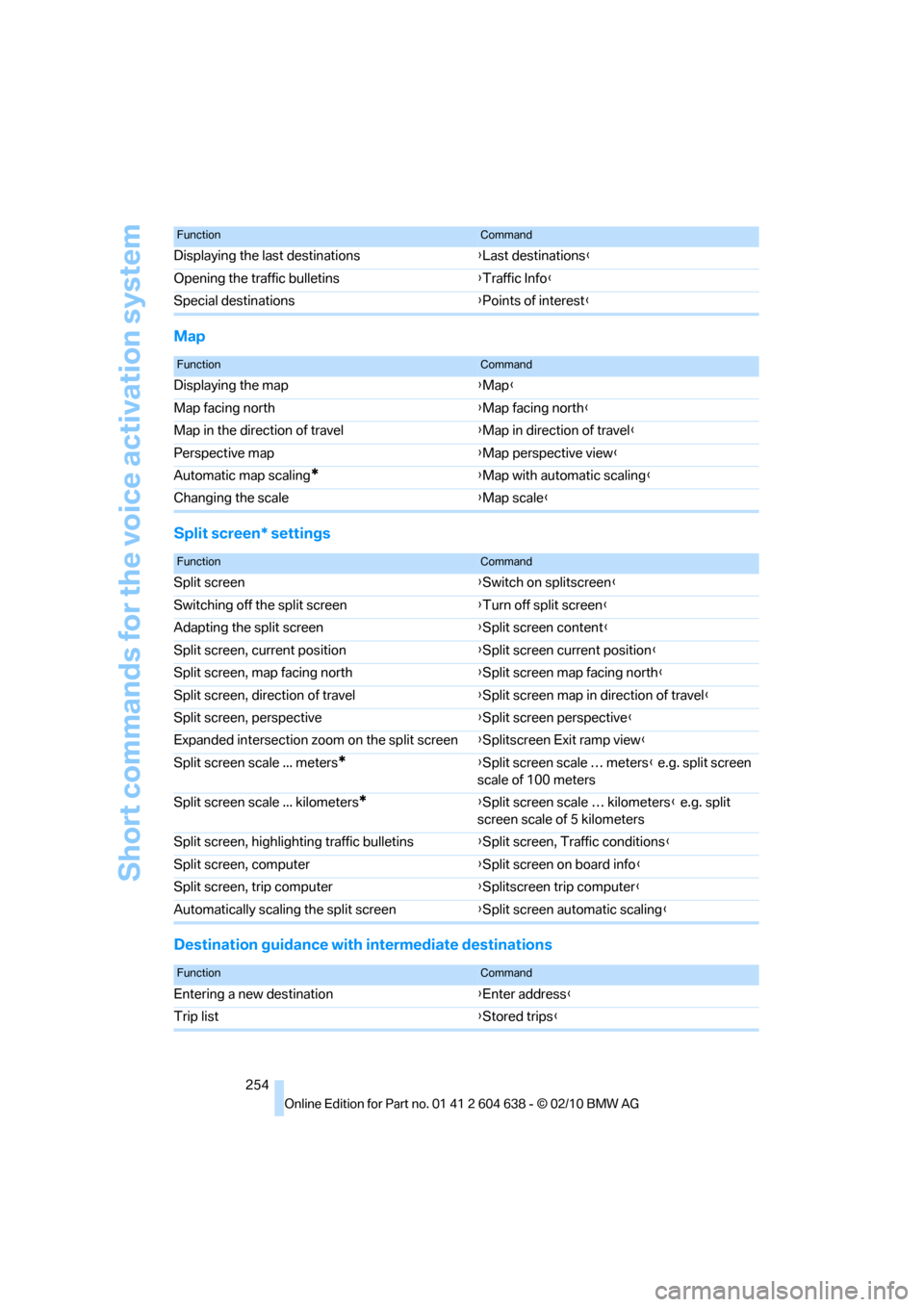
Map
Split screen* settings
Destination guidance with intermediate destinations
Displaying the last destinations{Last destinations}
Opening the traffic bulletins{Traffic Info}
Special destinations{Points of interest}
FunctionCommand
FunctionCommand
Displaying the map{Map}
Map facing north{Map facing north}
Map in the direction of travel{Map in direction of travel}
Perspective map{Map perspective view}
Automatic map scaling
*{Map with automatic scaling}
Changing the scale{Map scale}
FunctionCommand
Split screen{Switch on splitscreen}
Switching off the split screen{Turn off split screen}
Adapting the split screen{Split screen content}
Split screen, current position{Split screen current position}
Split screen, map facing north{Split screen map facing north}
Split screen, direction of travel{Split screen map in direction of travel}
Split screen, perspective{Split screen perspective}
Expanded intersection zoom on the split screen{Splitscreen Exit ramp view}
Split screen scale ... meters
*{Split screen scale … meters} e.g. split screen
scale of 100 meters
Split screen scale ... kilometers
*{Split screen scale … kilometers} e.g. split
screen scale of 5 kilometers
Split screen, highlighting traffic bulletins{Split screen, Traffic conditions}
Split screen, computer{Split screen on board info}
Split screen, trip computer{Splitscreen trip computer}
Automatically scaling the split screen{Split screen automatic scaling}
FunctionCommand
Entering a new destination{Enter address}
Trip list{Stored trips}
Page 263 of 278

Reference 261
At a glance
Controls
Driving tips
Communications
Navigation
Entertainment
Mobility
Condition Based Service
CBS227
Configuring settings, refer to
Personal Profile26
Confirmation signals for
locking/unlocking the
vehicle29
Congestion
– refer to Route, bypassing
sections145
Connecting vacuum cleaner,
refer to Connecting
electrical appliances118
Consumption, refer to
Average fuel
consumption77
Contacts
– creating196
Control Center, refer to
iDrive16
Control Display, refer to
iDrive16
– adjusting brightness87
– switching on/off19
Controller, refer to iDrive16
Controls and displays10
Control unit, refer to iDrive16
Convenient loading in
Convertible28
Convenient operation
– glass roof28
– glass roof with Comfort
Access34
– retractable hardtop28
– windows28
– windows with Comfort
Access34
Convertible
– bag holder119
– convenient loading28
– enlarging cargo area119
– folding down rear
backrest119
– retractable hardtop38
– rollover protection
system100
– securing cargo130
– stowing cargo130Coolant226
– checking level226
Coolant temperature76
Cooling, maximum107
Cooling fluid, refer to
Coolant226
Cooling system, refer to
Coolant226
Copyright2
Corner-illuminating lamps
– replacing bulbs234
Corner-illuminating lamps,
refer to Adaptive light
control102
Cornering lamps, refer to
Adaptive light control102
Correct tires220
Country codes DVD167
Courtesy lamps, refer to
Interior lamps105
Criteria for route144
Cross-hairs in navigation140
Cruise control66
– active68
– malfunction68
Cruise control, refer to Active
cruise control68
Cruising range77
Cupholders116
Curb weight, refer to
Weights249
Current playback
– external devices180
– of music collection174
Customer Relations201
D
Dashboard, refer to
Cockpit10
Dashboard, refer to
instrument cluster12
Dashboard lighting, refer to
Instrument lighting105
Data, technical246
– capacities250
– dimensions247
– engine246
– weights249Data memory228
Data transfer202
Date
– date format84
– setting84
Daytime running lights102
– replacing bulbs234
DBC Dynamic Brake
Control89
Deactivating front passenger
airbags98
Deadlocking, refer to
Locking28
Defect
– door lock30
– fuel filler flap206
– glass roof38
Destination, entering by town/
city name135
Destination address
– entering135,141
Destination entry via BMW
Assist140
Destination for navigation
– entering by voice141
– entering via map140
– entry135
– home address138
– manual entry135
Destination guidance144
– bypassing a route
section145
– changing specified
route144
– continuing144
– starting144
– voice instructions146
– volume of voice
instructions146
Digital clock75
Digital compass113
Digital radio, refer to HD
Radio158
Dimensions247
Directional indicators, refer to
Turn signals64
Direction instructions, refer to
Voice instructions146
Page 268 of 278

Everything from A to Z
266 Manual transmission57
Map for navigation
– changing scale147
– entering destination140
Map view146
Master key, refer to Remote
control with integrated
key26
Maximum cooling107
Maximum speed
– with winter tires221
Measurements, refer to
Dimensions247
Memory, refer to Seat and
mirror memory48
MENU button16
Menus, refer to iDrive16
Messages191
Messages from the concierge
service191
Microfilter
– BMW Maintenance
System227
– for automatic climate
control109
Microfilter/activated-charcoal
filter
– BMW Maintenance
System227
Microphone
– telephone14
– voice commands14
Mirror dimming feature51
Mirrors50
– automatic curb monitor50
– exterior mirrors50
– heating50
– interior rearview mirror51
– memory, refer to Seat and
mirror memory48
Mirrors, folding in before
entering a car wash50Mobile phone
– adjusting volume187
– connecting, refer to Mobile
phone, pairing184
– installation location, refer to
Center armrest115
– operation via iDrive187
– pairing184
– refer to separate Owner's
Manual
Mobile phone, installation
location, refer to Center
armrest115
Mobile phone, refer to
Telephone184
Mobile phone, refer to the
separate Owner's Manual
Modifications, technical, refer
to For your own safety5
Monitor, refer to iDrive
controls16
Monitoring system for tire
pressures, refer to Flat Tire
Monitor92
MP3 player, connecting, refer
to AUX-IN port
177
MP3 player, connecting, refer
to USB audio interface178
Multi-channel playback155
Multifunctional steering
wheel, refer to Buttons on
the steering wheel11
Multifunction switch
– refer to Turn signals/
headlamp flasher64
– refer to Wiper system65
Multimedia screen, refer to
iDrive16
Music, managing175
Music collection172
– backup176
– deleting176
– random sequence175
– restoring176
Music player, connecting,
refer to AUX-IN port177Music player, connecting,
refer to USB audio
interface178
Music search173
My Info191
N
Navigation
– starting destination
guidance after entering a
destination137
– storing current position137
– voice activation141
Navigation announcements,
refer to Switching voice
instructions on/off146
Navigation data134
Navigation system134
– address book137
– bypassing a route
section145
– continuing destination
guidance144
– destination entry135
– dynamic destination
guidance145
– entering a destination by
voice141
– entering a destination
manually135
– frequently asked
questions151
– gas station
recommendations146
– planning a trip142
– route list145
– selecting destination via
map140
– selecting route criteria144
– special destinations139
– starting destination
guidance144
– terminating destination
guidance144
– traffic bulletins148
– voice instructions146
– volume adjustment146
Page 274 of 278

Everything from A to Z
272 Transmission interlock
– refer to Changing selector
lever position58
– refer to P Park58
Transporting children
safely52
Transport securing devices,
refer to Securing cargo130
Tread depth, refer to Minimum
tire tread219
Trip, deleting143
Trip, storing143
Trip computer, refer to
Displays on the Control
Display77
Trip-distance counter, refer to
Trip odometer75
Triple turn signal activation65
Trip odometer75
Trips, changing143
Trunk lid31
– Comfort Access34
– emergency release32
– locking or unlocking
separately31
– opening from inside31
– opening from outside31
– remote control28
Turning circle, refer to
Dimensions247
Turn signal indicators
– indicator/warning lamp12
Turn signals64
– triple turn signal65
Tying down loads, refer to
Cargo loading130
U
Uniform Tire Quality Grading/
UTQR218
Units
– average fuel
consumption80
Units of measure
– temperature80
Universal garage door opener,
refer to Integrated universal
remote control111Universal mobile phone
preparation package, refer
to separate Owner's Manual
Unlatching, refer to
Unlocking33
Unlocking
– from inside31
– from outside27
– setting unlocking
characteristics28
– trunk lid34
– without remote control, refer
to Comfort Access33
Updating the navigation
data134
USB audio interface178
V
VCD167
Vehicle
– battery237
– breaking in126
– cargo loading129
– Identification Number, refer
to Engine compartment223
– measurements, refer to
Dimensions247
– parking56
– weight249
Vehicle jack236
Vehicle storage232
Ventilation109
– draft-free109
– in the rear109
Ventilation, refer to
Climate106
Ventilation while at a
standstill110
Vents, refer to Ventilation109
Video menu167
Video playback167
Voice, refer to Destination
guidance through voice
instructions146
Voice commands
– overview22
– short commands251
– telephone192Voice instructions from
navigation system146
– repeating146
– switching on/off146
– volume146
Voice phone book193
Volume154
– audio sources154
– fuel tank, refer to
Capacities250
– mobile phone187
– voice instructions146
Volume balance, tone
setting155
W
Warning and indicator
lamps13
Warning messages, refer to
Check Control84
Warning triangle239
Washer fluid66
– content of the reservoir66
Washer fluid reservoir66
Waste tray, refer to
Ashtray117
Water on roads, refer to
Driving through water128
Water penetration229,230
Waveband with the radio157
Wear indicators in tires, refer
to Minimum tread depth219
Weights249
Welcome lamps101
Wheel/tire combination, refer
to Correct wheels and
tires220
Wheelbase, refer to
Dimensions247
Wheels, new220
Wheels and tires208
Width, refer to
Dimensions247
Wind deflector40