2011 BMW 750I tool kit
[x] Cancel search: tool kitPage 67 of 299

Set the parking brake and further secure
the vehicle as required
Set the parking brake firmly when parking; oth‐
erwise, the vehicle could roll. On steep upward
and
downward inclines, further secure the vehi‐
cle, for example, by turning the steering wheel in
the direction of the curb. ◀
While driving
Use while driving:
Pull the switch and hold it. The vehicle brakes
hard while the button is being pulled.
The indicator lamp lights up in red, a sig‐
nal sounds and the brake lamps light up.
Lower lamp: indicator lamp in Canadian
models
If the vehicle is braked to a speed of approx.
2 mph/3 km/h, the parking brake remains set.
Releasing Press the switch while the brake pedal is
pressed or transmission position P is en‐
gaged.
The LED and indicator lamp go out.
The parking brake is released.
Take the remote control with you
Take the remote control with you when
leaving the vehicle so that children, for example,
cannot release the parking brake.◀
Manual release
The parking brake can be released manually in
the event of a power failure or electrical fault.
Before releasing, secure the vehicle
against rolling
Before releasing the parking brake manually,
and whenever you park the vehicle with the
parking brake released, ensure that position P of
the automatic transmission is engaged. Secure the vehicle in a manner appropriate to
the inclination of the road, e.g., with a wheel
chock; otherwise, there is the danger of the ve‐
hicle rolling.◀
Unlocking
1.
Remove the release tool from the tool kit. 2.
Raise the floor panel in the cargo area. 3.
Take out the floor trim in the cargo area, re‐
moving
the screws with the release tool, ar‐
rows. Seite 67
67Online Edition for Part no. 01 40 2 606 497 - 03 11 490
Reference Mobility Communication Entertainment Navigation Driving tips
Controls At a glance
Page 260 of 299
Replacing components
Tool kit
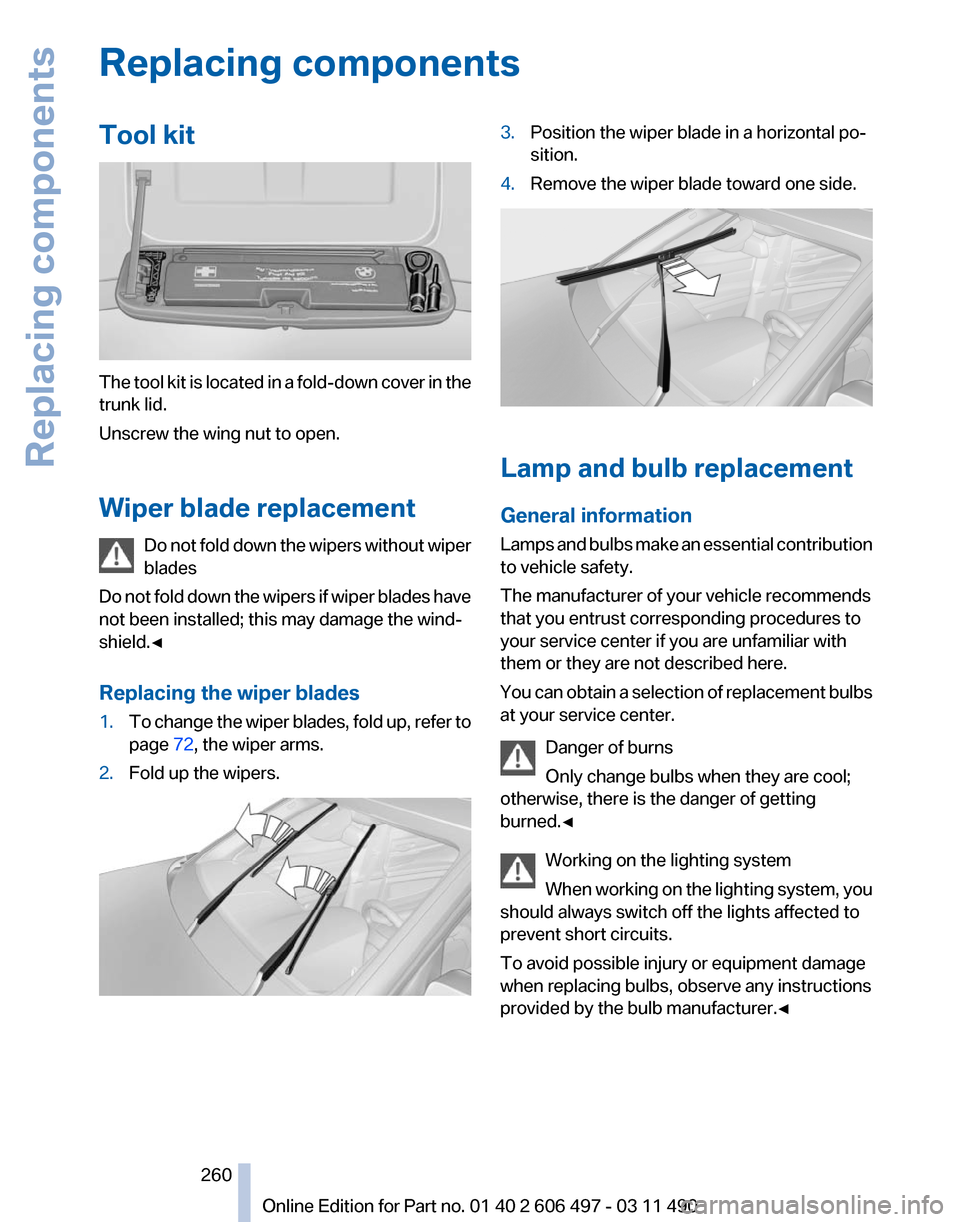
The tool kit is located in a fold-down cover in the
trunk lid.
Unscrew the wing nut to open.
Wiper blade replacement
Do
not fold down the wipers without wiper
blades
Do not fold down the wipers if wiper blades have
not been installed; this may damage the wind‐
shield.◀
Replacing the wiper blades
1. To change the wiper blades, fold up, refer to
page 72, the wiper arms.
2. Fold up the wipers. 3.
Position the wiper blade in a horizontal po‐
sition.
4. Remove the wiper blade toward one side. Lamp and bulb replacement
General information
Lamps
and bulbs make an essential contribution
to vehicle safety.
The manufacturer of your vehicle recommends
that you entrust corresponding procedures to
your service center if you are unfamiliar with
them or they are not described here.
You can obtain a selection of replacement bulbs
at your service center.
Danger of burns
Only change bulbs when they are cool;
otherwise, there is the danger of getting
burned.◀
Working on the lighting system
When working on the lighting system, you
should always switch off the lights affected to
prevent short circuits.
To avoid possible injury or equipment damage
when replacing bulbs, observe any instructions
provided by the bulb manufacturer.◀ Seite 260
260 Online Edition for Part no. 01 40 2 606 497 - 03 11 490Replacing components
Page 263 of 299

1.
Snap out the grill at the recess, arrow. 2.
Remove the screw using a screw driver. 3.
Pull the lamp out toward the front.
4. Remove the bulb and replace it.
5. Insert the new bulb and attach the cover in
the reverse order.
Tail lamps, bulb replacement
At a glance 1
Turn signal
2 Backup lamp
3 Inside brake lamp*
4 Tail lamp
5 Outside brake lamp
6 Rear reflector* Turn signal, brake, tail, and license
plate lamps
Follow the general instructions on lamps and
bulbs., refer to page
260
These lights are made using LED technology.
Contact your service center in the event of a
malfunction.
Lamps in the trunk lid
Follow the general instructions on lamps and
bulbs., refer to page 260
Access to the lamps
1. Remove the three screws using the screw
driver from the tool kit. 2.
Fold away the cover. 3.
Replace the defective bulb. Seite 263
263Online Edition for Part no. 01 40 2 606 497 - 03 11 490
Reference
Mobility Communication Entertainment Navigation Driving tips Controls At a glance
Page 264 of 299
Inside brake lamp*
21-watt bulb, H21W.
Pull out the bulb and replace it.
Backup lamp
16-watt bulb, W16W.
Pull out the bulb and replace it.
Changing wheels
Notes
The
vehicle equipment does not include a spare
tire.
When using run-flat tires* or tire sealants, a tire
does not need to be changed immediately in the
event of pressure loss due to a flat tire.
The tools for changing wheels are available as
accessories from your service center. Jacking points for the vehicle jack The jacking points for the vehicle jack are lo‐
cated in the positions shown.
Lug bolt lock*
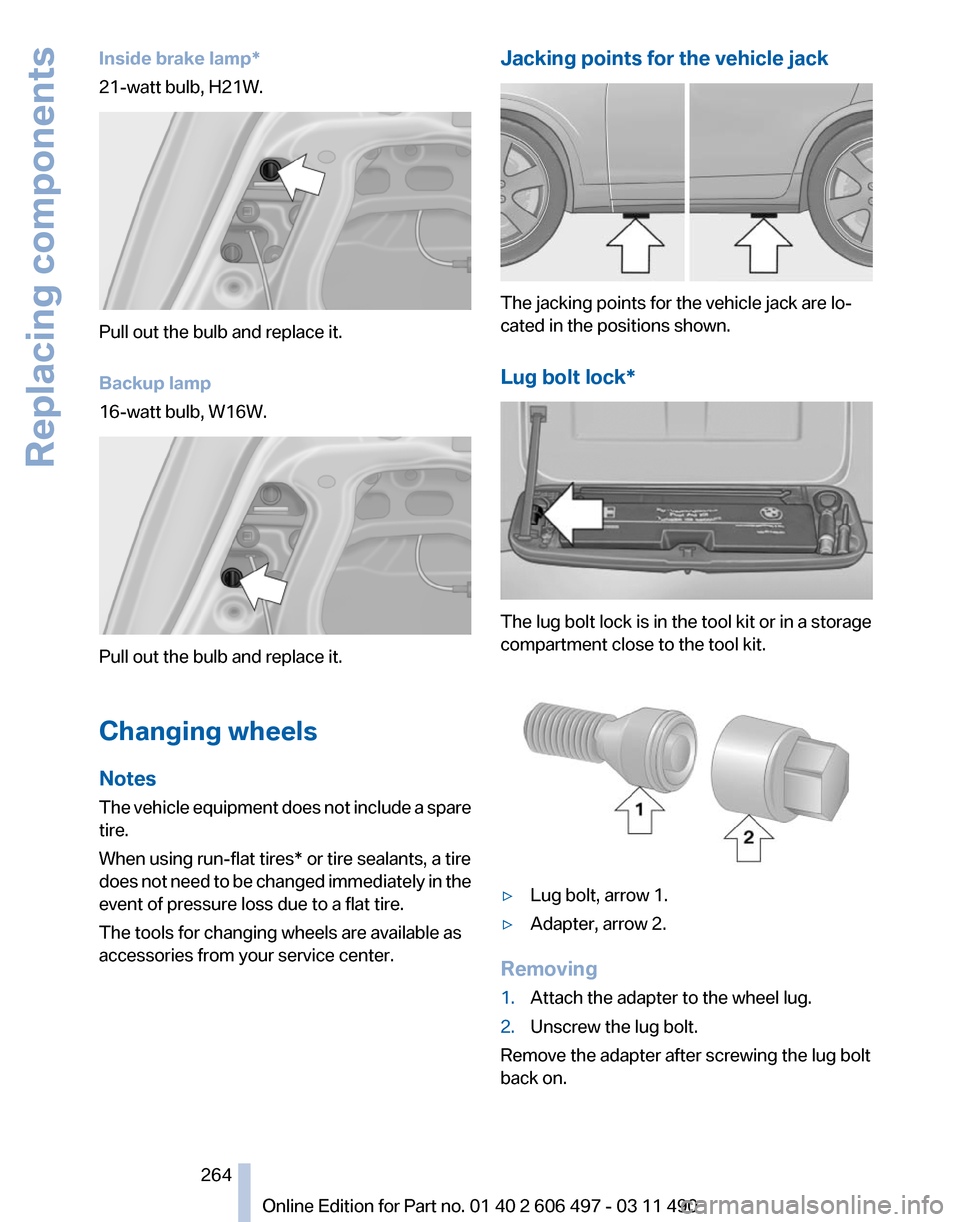
The lug bolt lock is in the tool kit or in a storage
compartment close to the tool kit.
▷
Lug bolt, arrow 1.
▷ Adapter, arrow 2.
Removing
1. Attach the adapter to the wheel lug.
2. Unscrew the lug bolt.
Remove the adapter after screwing the lug bolt
back on.
Seite 264
264 Online Edition for Part no. 01 40 2 606 497 - 03 11 490
Replacing components
Page 296 of 299

Time of arrival 79
Tire damage
249
Tire identification marks 248
Tire inflation pressure 244
Tire Pressure Monitor TPM 91
Tires, changing 250
Tires, everything on wheels and tires 244
Tires, run-flat tires 251
Tire tread 249
Toll roads, route 160
Tone 170
Tool kit 260
Tools 260
Top View 119
Total vehicle weight 278
Tow fitting 269
Towing 268
Town/city, navigation 152
Tow-starting 268
TPM Tire Pressure Moni‐ tor 91
Traction control 99
TRACTION
program, Dynamic
Driving Control 102
Traffic bulletins, naviga‐ tion 163
Traffic situation/gray card 164
Transmission, automatic 72
Transporting children safely 61
Tread, tires 249
Treble, tone 170
Trip computer 79
Triple turn signal activa‐ tion 70
Trip odometer 77
Trunk lid 39
Trunk lid, automatic 40
Trunk lid, emergency unlock‐ ing 42
Trunk lid, hotel function 41
Trunk lid, manual opera‐ tion 40
Trunk lid via remote con‐ trol 37
Turning circle 277 Turning circle lines, backup
camera 116
Turn signals, front, bulb re‐ placement 261
Turn signals, operation 70
Turn signals, rear, bulb re‐ placement 263
U
Unintentional alarm 44
Units of measure 81
Universal remote control 132
Unlock button, automatic transmission 73
Unlocking/locking from in‐ side 39
Unlocking/locking via door lock 38
Unlocking/locking
with remote
control 36
Updates made after the edito‐ rial deadline 6
Updating software 197
Upholstery care 272
USB audio interface 191
USB interface 138
V
Vanity mirror 60
Variable steering, Integral Ac‐ tive Steering 101
Vehicle battery 265
Vehicle battery, replacing 265
Vehicle, breaking in 144
Vehicle care 272
Vehicle identification number, refer to Identification number
in the engine compart‐
ment 253
Vehicle jack 264
Vehicle paint 272
Vehicle storage 273
Vehicle wash 271
Ventilation 128
Ventilation, refer to Parked-car ventilation 130 Version of the navigation
data 166
Video playback 181
Video playback, iPhone 193
Video playback, snap-in adapter 193
Voice activation, mobile phone 219
Voice activation, short com‐ mands 280
Voice activation system 25
Volume, setting 170
W
Warning lamps 14
Warning messages, refer to Check Control 82
Warning triangle 267
Washer fluid 72
Washer fluid reservoir, ca‐ pacity 279
Washer nozzles, wind‐ shield 72
Washer system 70
Washing, vehicle 271
Water on roads 145
Weather Band 174
Weights 278
Welcome lamps 84
Wheel base, vehicle 277
Wheel change 264
Wheels, changing 250
Wheels, everything on wheels and tires 244
Wheels,
Tire Pressure Monitor
TPM 91
Width with mirrors, vehi‐ cle 276
Window defroster, rear 127
Windows, powered 44
Windshield, climate con‐ trol 145
Windshield washer fluid 72
Windshield washer noz‐ zles 72
Windshield washer system 70
Windshield wiper 70
Seite 296
296 Online Edition for Part no. 01 40 2 606 497 - 03 11 490
Everything from A to Z