2011 BMW 740LI interior
[x] Cancel search: interiorPage 5 of 299

Contents
The fastest way to find information on a partic‐
ular topic or item is by using the index, refer to
page
288.
Using this Owner's Manual
6 Notes
At a glance
12 Cockpit
19 iDrive
25 Voice activation system
27 Integrated Owner's Manual in the vehicle
Controls
32 Opening and closing
48 Adjusting
61 Transporting children safely
65 Driving
75 Displays
84 Lamps
88 Safety
98 Driving stability control systems
105 Driving comfort
125 Climate control
132 Interior equipment
138 Storage compartments
Driving tips
144 Things to remember when driving
Navigation
152 Navigation
Entertainment
170 Tone
172 Radio
179 CD/multimedia
199 Rear entertainment
204 Professional rear entertainment Communication
212
Telephone
223 Office
232 Contacts
234 BMW ConnectedDrive
Mobility
242 Refueling
243 Fuel
244 Wheels and tires
253 Engine compartment
255 Engine oil
258 Maintenance
260 Replacing components
266 Breakdown assistance
271 Care
Reference
276 Technical data
280 Short commands of the voice activation
system
288 Everything from A to Z
Seite 5
Online Edition for Part no. 01 40 2 606 497 - 03 11 490 Reference Mobility Communication Entertainment Navigation Driving tips Controls At a glance
Page 7 of 299

For your own safety
Maintenance and repairs
Advanced technology, e.g., the use of modern
materials
and high-performance electronics, re‐
quires suitable maintenance and repair meth‐
ods.
Therefore, have this work performed only by a
BMW center or a workshop that works accord‐
ing to BMW repair procedures with appropri‐
ately trained personnel.
If this work is not carried out properly, there is
the danger of subsequent damage and related
safety hazards.
Parts and Accessories
For your own safety, use genuine parts and ac‐
cessories approved by BMW. When you pur‐
chase accessories tested and approved by
BMW and Genuine BMW Parts, you simultane‐
ously acquire the assurance that they have been
thoroughly tested by BMW to ensure optimum
performance when installed on your vehicle.
BMW warrants these parts to be free from de‐
fects in material and workmanship. BMW will not
accept any liability for damage resulting from in‐
stallation of parts and accessories not approved
by BMW. BMW cannot test every product made
by other manufacturers to verify if it can be used
on a BMW safely and without risk to either the
vehicle, its operation, or its occupants. Genuine
BMW Parts, BMW Accessories and other prod‐
ucts approved by BMW, together with profes‐
sional advice on using these items, are available
from all BMW centers. Installation and operation
of non-BMW approved accessories such as
alarms, radios, amplifiers, radar detectors,
wheels, suspension components, brake dust
shields, telephones, including operation of any
mobile phone from within the vehicle without
using an externally mounted antenna, or trans‐
ceiver equipment, for instance, CBs, walkie-
talkies, ham radios or similar accessories, may
cause extensive damage to the vehicle, com‐
promise its safety, interfere with the vehicle's
electrical system or affect the validity of the
BMW Limited Warranty. See your BMW center for additional information. Maintenance, re‐
placement,
or repair of the emission control de‐
vices and systems may be performed by any au‐
tomotive repair establishment or individual
using any certified automotive part.
California Proposition 65 Warning
California laws require us to state the following
warning:
Engine exhaust and a wide variety of automobile
components and parts, including components
found in the interior furnishings in a vehicle, con‐
tain or emit chemicals known to the State of Cal‐
ifornia to cause cancer and birth defects and re‐
productive harm. In addition, certain fluids
contained in vehicles and certain products of
component wear contain or emit chemicals
known to the State of California to cause cancer
and birth defects or other reproductive harm.
Battery posts, terminals and related accessories
contain lead and lead compounds. Wash your
hands after handling. Used engine oil contains
chemicals that have caused cancer in laboratory
animals. Always protect your skin by washing
thoroughly with soap and water.
Service and warranty
We recommend that you read this publication
thoroughly. Your vehicle is covered by the fol‐
lowing warranties:
▷ New Vehicle Limited Warranty.
▷ Rust Perforation Limited Warranty.
▷ Federal Emissions System Defect Warranty.
▷ Federal Emissions Performance Warranty.
▷ California Emission Control System Limited
Warranty.
Detailed information about these warranties is
listed in the Service and Warranty Information
Booklet for US models or in the Warranty and
Service Guide Booklet for Canadian models.
Your vehicle has been specifically adapted and
designed to meet the particular operating con‐
ditions and homologation requirements in your
country
and continental region in order to deliver
the full driving pleasure while the vehicle is op‐
erated under those conditions. If you wish to op‐
Seite 7
7Online Edition for Part no. 01 40 2 606 497 - 03 11 490
Reference Mobility Communication Entertainment Navigation Driving tips Controls At a glance
Page 18 of 299
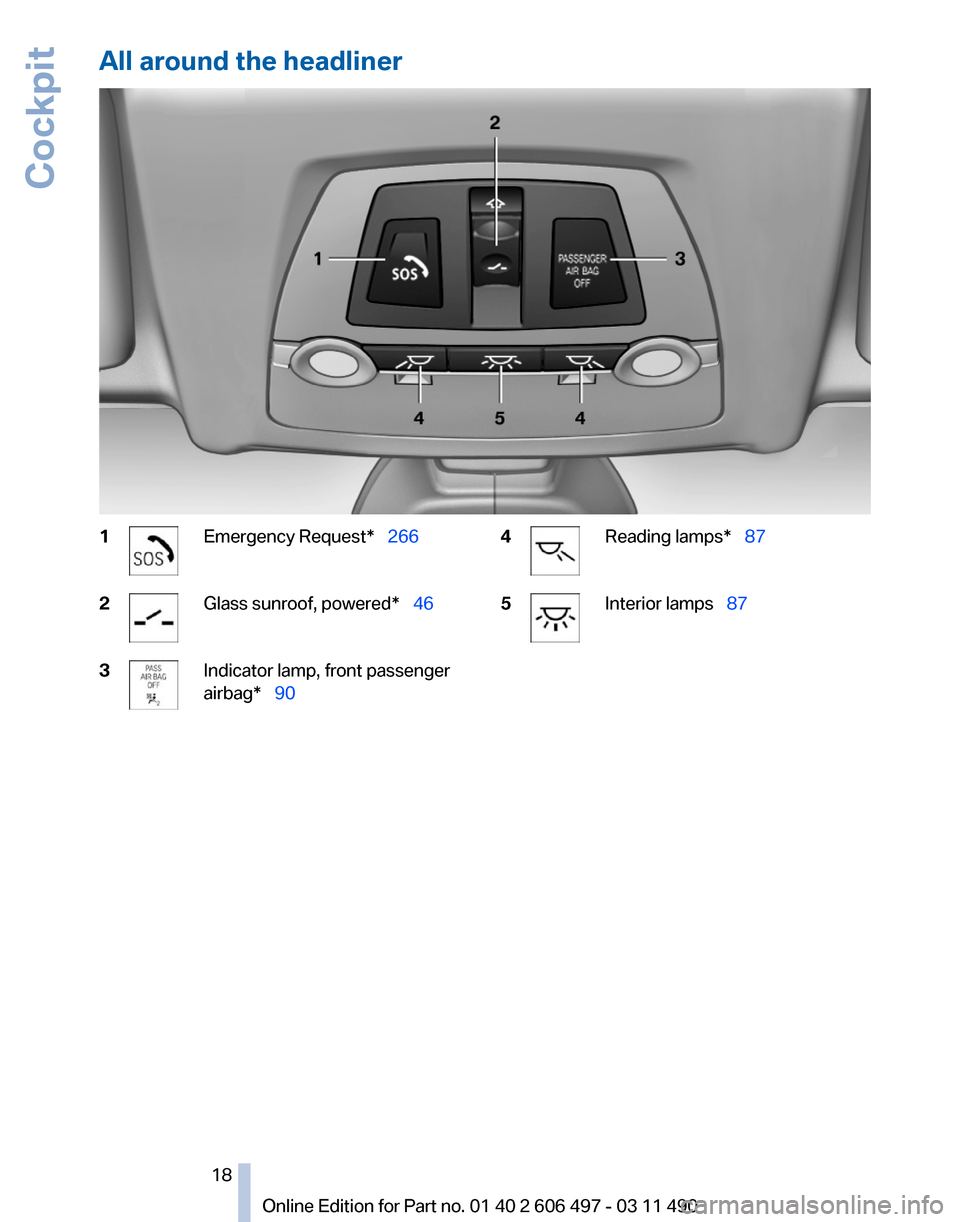
All around the headliner
1 Emergency Request* 266
2 Glass sunroof, powered*
46
3 Indicator lamp, front passenger
airbag* 90
4 Reading lamps*
87
5 Interior lamps 87
Seite 18
18 Online Edition for Part no. 01 40 2 606 497 - 03 11 490Cockpit
Page 26 of 299

Example: playing back a CD
1.
Switch on the Entertainment sound output
if necessary.
2. Press the button on the steering
wheel.
3. ›C D and multimedia‹
The medium last played is played back.
4. Press the button on the steering
wheel.
5. ›C D track ...‹ e.g., CD track 4.
Setting the voice dialog
You can set whether the system should use the
standard dialog or a shorter version.
In the shorter variant of the voice dialog, the an‐
nouncements from the system are issued in an
abbreviated form.
On the Control Display:
1. "Settings"
2. "Language/Units"
3. "Speech mode:"
4. Select the setting. Adjusting the volume
Turn
the volume button while giving an instruc‐
tion until the desired volume is set.
▷ The volume remains constant even if the
volume of other audio sources is changed. ▷
The volume is stored for the remote control
currently in use.
Notes on Emergency
Requests
Do
not use the voice activation system to initiate
an Emergency Request. In stressful situations,
the voice and vocal pitch can change. This can
unnecessarily delay the establishment of a tel‐
ephone connection.
Instead, use the SOS button*, refer to
page 266, in the vicinity of the interior mirror.
Environmental conditions
▷ Say the commands, numbers, and letters
smoothly and with normal volume, empha‐
sis, and speed.
▷ Always say commands in the language of
the voice activation system.
▷ When selecting a radio station, use the com‐
mon pronunciation of the station name.
▷ Keep the doors, windows, and glass sun‐
roof* closed to prevent noise interference.
▷ Avoid making other noise in the vehicle
while speaking.
Seite 26
26 Online Edition for Part no. 01 40 2 606 497 - 03 11 490
Voice activation system
Page 35 of 299

Display profile list during start
The profile list can be displayed during each
start for selecting the desired profile.
1.
"Settings"
2. "Profiles"
3. Open "Options".
4. "Display user list at startup"
Personal Profile settings
The following functions and settings can be
stored in a profile.
More information on the settings can be found
under:
▷ Active Cruise Control: collision warning, re‐
fer to page 110.
▷ Exterior mirror position, refer to page 58.
▷ CD/Multimedia, refer to page 179: audio
source listened to last.
▷ Dynamic Driving Control: sport program, re‐
fer to page 103.
▷ Driver's seat position, refer to page 37: au‐
tomatic retrieval after unlocking.
▷ Programmable memory buttons, refer to
page 23: assignment.
▷ Head-up Display, refer to page 123: selec‐
tion, brightness and position of the display.
▷ Headlamp courtesy delay feature, refer to
page 84: time setting.
▷ Tone, refer to page 170: tone settings.
▷ Automatic climate control, refer to
page 125: settings.
▷ Steering wheel position, refer to page 60.
▷ Navigation, refer to page 152: map views,
route criteria, voice output on/off.
▷ Night Vision with pedestrian detection, refer
to
page 120: selection of functions and type
of display.
▷ Daytime running lights*, refer to page 85:
current setting.
▷ Park Distance Control PDC, refer to
page 171:
adjusting the signal tone volume. ▷
Radio, refer to page 172: stored stations,
station listened to last, special settings.
▷ Backup camera, refer to page 116: selec‐
tion of functions and type of display.
▷ Side View, refer to page 118: selection of
the display type.
▷ Language on the Control Display, refer to
page 81.
▷ Lane departure warning, refer to page 94:
last setting, on/off.
▷ Active Blind Spot Detection, refer to
page 95: last setting, on/off.
▷ Triple turn signal activation, refer to
page 70.
▷ Locking the vehicle, refer to page 39: after
a brief period or after starting to drive.
Central locking system
The concept
The central locking system becomes active
when the driver's door is closed.
The system simultaneously engages and re‐
leases the locks on the following:
▷ Doors.
▷ Trunk lid.
▷ Fuel filler flap.
Operating from the outside
▷ Via the remote control.
▷ Via the driver's door lock*.
▷ Via the door handles*.
▷ Via the button in the trunk lid*.
The following takes place simultaneously when
locking/unlocking the vehicle via the remote
control:
▷ Anti-theft protection is switched on/off.
Doors cannot be unlocked using the lock
buttons or the door opener.
▷ The welcome lamps, interior lamps and
courtesy lamps* are switched on and off.
Seite 35
35Online Edition for Part no. 01 40 2 606 497 - 03 11 490
Reference Mobility Communication Entertainment Navigation Driving tips
Controls At a glance
Page 36 of 299

▷
The alarm system*, refer to page 43, is
armed or disarmed.
Operating from the inside Via the button for the central locking system.
If the vehicle has been locked from inside, the
fuel filler flap remains unlocked.
If an accident of a certain severity occurs, the
central locking system unlocks automatically.
The hazard warning system and interior lamps
come on.
Opening
and closing: from the
outside
Using the remote control
General information
Take the remote control with you
People or animals left unattended in a
parked vehicle can lock the doors from the in‐
side. Always take the remote control with you
when leaving the vehicle so that the vehicle can
then be opened from the outside.◀
Unlocking
Press the button.
The vehicle is unlocked.
You can set how the vehicle is to be unlocked.
The setting is stored for the remote control cur‐
rently in use.
1. "Settings"
2. "Door locks" 3.
"Unlock button:" 4.
Select the desired function:
▷"Driver's door only"
Only the driver's door and the fuel filler
flap are unlocked. Pressing again un‐
locks the entire vehicle.
▷ "All doors"
The entire vehicle is unlocked.
Convenient opening
The remote control can be used to simultane‐
ously
open the windows and the glass sunroof*.Press and hold the button on the re‐
mote control.
The windows and the glass sunroof* open.
Releasing the button stops the motion.
Locking Press the button on the remote control.
Do not lock from the outside
Do not lock the vehicle from the outside if
there are people in it, as the vehicle cannot be
unlocked from inside without special knowl‐
edge.◀
Switching on the interior lamps,
courtesy lamps*, and welcome lamps
Press the button on the remote control
with the vehicle locked.
Panic mode*
You can trigger the alarm system if you find
yourself in a dangerous situation. Seite 36
36 Online Edition for Part no. 01 40 2 606 497 - 03 11 490
Opening and closing
Page 38 of 299

For US owners only
The transmitter and receiver units comply with
part 15 of the FCC/Federal Communication
Commission
regulations. Operation is governed
by the following:
FCC ID:
▷ LX8766S.
▷ LX8766E.
▷ LX8CAS.
▷ LX8CAS2.
▷ MYTCAS4.
Compliance statement:
This device complies with part 15 of the FCC
Rules. Operation is subject to the following two
conditions:
▷ This device may not cause harmful interfer‐
ence, and
▷ this device must accept any interference re‐
ceived, including interference that may
cause undesired operation.
Any unauthorized modifications or changes to
these devices could void the user's authority to
operate this equipment.
Using the door lock
General information Do not lock from the outside
Do
not lock the vehicle from the outside if
there are people in it, as the vehicle cannot be
unlocked from inside without special knowl‐
edge.◀ Remove the key before pulling the door
handle
Before pulling the outside door handle, remove
the
key to avoid damaging the paintwork and the
key.◀
In some country-specific versions, the alarm
system* is triggered if the vehicle is unlocked via
the door lock.
Manual operation
If an electrical malfunction occurs, lock or unlock
the vehicle using a key via the door lock on the
driver's door.
Locking the doors and trunk lid at
once*
In some vehicle equipment versions, only the
driver's door can be locked via the door lock.
To lock all doors and the trunk lid at once:
1. With the doors closed, lock the vehicle using
the button for the central locking system in
the interior.
2. Unlock and open the driver's or front pas‐
senger door.
3. Lock the vehicle.
▷Lock the driver's door using the
integrated key in the door lock, or
▷ Press down the lock button of the front
passenger
door and close the door from
the outside.
The fuel filler flap can only be locked using the
remote control. Seite 38
38 Online Edition for Part no. 01 40 2 606 497 - 03 11 490
Opening and closing
Page 40 of 299

Opening from the inside
Push the button in the driver's footwell.
If the vehicle is stationary, the trunk lid opens if
it is not locked.
Manual release
All of the vehicle's keys fit the trunk lid lock, lo‐
cated in the license plate recess. Turn the key all the way to the left. The trunk lid
unlocks.
To avoid locking yourself out of the vehicle, do
not
place the key or remote control in the cargo
area.
The trunk lid is locked again as soon as it is
pushed closed.
If the trunk lid is opened via the lock with the
alarm system armed, the alarm is triggered.
Therefore, unlock the vehicle first.
If the alarm has been triggered accidentally:
switch off the alarm, refer to page 43.
Closing Recessed grips in the interior trim of the trunk
lid make it easier to pull down the lid. Danger of pinching
Make sure that the closing path of the
trunk
lid is clear; otherwise, injuries may result.◀ Do not place the remote control in the
cargo area
Take the remote control with you and do not
leave it in the cargo area; otherwise, the remote
control may be locked inside the vehicle when
the trunk lid is closed.◀
Automatic Soft Closing
To close it completely, push the trunk lid down
lightly.
It is closed automatically.
Locking the vehicle* Press the button on the inside of the trunk lid.
The vehicle is locked completely.
Automatic trunk lid operation*
Opening
The trunk lid opens fully.
▷
Press the button on the exterior of the trunk
lid. Seite 40
40 Online Edition for Part no. 01 40 2 606 497 - 03 11 490
Opening and closing