2011 BMW 550I door controls
[x] Cancel search: door controlsPage 219 of 304
Adjusting the volume
Turn the knob during an announcement.
▷
The volume remains constant even if the
volume of other audio sources is changed.
▷ The volume is stored for the remote control
currently in use.
Notes
Do not use the voice operation to initiate an
Emergency
Request. In stressful situations, the
voice and vocal pitch can change. This can un‐
necessarily delay the establishment of a tele‐
phone connection.
Instead, use the SOS button*, refer to
page 269, in the vicinity of the interior mirror.
Environmental conditions
▷ Say the commands, numbers, and letters
smoothly and with normal volume, empha‐
sis, and speed.
▷ Always say commands in the language of
the system. The language for the mobile
phone voice operation is preset and cannot
be changed in the Control Display.
▷ Keep the doors, windows, and glass sun‐
roof* closed to prevent noise interference.
▷ Avoid making other noise in the vehicle
while speaking.
Snap-in adapter*
Installation position
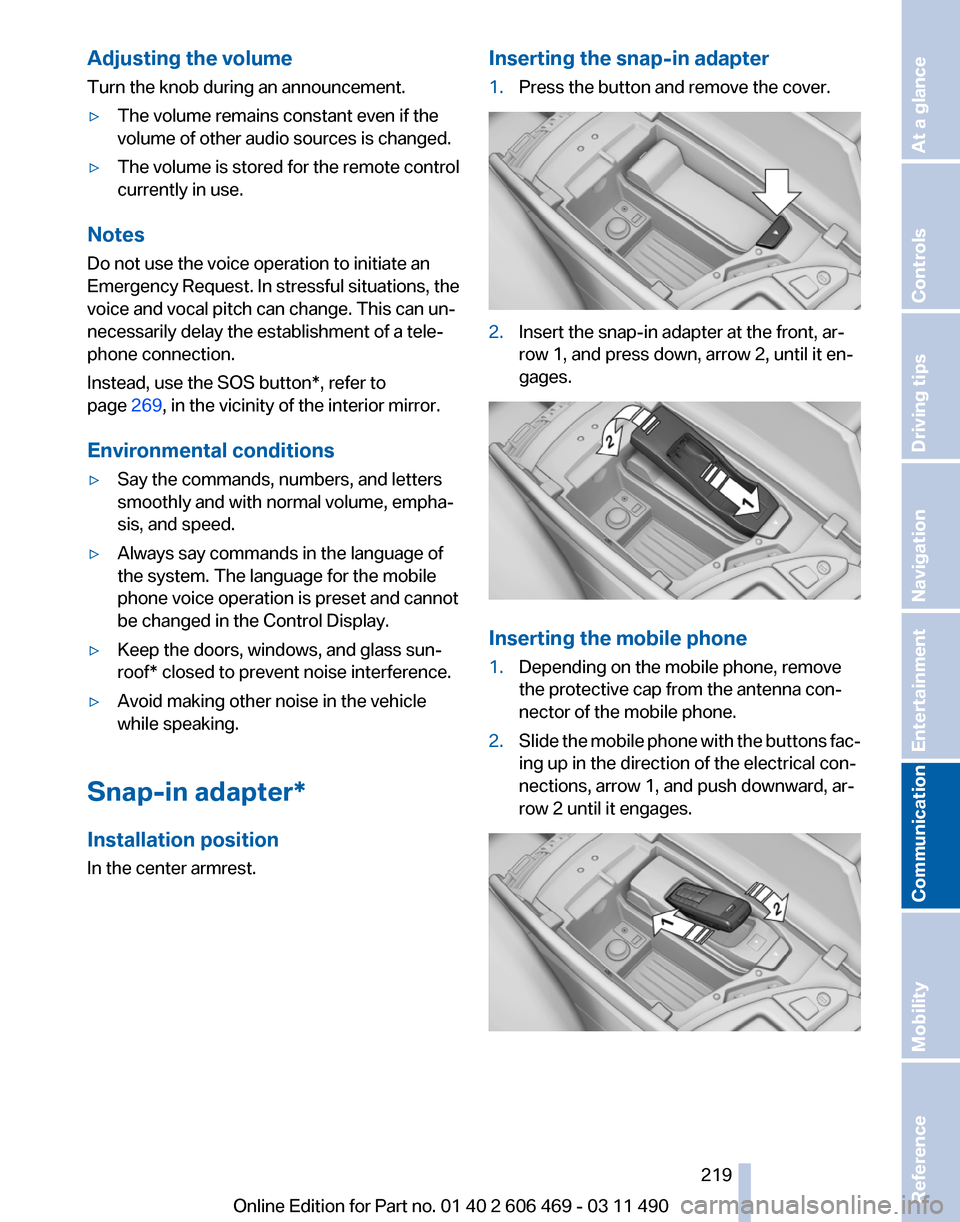
In the center armrest. Inserting the snap-in adapter
1.
Press the button and remove the cover. 2.
Insert the snap-in adapter at the front, ar‐
row 1, and press down, arrow 2, until it en‐
gages. Inserting the mobile phone
1.
Depending on the mobile phone, remove
the protective cap from the antenna con‐
nector of the mobile phone.
2. Slide the mobile phone with the buttons fac‐
ing up in the direction of the electrical con‐
nections, arrow 1, and push downward, ar‐
row 2 until it engages. Seite 219
219Online Edition for Part no. 01 40 2 606 469 - 03 11 490
Reference Mobility
Communication Entertainment Navigation Driving tips Controls At a glance
Page 275 of 304
Transmission position
Transmission position P is engaged automati‐
cally:
▷
When the ignition is switched off.
▷ After approx. 15 minutes.
Headlamps
▷ Do not rub dry and do not use abrasive or
caustic cleansers.
▷ Soak areas that have been soiled e.g. due to
insects, with shampoo and wash off with
water.
▷ Thaw ice with de-icing spray; do not use an
ice scraper.
After washing the vehicle
After washing the vehicle, apply the brakes
briefly
to dry them; otherwise, braking action can
be reduced and corrosion of the brake discs can
occur.
Vehicle care
Car care products
BMW recommends using cleaning and care
products from BMW, since these have been
tested and approved.
Car care and cleaning products
Follow the instructions on the container.
When cleaning the interior, open the doors or
windows.
Only use products intended for cleaning vehi‐
cles.
Cleansers can contain substances that are dan‐
gerous and harmful to your health.◀
Vehicle paint
Regular care contributes to driving safety and
value retention.
Environmental influences can act on the vehicle
paint. Tailor the frequency and extent of your car
care to these influences. Leather care
Remove dust from the leather often, using a
cloth or vacuum cleaner.
Otherwise, particles of dust and road grime
chafe in pores and folds, and lead to increased
wear and premature degradation of the leather
surface.
To guard against discoloration, such as from
clothing,
provide leather care roughly every two
months.
Clean light-colored leather more frequently as
dust and dirt are more noticeable.
Use leather care products; otherwise, dirt and
grease will gradually break down the protective
layer of the leather surface.
Suitable care products are available from the
service center.
Upholstery material care
Vacuum regularly with a vacuum cleaner.
If they are very dirty, e.g., beverage stains, use a
soft sponge or microfiber cloth with a suitable
interior cleaner.
Clean the upholstery down to the seams using
large sweeping motions. Avoid rubbing the ma‐
terial vigorously.
Damage from Velcro® fasteners
Open Velcro® fasteners on pants or other
articles of clothing can damage the seat covers.
Ensure that any Velcro® fasteners are closed.◀
Caring for special components
Light-alloy wheels
Use wheel cleaner, particularly during the winter
months. Do not use aggressive, acidic, strongly
alkaline or abrasive cleaners, or steam jets
above 140 ℉/60 ℃; follow the manufacturer's
instructions.
Chrome surfaces*
Carefully clean components such as the radiator
grille or door handles with an ample supply of Seite 275
275Online Edition for Part no. 01 40 2 606 469 - 03 11 490
Reference
Mobility Communication Entertainment Navigation Driving tips Controls At a glance
Page 285 of 304

Short commands of the voice activation
system*
General information
Instructions
for voice activation system, refer to
page 22. To have the available spoken instructions read
out loud: ›Voice commands‹
Adjusting
Vehicle
Function
Command
Open the main menu. ›Main menu‹
Open the options. ›Options‹
Open the settings. ›Settings‹
Info display of the instrument cluster. ›Info Display‹
Settings on the Control Display. ›Control display‹
Open the time and date. ›Time and date‹
Open the language and units. ›Language and units‹
Open the speed limit. ›Speed‹
Open the light. ›Lighting‹
Open the door lock. ›Door locks‹
Open the profiles. ›Profiles‹Equipment*
Function
Command
Open the air conditioning settings. ›Climate‹
Open the Head-up Display. ›head up display‹
Enable the rear. ›Allow rear control‹ Seite 285
285Online Edition for Part no. 01 40 2 606 469 - 03 11 490
Reference Mobility Communication Entertainment Navigation Driving tips Controls At a glance
Page 295 of 304

Before entering the car
wash 274
Belts, safety belts 48
Beverage holder, cu‐ pholder 140
Blinds, sun protection 41
Bluetooth audio 196
BMW Apps 236
BMW Apps, video play‐ back 195
BMW Assist 232
BMW EfficientDynamics, refer to Saving fuel 150
BMW homepage 6
BMW Internet page 6
BMW Maintenance Sys‐ tem 260
BMW Online 234
Bottle holder, refer to Cu‐ pholder 140
Brake assistant 95
Brake assistant, adaptive 95
Brake discs, breaking in 146
Brake force display 94
Brake lamps, brake force dis‐ play 94
Brake lamps, bulb replace‐ ment 266
Brake lights, adaptive 94
Brake pads, breaking in 146
Braking, notes 147
Breakdown assis‐ tance 269, 270
Breaking in 146
Brightness of Control Dis‐ play 79
Bulb replacement 262
Bulb replacement, front 263
Bulb replacement, rear 265
Bulbs and lamps 262
Button, RES 104
Button, Start/Stop 58
Bypassing, refer to starting aid 270
C
Calendar 226 California Proposition 65
Warning 7
Camera, backup camera 116
Camera, care 276
Camera, Side View 118
Camera, Top View 117
Can holder, refer to Cu‐ pholder 140
Car battery 267
Car care products 275
Care, displays 276
Care, vehicle 275
Cargo 148
Cargo area, enlarging 136
Cargo area lid 35
Cargo area, storage compart‐ ments 141
Cargo straps, securing cargo 149
Car key, refer to Remote con‐ trol 28
Carpet, care 276
Car wash 274
Catalytic converter, refer to Hot exhaust system 146
CBS Condition Based Serv‐ ice 260
CD/DVD 181
CD/DVD player, rear 201
CDs, storing 188
Cell phone 210
Center armrest 139
Center console 14
Central locking system 31
Central
screen, refer to Control
Display 16
Changes, technical, refer to Safety 7
Changing parts 262
Changing wheels/tires 251
Check Control 70
Children, seating position 54
Children, transporting safely 54
Child restraint fixing sys‐ tem 54
Child restraint fixing system LATCH 55 Child restraint fixing systems,
mounting 54
Child-safety locks 57
Child seat, mounting 54
Child seats 54
Chrome parts, care 275
Cigarette lighter 134
Cleaning, displays 276
Climate control 126
Climate control wind‐ shield 147
Clock 73
Closing/opening from in‐ side 35
Closing/opening via door lock 34
Closing/opening with remote control 32
Clothes hooks 141
Collision warning 108
Combination switch, refer to Turn signals 62
Combination switch, refer to Wiper system 62
Comfort Access 37
COMFORT
program, Dynamic
Driving Control 100
Computer 75
Concierge service 233
Condensation on win‐ dows 127
Condensation under the vehi‐ cle 148
Condition Based Service CBS 260
Confirmation signal 33
Contacts 221, 230
Control Display 16
Control Display, settings 78
Controller 16
Control systems, driving sta‐ bility 95
Convenient opening 32
Coolant 258
Coolant temperature 72
Cooling function 128
Cooling, maximum 127
Cooling system 258
Seite 295
295Online Edition for Part no. 01 40 2 606 469 - 03 11 490
Reference Mobility Communication Entertainment Navigation Driving tips Controls At a glance
Page 297 of 304

External temperature warn‐
ing 73
Eyes for securing cargo 149
F
Fader 172
Failure message, refer to Check Control 70
False alarm, refer to Uninten‐ tional alarm 40
Fan, refer to Air volume 127
Fault displays, refer to Check Control 70
Filler neck for engine oil 257
Fine wood, care 276
First aid kit 270
Fitting
for towing, refer to Tow
fitting 273
Flat tire, Tire Pressure Monitor TPM 88
Flat tire, warning lamp 89
Flat tire, wheel change 267
Flooding 147
Floor carpet, care 276
Floor mats, care 276
FM/AM station 174
Fold-out position, windshield wipers 64
Foot brake 147
Front airbags 85
Front fog lamps 83
Front fog lamps, front, bulb re‐ placement 265
Front lamps 263
Front passenger airbags, au‐ tomatic deactivation 86
Front passenger airbags, indi‐ cator lamp 87
Front seats, adjusting 44
Fuel cap 240
Fuel consumption, current 74
Fuel consumption, refer to Average fuel consump‐
tion 76
Fuel filler flap 240
Fuel gauge 72
Fuel quality 241 Fuel, tank capacity
284
Fuse 268
G
Garage door opener, refer to Integrated universal remote
control 132
Gas station recommenda‐ tion 163
Gear
change, automatic trans‐
mission 65
Gear shift indicator 75
General driving notes 146
Glass sunroof, powered 41
Glove compartment 138
GPS navigation, refer to Navi‐ gation system 154
Gross vehicle weight, ap‐ proved 283
Gross weight, permissible for trailer towing 283
H
Hand brake, refer to Parking brake 60
Hand-held transmitter, alter‐ nating code 133
Hazard warning flashers 269
HDC Hill Descent Control 96
HD Radio 175
Head airbags 85
Headlamp control, auto‐ matic 81
Headlamp courtesy delay fea‐ ture 80
Headlamp courtesy delay fea‐ ture via remote control 33
Headlamp flasher 62
Headlamp glass 263
Headlamps 263
Headlamps, care 275
Headlamp washer system 62
Headliner 15
Headphones, rear entertain‐ ment 205
Head restraints 44 Head restraints, front 49
Head restraints, rear 50
Head-up Display
124
Head-up Display, care 276
Heavy cargo, stowing 149
Height, seats 44
Height, vehicle 280
High-beam Assistant 82
High beams 62
High beams/low beams, refer to High-beam Assistant 82
Hill Descent Control HDC 96
Hills 148
Hill start assistant, refer to Drive-off assistant 95
Hints 6
Holder for beverages 140
Homepage 6
Hood 255
Horn 12
Hotel function, trunk lid 37
Hot exhaust system 146
House number, entering for navigation 155
Hydroplaning 147
I
Ice warning, refer to External temperature warning 73
Icy roads, refer to External temperature warning 73
Identification marks, tires 249
Identification number, refer to Engine compartment 255
iDrive 16
Ignition key, refer to Remote control 28
Ignition off 58
Ignition on 58
Indication of a flat tire 89
Individual air distribution 126
Individual settings, refer to Personal Profile 29
Inflation pressure, tires 242
Info display, refer to Com‐ puter 75
Seite 297
297Online Edition for Part no. 01 40 2 606 469 - 03 11 490
Reference Mobility Communication Entertainment Navigation Driving tips Controls At a glance
Page 299 of 304

Manual transmission 64
Map, destination entry
158
Map in split screen 165
Map view 163
Marking on approved tires 252
Marking, run-flat tires 252
Massage seat, front 46
Master key, refer to Remote control 28
Maximum cooling 127
Maximum speed, winter tires 252
Measure, units of 79
Medical kit 270
Memory for seat, mirrors, steering wheel 51
Menu
in instrument cluster 75
Menus, operating, iDrive 16
Menus, refer to iDrive operat‐ ing concept 17
Message list, traffic bulle‐ tins 165
Messages 224
Messages, refer to Check Control 70
Microfilter 129
Minimum tread, tires 251
Mirror 51
Mirror memory 51
Mobile communication devi‐ ces in the vehicle 147
Mobile phone 210
Modifications, technical, refer to Safety 7
Moisture in headlamp 263
Monitor, refer to Control Dis‐ play 16
Mounting of child restraint fix‐ ing systems 54
MP3 player 192
Multifunction steering wheel, buttons 12
Multimedia 181
Music collection 188
Music search 189
Music, storing 188 N
Navigation
154
Navigation data 168
Neck restraints, front, refer to Head restraints 49
Neck restraints, rear, refer to Head restraints 50
New wheels and tires 251
Night Vision with pedestrian detection 122
NORMAL program, Dynamic Driving Control 100
Notes 227
Number of cylinders, en‐ gine 281
Nylon rope for tow-starting/ towing 273
O
OBD Onboard Diagnos‐ tics 260
Obstacle marking, backup camera 115
Odometer 73
Office 221
Oil 257
Oil, adding 257
Oil additives 258
Oil
change interval, service re‐
quirements 74
Oil filler neck 257
Oil level check 257
Oil types, alternative 258
Oil types, approved 258
Old batteries, disposal 268
Onboard Diagnostics OBD 260
Onboard monitor, refer to Control Display 16
Online, refer to BMW On‐ line 234
Opening/closing from in‐ side 35
Opening/closing via door lock 34 Opening/closing with remote
control 32
Operating concept, iDrive 16
Outside air, refer to Automatic recirculated-air control 127
Overheating
of engine, refer to
Coolant temperature 72
P
Paint, vehicle 275
Panic mode 32
Parallel parking assistant 118
Park Distance Control PDC 111
Parked-car ventilation 131
Parked vehicle, condensa‐ tion 148
Parking aid, refer to PDC 111
Parking assistant 118
Parking brake 60
Parking lamps 80
Parking with Auto Hold 60
Passenger side mirror, tilting downward 52
Pathway lines, backup cam‐ era 114
PDC Park Distance Con‐ trol 111
Pedestrian detection, refer to Night Vision 122
People detection, refer to Night Vision 122
Permissible axle load 283
Personal information 221
Personal Profile 29
Phone 210
Pinch protection system, glass sunroof 42
Pinch protection system, win‐ dows 40
Plastic, care 276
PlugIn 237
Position, storing 156
Postal code, entering in navi‐ gation 154
Power failure 268
Power output, engine 281
Seite 299
299Online Edition for Part no. 01 40 2 606 469 - 03 11 490
Reference Mobility Communication Entertainment Navigation Driving tips Controls At a glance