Page 277 of 304
Seite 277277Online Edition for Part no. 01 40 2 606 469 - 03 11 490
Reference
Mobility Communication Entertainment Navigation Driving tips Controls At a glance
Page 281 of 304
Length, wheel base
1
Wheel base: 116.9 inches / 2,968 mm
2 Length: 193.1 inches / 4,905 mm
Smallest turning circle
Ø: 39 ft 2 in/11.95 m
Ø xDrive: 39 ft 8 in/12.10 m Ø with active steering: 37 ft 6 in/11.45 m
Engine specifications
The rated power outputs are established on the
basis of fuel grade AKI 91.
528i
Displacement
cu in/cm³ 182.8/2,996
No. of cylinders 6
Maximum output
at engine speed hp
rpm240
6,600
Maximum torque
at engine speed lb ft/Nm
rpm230/310
2,600–3,000 Seite 281
281Online Edition for Part no. 01 40 2 606 469 - 03 11 490
Reference Mobility Communication Entertainment Navigation Driving tips Controls At a glance
Page 283 of 304
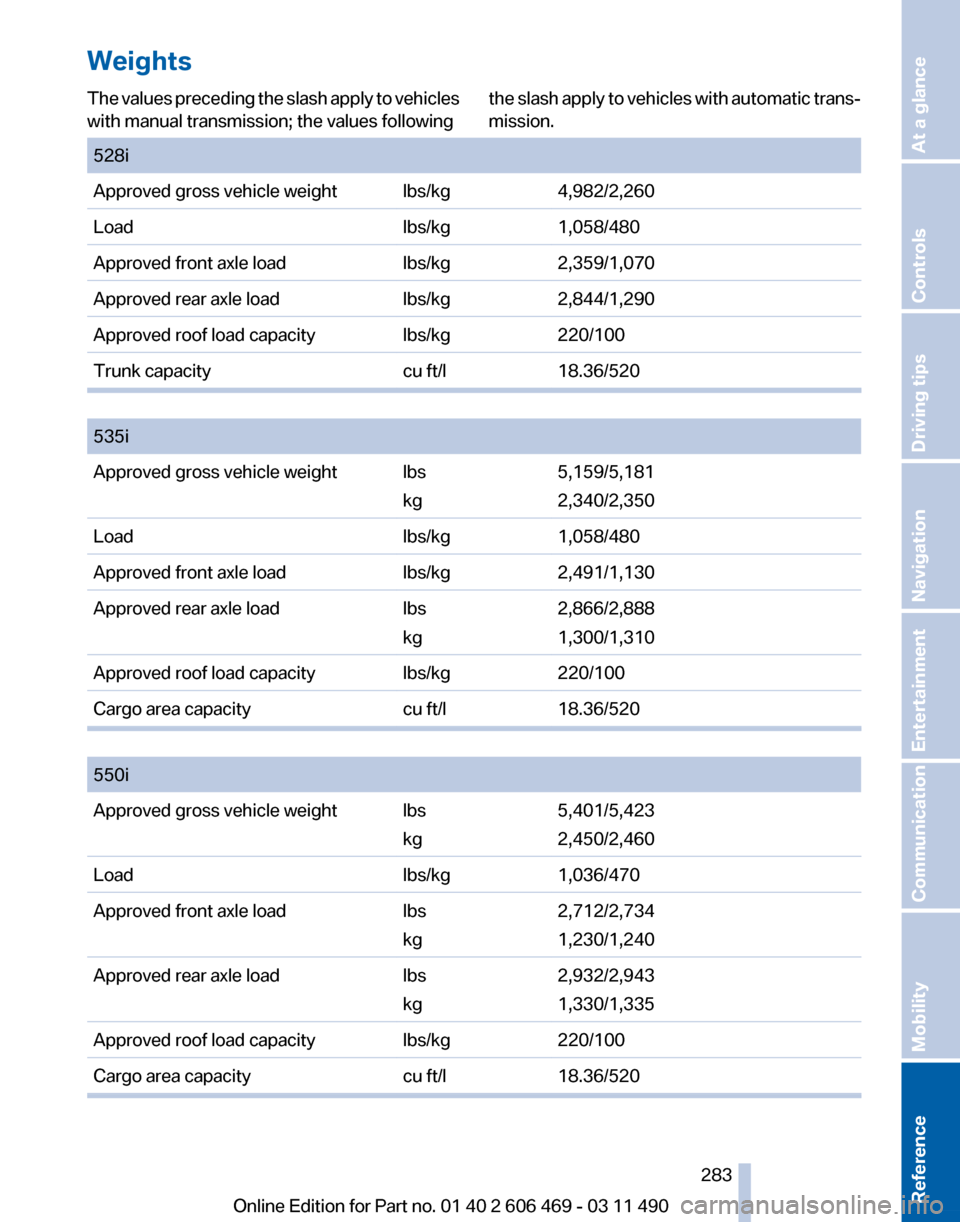
Weights
The values preceding the slash apply to vehicles
with manual transmission; the values following
the slash apply to vehicles with automatic trans‐
mission.
528i
Approved gross vehicle weight lbs/kg
4,982/2,260
Load lbs/kg1,058/480
Approved front axle load lbs/kg2,359/1,070
Approved rear axle load lbs/kg2,844/1,290
Approved roof load capacity lbs/kg220/100
Trunk capacity cu ft/l18.36/520
535i
Approved gross vehicle weight lbs
kg5,159/5,181
2,340/2,350
Load lbs/kg1,058/480
Approved front axle load lbs/kg2,491/1,130
Approved rear axle load lbs
kg2,866/2,888
1,300/1,310
Approved roof load capacity lbs/kg220/100
Cargo area capacity cu ft/l18.36/520
550i
Approved gross vehicle weight lbs
kg5,401/5,423
2,450/2,460
Load lbs/kg1,036/470
Approved front axle load lbs
kg2,712/2,734
1,230/1,240
Approved rear axle load lbs
kg2,932/2,943
1,330/1,335
Approved roof load capacity lbs/kg220/100
Cargo area capacity cu ft/l18.36/520 Seite 283
283Online Edition for Part no. 01 40 2 606 469 - 03 11 490
Reference Mobility Communication Entertainment Navigation Driving tips Controls At a glance
Page 285 of 304
Short commands of the voice activation
system*
General information
Instructions
for voice activation system, refer to
page 22. To have the available spoken instructions read
out loud: ›Voice commands‹
Adjusting
Vehicle
Function
Command
Open the main menu. ›Main menu‹
Open the options. ›Options‹
Open the settings. ›Settings‹
Info display of the instrument cluster. ›Info Display‹
Settings on the Control Display. ›Control display‹
Open the time and date. ›Time and date‹
Open the language and units. ›Language and units‹
Open the speed limit. ›Speed‹
Open the light. ›Lighting‹
Open the door lock. ›Door locks‹
Open the profiles. ›Profiles‹Equipment*
Function
Command
Open the air conditioning settings. ›Climate‹
Open the Head-up Display. ›head up display‹
Enable the rear. ›Allow rear control‹ Seite 285
285Online Edition for Part no. 01 40 2 606 469 - 03 11 490
Reference Mobility Communication Entertainment Navigation Driving tips Controls At a glance
Page 287 of 304

Function
Command
Open the route. ›Route information‹
Switch on the spoken instruction. ›Switch on voice instructions‹
Repeat the spoken instruction. ›Repeat voice instructions‹
Switch off the spoken instruction. ›Switch off voice instructions‹
Display the address book. ›Address book‹
Display the most recent destinations. ›Last destinations‹
Open the traffic bulletins. ›Traffic Info‹
Special destinations. ›Points of interest‹Map
Function
Command
Display the map. ›Map‹
Map facing north. ›Map facing north‹
Map facing the direction of travel. ›Map in direction of travel‹
Perspective map. ›Map perspective view‹
Automatic scaling of the map. ›Map with automatic scaling‹
Scale...feet. ›Map scale ... feet‹
Scale...meters. ›Map scale ... meters‹ e.g., map scale 100 meters
Scale...kilometers. ›Map scale ... kilometers‹ e.g., map scale 5 kilo‐
meters
Scale...miles. ›Map scale ... miles‹ e.g., map scale 5 milesSplit screen settings
Function
Command
Split screen. ›Switch on splitscreen‹
Switch off the split screen. ›Turn off split screen‹
Adjust the split screen. ›Split screen content‹
Split screen, map facing north. ›Split screen map facing north‹
Split screen, current position. ›Split screen current position‹ Seite 287
287Online Edition for Part no. 01 40 2 606 469 - 03 11 490
Reference Mobility Communication Entertainment Navigation Driving tips Controls At a glance
Page 289 of 304
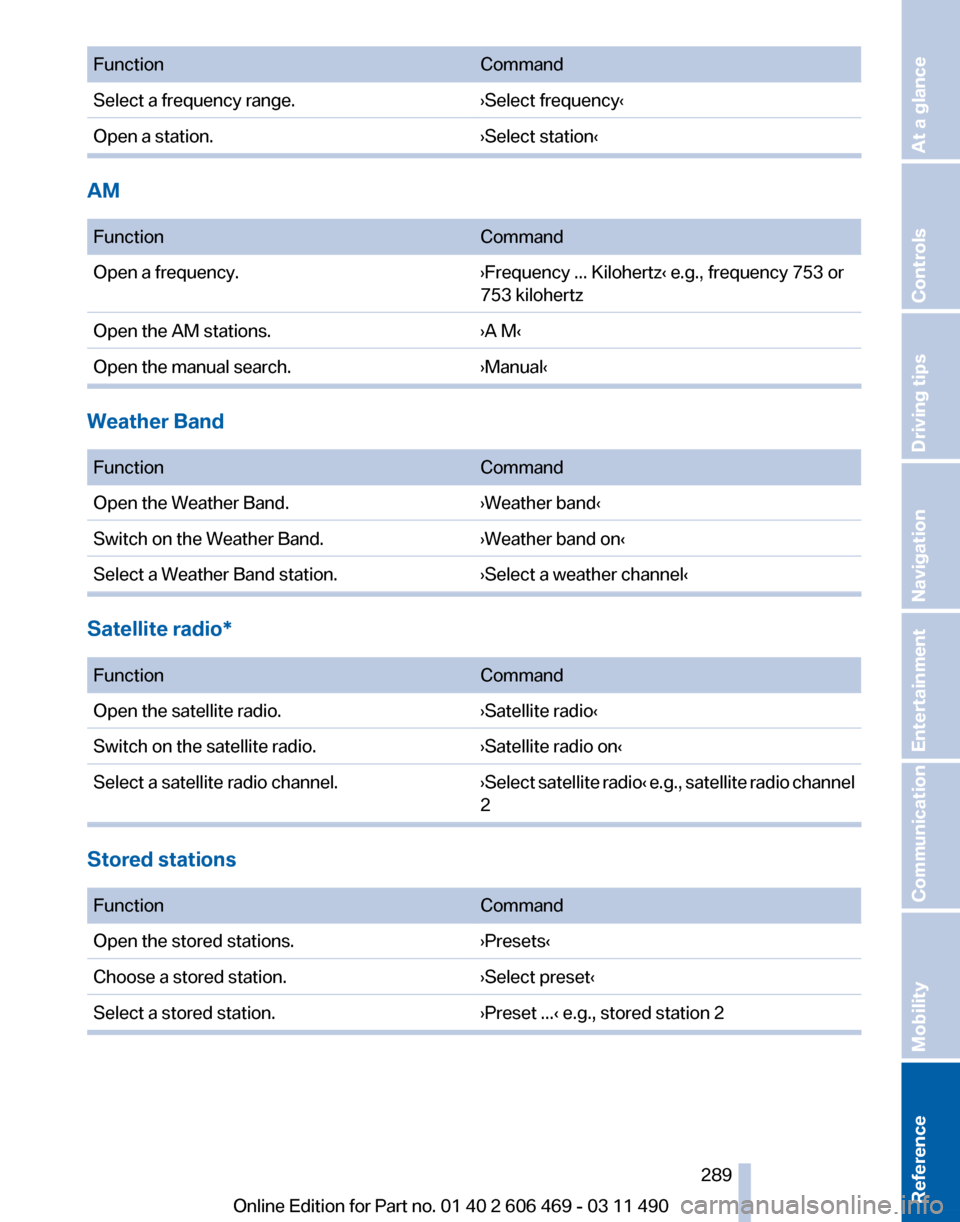
Function
Command
Select a frequency range. ›Select frequency‹
Open a station. ›Select station‹AM
Function
Command
Open a frequency. ›Frequency ... Kilohertz‹ e.g., frequency 753 or
753 kilohertz
Open the AM stations. ›A M‹
Open the manual search. ›Manual‹Weather Band
Function
Command
Open the Weather Band. ›Weather band‹
Switch on the Weather Band. ›Weather band on‹
Select a Weather Band station. ›Select a weather channel‹Satellite radio*
Function
Command
Open the satellite radio. ›Satellite radio‹
Switch on the satellite radio. ›Satellite radio on‹
Select a satellite radio channel. ›Select satellite radio‹ e.g., satellite radio channel
2Stored stations
Function
Command
Open the stored stations. ›Presets‹
Choose a stored station. ›Select preset‹
Select a stored station. ›Preset ...‹ e.g., stored station 2 Seite 289
289Online Edition for Part no. 01 40 2 606 469 - 03 11 490
Reference Mobility Communication Entertainment Navigation Driving tips Controls At a glance
Page 291 of 304
Tone
Function
Command
Open the tone settings. ›Tone‹Telephone*
Function
Command
Dial a phone number. ›Dial number‹
Open the Telephone menu. ›Telephone‹
Display the phone book. ›Phonebook‹
Redialing. ›Redial‹
Display received calls. ›Received calls‹
List of messages ›Messages‹
Open the Bluetooth devices. ›Bluetooth‹Office*
Function
Command
Open the Office menu. ›Office‹
Display Office Today. ›Current office‹
Display the contacts. ›Contacts‹
Display the messages. ›Messages‹
Display the calendar. ›Calendar‹
Display the tasks. ›Tasks‹
Display the reminders. ›Reminders‹ Seite 291
291Online Edition for Part no. 01 40 2 606 469 - 03 11 490
Reference Mobility Communication Entertainment Navigation Driving tips Controls At a glance
Page 293 of 304
Seite 293293Online Edition for Part no. 01 40 2 606 469 - 03 11 490
Reference Mobility Communication Entertainment Navigation Driving tips Controls At a glance