2011 BMW 535I Electronic
[x] Cancel search: ElectronicPage 90 of 304

Continued driving with a flat tire
If continuing to drive with a damaged tire:
1.
Avoid sudden braking and steering maneu‐
vers.
2. Do not exceed a speed of 50 mph/80 km/h.
3. Check the air pressure in all four tires at the
next opportunity.
If the tire inflation pressure in all four tires is
correct, the Tire Pressure Monitor may not
have been initialized. In this case, initialize
the system.
Possible driving distance with complete loss of
tire inflation pressure:
The possible driving distance after a loss of tire
inflation pressure depends on the cargo load
and the driving style and conditions.
For a vehicle containing an average load, the
possible driving distance is approx. 50 miles/
80 km.
When the vehicle is driven with a damaged tire,
its handling characteristics change, e.g., re‐
duced lane stability during braking, a longer
braking distance, and altered self-steering
properties. Adjust your driving style accord‐
ingly. Avoid abrupt steering maneuvers or driv‐
ing over obstacles, e.g., curbs, potholes, etc.
Because
the possible driving distance depends
on how the vehicle is used during the trip, the
actual distance may be smaller or greater de‐
pending on the driving speed, road conditions,
external temperature, cargo load, etc.
Continued driving with a flat tire
Drive moderately and do not exceed a
speed of 50 mph/80 km/h.
A loss of tire inflation pressure results in a
change in the handling characteristics, e.g., re‐
duced lane stability during braking, a longer
braking distance and altered self-steering prop‐
erties.◀
Final tire failure
Vibrations or loud noises while driving can
indicate the final failure of the tire. Reduce speed
and stop; otherwise, pieces of the tire could come loose and cause an accident. Do not con‐
tinue
driving, and contact your service center.◀
Message when the system was not
reset
A Check Control message is displayed.
The system detected a wheel change but was
not reset.
Warnings regarding the current tire inflation
pressure are not reliable.
Check the tire inflation pressure and reset the
system.
Malfunction The yellow warning lamp flashes and
then lights up continuously. A Check
Control message is displayed. No flat
tire can be detected.
Display in the following situations:
▷ A wheel without TPM electronics is fitted:
have
the service center check it if necessary.
▷ Malfunction: have the system checked by
your service center.
▷ TPM could not be fully reset. Reset the sys‐
tem again.
▷ Disturbance by systems or devices with the
same
radio frequency: after leaving the area
of the disturbance, the system automatically
becomes active again.
Declaration according to NHTSA/
FMVSS 138 Tire Pressure Monitoring
System
Each tire, including the spare (if provided)
should be checked monthly when cold and in‐
flated
to the inflation pressure recommended by
the vehicle manufacturer on the vehicle placard
or tire inflation pressure label. (If your vehicle has
tires of a different size than the size indicated on
the vehicle placard or tire inflation pressure la‐
bel, you should determine the proper tire infla‐
tion pressure for those tires.) As an added safety
feature, your vehicle has been equipped with a
tire pressure monitoring system (TPMS) that il‐
luminates a low tire pressure telltale when one Seite 90
90 Online Edition for Part no. 01 40 2 606 469 - 03 11 490
Safety
Page 147 of 304

Climate control windshield*
The marked area is not covered with heat re‐
flective coating.
Use this area for garage door openers, devices
for electronic toll collection, etc.
Climate
control laminated tinted safety
glass*
The vehicle glass provides full protection
against the harmful effects of UV radiation on the
skin.
Mobile communication devices in the
vehicle
Mobile communication devices in the ve‐
hicle
It is advised that you do not use mobile commu‐
nication devices, e.g., mobile phones, inside the
vehicle without connecting them directly to the
external antenna. Otherwise, the vehicle elec‐
tronics and mobile communication devices can
interfere with each other. In addition, there is no
assurance that the radiation generated during
transmission will be discharged from the vehicle
interior.◀
Hydroplaning
On wet or slushy roads, a wedge of water can
form between the tires and road surface.
This phenomenon is referred to as hydroplan‐
ing. It is characterized by a partial or complete
loss of contact between the tires and the road
surface, ultimately undermining your ability to
steer and brake the vehicle. Hydroplaning
When driving on wet or slushy roads, re‐
duce your speed to prevent hydroplaning.
◀
Driving through water
Drive though calm water only if it is not deeper
than 9.8 inches/25 cm and at this height, no
faster than walking speed, up to 6 mph/10 km/h. Adhere to water depth and speed limita‐
tions
Do not exceed this water depth and walking
speed; otherwise, the vehicle's engine, the elec‐
trical systems and the transmission may be
damaged.◀
Braking safely
Your vehicle is equipped with ABS as a standard
feature.
Applying the brakes fully is the most effective
way of braking in situations when this is neces‐
sary.
The vehicle maintains steering responsiveness.
You can still avoid any obstacles with a minimum
of steering effort.
Pulsation of the brake pedal and sounds from
the hydraulic circuits indicate that ABS is in its
active mode.
Objects in the area around the pedals
No objects in the area around the pedals
Keep floor mats, carpets, and any other
objects out of the area of motion of the pedals;
otherwise, the function of the pedals could be
impeded while driving
Do not place additional floor mats over existing
mats or other objects.
Only use floor mats that have been approved for
the vehicle and can be properly fixed in place.
Ensure that the floor mats are securely fastened
again after they were removed for cleaning, for
example.◀ Seite 147
147Online Edition for Part no. 01 40 2 606 469 - 03 11 490
Reference Mobility Communication Entertainment Navigation
Driving tips Controls At a glance
Page 176 of 304
Weather Band*
General information
The availability of the Weather Band and the
number of available channels can vary depend‐
ing on the region.
Switching on the Weather Band
1.
"Radio"
2. "Weather band"
3. Select the desired channel.
Additional information
Weather Band is a service of the National Oce‐
anic and Atmospheric Administration (NOAA).
Additional information on the Internet:
www.nws.noaa.gov.
Satellite radio
*
General information
The channels are offered in predefined pack‐
ages. The packages must be enabled by tele‐
phone.
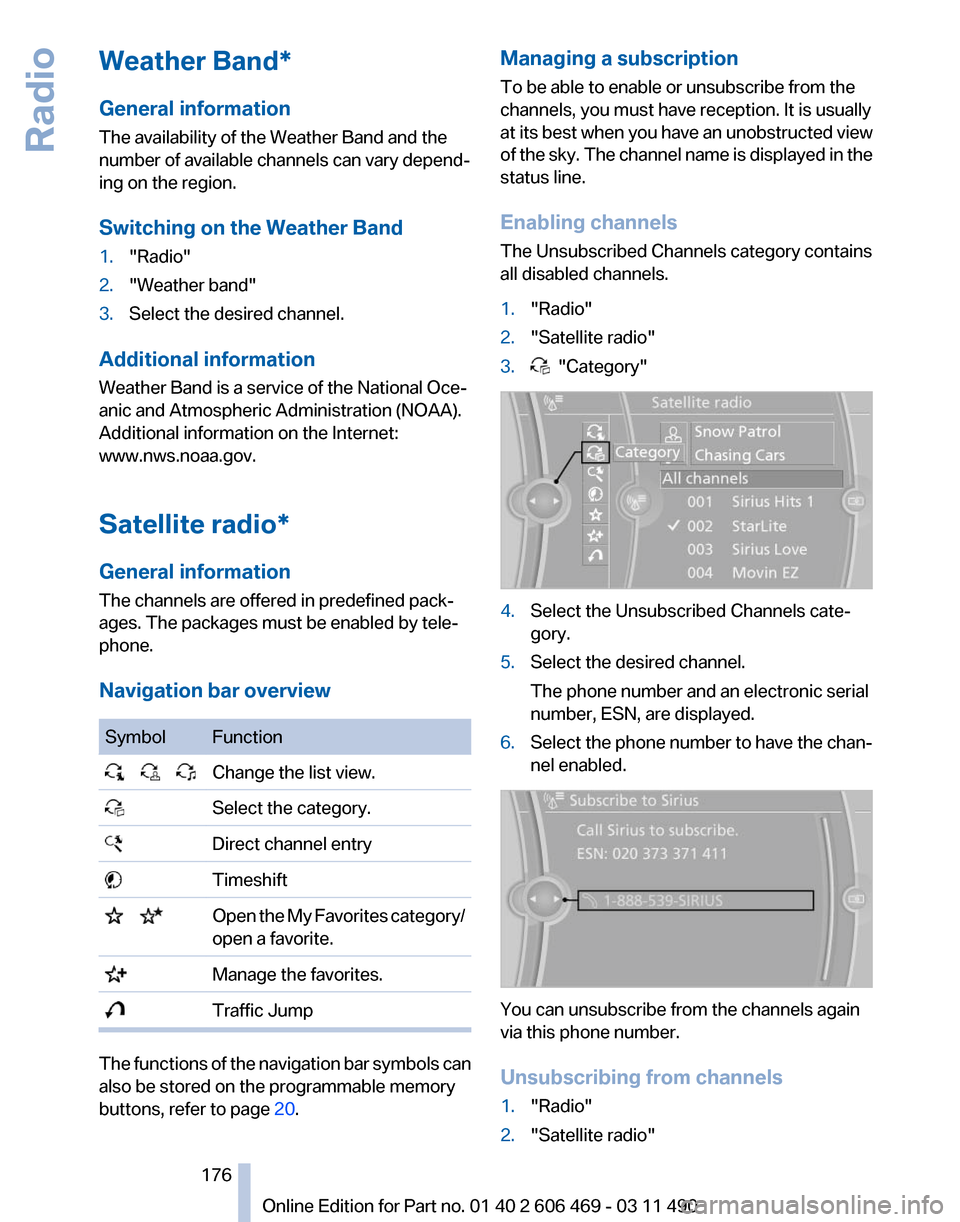
Navigation bar overview Symbol Function
Change the list view.
Select the category.
Direct channel entry
Timeshift
Open the My Favorites category/
open a favorite. Manage the favorites.
Traffic Jump
The functions of the navigation bar symbols can
also be stored on the programmable memory
buttons, refer to page
20. Managing a subscription
To be able to enable or unsubscribe from the
channels, you must have reception. It is usually
at
its best when you have an unobstructed view
of the sky. The channel name is displayed in the
status line.
Enabling channels
The Unsubscribed Channels category contains
all disabled channels.
1. "Radio"
2. "Satellite radio"
3. "Category"
4.
Select the Unsubscribed Channels cate‐
gory.
5. Select the desired channel.
The phone number and an electronic serial
number, ESN, are displayed.
6. Select the phone number to have the chan‐
nel enabled. You can unsubscribe from the channels again
via this phone number.
Unsubscribing from channels
1.
"Radio"
2. "Satellite radio"
Seite 176
176 Online Edition for Part no. 01 40 2 606 469 - 03 11 490
Radio
Page 177 of 304
3.
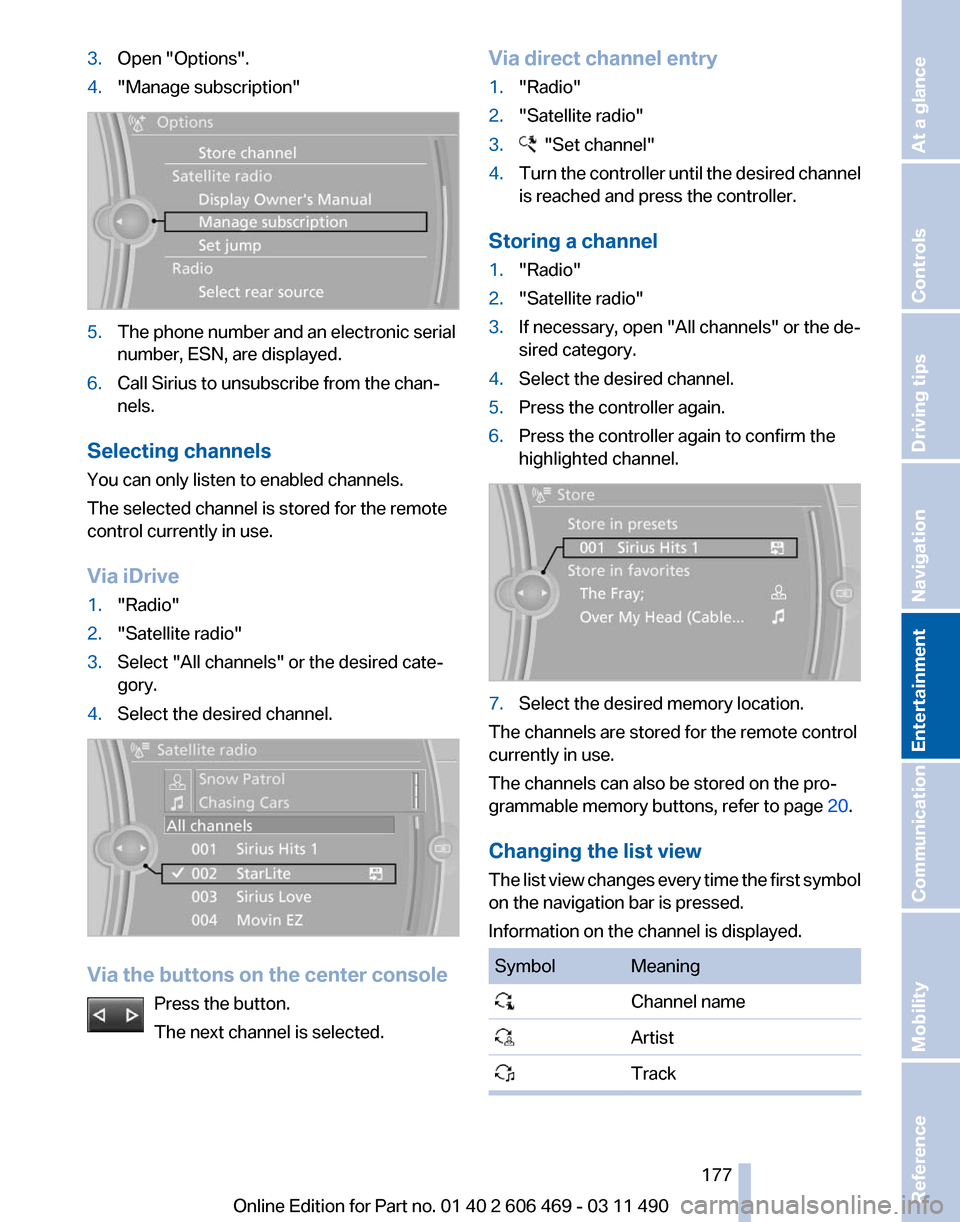
Open "Options".
4. "Manage subscription" 5.
The phone number and an electronic serial
number, ESN, are displayed.
6. Call Sirius to unsubscribe from the chan‐
nels.
Selecting channels
You can only listen to enabled channels.
The selected channel is stored for the remote
control currently in use.
Via iDrive
1. "Radio"
2. "Satellite radio"
3. Select "All channels" or the desired cate‐
gory.
4. Select the desired channel. Via the buttons on the center console
Press the button.
The next channel is selected. Via direct channel entry
1.
"Radio"
2. "Satellite radio"
3. "Set channel"
4. Turn the controller until the desired channel
is reached and press the controller.
Storing a channel
1. "Radio"
2. "Satellite radio"
3. If necessary, open "All channels" or the de‐
sired category.
4. Select the desired channel.
5. Press the controller again.
6. Press the controller again to confirm the
highlighted channel. 7.
Select the desired memory location.
The channels are stored for the remote control
currently in use.
The channels can also be stored on the pro‐
grammable memory buttons, refer to page 20.
Changing the list view
The
list view changes every time the first symbol
on the navigation bar is pressed.
Information on the channel is displayed. Symbol Meaning
Channel name
Artist
Track Seite 177
177Online Edition for Part no. 01 40 2 606 469 - 03 11 490
Reference Mobility Communication
Entertainment Navigation Driving tips Controls At a glance
Page 257 of 304

Engine oil
General information
The
engine oil consumption is dependent on the
driving style and driving conditions.
Therefore, check the engine oil level after every
refueling using the electronic engine oil level
check.
Checking the oil level
The concept
The oil level is monitored electronically and dis‐
played on the Control Display.
Requirements
▷ The engine must be running and warm after
the vehicle has been driven for at least
6 miles/10 km.
▷ The vehicle is stopped or being driven on a
level roadway.
Displaying the oil level
1. "Vehicle Info"
2. "Vehicle status"
3. "Engine oil level" Possible messages
▷
"Engine oil level OK"
▷ "Measurement not possible at this time."
▷ "Measuring engine oil level..."
Duration with the engine running: ap‐
prox. 3 minutes. Duration while driving: approx. 5 minutes.
▷ "Engine oil level below minimum. Add 1
quart!"
Add oil within the next 125 miles/200 km.
▷ "Engine oil level too high! Have this
checked."
Have the vehicle checked immediately.
Too much engine oil
Have the vehicle checked immedi‐
ately; otherwise, surplus oil can lead to en‐
gine damage.
◀ ▷
"Measurement inactive. Have this
checked."
Note the newly calculated remaining mile‐
age until the next oil service. Have the sys‐
tem checked as soon as possible.
Adding engine oil
Filler neck When the indicator lights up in the instrument
cluster, add 1 US quart/liter of engine oil within
the next 125 miles/200 km.
Recommended oil types, refer to page
258.
Protect children
Keep oil, grease, etc., out of reach of chil‐
dren and heed the warnings on the containers
to prevent health risks.◀ Seite 257
257Online Edition for Part no. 01 40 2 606 469 - 03 11 490
Reference
Mobility Communication Entertainment Navigation Driving tips Controls At a glance
Page 270 of 304
Assist Response Center may still be able to
hear you.
Initiating an Emergency Request
automatically
Under certain conditions, an Emergency Re‐
quest is automatically initiated immediately after
a severe accident. Automatic Collision Notifica‐
tion is not affected by pressing the SOS button.
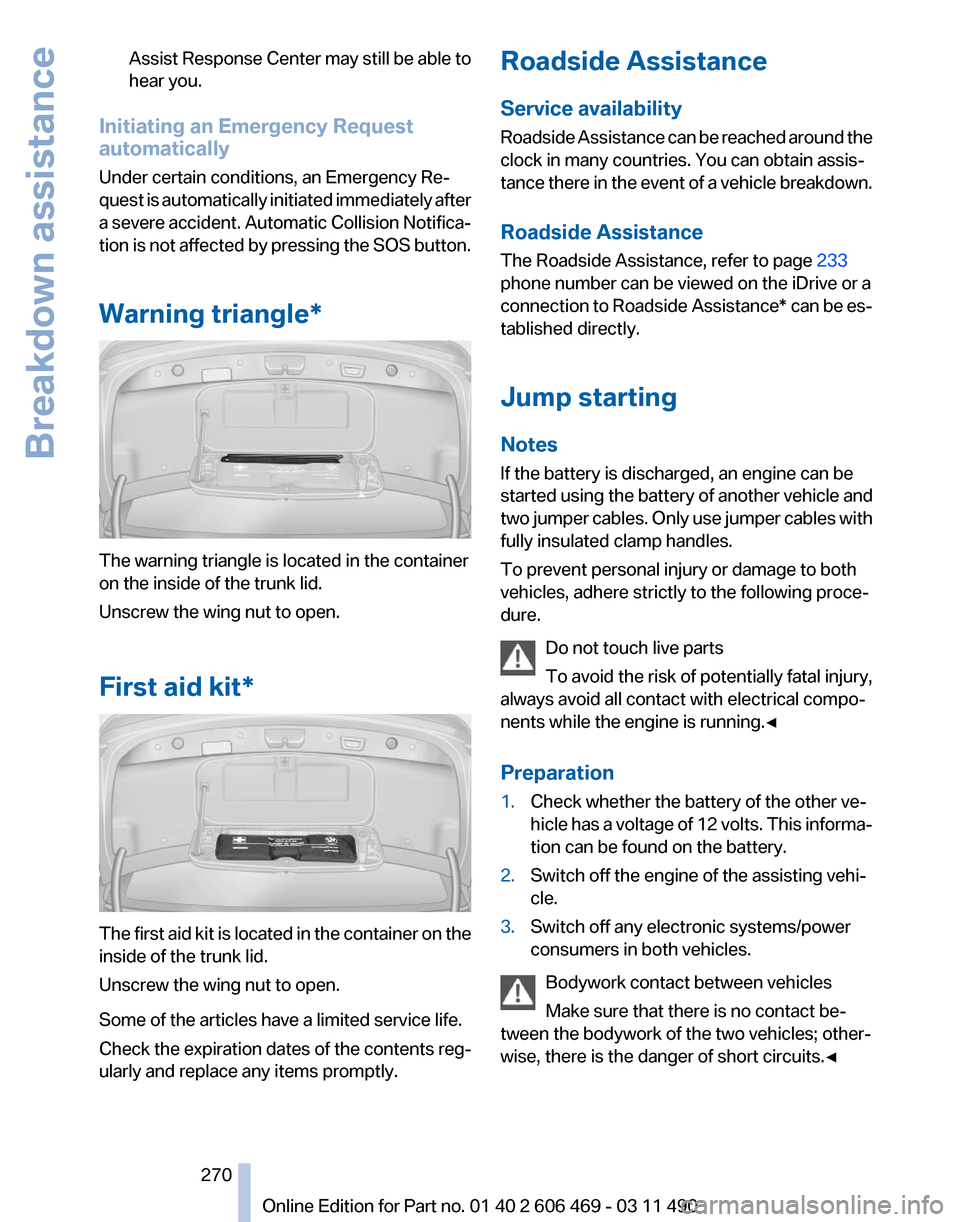
Warning triangle* The warning triangle is located in the container
on the inside of the trunk lid.
Unscrew the wing nut to open.
First aid kit*
The first aid kit is located in the container on the
inside of the trunk lid.
Unscrew the wing nut to open.
Some of the articles have a limited service life.
Check the expiration dates of the contents reg‐
ularly and replace any items promptly. Roadside Assistance
Service availability
Roadside Assistance can be reached around the
clock in many countries. You can obtain assis‐
tance there in the event of a vehicle breakdown.
Roadside Assistance
The Roadside Assistance, refer to page
233
phone number can be viewed on the iDrive or a
connection to Roadside Assistance* can be es‐
tablished directly.
Jump starting
Notes
If the battery is discharged, an engine can be
started using the battery of another vehicle and
two jumper cables. Only use jumper cables with
fully insulated clamp handles.
To prevent personal injury or damage to both
vehicles, adhere strictly to the following proce‐
dure.
Do not touch live parts
To avoid the risk of potentially fatal injury,
always avoid all contact with electrical compo‐
nents while the engine is running.◀
Preparation
1. Check whether the battery of the other ve‐
hicle has a voltage of 12 volts. This informa‐
tion can be found on the battery.
2. Switch off the engine of the assisting vehi‐
cle.
3. Switch off any electronic systems/power
consumers in both vehicles.
Bodywork contact between vehicles
Make sure that there is no contact be‐
tween the bodywork of the two vehicles; other‐
wise, there is the danger of short circuits.◀ Seite 270
270 Online Edition for Part no. 01 40 2 606 469 - 03 11 490Breakdown assistance
Page 296 of 304

Corrosion on brake discs 148
Cruise control 109
Cruise control, active with Stop & Go 102
Cruising range 73
Cupholder 140
Current fuel consumption 74
Current location, storing 156
Customer Relations 235
D
Damage, tires 251
Damping control, dynamic 98
Data, technical 280
Date 73
Daytime running lights 81
Defrosting, refer to Windows, defrosting 127
Destination distance 76
Destination guidance 161
Destination guidance with in‐ termediate destinations 160
Destination input, naviga‐ tion 154
Digital clock 73
Digital radio 175
Dimensions 280
Dimmable interior rearview mirror 53
Direction indicator, refer to Turn signals 62
Displacement, engine 281
Display,
electronic, instrument
cluster 69
Display in front wind‐ shield 124
Display lighting, refer to Instru‐ ment lighting 83
Displays, cleaning 276
Disposal, coolant 259
Disposal, vehicle battery 268
Distance control, refer to PDC 111
Distance, selecting for ACC 103
Distance to destination 76 Divided screen view, split
screen 20
Door lock, refer to Remote control 28
Doors, Automatic Soft Clos‐ ing 35
Downhill control 96
Drive-off assistant 95
Drive-off assistant, refer to DSC 95
Driving instructions, breaking in 146
Driving notes, general 146
Driving stability control sys‐ tems 95
Driving tips 146
DSC Dynamic Stability Con‐ trol 95
DTC Dynamic Traction Con‐ trol 96
DVD/CD 181
DVD/CD notes 187
DVD/CD player, rear 201
DVD changer 185
DVD settings 184
DVDs, storing 188
DVD, video 183
Dynamic Damping Control 98
Dynamic destination guid‐ ance 167
Dynamic Drive 98
Dynamic Driving Control 99
Dynamic Stability Control DSC 95
Dynamic Traction Control DTC 96
E
EfficientDynamics, refer to Saving fuel 150
Electronic engine oil level check 257
Electronic Stability Program ESP, refer to DSC 95
Emergency detection, remote control 29 Emergency release, door
lock 34
Emergency release, fuel filler flap 240
Emergency Request 269
Emergency service, refer to Roadside Assistance 270
Emergency start function, en‐ gine start 29
Emergency unlocking, trunk lid 37
Energy Control 74
Energy recovery 74
Engine compartment 255
Engine compartment, working in 255
Engine coolant 258
Engine oil 257
Engine oil, adding 257
Engine oil additives 258
Engine oil filler neck 257
Engine oil temperature 72
Engine oil types, alterna‐ tive 258
Engine oil types, ap‐ proved 258
Engine specifications 281
Engine start during malfunc‐ tion 29
Engine start, refer to Starting the engine 59
Engine start, Starting aid 270
Engine stop 59
Engine temperature 72
Equalizer 172
Equipment, interior 132
ESP Electronic Stability Pro‐ gram, refer to DSC 95
Exchanging wheels/tires 251
Exhaust system 146
Exterior
mirror, automatic dim‐
ming feature, dimmable exte‐
rior mirrors 52
Exterior mirrors 51
External devices 192
External start 270
External temperature dis‐ play 73
Seite 296
296 Online Edition for Part no. 01 40 2 606 469 - 03 11 490
Everything from A to Z
Page 298 of 304

Information on the navigation
data 168
Initialization, Integral Active Steering 98
Initializing,
Tire Pressure Mon‐
itor TPM 89
Instrument cluster 0
Instrument cluster, electronic displays 69
Instrument cluster, over‐ view 67
Instrument cluster with en‐ hanced features 0
Instrument lighting 83
Integral Active Steering 98
Integrated key 28
Integrated universal remote control 132
Intensity, AUTO program 127
Interactive map 158
Interior equipment 132
Interior lamps 83
Interior lamps via remote con‐ trol 32
Interior motion sensor 40
Interior rearview mirror 52
Interior rearview mirror, auto‐ matic dimming feature 53
Intermediate destinations 160
Internet page 6
Intersection, entering for navi‐ gation 155
Interval display, service re‐ quirements 74
iPod/iPhone 193
J
Jacking points for the vehicle jack 267
Jack, refer to Vehicle jack 267
Joystick, automatic transmis‐ sion 65
K
Key/remote control 28 Keyless Go, refer to Comfort
Access 37
Key
Memory, refer to Personal
Profile 29
Kickdown, automatic trans‐ mission 65
Knee airbag 85
L
Lamp replacement 262
Lamp replacement, front 263
Lamp replacement, rear 265
Lamps 80
Lamps and bulbs 262
Lane departure warning 91
Lane margin, warning 91
Language on Control Dis‐ play 79
Lashing eyes, securing cargo 149
LATCH child restraint fixing system 55
Leather, care 275
LEDs, light-emitting di‐ odes 263
Length, vehicle 281
Letters and numbers, enter‐ ing 21
License plate lamp, bulb re‐ placement 266
Light-alloy wheels, care 275
Light control 81
Light-emitting diodes, LEDs 263
Lighter, front 134
Lighter, rear 135
Lighting 80
Lighting via remote control 32
Light switch 80
Load 149
Loading 148
Lock, door 34
Locking/unlocking from in‐ side 35
Locking/unlocking via door lock 34 Locking/unlocking with re‐
mote control 32
Locking, automatic 35
Locking, central 31
Locking via trunk lid 36
Lock, power window 41
Locks, doors, and win‐ dows 57
Low beams 80
Low
beams, automatic, refer to
High-beam Assistant 82
Lower back support 46
Lug bolt lock 267
Luggage rack, refer to Roof- mounted luggage rack 150
Lumbar support 46
M
Maintenance 260
Maintenance require‐ ments 260
Maintenance, service require‐ ments 74
Maintenance System, BMW 260
Malfunction displays, refer to Check Control 70
Manual air distribution 126
Manual air volume 127
Manual brake, refer to Parking brake 60
Manual mode, transmis‐ sion 66
Manual operation, backup camera 114
Manual operation, door lock 34
Manual operation, exterior mir‐ rors 52
Manual operation, fuel filler flap 240
Manual operation, Park Dis‐ tance Control PDC 112
Manual operation, Side View 118
Manual operation, Top View 116
Seite 298
298 Online Edition for Part no. 01 40 2 606 469 - 03 11 490
Everything from A to Z