2011 BMW 528I microfilter
[x] Cancel search: microfilterPage 129 of 304
Switching on
Press any button.
Microfilter/activated-charcoal filter
The microfilter removes dust and pollen from
the incoming air.
The activated-charcoal filter removes gaseous
pollutants from the outside air that enters the
vehicle.
This combined filter should be replaced during
scheduled
maintenance of your vehicle., refer to
page 260
Ventilation
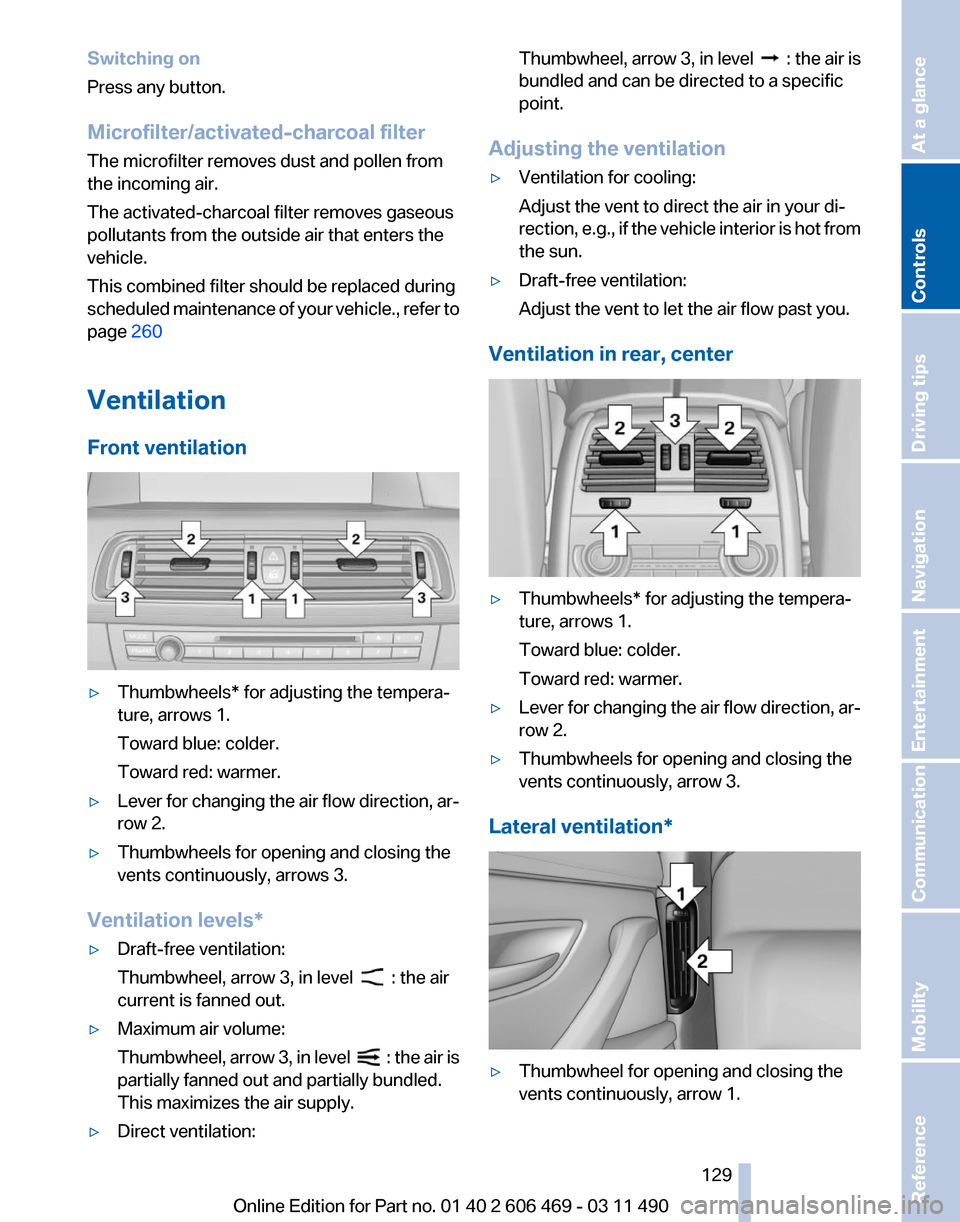
Front ventilation ▷
Thumbwheels* for adjusting the tempera‐
ture, arrows 1.
Toward blue: colder.
Toward red: warmer.
▷ Lever for changing the air flow direction, ar‐
row 2.
▷ Thumbwheels for opening and closing the
vents continuously, arrows 3.
Ventilation levels*
▷ Draft-free ventilation:
Thumbwheel, arrow 3, in level : the air
current is fanned out.
▷ Maximum air volume:
Thumbwheel,
arrow 3, in level : the air is
partially fanned out and partially bundled.
This maximizes the air supply.
▷ Direct ventilation: Thumbwheel, arrow 3, in level :
the air is
bundled and can be directed to a specific
point.
Adjusting the ventilation
▷ Ventilation for cooling:
Adjust the vent to direct the air in your di‐
rection,
e.g., if the vehicle interior is hot from
the sun.
▷ Draft-free ventilation:
Adjust the vent to let the air flow past you.
Ventilation in rear, center ▷
Thumbwheels* for adjusting the tempera‐
ture, arrows 1.
Toward blue: colder.
Toward red: warmer.
▷ Lever for changing the air flow direction, ar‐
row 2.
▷ Thumbwheels for opening and closing the
vents continuously, arrow 3.
Lateral ventilation* ▷
Thumbwheel for opening and closing the
vents continuously, arrow 1.
Seite 129
129Online Edition for Part no. 01 40 2 606 469 - 03 11 490
Reference Mobility Communication Entertainment Navigation Driving tips
Controls At a glance
Page 260 of 304

Maintenance
BMW Maintenance System
The maintenance system directs you to re‐
quired
maintenance measures and thereby sup‐
ports you in maintaining road safety and the op‐
erational reliability of the vehicle.
Condition Based Service CBS
Sensors and special algorithms take into ac‐
count the driving conditions of your vehicle.
Based on this, Condition Based Service deter‐
mines the maintenance requirements.
The system makes it possible to adapt the
amount of maintenance you need to your user
profile.
Details on the service requirements, refer to
page 74, can be displayed on the Control Dis‐
play.
Service data in the remote control
Information on the required maintenance is con‐
tinuously stored in the remote control. Your
service center will read out this data and suggest
the right array of service procedures for your ve‐
hicle.
Therefore, hand your service specialist the re‐
mote control that you used most recently.
Storage periods
Storage periods during which the vehicle bat‐
tery was disconnected are not taken into ac‐
count.
If this occurs, have a service center update the
time-dependent maintenance procedures,
such as checking brake fluid and, if necessary,
changing the engine oil and the microfilter/acti‐
vated-charcoal filter. Service and Warranty
Information Booklet for US
models and Warranty and
Service Guide Booklet for
Canadian models
Please
consult your Service and Warranty Infor‐
mation Booklet for US models and Warranty and
Service Guide Booklet for Canadian models for
additional information on service requirements.
Maintenance and repair should be performed by
your service center. Make sure to have regular
maintenance procedures recorded in the vehi‐
cle's Service and Warranty Information Booklet
for US models, and in the Warranty and Service
Guide Booklet for Canadian models. These en‐
tries are proof of regular maintenance.
Socket for OBD Onboard
Diagnosis There is an OBD socket on the driver's side for
checking
the primary components in the vehicle
emissions.
Emissions
▷The warning lamp lights up:
Emissions are deteriorating. Have
the
vehicle checked as soon as pos‐
sible.
▷ The warning lamp flashes under cer‐
tain circumstances: Seite 260
260 Online Edition for Part no. 01 40 2 606 469 - 03 11 490
Maintenance
Page 299 of 304

Manual transmission 64
Map, destination entry
158
Map in split screen 165
Map view 163
Marking on approved tires 252
Marking, run-flat tires 252
Massage seat, front 46
Master key, refer to Remote control 28
Maximum cooling 127
Maximum speed, winter tires 252
Measure, units of 79
Medical kit 270
Memory for seat, mirrors, steering wheel 51
Menu
in instrument cluster 75
Menus, operating, iDrive 16
Menus, refer to iDrive operat‐ ing concept 17
Message list, traffic bulle‐ tins 165
Messages 224
Messages, refer to Check Control 70
Microfilter 129
Minimum tread, tires 251
Mirror 51
Mirror memory 51
Mobile communication devi‐ ces in the vehicle 147
Mobile phone 210
Modifications, technical, refer to Safety 7
Moisture in headlamp 263
Monitor, refer to Control Dis‐ play 16
Mounting of child restraint fix‐ ing systems 54
MP3 player 192
Multifunction steering wheel, buttons 12
Multimedia 181
Music collection 188
Music search 189
Music, storing 188 N
Navigation
154
Navigation data 168
Neck restraints, front, refer to Head restraints 49
Neck restraints, rear, refer to Head restraints 50
New wheels and tires 251
Night Vision with pedestrian detection 122
NORMAL program, Dynamic Driving Control 100
Notes 227
Number of cylinders, en‐ gine 281
Nylon rope for tow-starting/ towing 273
O
OBD Onboard Diagnos‐ tics 260
Obstacle marking, backup camera 115
Odometer 73
Office 221
Oil 257
Oil, adding 257
Oil additives 258
Oil
change interval, service re‐
quirements 74
Oil filler neck 257
Oil level check 257
Oil types, alternative 258
Oil types, approved 258
Old batteries, disposal 268
Onboard Diagnostics OBD 260
Onboard monitor, refer to Control Display 16
Online, refer to BMW On‐ line 234
Opening/closing from in‐ side 35
Opening/closing via door lock 34 Opening/closing with remote
control 32
Operating concept, iDrive 16
Outside air, refer to Automatic recirculated-air control 127
Overheating
of engine, refer to
Coolant temperature 72
P
Paint, vehicle 275
Panic mode 32
Parallel parking assistant 118
Park Distance Control PDC 111
Parked-car ventilation 131
Parked vehicle, condensa‐ tion 148
Parking aid, refer to PDC 111
Parking assistant 118
Parking brake 60
Parking lamps 80
Parking with Auto Hold 60
Passenger side mirror, tilting downward 52
Pathway lines, backup cam‐ era 114
PDC Park Distance Con‐ trol 111
Pedestrian detection, refer to Night Vision 122
People detection, refer to Night Vision 122
Permissible axle load 283
Personal information 221
Personal Profile 29
Phone 210
Pinch protection system, glass sunroof 42
Pinch protection system, win‐ dows 40
Plastic, care 276
PlugIn 237
Position, storing 156
Postal code, entering in navi‐ gation 154
Power failure 268
Power output, engine 281
Seite 299
299Online Edition for Part no. 01 40 2 606 469 - 03 11 490
Reference Mobility Communication Entertainment Navigation Driving tips Controls At a glance