2011 BMW 528I lamp
[x] Cancel search: lampPage 5 of 304

Contents
The fastest way to find information on a partic‐
ular topic or item is by using the index, refer to
page
294.
Using this Owner's Manual
6 Notes
At a glance
12 Cockpit
16 iDrive
22 Voice activation system
24 Integrated Owner's Manual in the vehicle
Controls
28 Opening and closing
44 Adjusting
54 Transporting children safely
58 Driving
67 Displays
80 Lamps
85 Safety
95 Driving stability control systems
102 Driving comfort
126 Climate control
132 Interior equipment
138 Storage compartments
Driving tips
146 Things to remember when driving
Navigation
154 Navigation
Entertainment
172 Tone
174 Radio
181 CD/multimedia
201 Rear entertainment Communication
210
Telephone
221 Office
230 Contacts
232 BMW ConnectedDrive
Mobility
240 Refueling
241 Fuel
242 Wheels and tires
255 Engine compartment
257 Engine oil
260 Maintenance
262 Replacing components
269 Breakdown assistance
274 Care
Reference
280 Technical data
285 Short commands of the voice activation
system
294 Everything from A to Z
Seite 5
Online Edition for Part no. 01 40 2 606 469 - 03 11 490 Reference Mobility Communication Entertainment Navigation Driving tips Controls At a glance
Page 12 of 304

Cockpit
All around the steering wheel
1
Seating comfort functions* Seat, mirror, steering wheel mem‐
ory* 51
Active seat* 46
2 Roller sunblinds* 41
3 Rear window safety switch 41
4 Power windows 40
5 Exterior mirror operation 51
6 Driver assistance systems* Active Blind Spot Detec‐
tion* 92
Collision warning* 108
Lane departure warning* 91 Night Vision with pedestrian de‐
tection* 122
Head-up Display*
124
7 Lamps Front fog lamps
83 Parking lamps
80 Low beams 80
Automatic headlamp con‐
trol* 81
Daytime running lights* 81
Adaptive light control
* 81
High-beam Assistant* 82 Instrument lighting 83
Seite 12
12 Online Edition for Part no. 01 40 2 606 469 - 03 11 490
Cockpit
Page 13 of 304

8
Steering column stalk, left Turn signal 62
High beams, head‐
lamp flasher 62
High-beam Assistant* 82
Roadside parking lamps 81
Computer 75
9 Steering wheel buttons, left Store speed* 110 103
Resume speed 111 104
Cruise control on/off, interrupt‐
ing 110 102
Increase distance* 104
Decrease distance* 104
10 Instrument cluster 67
11 Steering wheel buttons, right Entertainment source
Volume Voice activation* 22
Telephone* 210
12 Steering column stalk, right Windshield wipers 62
Rain sensor*
63 Clean the windshields and head‐
lamps* 62
13 Start/stop the engine and switch
the ignition on/off 59
14 Horn
15 Steering wheel heating* 53
16 Adjust the steering wheel
53
17 Open the trunk lid
35
18 Unlocking the hood
Seite 13
13Online Edition for Part no. 01 40 2 606 469 - 03 11 490
Reference Mobility Communication Entertainment Navigation Driving tips Controls
At a glance
Page 15 of 304
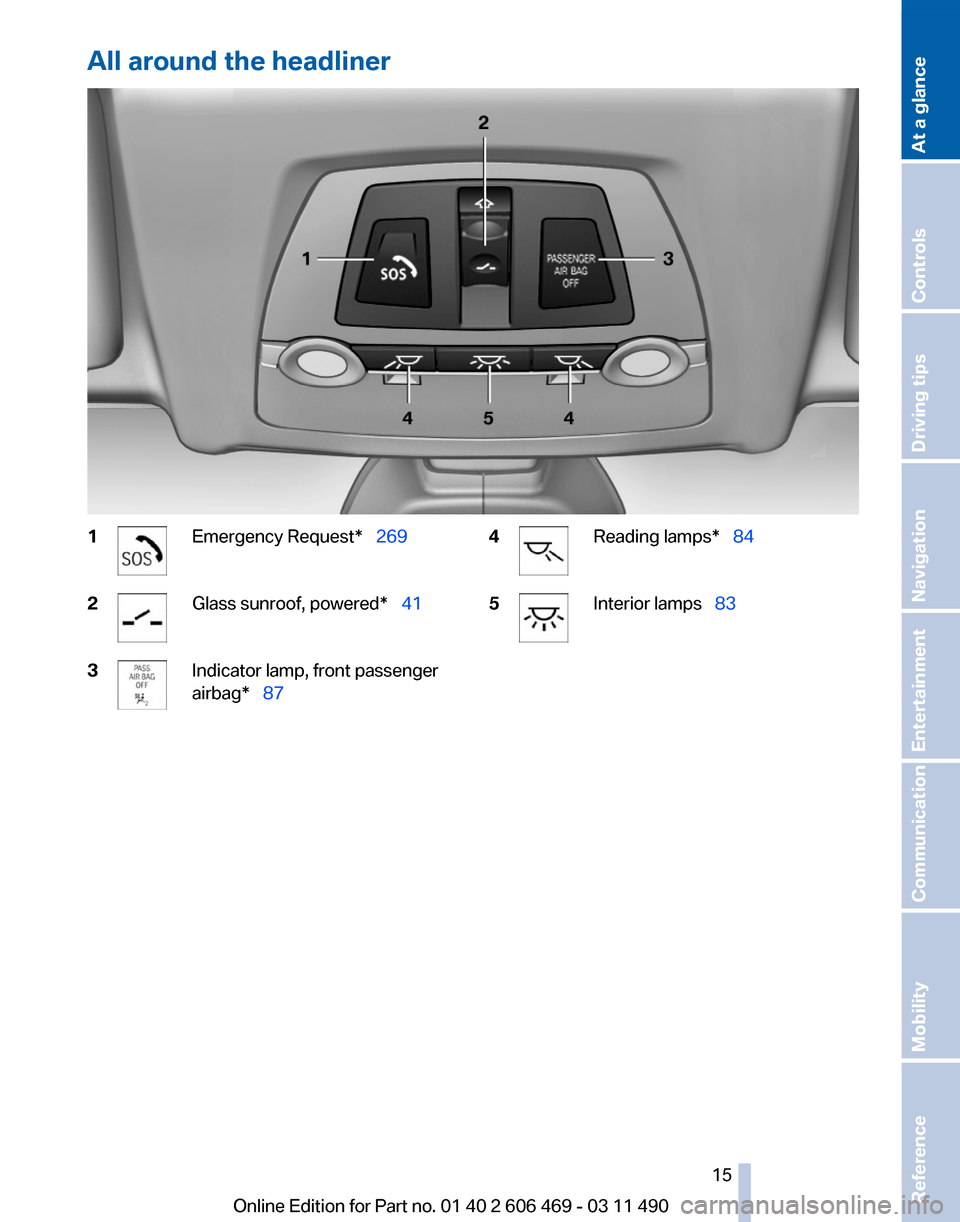
All around the headliner
1 Emergency Request* 269
2 Glass sunroof, powered*
41
3 Indicator lamp, front passenger
airbag* 87
4 Reading lamps*
84
5 Interior lamps 83
Seite 15
15Online Edition for Part no. 01 40 2 606 469 - 03 11 490
Reference Mobility Communication Entertainment Navigation Driving tips Controls
At a glance
Page 28 of 304

Opening and closing
Remote control/key
Buttons on the remote control
1
Unlocking
2 Locking
3 Trunk lid
4 Panic mode*, headlamp courtesy delay fea‐
ture
General information
The vehicle is supplied with two remote controls
with keys.
Every remote control contains a replaceable
battery.
The settings called up and implemented when
the vehicle is unlocked depend on which remote
control is used to unlock the vehicle, Personal
Profile, refer to page 29.
In addition, information about service require‐
ments is stored in the remote control, Service
data in the remote control, refer to page 260.Integrated key Press the button on the back of the remote con‐
trol, arrow 1, and pull out the key, arrow 2.
The integrated key fits the following locks:
▷
Driver's door.
▷ Storage compartment in the front center
armrest.
The storage compartment contains a switch for
separately securing the trunk lid, refer to
page 37.
Replacing the battery 1.
Take the integrated key out of the remote
control.
2. Push in the catch with the key, arrow 1.
3. Remove the cover of the battery compart‐
ment; see arrow 2.
4. Insert a battery of the same type with the
positive side facing upwards.
5. Press the cover closed.
Take the used battery to a recycling cen‐
ter or to your service center. Seite 28
28 Online Edition for Part no. 01 40 2 606 469 - 03 11 490
Opening and closing
Page 31 of 304

Display profile list during start
The profile list can be displayed during each
start for selecting the desired profile.
1.
"Settings"
2. "Profiles"
3. Open "Options".
4. "Display user list at startup"
Personal Profile settings
The following functions and settings can be
stored in a profile.
More information on the settings can be found
under:
▷ Active Cruise Control: collision warning, re‐
fer to page 108.
▷ Exterior mirror position, refer to page 51.
▷ CD/Multimedia, refer to page 181: audio
source listened to last.
▷ Dynamic Driving Control: sport program, re‐
fer to page 99.
▷ Driver's seat position, refer to page 33: au‐
tomatic retrieval after unlocking.
▷ Programmable memory buttons, refer to
page 20: assignment.
▷ Head-up Display, refer to page 124: selec‐
tion, brightness and position of the display.
▷ Headlamp courtesy delay feature, refer to
page 80: time setting.
▷ Tone, refer to page 172: tone settings.
▷ Automatic climate control, refer to
page 126: settings.
▷ Steering wheel position, refer to page 53
▷ Navigation, refer to page 154: map views,
route criteria, voice output on/off.
▷ Night Vision with pedestrian detection, refer
to
page 122: selection of functions and type
of display.
▷ Daytime running lights*, refer to page 81:
current setting.
▷ Park Distance Control PDC, refer to
page 173:
adjusting the signal tone volume. ▷
Radio, refer to page 174: stored stations,
station listened to last, special settings.
▷ Backup camera, refer to page 113: selec‐
tion of functions and type of display.
▷ Side View, refer to page 117: selection of
the display type.
▷ Language on the Control Display, refer to
page 79.
▷ Lane departure warning, refer to page 91:
last setting, on/off.
▷ Active Blind Spot Detection, refer to
page 92: last setting, on/off.
▷ Triple turn signal activation, refer to
page 62.
▷ Locking the vehicle, refer to page 35: after
a brief period or after starting to drive.
Central locking system
The concept
The central locking system becomes active
when the driver's door is closed.
The system simultaneously engages and re‐
leases the locks on the following:
▷ Doors.
▷ Trunk lid.
▷ Fuel filler flap.
Operating from the outside
▷ Via the remote control.
▷ Via the driver's door lock*.
▷ Via the door handles*.
▷ Via the button in the trunk lid*.
The following takes place simultaneously when
locking/unlocking the vehicle via the remote
control:
▷ Anti-theft protection is switched on/off.
Doors cannot be unlocked using the lock
buttons or the door opener.
▷ The welcome lamps, interior lamps and
courtesy lamps* are switched on and off.
Seite 31
31Online Edition for Part no. 01 40 2 606 469 - 03 11 490
Reference Mobility Communication Entertainment Navigation Driving tips
Controls At a glance
Page 32 of 304

▷
The alarm system*, refer to page 39, is
armed or disarmed.
Operating from the inside Via the button for the central locking system.
If the vehicle has been locked from inside, the
fuel filler flap remains unlocked.
If an accident of a certain severity occurs, the
central locking system unlocks automatically.
The hazard warning system and interior lamps
come on.
Opening
and closing: from the
outside
Using the remote control
General information
Take the remote control with you
People or animals left unattended in a
parked vehicle can lock the doors from the in‐
side. Always take the remote control with you
when leaving the vehicle so that the vehicle can
then be opened from the outside.◀
Unlocking
Press the button.
The vehicle is unlocked.
You can set how the vehicle is to be unlocked.
The setting is stored for the remote control cur‐
rently in use.
1. "Settings"
2. "Door locks" 3.
"Unlock button:" 4.
Select the desired function:
▷"Driver's door only"
Only the driver's door and the fuel filler
flap are unlocked. Pressing again un‐
locks the entire vehicle.
▷ "All doors"
The entire vehicle is unlocked.
Convenient opening
The remote control can be used to simultane‐
ously
open the windows and the glass sunroof*.Press and hold the button on the re‐
mote control.
The windows and the glass sunroof* open.
Releasing the button stops the motion.
Locking Press the button on the remote control.
Do not lock from the outside
Do not lock the vehicle from the outside if
there are people in it, as the vehicle cannot be
unlocked from inside without special knowl‐
edge.◀
Switching on the interior lamps,
courtesy lamps*, and welcome lamps
Press the button on the remote control
with the vehicle locked.
Panic mode*
You can trigger the alarm system if you find
yourself in a dangerous situation. Seite 32
32 Online Edition for Part no. 01 40 2 606 469 - 03 11 490
Opening and closing
Page 33 of 304

Press the button on the remote control
for at least 3 seconds.
To switch off the alarm: press any button.
Switching on the headlamp courtesy
delay feature Briefly press the button on the remote
control.
The duration can be set in the Control Display.
Opening the trunk lid Press
the button on the remote control
for approx. 1 second and release.
The trunk lid opens, regardless of whether it was
previously locked or unlocked.
During opening, the trunk lid pivots back and up.
Ensure that adequate clearance is available be‐
fore opening.
In some vehicle equipment variants, the trunk lid
can only be opened using the remote control if
the vehicle was unlocked first.
To avoid locking yourself out of the vehicle, do
not place the remote control into the cargo area.
The trunk lid is locked again as soon as it is
pushed closed.
Confirmation signals from the vehicle
1. "Settings"
2. "Door locks"
3. Deactivate or activate the desired confirma‐
tion signals.
▷"Acoustic sig. lock/unlock"
▷ "Flash when lock/unlock" Retrieving the seat, mirror, and
steering wheel settings
The driver's seat, exterior mirror, and steering
wheel positions selected last are stored for the
currently used remote control.
When the vehicle is unlocked, these positions
are automatically retrieved if this function was
activated.
Pinch hazard when moving back the seat
If
this function is used, first make sure that
the footwell behind the driver's seat is empty.
Otherwise, people can be injured or objects
damaged when the seat is moved back.◀
The adjustment procedure is interrupted:
▷ When a seat position switch is pressed.
▷ When a button of the seat, mirror, and steer‐
ing wheel memory is pressed briefly.
Activating the setting
1. "Settings"
2. "Door locks"
3. "Last seat position auto." Malfunction
If the vehicle can no longer be locked or un‐
locked
with the remote control, the battery may
be discharged or there may be interference from
external sources such as mobile phones, metal
objects, overhead power lines, transmission
towers, etc.
If this occurs, unlock or lock the vehicle at the
door lock using the key. Seite 33
33Online Edition for Part no. 01 40 2 606 469 - 03 11 490
Reference Mobility Communication Entertainment Navigation Driving tips
Controls At a glance