2011 AUDI TT ROADSTER instrument cluster
[x] Cancel search: instrument clusterPage 172 of 260

170 Cleaning and protection
-Serious injuries can result if plastic parts
come loose when the airbag is deployed.
- Always read and heed all WARNINGS and
the information
¢page 162.
(D Note
Cleaning agents containing solvents will
attack the material and can change the
way it behaves.
Instrument cluster glass
~ Clean the glass with a soft, damp cloth .
In order to preserve the anti-glare properties
of the instrument cluster glass, it should only
be cleaned with a soft, damp cloth.
Natural leather
Applies to vehicles: with natural leather
Audi makes great efforts to maintain the
properties , natural look and feel of interior
leather.
General
We offer many different types of leather on
our vehicles. Most are different types of nappa
leather, which has a smooth surface and
comes in various colors .
The intensity of the color determines the visu
al characterist ics and appearance. If the sur
face of the leather has a typical natural look,
then the leather is a nappa leather that has
been left in a relatively natural condition. This
leather offers par ticularly good com fort and
breathes well . Fine veins, closed grains , insect
bites, skin folds , and subtle variations in color
remain visible. These characteristics demon
strate that the material is natural.
Natural nappa leather is not covered by a col
or finish .
It is therefore more sensitive to soil
ing and wear, which is something you need to
consider if children, animals or other factors
might prove to be particularly hard on the
leather.
By contrast, leather types that are covered by
a colored finish layer are more durable. This has a positive effect on the leather's resist
ance to wear and soiling in daily us
e. On the
other hand, the typical characteristics of natu
ral leather are barely or not apparent. Howev
er, this does not mean that the leather itself
is of inferior quality .
Care and handling
Because of the exclusive nature of the types of
leather that Audi uses and their unique prop
erties (such as sensitivity to oils, grease, soil
ing, etc.), you will need to be somewhat care
ful with these leathers, and a certain type of care is required. For example, dark clothing
materials can discolor leather seats (especial
ly if such clothing is damp and was not dyed
correctly) . Dust and dirt particles in pores,
folds, and seams can have an abrasive effect
and can damage the leather surface as well as
weaken seams.
The leather should be cleaned regularly as
needed. After having been used for a relatively
long time, your leather seats will acquire a
rich aged finish. This is a characteristic of nat
ural leather and a sign of true quality .
In order to maintain the value of this natural
product over the life of your vehicle, you
should follow the recommendations below:
(D Note
- To keep your leather from bleaching out,
do not allow it to be exposed to bright
sunlight for long periods of time. If you
have to leave the vehicle parked outside
for long periods, cover the leather to
protect it from direct exposure to sun
light .
- Sharp objects on clothing, such as zip
pers, rivets or sharp pieces on belts can
leave permanent scratches or scrape
marks on the surface of the leather.
(l) Tips
-After each time you clean the leather and
at regular intervals, use a leather preser
vative creme that contains UV-blockers
and that works into the leather. This
Page 214 of 260
212 Tires and wheels
Tire pressure
monitoring system
General notes
Appl ies to vehicles: with tire pressure monitoring system
Each tire, including the spare (if provided),
should be checked monthly when cold and in
f lated to the inflation pressure recommended
by the vehicle manufacturer on the vehicle
placard or tire inflation pressure label. (If your
vehicle has t ires of a different size than the
size indicated on the vehicle placard or tire in
flation pressure label, you should determine
the proper tire inflation pressure for those
tires.)
As an added safety feature, your vehicle has
been equipped with a tire pressure monitoring
system (TPMS) that illuminates a low tire
pressure telltale when one or more of your
tires is significantly under-inflated. According
ly, when the low tire pressure telltale illumi
nates, you should stop and check your tires as
soon as possible, and inflate them to the proper pressure. Driving on a significantly un
der-inflated tire causes the tire to overheat
and can lead to tire failure. Under-inflation al
so reduces fuel efficiency and tire tread life,
and may affect the vehicle's handling and
stopping ability.
Please note that the TPMS is not a substitute
for proper tire maintenance, and it is the driv
er's responsib ility to ma inta in correct tire
pressure , even if under-inflation has not
reached the level to trigger illumination of the
TPMS low tire pressure telltale.
Your veh icle has also been equ ipped with a
TPMS malfunction indicato r to indicate when
the system is not operating properly. The
TPMS malfunction indicato r is combined with
the low tire pressure telltale. When the sys
tem detects a malfunction, the telltale will
f lash for approximately one minute and then
remain continuously illuminated. This se
quence will continue upon subsequent vehicle
start-ups as long as the ma lfunction exists. When the
malfunction indicator is illuminat
ed, the system may not be ab le to detect or
s ignal low tire pressure as intended. TPMS
malfunctions may occur for a variety of rea
sons, including the installation of replace
ment or alternate tires or wheels on the vehi
cle that prevent the TPMS from functioning
properly. Always check the TPMS malfunction
telltale after replacing one or more tires or
wheels on your vehicle to ens ure that the re
placement or alternate ti res and wheels allow
the TPMS to continue to function properly.
Tire pressure indicator appears
Applies to veh icles : w ith tire pressure monitoring system
The tire pressure indicator in the instrument
cluster informs you if the tire pressure is too
low or if there is a system malfunction.
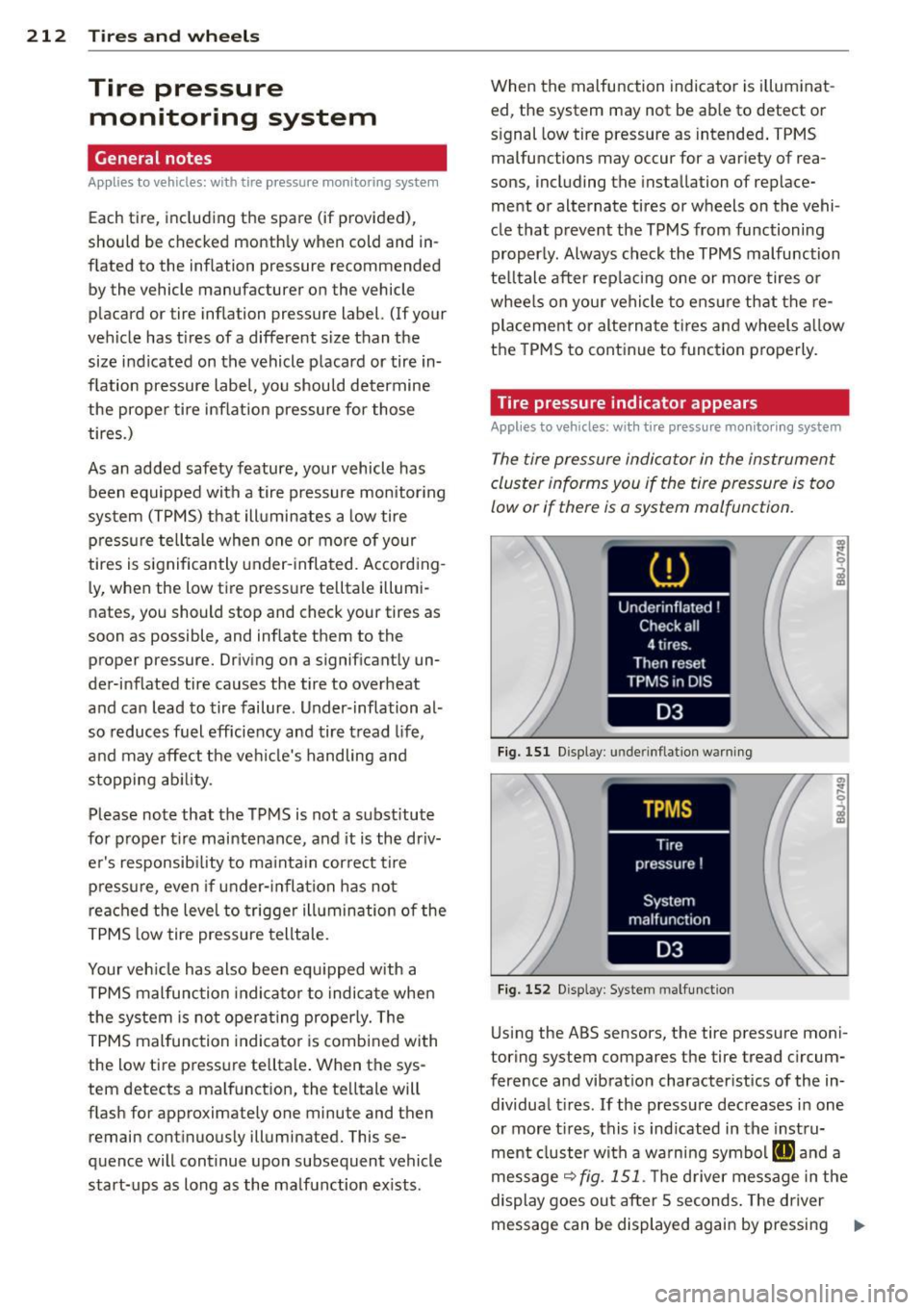
Fig. 151 Display : underinflatio n warning
Fig. 152 Display: System malfunction
Using the ABS sensors, the tire pressure moni
toring system compares the tire tread circum
ference and vibration characteristics of the in dividual tires. If the pressure decreases in one
or more t ires, this is indicated in the instru
ment cluster with a warning symbol
g and a
message
r=:> fig. 151. Th e driver message in the
display goes out after 5 seconds. The driver
message can be displayed again by pressing
11--
Page 215 of 260

the !CHECK I button @c:> page 10, fig. 3. If on
l y one tire is affected, the display will indicate
its pos ition.
The tire p ress ure moni to ring m ust be reset in
the menu display each time the pressures are
adjusted (e .g. when switc hing between parti
a l and full load pressure) or after chang ing or
replac ing a tire on your vehicle
c:> page 214.
You can find the recommended tire pressures
for your vehicle on the label on the driver's
door p illar
c:> page 198.
Tire tread circumference and vibration charac
ter istics can change and cause a tire pressure
warn ing if:
- the tire pressure in one or more t ires is too
low,
- the tire has structural damage,
- the tire pressure was changed, whee ls rotat -
ed or replaced but the TPMS was not reset
c:> page 214 .
Warning symbol s
[@] Loss of pressure in at least one tire c:> ,&..
Check the ti re or tires and rep lace or repair if
necessary . The indicator light
RI] in the instru
ment cluster also illuminates
r=:>page 13.
Check/correct the pressures of all four tires
and reset TPMS in the menu display.
11@1@1 < T ire Pressure Monitoring Sys tem) Tire
p re ss ure! Sy stem malfunction. JfllAl@ ap
pears after switching the ignition on or while
driving
r=:> fig. 152 and the indicator light RI] in
the instrument cluster blinks for approxi
mately one minute and then stays on, there is
a system malfunction . See your author ized
Aud i dealer as soon as possible.
.&, WARNING
- If the t ire pressure indicator appea rs in
the instrument cl uster d isplay, one or
more o f you r tires is s ignificantly under
inflated. Reduce your speed immediately
and avoid any hard steering or bra king
maneuvers. Stop as soon as possible and
check the t ires and the ir pressures. In
flate the tire pressure to the proper pres-
.
Tire s an d wheel s 213
sure as indicated on the vehicle's tire
pressure labe l
r=:>page 198. Driving on a
significantly under-inflated tire causes
the t ire to overheat and can lead to tire
fa ilure . Unde r-inflation also is l ikely to
impair the vehicle's handling and stop
ping ability.
- The d rive r is respons ib le for maintaining
the co rrect tire pressures. You must
check the tire pressures regularly.
- Unde r ce rtain conditions (such as a spo r
ty driving style, winter conditions or u n
p aved roads), the pressu re monitor indi
ca tor may be delayed.
- Ask you r authorized Aud i dea le r i f run
f lat tires may be used on your vehicle.
Your vehicle registration becomes invalid
if you use these t ires when not perm it
ted. Damage to your vehicle or accidents
could a lso result.
- If you switch between standard and run
flat tires, an autho rized Audi dealer o r
qualified workshop must reprogram the
contro l modu le.
(D Tips
- The tire pressure monitor ing system
stops work ing when there is an ESP/ABS
ma lfunction.
- Us ing snow c hains may res ult in a system
ma lfunction.
- Tires wit h the identification "AO" or "RO"
have been specially matched with yo ur
Audi. We recommend using on ly these
tires because they meet the highest
standards regarding safety and dr iv ing
character istics when used correctly. Your
authorized Audi dealer wi ll gladly pro
vide you with more information .
•
•
Page 222 of 260
220 What do I do now?
Preliminary steps
Applies to vehicles: with T ire Mobility System
Some preliminary steps are necessary for tire
repair .
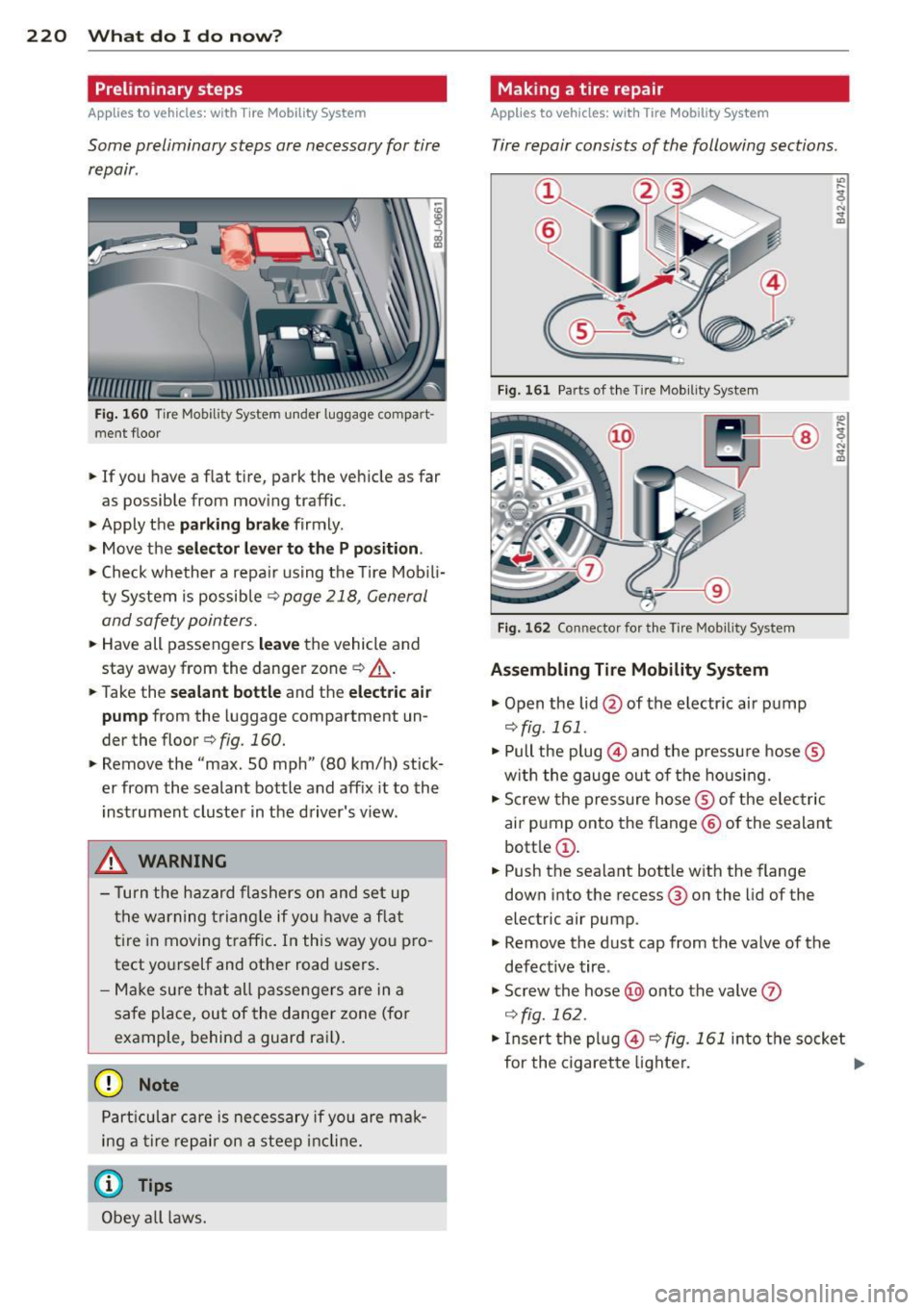
Fig. 160 Tire Mobili ty System under luggage co mpart
men t floor
• If you have a flat tire, park the vehicle as far
as possible from mov ing traffic .
• Apply the
park ing brake firmly .
• Move the
selector lever to the P position .
• Check whether a repa ir using the Tire Mobili
ty System is possible
¢ page 218, General
and safety pointers.
• Have all passengers leave the vehicle and
stay away from the danger zone ¢
_A.
• Take the sealant bottle and the electric air
pump
from the luggage compartment un
der the floor
c> fig. 160.
• Remove the "max. 50 mph" (80 km/h) stick
er from the sealant bottle and aff ix it to the
instrument cluster in the driver's view .
..&, WARNING
- Turn the hazard flashers on and set up
the warning triangle if you have a flat
tire in moving t raff ic. In this way you pro
tect yo u rs elf and other road users .
- Make sure that all passengers are in a
safe place, out of the danger zone (for
example, behind a guard rail).
(D Note
Particular care is necessary if you are mak
ing a tir e repair on a steep incline.
@ Tips
Obey all laws.
Making a tire repair
Applies to vehicles: with Tire Mob ility System
Tire repair consists of the following sections .
Fig. 161 Parts of the Tire Mob ility System
Fig . 1 62 Con nector for the Tire Mob ility System
Assembling Tire Mobility System
• Open the lid @of the electr ic air pump
c>fig . 161 .
• Pull the plug@) and the pressu re hose ®
w ith the gauge out of the housing.
• Screw the pressure hose® of the electric
air pump onto the flange@ of the sealant
bott le @ .
• Push the sealant bott le with the flange
down into the recess @ on the lid of the
electric air pump.
• Remove the dust cap from the valve of the
defective tire .
• Screw the hose @) onto the valve
• In sert the plug @ c> fig. 161 into the socket
for the cigarette lighter. .,.
Page 229 of 260

Fuses and bulbs
Electrical fuses
Replacing fuses
Fuses that have blown will have metal strips
that have burned through.
Fig. 170 End face of instrument panel: removing cover
p late to access fuses
Fig. 171 Left side of eng ine compart ment: fuse cove r
Fuse cover on the left end face of the
instrument panel
.. Switch off the ignition and the electrical
component affected .
.. Carefully pry the fuse cover off the instru
ment panel using the ignition key or a
screwdriver ~
fig. 170.
.. Check the fuse list ing on the next pages to
find o ut which f use belongs to the compo
nent which has failed ¢
page 228, Fuse Lo
cation, Instrument Panel left .
.. Remove the blown fuse with the plastic clip
provided. The clip is located on the holder in
the fuse box.
.. Replace a blown fuse (recognizable by the
melted metal str ip inside) with a fuse of the
same amperage .
.. Firmly snap the cover back onto the instru
ment pane l face .
Fuse s and bulbs 22 7
Fuse cover in engine compartment
.. Switch the ignit ion and the affected con
sumer off .
.. Unlatch the fuse cover, p ush the two slides
forward
~ fig. 171.
.. Find out which fuse belongs to the equip
ment which stopped working
~ page 229,
Fuse location, le~ side of engine compart
ment.
.. Remove the plastic from its retainer in the
fuse box cove r (left face end of the instru
ment panel), place it on the f use in question
and pull it out .
.. If the fuse is burned out (recognizable by
melted strips of metal), replace it with a
new fuse
of the same rating.
.. Replace the fuse cover .
.. Push the two slides to the rear¢
fig. 171.
Install the fuse cover carefully to prevent
water from enter ing .
The various electrical circuits are protected by
fuses. The fuses are clustered in a centralized unit. The unit is located behind the face panel
at the end of the instrument panel.
Two spare fuses and a sticker identifying the
fuses are located on the inside of the fuse box
cover.
You are well advised to keep a supply of spare
fuses in your vehicle. Fuses with the proper ampere ratings are available at your author
ized Audi dealer .
A WARNING
Do not repair fuses and never replace a
blown fuse with one that has a higher amp
rating. Th is can cause damage to the elec
trical system and a fire .
(D Note
If a new fuse burns out again after short ly
have you have installed it, have the electri
cal system checked by your authorized Au
di dealer .
Page 231 of 260

No.
25
Heater rear window Coupe/
heated rear window Roadster
26 Driver's side power window
27 Passenger's side power window
28 Not used
29 Washer pump
30 Cigarette lighter
31 Starter
32 Steering column module
33 Instrument cluster
34 Radio navigation system, radio
35 Audio amplifier
Engine (control unit)
37 CAN (Gateway)
38 Cigarette lighter
39 Not used
40 Not used
41 Not used
42 Not used
43 Not used
44 Not used
45 Not used
46 Not used
47 SOARS tuner, cell phone p ack-
age, TV tuner
48 VOA interface
49 N ot used
Fuse location, left side of engine
compartment Amps
30/20
30 15
40
30 10 5
20
-
5
5
F ig. 173 Illustrat ion of fuse holder on left side of en
g ine co mpa rtment : fuses (without fuse cover)
Fuse s and bulb s 229
Some of the equipment items listed are op
tiona l or only avai lab le on certain model con
figurations.
Note tha t the foll owing table i s ac cur ate at
the time of going t o press and is subject to
change . In the event of di screpancie s, the la·
bel on the inside of the cover always takes
precedence.
No . Equipment Amps
Fuse holder (black )
1 Notused -
----------'
2 Not used
3 Not used
4 Not used
Anti-theft warning system (sen-
5 sor), anti-theft wa rning system
(horn)
6 H eadlamp washer system
7
Electric fuel pumps (supply)/
volume control valve
8 W indshield wipers
9
Heated seats (driver and pas-
senger)
10
L umbar support (driver a nd
passenger)
11 Not used
12 Vent ilation blower
Fuse holder (brown )
1
2
3
4
5
6
7
9 N
ot used
Not used
Not used
Not used
Relay coil relay volume contro l
va lve
Position ing valves pre-wired en
g ine harness
I gnition coils
Eng ine (control unit)
10 Water pump delayed-off
5
30
15/10
30
25
10
40
-
5
10
10
20
25 10
1111-
Page 252 of 260

250 Index
Washer system . . . . . . . . . . . . . . . . . . . . . 62
Xenon headlights . . . . . . . . . . . . . . . . . . . 53
H ead restraints . ........... .... .... . 101
Adjusting .. ............. .. .. .. .. . 101
Heated front seats (climate control) . . . . . . . . . .
79
rear window . . . . . . . . . . . . . . . . . . . . . . . 79
Heated outside mirrors ..... .... .... .. 59
Heated seats . . . . . . . . . . . . . . . . . . . . . . . .
79
Heated washer jets
W iper and washer system .. .. .. .. .. . . 60
Heating ... .. ................ ..... .. 75
H igh beam . . . . . . . . . . . . . . . . . . . . . . 53, 55
Warn ing/ indicator l ights . .. .... .. .. .. 15
High voltage warn ing label ...... .. .. . 237
Hill Descent Assist .......... ... .... ..
90
H omeLink ® universal remote control . . . . 94
Hood
Opening . .. ..... ........... ... .. . 178
Release lever .. .... ...... .. .. .. .. . 178
Horn .. ... .................. ..... .. .
8
H ow many airbags does my vehicle have? 121
How often should I check my tire pres-
sures? .. .. .. ................ ... ... 201
How safety belt pretensioners work ... . 113
H ydroplaning 204
I
Ignition key . . . . . . . . . . . . . . . . . . . . . . . . . 80
Ignition key safety lock ..... .. .. .... .. 81
I gnition lock . . . . . . . . . . . . . . . . . . . . . . . . 80
Ignition lock pos itions . . . . . . . . . . . . . . . . 80
Immobilizer ................ .. .... .. 12
Important things to do before driving . . . 98
Improperly worn safety belts . .. .. .. .. . 112
I ndicator light
Airbag system . . . . . . . . . . . . . . . 125, 126
Audi magnetic ride ......... ... .... .. 14
C lutch overheating . . . . . . . . . . . . . . . . . . 92
PASSENGER AIR BAG OFF .. .... .... . 126
I ndicator lights ............ .. .. .. .. .. 13
Red symbols in the center disp lay .... . . 29
Ye llow symbols in the center disp lay ... 29
Infant seats . ... .......... .. .. .. .. . 141
Inside rearview mirror ...... .. .. .... .. 58 Installing child safety seats
Safety be lts . . . . . . . . . . . . . . . . . . . . . . 144
Instrument cluster and controls ... .... . 10
Instrument panel illumination .... .... . 57
Instruments and controls General illustration . . . . . . . . . . . . . . . . . . 8
Interior lights . . . . . . . . . . . . . . . . . . . . . . . 56
Luggage compartment ............. . 57
J
Jump-starting . .. .. ..... ....... ... .. 231
Jumper cables ... .. ............. .... 232
K
Key ........ .... .. .................. 35
Battery replacement .............. .. 36
Convenience opening and closing of pow-
er top .... ...... ............. .... . 48
Convenience opening and closing of win-
dows ........ ... .. ................ 44
Emergency key ... ....... ...... .. .. . 35
Key replacement .............. ..... 35
Master key ....................... . 35
Valet key .. .. .. .. ... .......... .... . 35
Keyless entry remote control .. .. ... ... . 35
Kick -down . . . . . . . . . . . . . . . . . . . . . . . . . . 91
Knee air bags .. .. .. ... .......... .... 130
Description .. .. .. ............. .. .. 130
How they work ... ................ . 131
Important safety instructions ........ 132
L
Lap timer ... .. .. .. ............. .. .. . 25
Launch Control Program ... ...... .. .. . 91
Leather . . . . . . . . . . . . . . . . . . . . . . . . . . . 170
Cleaning ......................... 171
Leaving home ..... ............. .... . 54
Lifting jack . .... .. .. ... ... ..... .. .. 223
Lifting vehicle ..... ................ . 236
Light/rain sensor defective ........... . 34
Lights . .... .... .. ............. .... . 53
Coming/Leaving home . . . . . . . . . . . . . . . 54
Emergency flasher . . . . . . . . . . . . . . . . . . 56
Exterior lighting . . . . . . . . . . . . . . . . . . . . 54
Front fog lights . . . . . . . . . . . . . . . . . . . . 55