2011 AUDI S8 parking brake
[x] Cancel search: parking brakePage 126 of 302

124 Homelink®
Homelink®
Universal remote
control
General information
Applies to vehicles: with Home link® universal remote
control
The Homelink universal remote control can
be programmed with hand -held transmitters
from existing equipment.
Using the Homelink universal remote control,
you can operate equipment such as garage
doors, property gates and house lights from
ins ide your vehicle .
Using the Homelink universal remote control,
you can replace up to three separate hand
held transmitters for equipment on your
property with just one universal remote con
trol. Most of these transmitters are used to
ope rate ga rage doo rs and property gates. The
individual transmitters are programmed at
the front bumper. That is where the control
module is located.
The transmitters must be programmed first in
order to operate systems using the Homelink
universal remote control.
.&_ WARNING
-
-Never use the Homelink ® transmitter
with any garage door opener that does have not the safety stop and reverse fea
ture as required by federal safety stand
ards . This includes any garage door open
er model manufactured before April 1, 1982.
- A garage door opener which cannot de
tect an object, signa ling the door to stop
and reverse does not meet current feder
al safety standards . Using a garage door
opener witho ut these features increases
risk of serious injury or death.
- For safety reasons never release the
parking brake or start the engine while
anyone is standing in front of the vehicle .
- A garage door or an estate gate may
sometimes be set in motion when the Homelink
® remote control is being pro
grammed. If the device is repeatedly ac
tivated, this can overstrain motor and
damage its electrical components - an
overheated motor is a fire hazard!
- To avoid possible injuries or property
damage, please always make absolutely
certain that no persons or objects are lo
cated in the range of motion of any
equ ipment being operated.
(D Tips
- If you would like additional information
on the Homelink ® Universal Transceiver,
Homelink compatible products, or to
purchase other accessories such as the
Homelink ® Light ing Package, please
contact Homelink at 1-800 -355-3515 o r
on the Internet at www.homelink .com.
- For Declaration of Comp liance to United
States FCC and Industry Canada regula
tions ¢
page 286.
Page 127 of 302

Programming transmitters
Applies to vehicles: with Horne link
You con program the buttons in the Home
Link universal remote control located in the
vehicle headliner.
F ig. 1 34 Co ntro l u ni t in th e headlin er
Fi g. 1 35 Left front a rea of t he b um per
Programming a button
• Make sure your veh icle is within operating
range of the remote controlled garage door
opener.
• Set the parking brake¢&.
in General infor
mation on page 124.
• Switch the ign ition on. Do not start the en
gine!
• There are two ways to program a button :
press the button that you wou ld like to pro
gram . The MMI will display instructions to
guide you through the programm ing . Or
• Se lect :
I CAR I funct ion but ton> Car system s
control button > Vehi cle setting s > Garage
door opener > Program gar age d oor op en
er .
• Se lect the b utton that you wo uld like to pro
gram.
• Follow the instructions in the MMI.
• If the garage door open ing must also be
synchronized w it h the Homelink module,
Homelink ® 125
refer to the owner's manua l for the garage
door opener .
Using the programmed button
• Press the p rogrammed butto n c;;> 6_ in Gen
eral information on page 124
to open the
garage door . The light @will b link or turn
on.
• Press the button again to close the garage
door
¢ &. in General information on
page 124.
Erasing the button programming
• Select: I CAR I function button > Car sy ste m s
function key > Vehicle setting s > Garage
doo r opener
> Clear p rogr am sett ings >
Y e s.
Displaying the ver sion /status /country
code
• Select: !CAR ! function button > Car systems
contro l button > V ehicle settings > Garage
door ope ner > V ersion in form ation .
You can program both fixed code and rolling
code systems using these instructions.
Programming a button
The requ ired distance between the handhe ld
transmit ter and the Homeli nk modu le in the
bumpe r depends on the system that you are
programming . You may have to try severa l
times.
Each of the buttons can be reprogrammed in
dividually. The procedure is the same as fo r in
itia l programming.
r::!:> page 125, Programming
a button.
Erasing the button programming
Ind ividual buttons can be reprogrammed. Fol
low the same steps used when first program
ming the button.
If you would like to erase all prog rammed but
t ons at the same time, sele ct Erase bu tton
programming .
Page 196 of 302

194 Intelligent technology
been damaged, the brake pedal must be
pressed considerably harder to make up
for the lack of booster assistance.
Servotronic ® -
advanced power
steering system
The power steering systems use the power of
the running engine to allow precise steering
with little effort .
The advanced Servotronic® power steering
system senses the road speed and e lectroni
cally adjusts power assistance to prov ide com
fortable and safe steering response exactly
matched to the veh icle speed.
Power steering w ill not work if the eng ine is
off . As a result, the steering whee l wi ll be hard
to turn.
The power steering fluid level is checked dur
ing the scheduled maintenance serv ices.
([) Note
If there is an electronic malfun ct ion, ser
votronic
w ill still f unction like a conven
tional power steer ing system, providing a
constant steering support force that is no
longer proportionate to the vehicle speed.
This is most noticeab le when turning the
steer ing whee l at low speeds (for examp le
when parking), - more effo rt will be re
qui red than usua l.
- Be aware of the different than usual
stee ring response and adjust yo ur stee r
i ng fo rce accord ingly.
- Have the p roblem checked and set rig ht
by an Aud i deale r as soon as possib le.
(D Tips
- When the engine is runn ing, never hold
t h e steer ing whee l turned all the way to
the right or to the left for longer than 15
se conds. The power steer ing p ump w ill
ove rhe at the hydr aulic flu id if you keep
ho ld ing the steering whee l turned all the way
. This is likely to damage the power
steering system .
- If the powe r steering system sho uld fai l
entirely, o r if the engine is not runn ing
(for examp le, whi le being towed), you
w ill sti ll be able to steer the veh icle.
However,
considerably more effort will
be required to do so.
- If the power steering system sho uld
have a leak, or is not functioning proper
ly, contact your author ized Audi dealer
immed iately.
- The power steering system requ ires a
specially fo rmu lated hydraulic fluid. The
powe r stee ring fluid reservoir is locat ed
in the engine compartment
Q page 224.
T he corre ct fl uid level i n the reservoir is
impo rta nt fo r proper fu nctioning of the
powe r stee ring .
Driving with your
quattro ®
With All Wheel Drive, all four wheels are driv
en .
Gen eral information
With A ll W heel Drive, power is distributed to
all four wheels. This happens automatically
depending on your driving style and the road
condit ions at the time. See also
Q page 190.
With the sport different ial*, powe r distribu
tion to the rear wheels is variable and can be
adjusted with Audi drive select*
Q page 106 .
Winter tires
When driving in the winter, yo ur vehicle with
All Wheel D rive has an advantage, even w ith
r egular tires . In wi nter road conditions it may
be advisable to mount winter tires (or all-sea
son tires) for improved driveability and brak
i ng : these tires must be mo unted o n
all four
wheel s. See also q page 253, Winter tires.
Tire chains
Where tire chains are mandatory on certa in
roads, this no rma lly also app lies to veh icles
with All Wheel D rive
q page 254, Snow
chains .
Page 207 of 302

Parking on a slope
Do not pork on a slope with a trailer. If it can
not be avoided, do so only ofter doing the fol
lowing:
When parking:
.. Apply the foot brake .
.,. Have someone place chocks under both the
vehicle and the trailer wheels .
.,. With chocks in place, slowly release the
brakes until the whee l chocks absorb the
load .
.. Turn the wheels towa rds the curb .
.. Apply the parking brake .
.. Se lect the
P se lector lever position.
When restarting after parking:
.. Apply the foot brake .
.,. Start the engine .
.. Select the
D se lector lever position .
.. Release the parking brake and slowly pull
out and away from the wheel chocks .
.. Stop and have someone retrieve the wheel
chocks.
If you move the selector lever of the auto
matic transmission to
P before applying
the parking brake and before blocking the
wheels, you may have to use more force
later to move the lever out of the
P posi
tion .
Trailer towing 205
•
•
Page 224 of 302

222 Checking and filling
Checking and filling Engine hood
Releasing the engine hood
The engine hood is released from inside the
vehicle .
Fig. 175 Driver foo twell: release lever
AUD I
Fig. 176 Rocker switch un der the hood
Make sure the wiper arms are not raised up
from the windshield. Otherwise the paint
could be damaged.
.,. Pull the lever under the instrument panel in
the direction of the arrow
¢ fig. 175.
.,. Raise the hood slightly¢,&. .
... Press the rocker switch under the hood up
ward ~
fig. 176. This releases the catch.
... Open the hood.
&_ WARNING
Hot engine coolant can burn you.
- To reduce the risk of being burned, never
open the hood if you see or hear steam
or coolant escaping from the engine compartment . Wait until no steam or
coolant can be seen or heard before care
fully opening the hood .
' Working in the engine compartment
Be especially careful whenever you work in
the engine compartment.
Whenever you must perform any work in the
engine compartment, for example checking
and filling different fluids, there is a risk of injury, burns and accidents. To prevent per
sonal injury always observe the following
WARNINGS. The engine compartment of any
vehicle is a hazardous area
¢ ,&. .
/n.. WARNING
To help avoid injury, before you check any
thing under the hood:
- Turn off the engine.
- Switch off the ignition .
- Apply the parking brake.
- Move selector lever to "P" (Park) .
- Always let the engine cool down. Hot
components will burn skin on contact.
- To reduce the risk of being burned, never
open the hood if you see or hear steam
or coolant escaping from the engine
compartment. Wait until no steam or
coolant can be seen or heard before care
fully opening the hood.
- Keep children away from the engine com
partment.
- Never spill fluids on hot engine compo
nents . They can cause a fire .
- Never touch the radiator fan. The auxili
ary electric fan is temperature controlled
and can switch on suddenly .
- Never open the coolant reservoir cap
when the engine is still warm . The cool
ant system is pressurized and hot cool
ant could spray out.
- Protect your face, hands and arm from
steam or hot engine coolant by placing a
thick rag over the cap when you open the
coolant reservoir.
- If work on the fuel system or the electri
cal system is necessary:
- Always disconnect the battery.
Page 265 of 302

other warning devices to alert other mo
torists.
- Make sure that passengers wait in a safe
place away from the vehicle and well
away from the road and traffic.
- To help prevent the vehicle from moving
suddenly and possibly slipping off the
jack, always fully set the parking brake
and block the wheel diagonally opposite
the wheel being changed. When one
front wheel is lifted off the ground, plac
ing the Automatic Transmission in "P"
(Park) will
not prevent the vehicle from
moving.
- Before you change a wheel, be sure the
ground is level and firm. If necessary,
use a sturdy board under the jack.
- After installing the spare wheel, make
sure that you replace the flat tire/wheel
in its storage area properly and tighten
the knurled retaining screw securely.
@ Tips
Before changing the wheel, you must acti·
vate the jacking mode, so that the auto
matic controls for the Adaptive Air Sus
pension do not make it more difficult to
lift the vehicle with the jack ¢
page 265.
Changing a wheel
When you change a wheel, follow these
quence described below step-by-step and in
exactly that order.
1. Activate the vehicle jack mode
¢ page 265.
2. Remove the decorative wheel cover*. For
more details see also¢
page 264, Deco
rative wheel covers
or ¢ page 264,
Wheels with wheel bolt caps.
3 . Loosen the wheel bolts¢ page 264 .
4. Locate the proper mounting point for the
jack and align the jack below that point
¢page 265.
5. Raise the car with the jack¢ page 265.
6. Remove the wheel with the flat tire and
then install
the spare ¢ page 266.
What do I do now? 263
7. Tighten all wheel bolts lightly.
8.
Lower the vehicle with the jack.
9. Use the wheel bolt wrench and
firmly
tighten all wheel bolts¢ page 264.
10. Replace the decorative wheel cover*.
11. Deactivate the vehicle jack mode in the
MMI:
ICARI function button > Car systems
control button > Servicing & checks> Air
susp.: jack mode> Off .
The vehicle jack mode switches off automati
cally at speeds above 10 km/h .
A WARNING
Always read and follow all WARNINGS and
information¢ .&
in Raising the vehicle on
page 265
and ¢ page 267.
After changing a wheel
A wheel change is not complete without the
doing the following.
.. Store and secure the wheel you replaced in
the spare wheel well.
.. Replace the tools and the jack in their prop
er location.
.. Check the
tire pressure on the spare wheel
immediately after mounting it.
.. As soon as possible, have the
tightening
torques
on all wheel bolts checked with a
torque wrench. The correct tightening tor
que is 90
ft lb (120 Nm).
.. Have the flat tire
replaced as soon as possi
ble .
(D Tips
-If you notice that the wheel bolts a re
corroded and difficult to turn while
changing a tire, they should be replaced
before you check the tightening torque.
- Drive at reduced speed until you have the
tightening torques checked.
•
•
Page 267 of 302
@ Tips
-Never use the hexagonal socket in the
handle of the screwdriver to loosen or
tighten the wheel bolts.
- If a whee l bolt is very tight, you may find
it easier to loosen by carefully pushing
down on the end of the wheel bolt
wrench w ith
one foot only. As you do so,
hold on to the car to keep your ba lance
and take ca re not to slip.
Raising the vehicle
The vehicle must be li~ed with the jack first
before the wheel can be removed .
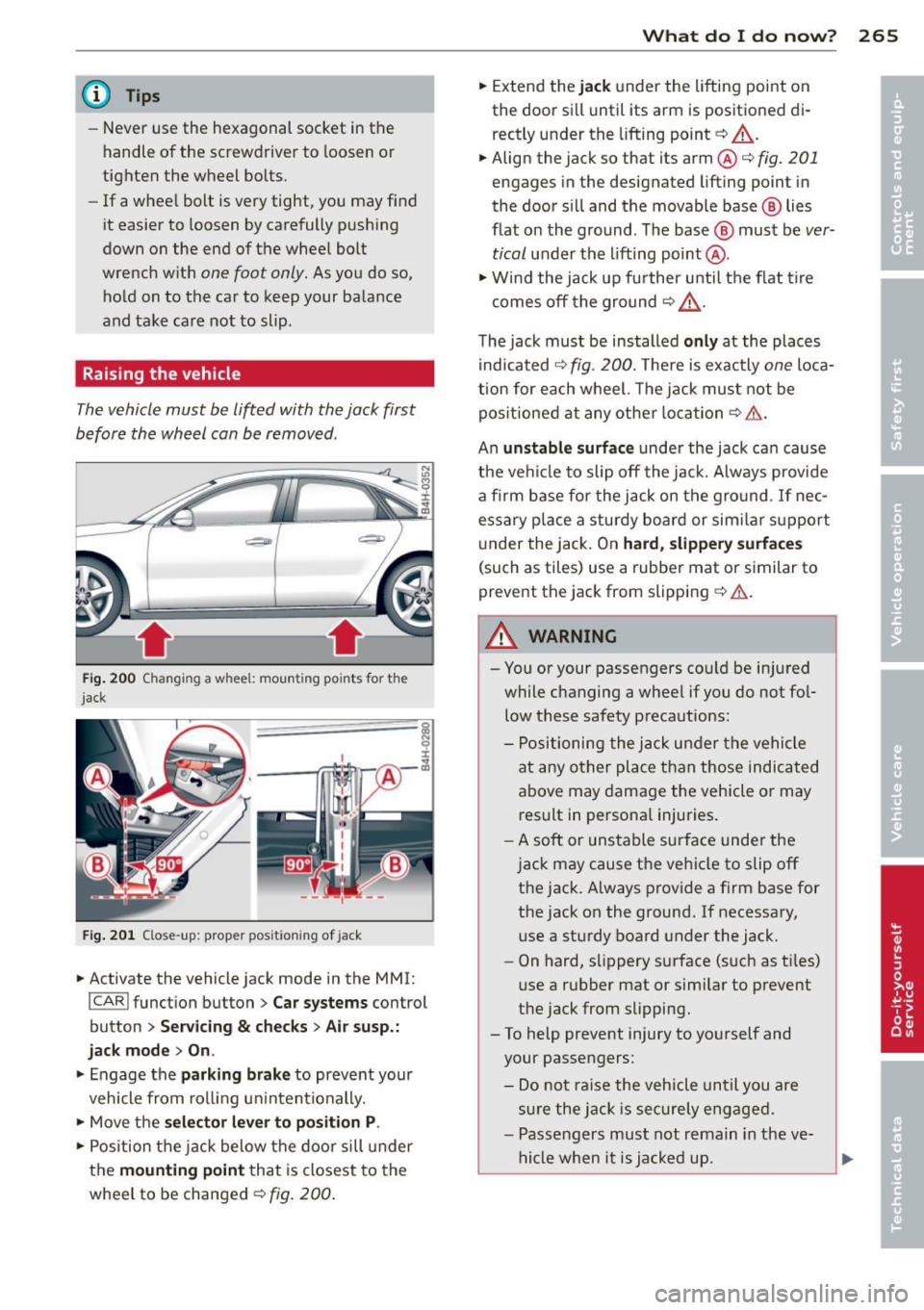
-itr·--
Fi g. 200 Changing a whee l: mou nting po ints fo r the
jack
F ig . 20 1 Close -up: proper positioning of jack
.. Activate the vehicle jack mode in the MMI:
I CAR I function button> Car systems control
button
> Servicing & ch ecks > Ai r susp.:
jack mod e> On.
.. Engage the parking brake to prevent your
vehicle from rol ling un intentionally.
.. Move the
se lector le ver to pos ition P.
.. Position the j ack below the door sill under
the
mounting point that is closest to the
whee l to be changed ¢
fig. 200 .
What do I d o now ? 265
.. Extend the jack under the lifting point on
the door sill until its arm is positio ned di
rectly under the lifting point ¢
A.
.. Align the jack so that its arm@¢ fig. 201
engages in the designated lifting point in
the doo r si ll and the movable base @ lies
flat o n the ground. The base @ must be
ver
tical
under th e lifting point @.
.. Wi nd the jack up fu rther until the flat t ire
comes off the gro und
¢ A_ .
The jack must be installed only at the places
i ndicated
¢ fig . 200. The re is exactly one loca
tion for each wheel. The j ack mus t not be
pos it ioned at any other location
¢ & .
An unstable surface under the jack ca n cause
the vehicle to slip off the jack. Always provide
a firm base for the jack on t he g ro und . If nec
essary p lace a sturdy board or sim ilar support
u nder the jack . On
hard, slipper y surface s
(such as tiles) use a rubbe r mat or similar to
prevent the jack from slipping
¢ & .
A WARNING
- You or your passengers co uld be in jured
while c hanging a wheel if you do not fo l
low these safety precautions:
- Positioning the j ack under the vehicle
at any o ther place than those indicated
above may damage the vehicle or may result in persona l injuries .
- A soft or uns table surf ace unde r the
j ac k may cause the vehicle to slip off
the jack. Always provide a f irm base for
the jack on the ground. If necessary, use a sturdy board under the jack.
- On hard, s lippery surface (such as ti les)
use a rubber mat or similar to prevent
the jack from slipping.
- To help prevent injury to yo urself and
your passengers:
- Do n ot ra ise the veh icle until you are
s ur e the jack is securely engaged .
- Passe ngers must not remain in the ve
h icle when i t is ja cked up.
Page 272 of 302

2 70 Fu ses and bulb s
Luggage compartment fuse assignment
Fig. 208 Luggage co mpar tment: fuse panel with plastic b racket
Fu se pan el A (black ) Fuse panel
@ (b lac k)
I
No.
Equ ipment Amps No
. Equipment
Amps .
l!l button, data logger, diag-
1 nostic con
nector, adaptive
5 10
Rear seat heating, refrigera-
5 j tor, interior rearview mirror
lighting system 11 Dynam
ic steer ing 5
2 Networking gateway
5 12
Selector lever, BCM-2
5
3 adaptive air suspension
5 13 Audi side ass
ist 5
4 Parking system 5 14 Engine control module
5
5 Steering column
lever
5 1
5 Starter 40
I 6 Suspension control system
5
sensor left headlight/Headlight
'
16
10/5
range control system
.
7 Belt tensioners, airbag con-
5
trol module Fuse pan el@ (red)
No. Equipment Amps
Heated washer fluid nozzles,
Homelink (garage door
8 opener), night vision system
5
control module, sport differ- 1
left reversib
le be lt tens ioner
25
2 II
R_ight reversible belt ten-
25
s1oner
ential, ioniser 3
Starter diagnos
is
5
9
Electromechan ica l park ing
5
brake con tro l module 4 DC/DC converter
7,5
5 Adaptive cruise control 7,5