2011 AUDI A5 COUPE steering wheel
[x] Cancel search: steering wheelPage 158 of 362

1111..__T_ r_a _ n_ s_m_ i _s_ s_ io_ n _____________________________________________________ _
Applie s to veh icles : wi th tiptro nic steer ing whe el
Steering wheel with tiptronic
The shift buttons on the steering wheel allow the driver to
shift gears manually.
F ig. 15 0 Steering
wh eel: Sh ift butt ons
- To downshift, touch the button on the left Q.
- To upshift , touch the button on the right G) .
The shift but tons are a ct ivated when the selec to r l ever is in D, Sor in
the manual shift program (t iptronic).
Of course, you can continue to use the manual shift program with the
selector lever on the cente r console. •
Applies to veh icles: w ith automat ic transm ission
Automatic transmission malfunction l
In the event of a system malfunction, the automatic transmission
switches to emergency operation mode.
Gearbox malfunction : you can continue driving
You can continue to dr ive the vehicle . See an authorized Audi dealer
or other qualifie d workshop at the next opportu nity.
Gearbo x malfunction : you can continue driving (limited
functionality)
T he re is a ser ious system malfunc tion:
• The program sh if ts only into certa in gea rs .
• T he engine may stall.
• It is not possible to restart the engine if it has been switched off.
• Continuing to d rive cou ld res ult in subseq uent damage .
0 Note
If the transmission switches to fail-safe mode, you sho uld take the
vehicle to an authorized Audi dea lership as soon as poss ible to have
t he con ditio n corre cted. •
Applies t o vehi cles: with au to m ati c transm iss ion
Emergency release of the selector lever
I f the vehi cle's power supply fails, the selector lever can
be released in an emergency.
Fig. 1 51 Removi ng
as htr ay in sert ..
Page 165 of 362
___________________________________________________ P_ a _ r_k :...:.; a..::s ...:s...: i..::s ...:t _ ___,J_
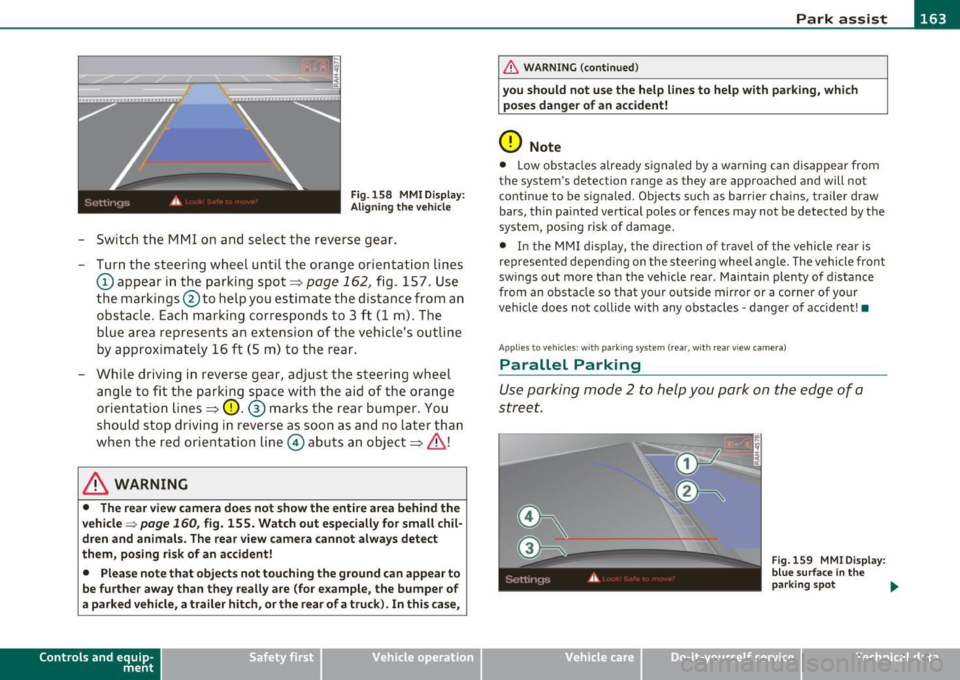
Fig. 158 MMI D isplay:
Ali gning the vehicl e
-Switch the MMI on and se lect the reverse gear .
- Turn the steering wheel until the orange orientation lines
(D appear in the parking spot=> page 162 , fig. 157. Use
the markings @to help you estimate the distance from an
obstac le. Each marking corresponds to 3 ft (1 m) . The
b lue ar ea represents an extension of the vehicle's outline
by approximately 16
ft (5 m) to the rear .
- While driving in reverse gear, adjust the steering wheel ang le to fit the parking space with the aid of the orange
orientation lines =>
0. ® marks the rear bumper . You
should stop driving in reverse as soon as and no la ter than
when the red orientation line© abuts an object=>& !
& WARNING
• The rear view came ra does not show the enti re area beh ind the
v ehicle =>
page 160, fig. 155. Watch out e spe cially fo r s mall chil ·
dren and animal s. The rear v iew cam era cannot alwa ys dete ct
them , posing ri sk of an accident!
• Plea se note that obje ct s not tou ching the groun d can appear to
be further awa y than th ey reall y are (for example , th e bum per of
a parked vehi cle, a trailer hit ch , or the r ear of a truck) . In thi s case ,
Con tro ls a nd e quip ·
m en t Vehicle
OP-eration
& WARNING (con tin ued)
you sh o uld not use the help lin es to help with p arking , whic h
po se s dang er of an accident!
0 Note
• Low obstacles a lready signaled by a wa rning c an disappear from
the sys tem's de te ct ion range as they are app roached and will no t
conti nue to be signaled . Objects such as barrier cha ins, trailer draw
bars, thin painted ve rtical poles or fences may not be detected by the
system , posing risk of damage.
• In the MMI display , the direc tion o f travel o f the vehicle rear is
represen ted depend ing on the steering whee l angle. The vehicle front
swings out more than the veh icle rear . Maintain plenty of distance
from an obstacle so that your outside mirror or a corner of your
vehicle does not collide with any obstacles -danger of accident !•
Ap plie s to veh icle s: with pa rk ing syst e m (r ea r, wi th rear vie w cam era)
Parallel P arking
Use parking mode 2 to help you park on the edge of a
street.
Vehicle care
Fig. 159 MMI Di spl ay :
blue surface In the
p arking s pot
~
Do-it-yourselt service iTechnical data
Page 166 of 362
1111....__P_ a_r_ k_ a_s_ s_ i_ s _t __________________________________________________ _
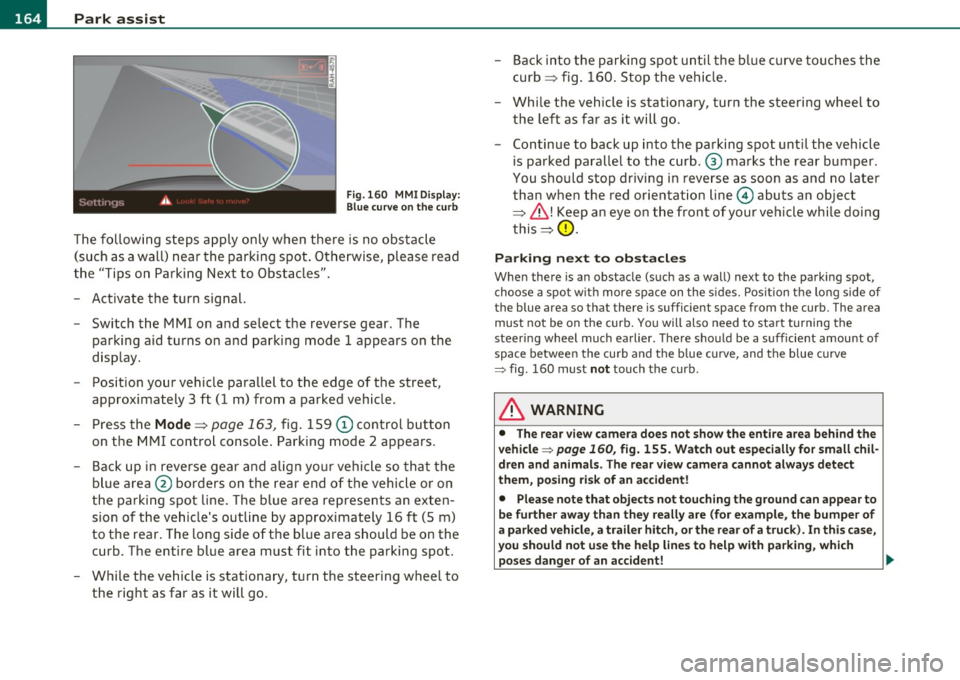
Fig.160 MMI Display:
Blue curve on the curb
The following steps apply only when there is no obstacle
(such as a wall) near the parking spot. Otherwise, please read
the "Tips on Parking Next to Obstacles".
- Activate the turn signal.
- Switch the MMI on and select the reverse gear. The
parking aid turns on and parking mode 1 appea rs on the
display.
- Position your vehicle parallel to the edge of the street,
approximately 3 ft (1 m) from a parked vehicle.
- Press the
Mode => page 163, fig. 159 (D control button
on the MMI control console. Parking mode 2 appears.
- Back up in reverse gear and align your vehicle so that the
blue area ® borders on the rear end of the vehicle or on
the parking spot line. The blue area represents an exten
sion of the vehicle's outline by approximately 16 ft (5 m)
to the rear. The long side of the blue area should be on the
curb. The entire blue area must fit into the parking spot.
- While the vehicle is stationary, turn the steering wheel to
the right as far as it will go. -
Back into the parking spot until the blue curve touches the
curb ::::> fig. 160. Stop the vehicle.
- While the vehicle is stationary , turn the steering wheel to
the left as far as it will go .
- Continue to back up into the parking spot until the vehicle
is parked parallel to the curb .® marks the rear bumper .
You should stop driving in reverse as soon as and no later
than when the red orientation line© abuts an object
=> & !Keep an eye on the front of your vehicle while doing
this =>
0.
Parking next to obstacles
When there is an obstacle (such as a wall) next to the parking spot,
choose a spot with more space on the sides. Position the long side of
the blue a rea so that the re is sufficient space from the curb. The area
must not be on the curb. You will also need to start turning the
steering wheel much earlier. There should be a sufficient amount of
space between the curb and the blue curve, and the blue curve
=> fig . 160 must not touch the curb .
& WARNING
• The rear view camera does not show the entire area behind the
vehicle => page
160, fig. 155. Watch out especially for small chil
dren and animals. The rear view camera cannot always detect
them, posing risk of an accident!
• Please note that objects not touching the ground can appear to
be further away than they really are (for example, the bumper of
a parked vehicle, a trailer hitch, or the rear of a truck). In this case,
you should not use the help lines to help with parking, which
poses danger of an accident! _,,,
Page 167 of 362

Park assist IIJII _________________________________ _____;.....:;_;_.:..:,____;;_ ____ _
0 Note
In the MMI display, the d irect ion of t ravel of the vehicle rear is rep re
sented depend ing on the steering wheel angle. The vehicle front
swi ngs ou t mo re t han t he ve hicle re ar. M ain tain ple nty of dist ance
from an obstacle so t hat your outs ide mirror or a corner of your
vehicle d oes no t collide with any o bstacles - dange r of accide nt!
[ i ) Tips
Th e left or right or ientat ion lines and s urfaces will be displ aye d,
depending on the tu rn signal being used. •
App lies to veh icles : with park ing syst em (rear, wit h rea r view cam era)
Adjusting the display and warning tones
The display and warning tones are adjusted in the radio
or fv1fv1 I*.
-Select : [CAR]> Parking system.
Display
• Off -
when the parking system is switched off, only aud ible sig nals
are given.
• On -when the pa rking system is switc hed on, the pic ture from the
rea r view camera is displayed.
Warning tones
• Rear volume -rear sensor vo lume
• Rear frequency -rear sensor frequency
• In-car entertainment fader -when the par kin g sys tem i s sw itched
on, the volume of the active audio source is lowered.
T he newly a djusted value is br iefly hear d from the signal generator .
T he settings are automatica lly stored and assigned to the remote
cont rol key.
Controls and equip
ment Safety first
& WARNING
•
Always make sure that the volume and frequency of the
warning tones i s adju sted so that you can easily hear the acou stic
distance signal even if the radio is playing , the air-conditioner
blower is on High or there is a high level of outside noise.
• Check the settings whenever someone else has driven the
vehicle before you.
[I] Tips
• Th e warning tones can also be ad justed directly from the rea r view
camera image . Simply p ress the
[Settings I* cont rol b utton .
• C han ged settings are a ctivat ed w hen parking assist is switched on
again .•
A pplies to v ehicl es: w ith park ing syst em (r e a r, wi th re ar view cam era)
Error messages
If a warni ng tone is aud ible fo r about five se conds when yo u turn on
the ignition, the re is a ma lfunction in t he system. Have the prob lem
co rrected by yo ur a utho rized Audi dea ler .
K eep the se nsors in the rear b umper clean and free from i ce s o th at
the acoustic pa rk assist system can function p roper ly .•
Vehicle care Technical data
Page 174 of 362

-Driving
Safely ----------=-----------------
Proper occupant seating positions
Proper seating position for the driver
The proper driver seating position is important for safe,
relaxed driving.
Fig. 164 Correct
seating position
For your own safety and to reduce the risk of injury in the
event of an accident, we recommend that you adjust the
driver's seat to the following position:
- Adjust the driver's seat so that you can easily push the
pedals all the way to the floor while keeping your knee(s)
slightly bent~& .
- Adjust the angle of the seatback so that it is in an upright
pos ition so that your back comes in full contact with it
when you drive.
- Adjust the steering wheel so that there is a distance of at least 10 inches (25 cm) between the steering wheel and
your breast bone~ fig . 164. If not possible, see your
authorized Audi dealer about adaptive equipment.
- Adjust the steering wheel so that the steering wheel and airbag cover points at your chest and not at your face. -
Grasp the top of the steering wheel with your elbow(s)
slightly bent.
- Applies to vehicles w ith adjustable head restraints: Adjust
the head restraint so the upper edge is as even as poss ible
with the top of your head. If that is not possible, try to
adjust the head restraint so that it is as close to this posi
tion as possible.
Fasten and wear safety belts correctly~
page 185.
-Always keep both feet in the footwell so that you are in
control of the vehicle at all t imes.
For de tailed inform ation on h ow to adju st the d river 's seat , see
~ page 76 .
& WARNING
Drivers who are unbelted, out of position or too close to the airbag
can be seriously injured by an airbag as it unfolds. To help reduce
the risk of serious personal injury:
• Always adjust the driver's seat and the steering wheel so that
there are at least 10 inches (25 cm) between your breastbone and
the steering wheel.
• Always hold the steering wheel on the outside of the steering
wheel rim with your hands at the 9 o'clock and 3 o'clock positions
to help reduce the risk of personal injury if the driver's airbag
inflates.
• Never hold the steering wheel at the 12 o'clock position or with
your hands at other positions inside the steering wheel rim or on
the steering wheel hub. Holding the steering wheel the wrong way
can cause serious injuries to the hands, arms and head if the
driver's airbag deploys.
• Pointing the steering wheel toward your face decreases the
ability of the supplemental driver's airbag to protect you in a colli·
sion. .,
Page 185 of 362

What happens to occupants not wearing
safety belts?
In crashes unbelted occupants cannot stop themselves from flying forward and being injured or killed. Always
wear your safety belts!
Fig. 170 A driver not
wearing a safety belt is
violently thrown
forward
Fig. 171 A rear
passenger not wearing
a safety belt will fly
forward and strike the
driver
Unbelted occupants are not able to resist the tremendous forces of
impact by holding tight or bracing themselves. Without the benefit
of safety restraint systems, the unrestrained occupant will slam
violently into the steering wheel, instrument panel, windshield, or
whatever else is in the way=:> fig. 170. This impact with the vehicle
interio r has all the energy they had just before the crash.
Never rely on airbags alone for protection . Even when they deploy,
airbags provide only additional protection. Airbags are not supposed
Safety first Vehicle OP-eration
Safety belts
to deploy in all kinds of accidents. Although your Audi is equipped
with airbags, all vehicle occupants, including the driver, must wear
safety belts correctly in order to minimize the risk of severe injury or
death in a crash.
Remember too, that airbags will deploy only once and that your
safety belts are always there to offer protection in those accidents in
which airbags are not supposed to deploy or when they have already
deployed . Unbelted occupants can also be thrown out of the vehicle
where even more severe or fatal injuries can occur.
It is also important for the rear passengers to wear safety belts
correctly. Unbelted passengers in the rear seats endanger not only
themselves but also the driver and other passengers=:> fig . 171. In a
frontal collision they will be thrown forward violently, where they can
hit and injure the driver and/or front seat passenger. •
Safety belts protect
People think it's possible to use the hands to brace the
body in a minor collision. It's simply not true!
Fig. 172 Driver is
correctly restrained in
a sudden braking
maneuver
Safety belts used properly can make a big difference. Safety belts
help to keep passengers in their seats, gradually reduce energy levels
applied to the body in an accident, and help prevent the uncontrolled
movement that can cause serious injuries. In addition, safety belts
reduce the danger of being thrown out of the vehicle. .,.
Vehicle care Do-it-yourselt service iTechnical data
Page 192 of 362

........ _A_ i_rb _ a_,g,:;._ s_, y'- s_ t_e _m ________________________________________________ _
Airbag system
Important things to know
Importance of wearing safety belts and
sitting properly
Airbags are only supplemental restraints. For airbags to
do their job, occupants must always properly wear their
safety belts and be in a proper seating position.
For your safety and the safety of your passengers, before
driving off, always:
- Adjust the driver's seat and steering wheel properly
~ page 172,
-Adjust the front passenger's seat properly~ page 74,
- Wear safety belts properly~
page 184,
-Always properly use the proper child restraint to protect
children~
page 215.
In a collision airbags must inflate within the blink of an eye and with
considerable force. The supplemental airbags can cause injuries if the
driver or the front seat passenger is not seated properly. Therefore in
order to help the airbag to do its job, it is important, both as a driver
and as a passenger to sit properly at all times.
By keeping room between your body and the steering wheel and the
front of the passenger compartment, the airbag can inflate fully and
completely and provide supplemental protection in certain frontal
collisions =>
page 172, "Proper occupant seating positions". For
details on the operation of the seat adjustment controls=>
page 76.
It's especially important that children are properly restrained
=>
page 215.
There is a lot that the driver and the passengers can and must do to help the individual safety features installed in your Audi work
together as a system.
Proper seating position is important so that the front airbag on the
driver side can do its job. If you have a physical impairment or condi
tion that prevents you from sitting properly on the driver seat with
the safety belt properly fastened and reaching the pedals, special
modifications to your vehicle may be necessary .
Contact your authorized Audi dealer, or call Audi Customer Relations
at 1-800-822-2834.
When the airbag system deploys, a gas generator will fill the airbags, break open the padded covers, and inflate between the steering
wheel and the driver and between the instrument panel and the front passenger. The airbags will deflate immediately after deployment so
that the front occupants can see through the windshield again
without interruption.
All of this takes place in the blink of an eye, so fast that many people
don't even realize that the airbags have deployed. The airbags also
inflate with a great deal of force and nothing should be in their way
when they deploy . Front airbags in combination with properly worn
safety belts slow down and limit the occupant's forward movement.
Together they help to prevent the driver and front seat passenger
from hitting parts of the inside the vehicle while reducing the forces acting on the occupant during the crash. In this way they help to
reduce the risk of injury to the head and upper body in the crash.
Airbags do not protect the arms or the lower parts of the body.
Both front airbags will not inflate in all frontal collisions. The trig
gering of the airbag system depends on the vehicle deceleration rate
caused by the collision and registered by the electronic control unit .
If this rate is below the reference value programmed into the control
unit, the airbags will not be triggered, even though the car may be
badly damaged as a result of the collision. Vehicle damage, repair _,.
Page 193 of 362

_________________________________________________ A_ ir_ b_ a_,,g :;..__ s-=y '"- s_ t_ e_ m __ _
costs o r even t he lack of ve hicle damage is not necessarily an ind ica
t ion of w heth er an a irba g should inflat e or not.
It is not poss ible to define a range of ve hicle speeds t hat w ill cover
every possible k ind and a ngle of impact that will always trigger the
a ir bags, sin ce the cir cums ta nc es w ill vary con sid erab ly be twee n one
co llision and another . Important factors inclu de, for exam ple, the
n at ure (h ard or so ft ) of th e obje ct wh ich t he c ar hi ts, the an gle of
impact, vehicle speed, etc . T he front airbags w ill also not inflate in
s ide or rear co ll is io ns, or i n roll-o ve rs.
Always remember: Airbags w ill deploy only once, a nd only in certain
kinds of coll isions . Yo ur safety be lts are a lways there to offer protec
ti on in t hose situ ations i n w hich air bags are not s upposed to deploy,
or w hen they have alrea dy de ploye d; for examp le, w hen your ve hicle
st rike s or i s struc k by ano ther afte r the firs t collis io n .
T hi s is just one of the reasons w hy a n airbag is a s upplementary
res tra in t a nd i s no t a su bs titu te for a saf ety bel t. The air bag syste m
works most effective ly whe n used w ith the safety belts . Therefore,
always p rope rly wea r you r sa fety belts ~ page 18 1.
& WARNING
Sitting too close to the steering wheel or instrument panel will
decrease the effectiveness of the airbags and will increase the r isk
of personal injury in a collision.
• Never sit closer than 10 inches (25 cm ) to the steer ing wheel or
instrument panel.
• If you cannot sit more than 10 inches (25 cm ) from the
steering wheel, investigate whether adaptive equipment may be
available to help you reach the pedals and increase your seating
distance from the steering wheel.
• If you are unrestrained, leaning forward, sitting sideways or
out of pos ition in any way, your risk of injury is much higher.
• You will also receive serious injuries and could even be killed if
you are up against the airbag or too close to it when it inflates -
even with an Advanced Airbag .
Controls and equip
ment Safety first Vehicle operation
& WARNING
(co ntinued )
• To reduce the risk of injury when an airbag inflates, always
wear safety belts properly=>
page 185, "Safety belts ".
• Always make certain that children age 12 or younger always
ride in the rear seat. If children are not properly restrained, they
may be severely injured or killed when an airbag inflates.
• Never let children r ide unrestrained or improperly restrained in
the vehicle. Adjust the front seats properly .
• Never r ide with the backrest reclined.
• Always sit as far as possible from the steering wheel or the
instrument panel=>
page 172.
• Always sit upright with your back against the backre st of your
seat .
• Never place your feet on the instrument panel or on the seat.
Always keep both feet on the floor in front of the seat to help
prevent serious injuries to the leg s and hips if the airbag inflates .
• Never recline the front passenger 's seat to transport objects .
Items can also move into the area of the side airbag or the front
airbag during braking or in a sudden maneuver. Objects near the
airbags can become projectiles and cause injury when an airbag
inflates .
& WARNING
Airbags that have deployed in a crash must be replaced.
• Use only original equ ipment airbags approved by Aud i and
installed by a trained technician who ha s the necessary tools and
diagnostic equipment to properly replace any airbag in your
vehicle and assure system effectiveness in a crash.
• Never permit salvaged or recycled airbags to be installed in
your vehicle. •
Vehicle care Do-it-yourself service Technical data