2011 Alfa Romeo MiTo ignition
[x] Cancel search: ignitionPage 17 of 262

16GETTING TO KNOW YOUR CAR
Excessive engine coolant
temperature (red)
This warning light comes on when the ignition key is
turned to MAR, but it should go off after a few seconds.
The warning light turns on when the engine is overheated. The dis-
play will show the dedicated message. If the warning light comes
on, proceed as follows:
❍during normal travel: stop the car, stop the engine and check
that the water level in the reservoir is not under the MIN line.
In this case, wait for a few minutes for the engine to cool down,
then slowly and carefully open the cap, top-up with coolant and
check that the level is between the MIN and MAX references
on the reservoir. Also check for leaks. If the warning light comes
on again at the next engine start-up, contact your nearest Al-
fa Romeo Authorised Service.
❍In the case of demanding use (e.g. towing trailers uphill or
car at full load): slow down and stop the car if the warning light
stays on. Stop for 2 or 3 minutes with the engine running and
slightly accelerated to favour better coolant circulation. Then
stop the engine. Check the correct fluid level as described pre-
viously.
IMPORTANT Over demanding routes, it is advisable to keep the
engine on and slightly accelerated for a few minutes before switch-
ing it off.
u
Electric power steering failure (red)
This warning light comes on when the ignition key is
turned to MAR, but it should go off after a few sec-
onds.
If the warning light (or symbol on the display) remains on, you will
not have steering assistance and the effort required to operate
the steering wheel will be increased. Steering is, however, possi-
ble. In this case contact your nearest Alfa Romeo Authorised Ser-
vice. The display will show the dedicated message.g
Start&Stop system deactivation
(amber)
The warning light comes on when the Start&Stop sys-
tem is deactivated by pressing the button on the auxil-
iary control panel next to the steering wheel. On some versions the
display shows the associated message.T
Page 18 of 262

EOBD/injection system failure
(amber)
Under normal conditions, the warning light comes on
when the ignition key is turned to MAR, but should go off
as soon as the engine is started.
If the warning light remains on or comes on whilst driving, this
means that the injection system is not working properly; in partic-
ular, if the warning light comes on constantly, this indicates a mal-
function in the supply/ignition system that could cause excessive
exhaust emissions, a possible loss of performance, poor driveabil-
ity and high fuel consumption.
On certain versions the dedicated message is displayed.
Under these conditions, the vehicle can continue travelling at mod-
erate speed without demanding excessive effort from the engine.
Prolonged use of the car with the warning light on may cause dam-
age. Contact your nearest Alfa Romeo Authorised Service as soon
as possible.
The warning light goes out after the fault is cleared, and the indi-
cation is stored in the system.
GETTING TO KNOW YOUR CAR17
1
Doors not closed correctly (red)
The warning light (or symbol on the display) lights up
when one or more doors or the boot tailgate are not
properly closed. A buzzer will sound when doors are open
and the car is moving. On some versions the warning light (or sym-
bol on the display) also lights up when the bonnet is not closed
correctly.´
Luggage compartment open
On some versions a message + symbol on the display
are shown when the luggage compartment is open.R
Bonnet open
On some versions a message + symbol on the display
are shown when the bonnet is open.S
U
Page 19 of 262

18GETTING TO KNOW YOUR CAR
VDC system (amber)
(for versions/markets, where provided)
This warning light comes on when the ignition key is
turned to MAR, but it should go off after a few seconds.
If the warning light does not go out, or if it remains lit up when
driving, contact an Alfa Romeo Authorised Service. On certain ver-
sions the dedicated message is displayed. If the warning light flash-
es when driving, this indicates that the VDC system is active.
ASR failure
This warning light comes on when the ignition key is turned to MAR,
but it should go off after a few seconds. If the warning light does
not go out, or if it remains lit up when driving, contact an Alfa
Romeo Authorised Service. On certain versions the dedicated mes-
sage is displayed.
If the warning light flashes when driving, this indicates that the ASR
system is active.
Hill Holder failure
This warning light comes on, on some versions together with the
*symbol and a message in the display, in the event of a Hill Hold-
er system failure. If this occurs, contact your nearest Alfa Romeo
Authorised Service.
á
NOTE (this information applies to petrol
engine only)
If the warning light is flashing, this indicates that the catalytic
converter may be damaged.
If the warning light comes on intermittently, release the accelera-
tor pedal to lower the speed of the engine until the warning light
stops flashing; continue the journey at moderate speed, trying to
avoid driving conditions that may cause further flashing and con-
tact an Alfa Romeo Authorised Service as soon as possible.
Contact an Alfa Romeo Authorised Service as soon
as possible if the
Uwarning light does not light
up when the key is turned to MAR or if, while trav-
elling, the warning light comes on either steadily or blink-
ing (along with a message on the display). The opera-
tion of the warning light
Umay be checked by the traf-
fic police using specific devices. Follow the laws in force
in the country where you are driving.
Page 23 of 262
22GETTING TO KNOW YOUR CAR
Speed limit exceeded (red)
(for versions/markets, where provided)
This warning light (for versions/markets, where pro-
vided) comes on when the vehicle speed exceeds 120
km/h.
When the vehicle exceeds the speed limit set in the Setup Menu
(e.g. 120 km/h), on some versions a message and symbol are
shown in the display and a buzzer sounds.
X
General failure (amber)
(for versions/markets, where provided)
On some versions, this warning light comes on under the
following circumstances:
External lights failure
See description of 6warning light.
Brake lights failure
See description of “brake lights failure”.
Fuel lock
This warning light comes on when the fuel cut-off inertia switch is
triggered. The display will show the dedicated message.
è
Particulate trap filter blocked
(Diesel with DPF versions) (amber)
When the ignition key is turned to MAR, the warning
light switches on but it must switch off after a few seconds.
The warning light comes on constantly to notify the driver that
the DPF system needs to eliminate captured pollutants (particu-
late) by the regeneration process. The warning light does not come
on during every DPF regeneration, but only when driving conditions
require notification of the driver. To switch the warning light off,
the car must stay in motion until regeneration has been complet-
ed. The process normally takes about 15 minutes. The optimum
conditions to end the process are achieved by keeping the car in
motion up to 60km/h with an engine speed higher than 2,000
rpm. This light coming on is not a car defect and therefore the car
does not need to go to the workshop.
A specific message will appear on the display when the warning
light comes on (for versions/markets, where provided).
h
Always drive at a speed appropriate to the traffic
conditions, the weather and speed limits. The en-
gine may be turned off while the DPF light is on;
however, repeated interruption of the regeneration process
may result in premature exhaustion of engine oil. For this
reason it is always advisable to wait for the light to go
off before turning off the engine, following the instruc-
tions appearing above. It is not advisable to complete DPF
regeneration with the vehicle stationary.
Page 25 of 262

24GETTING TO KNOW YOUR CAR
Display of selected driving mode
(“Alfa DNA” system)
(for versions/markets, where provided)
On versions equipped with a “Reconfigurable multifunctional Dis-
play” a message + symbol associated with the selected driving
mode - “DYNAMIC”, “NORMAL” or “ALL WEATHER” - is shown.
A warning message is shown on the display if one of these dri-
ving modes is not available.
On versions equipped with a “Multifunctional display” a letter (d
or a) associated with the selected driving mode is shown togeth-
er with a dedicated message.
Engine oil level display
(for versions/markets, where provided)
When the ignition key is turned to MAR the display shows, for a few
seconds, the engine oil level. In the event of an insufficient engine
oil level, a warning message appears on the display.
IMPORTANT To determine the correct engine oil quantity, always check
using the marks on the dipstick (see paragraph "Checking levels" in
"5" section).
IMPORTANT For a correct engine oil level indication, perform the check
with the car parked on a level surface.
IMPORTANT To perform the engine oil reading correctly, after turning
the key to MAR wait for about 2 seconds before starting the engine.
IMPORTANT The engine oil level may increase after a long stop.
T.P.M.S. system failure (amber)
(for versions/markets, where provided)
This warning light (or symbol in the display) comes on (on some
versions together with a message in the display) when a fault is
detected in the T.P.M.S tyre inflation pressure monitoring system:
if this occurs, contact your nearest Alfa Romeo Authorised Service
as soon as possible.
Should one or more wheels be fitted without sensors, the display
will show a warning message until initial conditions are restored.
Check tyre inflation pressure
(for versions/markets, where provided)
If this warning light (or symbol in the display) comes on (on some
versions together with a message in the display) this indicates that
the tyre pressure is below the optimum value recommended to
guarantee long tyre life and low fuel consumption. It may also in-
dicate a slow loss of pressure.
Should two or more tyres be discovered to be in the above men-
tioned condition, the display will show the indications corresponding
to each tyre in sequence. Under these circumstances you should
restore the correct pressure values (see chapter 6).
Page 27 of 262
26GETTING TO KNOW YOUR CAR
DISPLAY
The car may be equipped with the multifunctional display/multi-
functional reconfigurable display which, in accordance with the set-
tings made, can display useful information when driving.
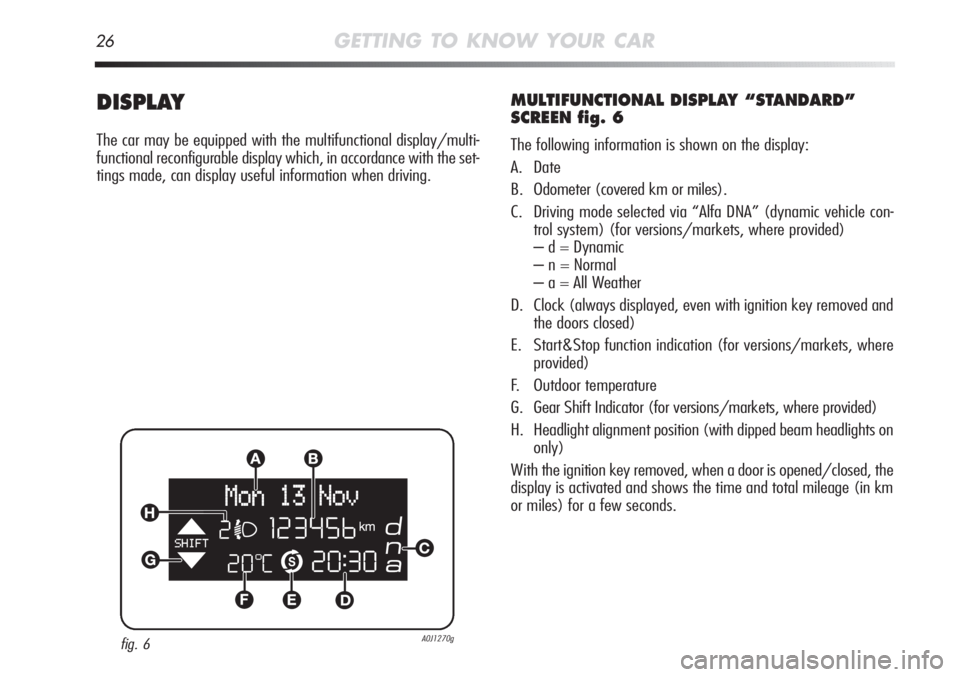
MULTIFUNCTIONAL DISPLAY “STANDARD”
SCREEN fig. 6
The following information is shown on the display:
A. Date
B. Odometer (covered km or miles).
C. Driving mode selected via “Alfa DNA” (dynamic vehicle con-
trol system) (for versions/markets, where provided)
– d = Dynamic
– n = Normal
– a = All Weather
D. Clock (always displayed, even with ignition key removed and
the doors closed)
E. Start&Stop function indication (for versions/markets, where
provided)
F. Outdoor temperature
G. Gear Shift Indicator (for versions/markets, where provided)
H. Headlight alignment position (with dipped beam headlights on
only)
With the ignition key removed, when a door is opened/closed, the
display is activated and shows the time and total mileage (in km
or miles) for a few seconds.
fig. 6A0J1270g
Page 30 of 262

GETTING TO KNOW YOUR CAR29
1
WELCOME MOVEMENT
On some versions, when the key is turned to MAR, the following
occurs:
❍quick movement (up and down) of the speedometer and rpm
gauge;
❍illumination of graphic symbols/display;
❍an animated graphic representation of the vehicle profile ap-
pears on the display.
Gauge movement
❍If the key is removed from the ignition switch whilst the gauges
are moving, they immediately return to their initial position.
❍Once they have reached the end-of-scale values the gauges rest
on the value indicated by the vehicle.
❍The movement of the gauges stops when the engine is started.
Illumination of graphic symbols/display
A few seconds after the key is inserted, the gauges, graphic sym-
bols and display light up in sequence.
Display of graphic animation
When the key is removed from the ignition switch (with the doors
closed), the display remains lit up and shows a graphic animation.
The display illumination is then dimmed gradually until it goes
out completely.
CONTROL BUTTONS fig. 9/9a
“+” or “▲ Ò”(versions with Start&Stop system) To scroll the dis-
played menu and the related options upwards or to increase the
displayed value
“MENU ESC”: press briefly to access the menu and/or go to next
screen or confirm the required menu option. Hold
down to go back to the standard screen.
“–” or “
▼ “ (versions with Start&Stop system) to scroll the
displayed menu and the related options downwards or to decrease
the value displayed.
fig. 9A0J0024m
Page 31 of 262

30GETTING TO KNOW YOUR CAR
WARNING The buttons "+" and "–" (or “▲ Ò“ and “▼ “ for
versions with Start&Stop system) activate different functions de-
pending on the following situations:
❍to scroll the menu options upwards and downwards;
❍to increase or decrease values during settings.
With the ignition key removed, when a door is opened, the display
is activated and shows the total mileage (in km or miles) for a few
seconds.
SETUP MENU
The menu comprises a series of items which can be selected us-
ing the + and – (or “
▲ Ò“ and “▼ “ for versions with
Start&Stop system) buttons to access the different selection and
setting operations (setup) given in the following paragraphs. Some
items also have a sub-menu. The setup menu can be activated by
briefly pressing the MENU ESC button.
NOTE The following pages describe the buttons + and –. For the
versions with Start&Stop system, the buttons are “
▲ Ò“ and
“
▼ “.
fig. 9a - Start&Stop system versionsA0J0276m