Page 179 of 562

�µ�µ
�µ
You cannot lock the doors if any
door is not f ully closed, if the built-in
key is in the ignition switch, or if the
ignition switch is in any position
except the LOCK (0) position.
When you cannot set the security
system because the trunk or hood is
open, no exterior light blinks and/or
no beeper sounds.
Press this button once
to unlock the driver’s door. Press it
twice to unlock the other doors.
Some exterior lights will f lash twice
each time you press the button. The
ceiling light (if the ceiling light
switch is in the DOOR position) will
come on when you press the
UNLOCK button. If you do not open
any door within 30 seconds, the
ceiling light f ades out. If you relock
the doors with the remote before 30
seconds have elapsed, the ceiling
light will go of f immediately. To change the ‘‘DOOR LOCK
MODE’’ setting, see page .
To change the ‘‘INTERIOR LIGHT
DIMMING TIME,’’ see page .
If you unlock the doors with the
remote, but do not open any door
within 30 seconds, the doors
automatically relock and the security
system sets.
To change the ‘‘SECURITY
RELOCK TIMER’’ setting, see page
.
To change the ‘‘KEYLESS LOCK
ACKNOWLEDGMENT’’ setting, see
page .
You can also open all power windows
and the moonroof f rom outside the
vehicle with the remote transmitter
(see page ). Pressthisbuttonfor
about 1 second to open the trunk.
You cannot open the trunk if the
built-in key is in the ignition or the
ignition switch is in any position
except the LOCK (0) position. You
cannot open the trunk with the
remote if the trunk main switch is
turned off.
Pressthisbuttonfor
about 2 seconds to attract attention:
the horn will sound and the exterior
lights will f lash f or about 30 seconds.
To cancel panic mode, press any
other button on the remote.
127
116
129
131
187
K eyless A ccess System
UNL OCK TRUNK
PA NIC
Inst rument s and Cont rols
173
10/08/04 19:11:11 31SJA660_178
ProCarManuals.com
Page 180 of 562

The driving position memory
activated (Driver 1, Driver 2) is
shownonthebackof eachremote.
Make sure you store your desired
driving position in the memory thatis activated by the remote you
normally carry.
When you unlock the driver’s door
with your remote transmitter, each
remote transmitter activates the
customized settings related to that
remote. To turn of f this f eature, press and
hold the LOCK and UNLOCK
buttonsatthesametime.TheLED
in the remote will blink once. Then
release the buttons. Doing this
cancels the keyless memory settings
f or that remote and restores the
def ault settings.
Some of them keep the same
settings as they were set previously.
To turn the keyless memory settings
back on, repeat this procedure. The
LED will blink twice to indicate the
f eature has been turned on.
When you unlock and open the
driver’s door with the remote, the
driver’s seat (except power lumbar)
and outside mirrors move to the
positions stored in memory. An
indicator on one of the driving
position memory buttons on the
driver’s door also comes on.
Navigation system pref erences
(see the navigation system
manual).
Here are the settings activated with
the remote:
Driving position memory
(see page ).
Customized settings
(see page ).
Audio system settings
(see page ).
Climate control settings
(see page ).
Compass system pref erences
(see page ). 164
81
213 205
281
U.S. RL model
Except U.S. RL model
K eyless A ccess System
Recalling a Memorized Driving
Position
174
DRIVER’S ID
10/08/04 19:11:27 31SJA660_179
ProCarManuals.com
Page 184 of 562

To remove the ignition switch cover,
insert the built-in key (see page ),
then pull the cover out by pulling the
built-in key while pushing it.
Also, if you close the door when the
ignition switch is not in the LOCK
(0) position and the remote is not
inside the vehicle, the keyless access
alarm sounds outside the vehicle, a
message appears on the multi-
inf ormation display, and the beeper
sounds if the ignition switch is in the
ON (II) position.
When the beeper sounds af ter you
close the driver’s door outside the
vehicle, check the position of the
ignition switch and the location of
the remote.
If the engine is running and you
removetheremotefromthevehicle,
it will continue to run. But once
turned to the LOCK (0) position, the
engine will not restart until a remote
is brought back into the vehicle.
To turn the ignition switch to the
LOCK (0) position, put the
transmission in Park, press the
switch in, and turn it to the LOCK
(0) position. When the transmission
is not in Park, you cannot turn the
ignition switch to the LOCK (0)
position.
Bef ore leaving the vehicle, make
sure the ignition switch is in the
LOCK (0) position.
If you open the driver’s door with the
ignition switch in the ACCESSORY
(I) position, a beeper will sound.
You will also see a ‘‘RETURN
IGNITION SWITCH TO LOCK (0)
POSITION’’ message on the multi-
inf ormation display.
181
K eyless A ccess System
Removing the Ignition Switch
Cover
178
BUILT-IN KEY
IGNITION SWITCH COVER
pushpull
10/08/04 19:12:13 31SJA660_183
ProCarManuals.com
Page 185 of 562

The engine does not restart if you
turn the ignition switch to the LOCK
(0) position when the remote is
outside the vehicle. Check where the
remote is. Make sure that you carry
the remote or built-in key with you
when you operate the ignition switch.
If you pass the remote through an
open window, the system does not
respond.Also,evenwhentheremote
is inside the vehicle, the beeper may
sound when the location of the
remote is not detected due to
surrounding conditions. It is not a
f ailure. Make sure that you carry the
remote with you.
The outside beeper sounds when
the ignition switch is in the
ACCESSORY (I) or the ON (II)
position.
When the ignition switch is in the
ON (II) position, the multi-
inf ormation display shows
‘‘KEYLESS REMOTE NOT
DETECTED,’’ and the inside and
outside beepers sound.
The multi-inf ormation display
message goes away when you
bring the remote back inside the
vehicle, and close the door or
apply the parking brake.
If the engine is running and you
removetheremotefromthe
vehicle, it will continue to run.
Once turned to the LOCK (0)
position, the engine will not restart
until a remote is brought back into
the vehicle.
When you are pressing the ignition
switch, or when the ignition switch is
in the ON (II) position, the beeper
sounds if you take the remote out of
the vehicle and close the door.
CONT INUED
K eyless A ccess System
K eyless Remot e Not Det ect ed
Beeper and Message
Inst rument s and Cont rols
179
10/08/04 19:12:25 31SJA660_184
ProCarManuals.com
Page 186 of 562
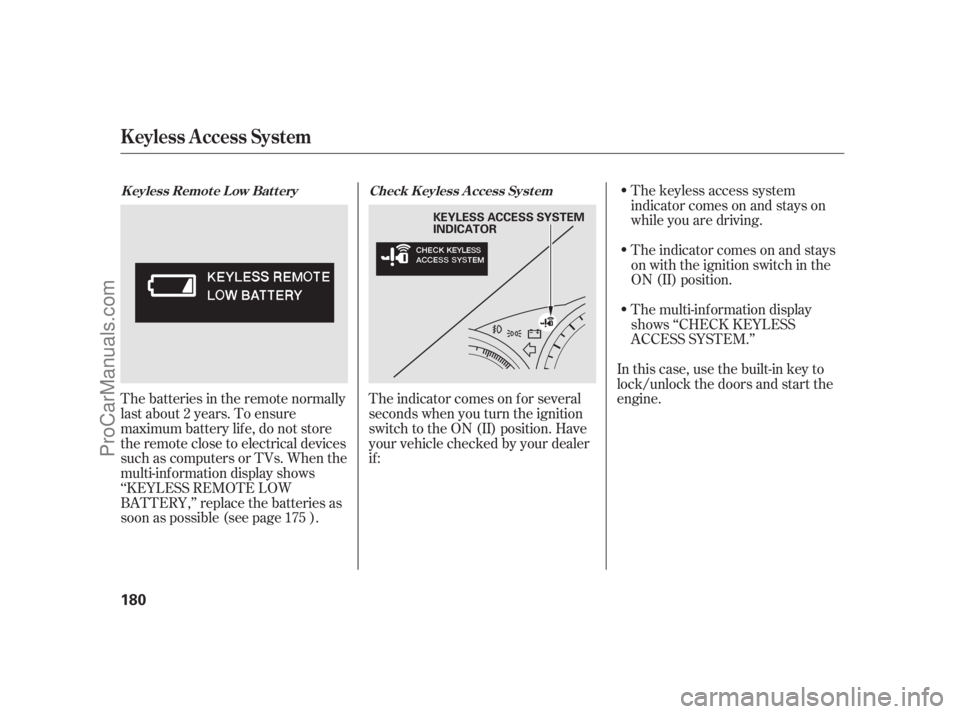
The keyless access system
indicator comes on and stays on
while you are driving.
The indicator comes on and stays
on with the ignition switch in the
ON (II) position.
The multi-inf ormation display
shows ‘‘CHECK KEYLESS
ACCESS SYSTEM.’’
In this case, use the built-in key to
lock/unlock the doors and start the
engine.
The indicator comes on f or several
seconds when you turn the ignition
switch to the ON (II) position. Have
your vehicle checked by your dealer
if :
Thebatteriesintheremotenormally
last about 2 years. To ensure
maximum battery life, do not store
the remote close to electrical devices
such as computers or TVs. When the
multi-inf ormation display shows
‘‘KEYLESS REMOTE LOW
BATTERY,’’ replace the batteries as
soon as possible (see page ).
175Check K eyless A ccess Syst em
K eyless Remot e L ow Bat t ery
K eyless A ccess System
180
KEYLESS ACCESS SYSTEM
INDICATOR
10/08/04 19:12:36 31SJA660_185
ProCarManuals.com
Page 193 of 562

If the window runs into any obstacle
while it is closing automatically, it
will reverse direction, and then stop.
To close the window, remove the
obstacle, then use the window switch
again.
Auto reverse stops sensing when the
window is almost closed. You should
always check that all passengers and
objects are away from the window
bef ore closing it.The driver’s window auto
reverse f unction is disabled when
you continuously pull up the switch. The power windows have a key-of f
delay. You can still open and close
the windows f or up to 10 minutes
after you turn off the ignition switch.
The key-of f delay cancels as soon as
you open either f ront door. You must
then turn the ignition switch to the
ON (II) position f or the power
windows to operate.
You can open all of the windows and
the moonroof f rom outside with the
remote.Press the UNLOCK button once
to unlock the driver’s door.
1.
CONT INUED
A uto Reverse
Opening the Windows and
Moonroof with the Remote
Power Windows
Inst rument s and Cont rols
187
NOTE:
UNLOCK BUTTON
10/08/04 19:13:49 31SJA660_192
ProCarManuals.com
Page 194 of 562

Turn the built-in key clockwise
again, and hold it. All four
windows and the moonroof start to
open. To stop the windows and
moonroof , release the built-in key.
You can open and close the windows
and moonroof with the built-in key in
the driver’s door lock. Turn the key clockwise, then
release it.
To open:
Insert the built-in key in the driver’s
door lock.
Press the UNLOCK button a
second time, and hold it. All the
doors unlock, and all f our windows
and moonroof start to open. To
stop the windows and moonroof ,
release the button.
To open the windows and
moonroof f urther, press the
button again (within 10 seconds of
step 1) and hold it. If the windows
and the moonroof stop bef ore the
desired position, repeat steps 1
and 2.
You cannot close the windows or the
moonroof with the remote. To open the windows and the
moonroof f urther, turn and hold
the key again (within 10 seconds
of step 2).
To close: Insert the built-in key in the driver’s
door lock.
Turn the key counterclockwise,
then release it.
Turn the key counterclockwise
again, and hold it. All four
windows and the moonroof start to
close. To stop the windows and
the moonroof , release the key.
1.
2. 3.
4.
1.
2.
3.
2.
3.
Power Windows
Opening/Closing the Windows
and Moonroof with the Built-in
Key
188
Open
Close
10/08/04 19:14:06 31SJA660_193
ProCarManuals.com
Page 206 of 562
Af ter pushing the DOOR button, all
the lights come on when you open
any door, unlock the doors with the
remote or built-in key, or turn the
ignition switch f rom the ON (II) or
the ACCESSORY (I) position to the
LOCK (0) position. The indicator in
the button comes on as a reminder.
The f ront and rear of the ceiling
have ceiling lights. To change the ‘‘INTERIOR LIGHT
DIMMING TIME’’ setting, see page.
Push each ceiling light button to turn
its light on and of f .
Push the ON button to turn on all the
ceiling lights. Push the OFF button
to turn them off. 116 Ceiling L ights
Interior Lights
200
CEILING LIGHT
BUTTONS
CEILING LIGHT
BUTTONS
OFF BUTTON
DOOR BUTTON
ON BUTTON Front
Rear
10/08/04 19:15:55 31SJA660_205
ProCarManuals.com