Page 333 of 517
System Setup
This command group allows you to
change or customize HFL basic
settings.
To set a 4-digit passcode to lock theHFL system for security purposes:Press and release the HFL Talk
button before a command.
1. Say ‘‘System setup .’’
2. Say ‘‘Security ’’after the prompts.
3. Follow the HFL prompts and say the 4-digit passcode you want to
set.
4. Follow the HFL prompts to confirm the number. NOTE
: Once a passcode is set, you
will need to enter it to use HFL each
time you start the vehicle. If you
forget the code, your dealer will have
to reset it for you, or you will have to
clear the entire system (see page
330).
Bluetooth
®HandsFreeLink
®
32810/06/08 17:42:32 11 ACURA RDX MMC North America Owner's M 50 31STK640 enu
Page 341 of 517

Delete-Select this option to delete
the current message.
Voice -Select this option to hear a
voice read the entire message. This
gives you more information than the
screen can display at one time. When
you select the Voice option, it
changes to a Stop Reading option.
Select the option again to stop the
voice.
Call -Select this button to call a
phone number embedded in the
message. When you select Call,theBluetooth
®HandsFreeLink
®(HFL)
dials the number for you.
To make a call, your
Bluetooth
®
compatible phone must be paired to
your vehicle's HandsFreeLink
system, have its power on, and be
inside the vehicle (see page 313). Find Nearest Acura Dealer
-
Select this option to find the nearest
Acura dealer using the navigation
system.
Call Your Acura Dealer -Select
this button to call the Acura dealer
you purchased your vehicle from.
AcuraLink also directs you to this
dealer so you can schedule a
maintenance appointment or receive
information about a message. If you
visit another dealer for service two
times within a 14-month period,
AcuraLink will reset to call that
dealer.
Diagnostic Info -Select this
button to get more information about
the current diagnostic message. To
use this option, your cell phone must
be linked to the HFL and have a
compatible data service available.
Access the Owner Link website to
find out which data services are
currently compatible with AcuraLink. Message Preferences
To set your AcuraLink preferences
(the types of messages you want to
receive, if any), visit the My Acura
website at
www.owners.acura.com
If you do not have internet access,
call Acura Client Services at
(800) 382-2238; they can set your
message preferences for you.
AcuraLink
®(U.S. models only)
33610/06/08 17:42:32 11 ACURA RDX MMC North America Owner's M 50 31STK640 enu
Page 346 of 517
Select the received message, then
press ENTER. You will see the
message as shown. To make an
appointment, select‘‘Schedule
Dealer Appt. ’’then press ENTER.
The system will automatically
connect to the Acura server, then
show you an appropriate
appointment date and time on the
navigation screen. If you accept this
appointment, select ‘‘Confirm
Appointment, ’’then press ENTER.
The confirmation message will be
displayed on the screen. Make sure
to confirm the appointment date,
time and dealer. If it is OK, press
ENTER.
If you want to change or reschedule
the appointment date, select
‘‘Cancel,’’ then press ENTER.
CONTINUED
AcuraLink
®(U.S. models only)
341
Features
10/06/08 17:42:32 11 ACURA RDX MMC North America Owner's M 50 31STK640 enu
Page 354 of 517
If the engine has just been started, it
may take a short time for the system
to display the rearview.
The camera display brightness is
adjusted automatically by sensors. If
you use the camera display
continuously at high temperature,
the image will gradually dim and
eventually turn off automatically. If
you change to another shift position,
the camera display will come on
again when you return to reverse.
The inside mirror will be hot when
you use the monitor for an extended
period of time.
If a bright light (such as sunlight) is
reflected on the mirror, the image
may be difficult to see.
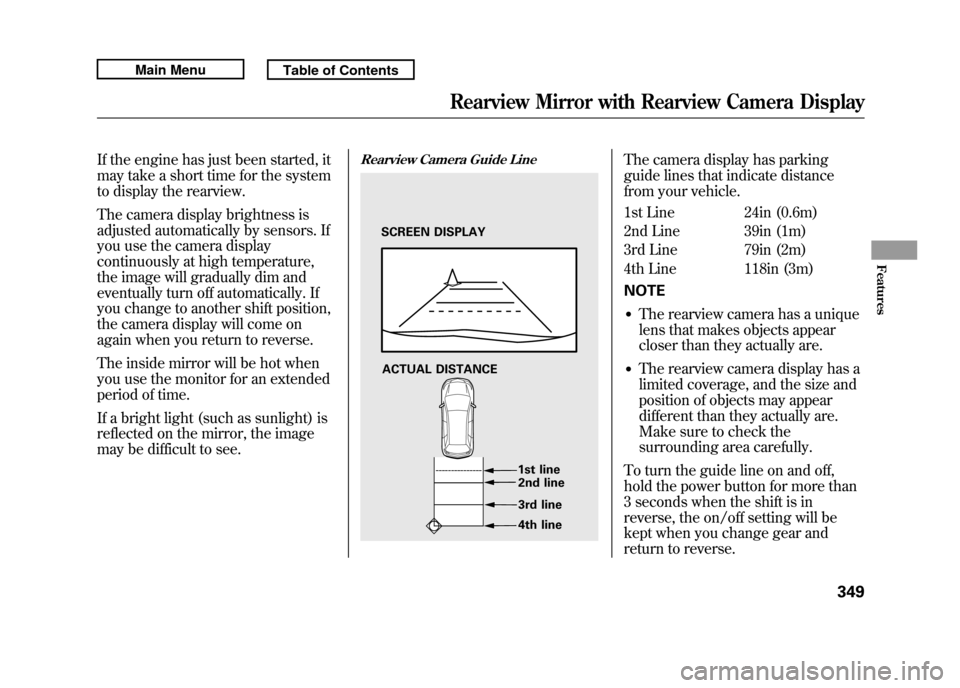
Rearview Camera Guide Line
The camera display has parking
guide lines that indicate distance
from your vehicle.
1st Line 24in (0.6m)
2nd Line 39in (1m)
3rd Line 79in (2m)
4th Line 118in (3m)
NOTE●The rearview camera has a unique
lens that makes objects appear
closer than they actually are.●The rearview camera display has a
limited coverage, and the size and
position of objects may appear
different than they actually are.
Make sure to check the
surrounding area carefully.
To turn the guide line on and off,
hold the power button for more than
3 seconds when the shift is in
reverse, the on/off setting will be
kept when you change gear and
return to reverse.
SCREEN DISPLAY
ACTUAL DISTANCE 1st line2nd line
3rd line
4th line
Rearview Mirror with Rearview Camera Display
349
Features
10/06/08 17:42:32 11 ACURA RDX MMC North America Owner's M 50 31STK640 enu
Page 357 of 517

Break-in Period
Help assure your vehicle's future
reliability and performance by paying
extra attention to how you drive
during the first 600 miles (1,000 km).
During this period:●Avoid full-throttle starts and rapid
acceleration.●Avoid hard braking for the first 200
miles (300 km).●Do not change the oil until the
scheduled maintenance time.●Do not tow a trailer.
You should also follow these
recommendations with an
overhauled or exchanged engine, or
when the brakes are replaced. Fuel Recommendation
Your vehicle is designed to operate
on premium unleaded gasoline with
a pump octane of 91 or higher. If this
octane grade is unavailable, regular
unleaded gasoline with a pump
octane of 87 or higher may be used
temporarily. The use of regular
unleaded gasoline can cause metallic
knocking noises in the engine and
will result in decreased engine
performance. The long-term use of
regular-grade gasoline can lead to
engine damage.
Avoid driving with an extremely low
fuel level. Running out of fuel could
cause the engine to misfire, damaging
the catalytic converter.We recommend using quality
gasolines containing detergent
additives that help prevent fuel
system and engine deposits.
In addition, in order to maintain good
performance, fuel economy, and
emissions control, we strongly
recommend, in areas where it is
available, the use of gasoline that
does NOT contain manganese-based
fuel additives such as MMT.
Use of gasoline with these additives
may adversely affect performance,
and cause the malfunction indicator
lamp on your instrument panel to
come on. If this happens, contact
your authorized dealer for service.
Break-in Period, Fuel Recommendation35210/06/08 17:42:32 11 ACURA RDX MMC North America Owner's M 50 31STK640 enu
Page 394 of 517

If the ABS indicator and the brake
system indicator come on together,
and the parking brake is fully
released, the EBD system may also
be shut down.
Test your brakes as instructed on
page 467. If the brakes feel normal,
drive slowly and have your vehicle
repaired by your dealer as soon as
possible. Avoid sudden hard braking
which could cause the rear wheels to
lock up and possibly lead to a loss of
control.Important Safety Reminders
ABS does not reduce the time or
distance it takes to stop the
vehicle.
It only helps with the
steering control during braking.
ABS will not prevent a skid that
results from changing direction
abruptly, such as trying to take a
corner too fast or making a sudden
lane change. Always drive at a safe
speed for the road and weather
conditions.
ABS cannot prevent a loss of
stability. Always steer moderately
when you are braking hard. Severe
or sharp steering wheel movement
can still cause your vehicle to veer
into oncoming traffic or off the road. A vehicle with ABS may require a
longer distance to stop
on loose or
uneven surfaces, such as gravel or
snow, than a vehicle without anti-
lock.
Anti-lock Brakes (ABS)
389
Driving
10/06/08 17:42:32 11 ACURA RDX MMC North America Owner's M 50 31STK640 enu
Page 404 of 517

Checking Loads
The best way to confirm that all loads
are within limits is to check them at a
public scale. For public scales in your
area, check your local phone book,
or contact your trailer dealer or
rental agency for assistance.
If you cannot get to a public scale,
you can estimate the total trailer
weight by adding the weight of your
trailer (as quoted by the
manufacturer) with everything in or
on the trailer.
If you normally pull the same load
each time you tow a trailer, you can
use a suitable scale or a special
tongue load gauge to check the
tongue load the first time you set up
a towing combination (a fully loaded
vehicle and trailer), then recheck the
tongue load whenever the conditions
change.Towing Equipment and
Accessories
Towing can require a variety of
equipment, depending on the size of
your trailer, how it will be used, how
much load you are towing, and
where you tow.
Discuss your needs with your trailer
sales or rental agency, and follow the
guidelines in this section. Also make
sure that all equipment is properly
installed and maintained, and that it
meets federal, state, provincial,
territorial and local regulations.
HitchesAny hitch used on your vehicle must
be properly bolted to the underbody.Safety ChainsAlways use safety chains when you
tow a trailer. Make sure the chains
are secured to the trailer and hitch,
and that they cross under the tongue
and can catch the trailer if it becomes
unhitched. Leave enough slack to
allow the trailer to turn corners
easily, but do not let the chains drag
on the ground.
CONTINUED
Towing a Trailer
399
Driving
10/06/08 17:42:32 11 ACURA RDX MMC North America Owner's M 50 31STK640 enu
Page 417 of 517

When the remaining engine oil life is
15 to 6 percent, the multi-information
display shows a‘‘SERVICE DUE
SOON ’’message along with the
maintenance schedule code
indicating the main and sub items
required at the time of the oil
change. Refer to page 418 for a
complete list of the maintenance
main items and sub items.
When the remaining oil life is 5 to 1
percent, the multi-information display
shows a ‘‘SERVICE DUE NOW ’’
message with the same maintenance
items ‘‘SERVICE DUE SOON’’ was
displayed with. When you see this
message have the indicated
maintenance performed as soon as
possible.
Press the SEL/RESET button on the
steering wheel repeatedly to select
the engine oil life. The message
‘‘ SERVICE ’’, along with ‘‘5% ’’, and the
maintenance item code are displayed
on the lower part of the multi-
information display when the
calculated engine oil life is 1- 5
percent (see page 411).
MAINTENANCE ITEM CODE(S)
Maintenance Minder™41210/06/08 17:42:32 11 ACURA RDX MMC North America Owner's M 50 31STK640 enu

