Page 64 of 609

If you decide that a child can safely
ride up front, be sure to:●
Carefully read the owner's manual,
and make sure you understand all
seat belt instructions and all safety
information.
●
Move the vehicle seat to the rear-
most position.
●
Have the child sit up straight, back
against the seat, and feet on or
near the floor.
●
Check that the child's seat belt is
properly and securely positioned.
●
Supervise the child. Even mature
children sometimes need to be
reminded to fasten the seat belts
or sit properly.Additional Safety Precautions
●
Do not let a child wear a seat belt
across the neck.
This could result
in serious neck injuries during a
crash.
●
Do not let a child put the shoulder part of a seat belt behind the back
or under the arm.
This could cause
very serious injuries during a
crash. It also increases the chance
that the child will slide under the
belt in a crash and be injured.
●
Two children should never use the
same seat belt.
If they do, they
could be very seriously injured in a
crash.
●
Do not put any accessories on a
seat belt.
Devices intended to
improve a child's comfort or
reposition the shoulder part of a
seat belt can make the belt less
effective and increase the chance
of serious injury in a crash.
Protecting Larger Children
59
Driver and Passenger Safety
10/06/29 11:59:04 11 ACURA MDX MMC North America Owner's M 50 31STX640 enu
Page 68 of 609

This section gives information about
the controls and displays that
contribute to the daily operation of
your vehicle. All the essential
controls are within easy reach.Control Locations
..........................
64
Instrument Panel
..........................
65
Instrument Panel Indicators
..........
66
Gauges
..........................................
76
Multi-Information Display
.............
77
Controls Near the Steering
Wheel
.....................................
124
Windshield Wipers and Washers
..............................
125
Rear Window Wiper and Washer
...............................
126
Turn Signal and Headlights
........
127
Hazard Warning Button
..............
131
Rear Window Defogger
...............
131
Instrument Panel Brightness
......
132
Steering Wheel Adjustments
.......
133
Keys and Locks
...........................
135
Immobilizer System
....................
137
Ignition Switch
............................
138
Door Locks
.................................
139
Childproof Door Locks
............
140
Tailgate
.......................................
140
Power Tailgate
........................
141
Remote Transmitter
....................
144 Seats
...........................................
148
Detachable Anchor
.................
154
Seat Heaters
................................
156
Seat Heaters and Seat
Ventilation
...............................
157
Power Windows
..........................
158
Moonroof
....................................
161
Parking Brake
.............................
163
Mirrors
.......................................
163
Driving Position Memory System
....................................
166
Interior Lights
.............................
168
Interior Convenience Items
.........
171
Beverage Holders
...................
172
Console Compartment
............
173
Storage Compartment
.............
173
Glove Box
...............................
173
Sunglasses Holder
..................
174
Sun Visor
................................
174
Vanity Mirror
..........................
175
Accessory Power Sockets
.......
175
AC Power Outlet
.....................
176
Instruments and Controls
63
Instruments and Controls
10/06/29 11:59:04 11 ACURA MDX MMC North America Owner's M 50 31STX640 enu
Page 70 of 609

ꭧ: If equipped
The U.S. instrument panel is shown. Differences for the Canadian models are noted in the text.
MESSAGE INDICATOR (P. 71)
HIGH BEAM INDICATOR (P. 72) SH-AWD INDICATOR (P. 71)
ANTI-LOCK BRAKE SYSTEM
INDICATOR (P. 68)
FOG LIGHT INDICATOR (P. 72)
DOOR/TAILGATE OPEN
INDICATOR (P. 74)
IMMOBILIZER SYSTEM
INDICATOR (P. 72)
CHARGING SYSTEM
INDICATOR (P. 67)
VEHICLE STABILITY ASSIST
(VSA) SYSTEM INDICATOR
(P. 69) SECURITY SYSTEM INDICATOR (P. 75)
ACTIVE DAMPER SYSTEM INDICATOR
ꭧ(P. 75)
PARKING BRAKE AND BRAKE SYSTEM INDICATOR (P. 67) LOW FUEL INDICATOR (P. 75)
SEAT BELT REMINDER INDICATOR (P. 66)
COLLISION MITIGATION BRAKING
SYSTEM
™(CMBS ™) INDICATOR
ꭧ(P. 73)
SUPPLEMENTAL RESTRAINT
SYSTEM INDICATOR (P. 68)
CRUISE MAIN INDICATOR
ꭧ(P. 73)/
ADAPTIVE CRUISE CONTROL (ACC) INDICATOR
ꭧ(P. 73)
MALFUNCTION INDICATOR
LAMP (P. 67)
VSA OFF INDICATOR
(P. 69)
A/T TEMPERATURE
INDICATOR (P. 70) BLIND SPOT INFORMATION SYSTEM INDICATOR
ꭧ(P. 74)
CRUISE CONTROL
INDICATORꭧ(P. 73)
MULTI-INFORMATION DISPLAY (P. 77)
LOW TIRE PRESSURE INDICATOR (P. 70)
LOW OIL PRESSURE
INDICATOR (P. 67) LIGHT ON INDICATOR (P. 72)
SIDE AIRBAG OFF INDICATOR (P. 68)
Instrument Panel
65
Instruments and Controls
10/06/29 11:59:04 11 ACURA MDX MMC North America Owner's M 50 31STX640 enu
Page 71 of 609

The instrument panel has many
indicators to give you important
information about your vehicle.
Seat Belt Reminder
Indicator
This indicator comes on when you
turn the ignition switch to the ON
(II) position. It reminds you and your
passengers to fasten your seat belts.
A beeper also sounds if you have not
fastened your seat belt.
If you turn the ignition switch to the
ON (II) position before fastening
your seat belts, the beeper sounds,
and the indicator flashes. If you do
not fasten your seat belts before the
beeper stops, the indicator stops
flashing but remains on.
If your front passenger does not
fasten their seat belt, the indicator
comes on about 6 seconds after the
ignition switch is turned to the ON
(II) position. If either of you do not fasten your
seat belt while driving, the beeper
will sound and the indicator will flash
again at regular intervals, and you
will see a
‘‘FASTEN SEAT BELT ’’or
‘‘ FASTEN PASSENGER SEAT
BELT ’’message on the multi-
information display (see page 86).
For more information, see page 21.
Instrument Panel Indicators6610/06/29 11:59:04 11 ACURA MDX MMC North America Owner's M 50 31STX640 enu
Page 76 of 609

Message Indicator
This indicator comes on when there
is a system message on the multi-
information display. Press the INFO
button on the steering wheel (see
page 77) to see the message (see
page 86).
Most of the time, this indicator
comes on along with other indicators
in the instrument panel such as the
seat belt reminder indicator, SRS
indicator, VSA system indicator, etc.
Super Handling-All
Wheel Drive (SH-AWD)
Indicator
This indicator normally comes on for
a few seconds when you turn the
ignition switch to the ON (II)
position. If this indicator comes on at
any other time, there is a problem in
the SH-AWD system. You will also
see a ‘‘CHECK SH-AWD SYSTEM ’’
message on the multi-information
display (see page 87). Take your
vehicle to a dealer to have it checked.
For more information, see page 446. If the indicator blinks while driving,
it indicates the differential
temperature is too high.
You will also see a
‘‘SH-AWD DIFF
TEMP. HIGH ’’message on the multi-
information display (see page 87).
Pull to the side of the road when it is
safe, shift to Park, and let the engine
idle until the indicator goes out.
Continuing to drive with the SH-AWD
indicator blinking may cause serious
damage to the system.
CONTINUED
Instrument Panel Indicators
71
Instruments and Controls
10/06/29 11:59:04 11 ACURA MDX MMC North America Owner's M 50 31STX640 enu
Page 87 of 609

HandsFreeLink™You can receive or make phone calls
from your cell phone through your
vehicle's
Bluetooth
®HandsFreeLink
®
(HFL) system without touching your
cell phone. Battery Charge Low
When the battery's state of charge is
low, the vehicle's battery
management system triggers one of
the following
‘‘BATTERY CHARGE
LOW ’’messages if the ignition is on
or off.
Depending on how low the battery's
state of charge dropped and how
long it remained low, these messages
may occur frequently. It may take a
number of trips to sufficiently
recharge the battery and the
messages to no longer appear.
IGN ON (II) -Immediately turn off
all electrical devices (interior lights,
air conditioning, audio, heated seats,
etc.). Try not to operate other
electrically operated controls such as
the power windows. Driving the
vehicle will recharge the battery. If
the message continues to display
while driving, see your dealer.
Multi-Information Display8210/06/29 11:59:04 11 ACURA MDX MMC North America Owner's M 50 31STX640 enu
Page 95 of 609
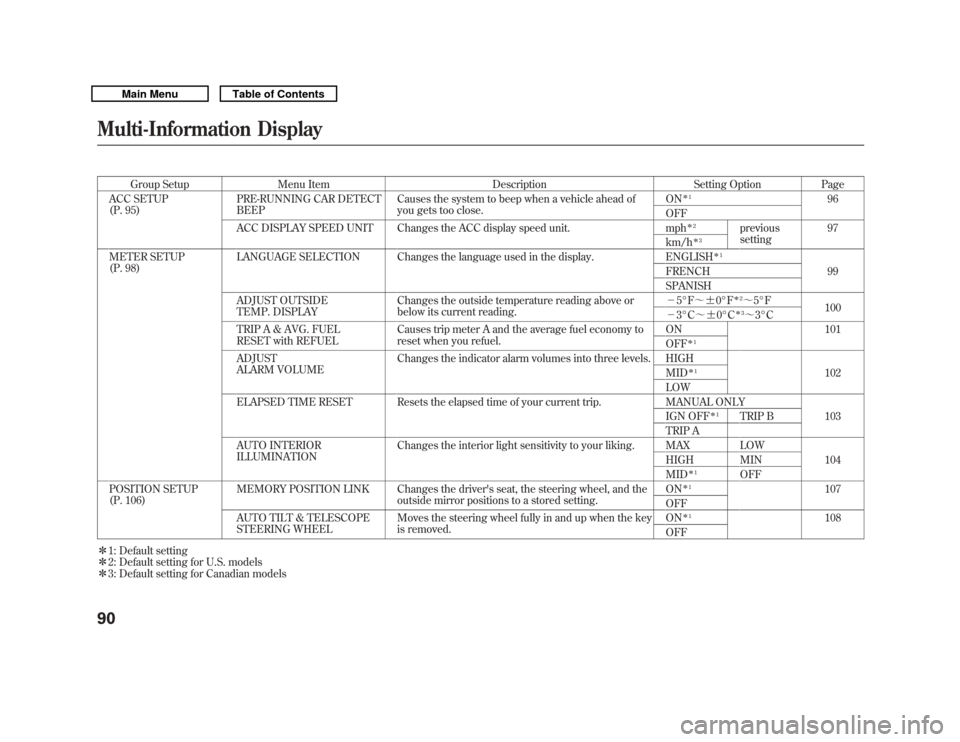
Group SetupMenu Item DescriptionSetting OptionPage
ACC SETUP
(P. 95) PRE-RUNNING CAR DETECT
BEEP Causes the system to beep when a vehicle ahead of
you gets too close. ON
ꭧ
1
96
OFF
ACC DISPLAY SPEED UNIT Changes the ACC display speed unit. mph
ꭧ 2
previous
setting 97
km/h
ꭧ 3
METER SETUP
(P. 98) LANGUAGE SELECTION Changes the language used in the display. ENGLISH
ꭧ
1
99
FRENCH
SPANISH
ADJUST OUTSIDE
TEMP. DISPLAY Changes the outside temperature reading above or
below its current reading. -
5°F ~ꭗ0°F
ꭧ 2~5°F
100
- 3°C ~ꭗ0°Cꭧ 3~ 3°C
TRIP A & AVG. FUEL
RESET with REFUEL Causes trip meter A and the average fuel economy to
reset when you refuel. ON 101
OFF
ꭧ
1
ADJUST
ALARM VOLUME Changes the indicator alarm volumes into three levels. HIGH
102
MID
ꭧ 1
LOW
ELAPSED TIME RESET Resets the elapsed time of your current trip. MANUAL ONLY 103
IGN OFF
ꭧ 1
TRIP B
TRIP A
AUTO INTERIOR
ILLUMINATION Changes the interior light sensitivity to your liking. MAX LOW
104
HIGH MIN
MID
ꭧ 1
OFF
POSITION SETUP
(P. 106) MEMORY POSITION LINK Changes the driver's seat, the steering wheel, and the
outside mirror positions to a stored setting. ON
ꭧ
1
107
OFF
AUTO TILT & TELESCOPE
STEERING WHEEL Moves the steering wheel fully in and up when the key
is removed. ON
ꭧ
1
108
OFF
ꭧ 1: Default setting
ꭧ 2: Default setting for U.S. models
ꭧ 3: Default setting for Canadian models
Multi-Information Display9010/06/29 11:59:04 11 ACURA MDX MMC North America Owner's M 50 31STX640 enu
Page 112 of 609
Memory Position LinkIf‘‘MEMORY POSITION LINK ’’is
set to ‘‘ON, ’’the driver's seat, the
steering wheel, and outside mirror
positions move to the position stored
in the memory when you open the
driver's door, using the remote
transmitter.
You can choose this customize item
from ‘‘POSITION SETUP ’’by
pressing the INFO (
/
) button
repeatedly.
Press the SEL/RESET button to see
the selections.
Select ON or OFF by pressing the
INFO (
/
) button, then enter your
selection by pressing the SEL/
RESET button.
When your selection is successfully
completed, the display changes as
shown above, and then goes back to
the customize item screen.
If the ‘‘SETTING INCOMPLETE ’’
message appears, go back to
‘‘ MEMORY POSITION LINK ’’and
repeat the procedure again.
CONTINUED
Multi-Information Display
107
Instruments and Controls
10/06/29 11:59:04 11 ACURA MDX MMC North America Owner's M 50 31STX640 enu
