Page 88 of 609
IGN ACCESSORY (I) or LOCK (0)
-Follow the message and turn off
all electrical devices. Driving the
vehicle will recharge the battery,
however the vehicle may not start. If
the vehicle doesn't start, see jump
starting (page 552) or contact your
dealer. Trip Computer
When the main menu displays
‘‘TRIP
COMPUTER ’’, pressing the SEL/
RESET button changes the display to
‘‘ AVERAGE FUEL A/RANGE ’’to
‘‘ AVERAGE FUEL B/RANGE ’’and
to ‘‘AVERAGE SPEED/ELAPSED
TIME’’ .
AVERAGE FUEL A/BThis shows your vehicle's average
fuel economy in mpg (U.S. models)
or liter/100 km (Canadian models)
since you last reset the Trip A or Trip
B.
You can customize the Trip A and
AVERAGE FUEL A reset condition
on the multi-information display (see
page 101).
CONTINUED
Multi-Information Display
83
Instruments and Controls
10/06/29 11:59:04 11 ACURA MDX MMC North America Owner's M 50 31STX640 enu
Page 94 of 609

Customize SettingsWhen the main menu displays
‘‘Keyless Memory Settings ™,’’you
can customize some vehicle control
settings.
To enter the customizing mode,
press the SEL/RESET button.
To change the settings, the ignition
switch must be in the ON (II)
position, and the vehicle must be
stopped with the transmission in
Park. If you turn the ignition switch to the
ACCESSORY (I) or the LOCK (0)
position, or move the shift lever out
of Park, the display will change to the
normal screen.
You can customize some vehicle
control settings for
‘‘DRIVER 1 ’’and
‘‘ DRIVER 2’’ separately. If ‘‘DRIVER
1 ’’ or ‘‘DRIVER 2’’ is not displayed,
customizing is not possible.
To have the driver's ID detected,
make sure your remote transmitter is
linked to the system (see Keyless
Memory Settings ™on page 147).
If you want the settings as they were
when the vehicle left the factory,
select DEFAULT ALL, as described
on page 92.
If you want to change any vehicle
control settings, select CHG
SETTING, then press the SEL/
RESET button.
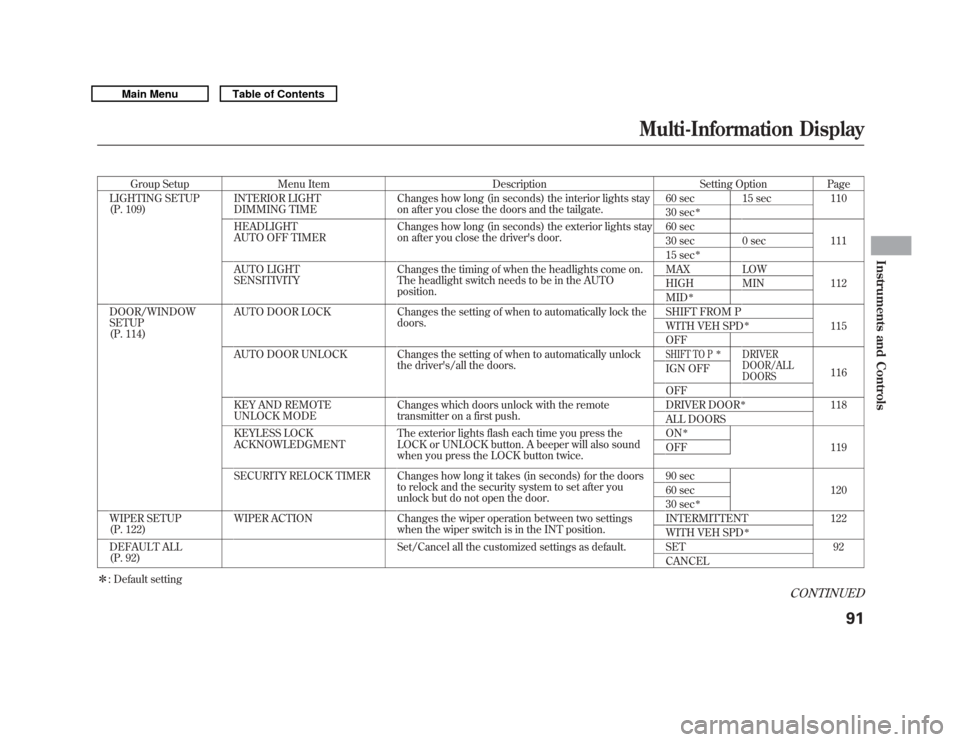
Refer to the table on the following
pages about the settings you want to
customize.
CONTINUED
Multi-Information Display
89
Instruments and Controls
10/06/29 11:59:04 11 ACURA MDX MMC North America Owner's M 50 31STX640 enu
Page 96 of 609
Group SetupMenu Item DescriptionSetting OptionPage
LIGHTING SETUP
(P. 109) INTERIOR LIGHT
DIMMING TIME Changes how long (in seconds) the interior lights stay
on after you close the doors and the tailgate. 60 sec 15 sec
110
30 sec
ꭧ
HEADLIGHT
AUTO OFF TIMER Changes how long (in seconds) the exterior lights stay
on after you close the driver's door. 60 sec
111
30 sec 0 sec
15 sec
ꭧ
AUTO LIGHT
SENSITIVITY Changes the timing of when the headlights come on.
The headlight switch needs to be in the AUTO
position. MAX LOW
112
HIGH MIN
MID
ꭧ
DOOR/WINDOW
SETUP
(P. 114) AUTO DOOR LOCK Changes the setting of when to automatically lock the
doors. SHIFT FROM P
115
WITH VEH SPD
ꭧ
OFF
AUTO DOOR UNLOCK Changes the setting of when to automatically unlock the driver's/all the doors.SHIFT TO P
ꭧ
DRIVER
DOOR/ALL
DOORS
116
IGN OFF
OFF
KEY AND REMOTE
UNLOCK MODE Changes which doors unlock with the remote
transmitter on a first push. DRIVER DOOR
ꭧ
118
ALL DOORS
KEYLESS LOCK
ACKNOWLEDGMENT The exterior lights flash each time you press the
LOCK or UNLOCK button. A beeper will also sound
when you press the LOCK button twice. ON
ꭧ
119
OFF
SECURITY RELOCK TIMER Changes how long it takes (in seconds) for the doors to relock and the security system to set after you
unlock but do not open the door. 90 sec
120
60 sec
30 sec
ꭧ
WIPER SETUP
(P. 122) WIPER ACTION Changes the wiper operation between two settings
when the wiper switch is in the INT position. INTERMITTENT 122
WITH VEH SPD
ꭧ
DEFAULT ALL
(P. 92)
Set/Cancel all the customized settings as default. SET 92
CANCEL
ꭧ : Default setting
CONTINUED
Multi-Information Display
91
Instruments and Controls
10/06/29 11:59:04 11 ACURA MDX MMC North America Owner's M 50 31STX640 enu
Page 108 of 609
Elapsed Time ResetThere are four elapsed time reset
choices you can make:
MANUAL ONLY-You can reset
the elapsed time, when Trip
Computer's Elapsed Time is
displayed (see page 84).
IGN OFF -The elapsed time is
reset when you turn the ignition
switch to the LOCK (0) position.
TRIP A -The elapsed time is reset
when the Trip A is reset.
TRIP B -The elapsed time is reset
when the Trip B is reset.
You can choose this customize item
from ‘‘METER SETUP ’’by pressing
the INFO (
/
) button repeatedly.
Press the SEL/RESET button to see
the selections.
Select the desired setting by
pressing the INFO (
/
) button,
then enter your selection by pressing
the SEL/RESET button.CONTINUED
Multi-Information Display
103
Instruments and Controls
10/06/29 11:59:04 11 ACURA MDX MMC North America Owner's M 50 31STX640 enu
Page 113 of 609
Auto Tilt & Telescope Steering WheelWhen‘‘AUTO TILT & TELESCOPE
STEERING WHEEL ’’is set to ‘‘ON, ’’
the steering wheel automatically
moves fully in and up when you turn
the ignition switch to the LOCK (0)
position and remove the key.
You can choose this customize item
from ‘‘POSITION SETUP ’’by
pressing the INFO (
/
) button
repeatedly.
Press the SEL/RESET button to see
the selections.
Select ON or OFF by pressing the
INFO (
/
) button, then enter your
selection by pressing the SEL/
RESET button.
When your selection is successfully
completed, the display changes as
shown above, and then goes back to
the customize item screen.
If the ‘‘SETTING INCOMPLETE ’’
message appears, go back to ‘‘AUTO
TILT & TELESCOPE STEERING
WHEEL ’’and repeat the procedure
again.
Multi-Information Display10810/06/29 11:59:04 11 ACURA MDX MMC North America Owner's M 50 31STX640 enu
Page 119 of 609
Door/Window Setup
Here are the five custom settings for
the door/window setup:●
AUTO DOOR LOCK
●
AUTO DOOR UNLOCK
●
KEY AND REMOTE UNLOCK
MODE
●
KEYLESS LOCK
ACKNOWLEDGMENT
●
SECURITY RELOCK TIMER
While ‘‘DOOR/WINDOW SETUP ’’is
shown, press the SEL/RESET button
to enter the customize mode.
Each time you press the INFO
(/
) button, the screen changes as
shown in the illustration. Press the
INFO (
/
) button until you see the
setting you want to customize, then
press the SEL/RESET button to
enter your selection.
SEL/RESET
BUTTON
INFO ( ▲or▼ )
BUTTON
Multi-Information Display11410/06/29 11:59:04 11 ACURA MDX MMC North America Owner's M 50 31STX640 enu
Page 120 of 609
Auto Door LockThere are three settings you can
choose from:
SHIFT FROM P-
The doors lock whenever you move
the shift lever out of Park.
WITH VEH SPD -
The doors lock when the vehicle
speed reaches about 10 mph (about
16 km/h).
OFF -
The auto door lock is deactivated all
the time.
You can choose this customize item
from ‘‘DOOR/WINDOW SETUP ’’by
pressing the INFO (
/
) button
repeatedly.
Press the SEL/RESET button to see
the selections.
Select the desired setting by
pressing the INFO (
/
) button,
then enter your selection by pressing
the SEL/RESET button.CONTINUED
Multi-Information Display
115
Instruments and Controls
10/06/29 11:59:04 11 ACURA MDX MMC North America Owner's M 50 31STX640 enu
Page 121 of 609
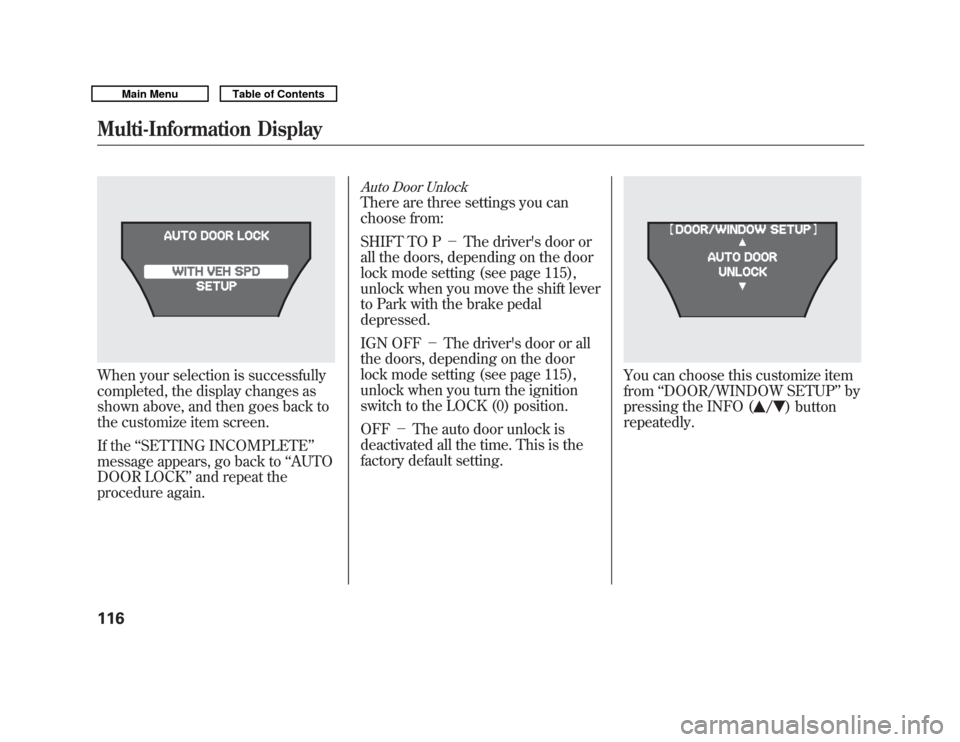
When your selection is successfully
completed, the display changes as
shown above, and then goes back to
the customize item screen.
If the‘‘SETTING INCOMPLETE ’’
message appears, go back to ‘‘AUTO
DOOR LOCK ’’and repeat the
procedure again.
Auto Door UnlockThere are three settings you can
choose from:
SHIFT TO P -The driver's door or
all the doors, depending on the door
lock mode setting (see page 115),
unlock when you move the shift lever
to Park with the brake pedal
depressed.
IGN OFF -The driver's door or all
the doors, depending on the door
lock mode setting (see page 115),
unlock when you turn the ignition
switch to the LOCK (0) position.
OFF -The auto door unlock is
deactivated all the time. This is the
factory default setting.
You can choose this customize item
from ‘‘DOOR/WINDOW SETUP ’’by
pressing the INFO (
/
) button
repeatedly.
Multi-Information Display11610/06/29 11:59:04 11 ACURA MDX MMC North America Owner's M 50 31STX640 enu