Page 96 of 609
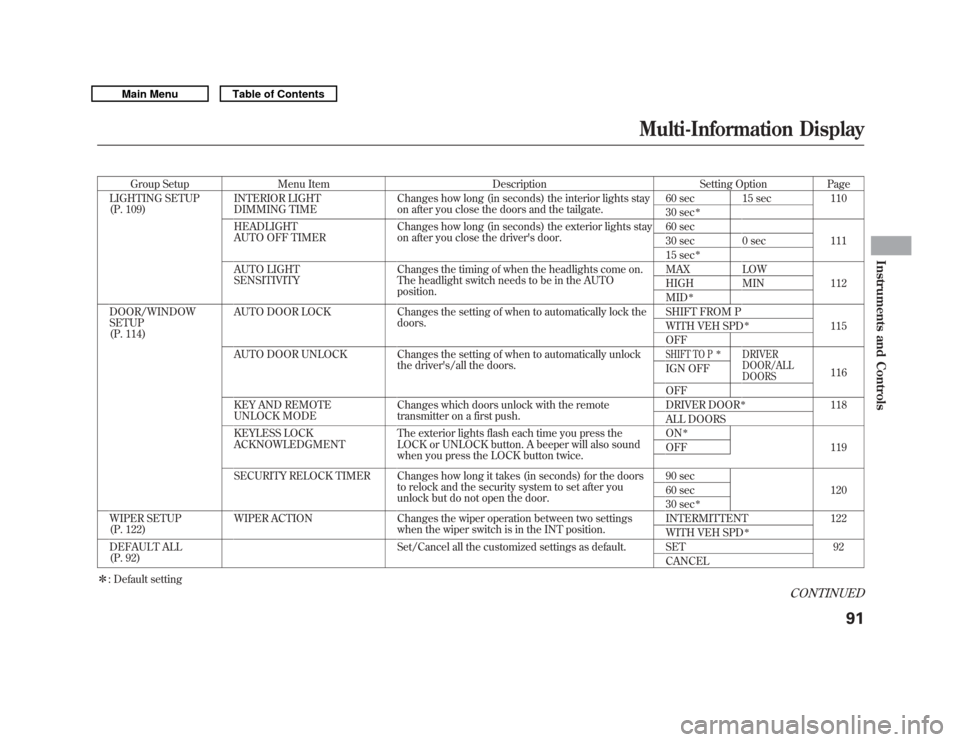
Group SetupMenu Item DescriptionSetting OptionPage
LIGHTING SETUP
(P. 109) INTERIOR LIGHT
DIMMING TIME Changes how long (in seconds) the interior lights stay
on after you close the doors and the tailgate. 60 sec 15 sec
110
30 sec
ꭧ
HEADLIGHT
AUTO OFF TIMER Changes how long (in seconds) the exterior lights stay
on after you close the driver's door. 60 sec
111
30 sec 0 sec
15 sec
ꭧ
AUTO LIGHT
SENSITIVITY Changes the timing of when the headlights come on.
The headlight switch needs to be in the AUTO
position. MAX LOW
112
HIGH MIN
MID
ꭧ
DOOR/WINDOW
SETUP
(P. 114) AUTO DOOR LOCK Changes the setting of when to automatically lock the
doors. SHIFT FROM P
115
WITH VEH SPD
ꭧ
OFF
AUTO DOOR UNLOCK Changes the setting of when to automatically unlock the driver's/all the doors.SHIFT TO P
ꭧ
DRIVER
DOOR/ALL
DOORS
116
IGN OFF
OFF
KEY AND REMOTE
UNLOCK MODE Changes which doors unlock with the remote
transmitter on a first push. DRIVER DOOR
ꭧ
118
ALL DOORS
KEYLESS LOCK
ACKNOWLEDGMENT The exterior lights flash each time you press the
LOCK or UNLOCK button. A beeper will also sound
when you press the LOCK button twice. ON
ꭧ
119
OFF
SECURITY RELOCK TIMER Changes how long it takes (in seconds) for the doors to relock and the security system to set after you
unlock but do not open the door. 90 sec
120
60 sec
30 sec
ꭧ
WIPER SETUP
(P. 122) WIPER ACTION Changes the wiper operation between two settings
when the wiper switch is in the INT position. INTERMITTENT 122
WITH VEH SPD
ꭧ
DEFAULT ALL
(P. 92)
Set/Cancel all the customized settings as default. SET 92
CANCEL
ꭧ : Default setting
CONTINUED
Multi-Information Display
91
Instruments and Controls
10/06/29 11:59:04 11 ACURA MDX MMC North America Owner's M 50 31STX640 enu
Page 116 of 609
Headlight Auto Off TimerThe headlights, parking lights, side
marker lights, taillights, and license
plate lights go off after the selected
time when you remove the key from
the ignition switch and close the
driver's door. To change how long
the lights stay on before they go off,
follow these instructions:
You can choose this customize item
from‘‘LIGHTING SETUP ’’by
pressing the INFO (
/
) button
repeatedly.
Press the SEL/RESET button to see
the selections.
Select the desired setting by
pressing the INFO (
/
) button,
then enter your selection by pressing
the SEL/RESET button.CONTINUED
Multi-Information Display
111
Instruments and Controls
10/06/29 11:59:04 11 ACURA MDX MMC North America Owner's M 50 31STX640 enu
Page 121 of 609
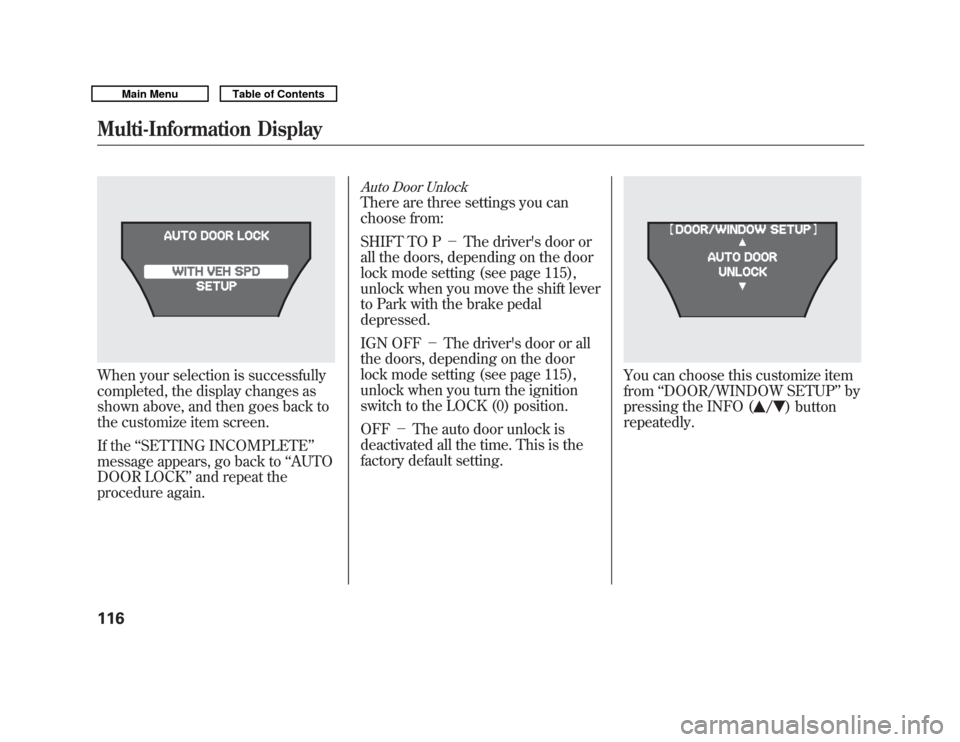
When your selection is successfully
completed, the display changes as
shown above, and then goes back to
the customize item screen.
If the‘‘SETTING INCOMPLETE ’’
message appears, go back to ‘‘AUTO
DOOR LOCK ’’and repeat the
procedure again.
Auto Door UnlockThere are three settings you can
choose from:
SHIFT TO P -The driver's door or
all the doors, depending on the door
lock mode setting (see page 115),
unlock when you move the shift lever
to Park with the brake pedal
depressed.
IGN OFF -The driver's door or all
the doors, depending on the door
lock mode setting (see page 115),
unlock when you turn the ignition
switch to the LOCK (0) position.
OFF -The auto door unlock is
deactivated all the time. This is the
factory default setting.
You can choose this customize item
from ‘‘DOOR/WINDOW SETUP ’’by
pressing the INFO (
/
) button
repeatedly.
Multi-Information Display11610/06/29 11:59:04 11 ACURA MDX MMC North America Owner's M 50 31STX640 enu
Page 122 of 609
Press the SEL/RESET button to see
the selections.
Select the desired setting by
pressing the INFO (
/
) button,
then enter your selection by pressing
the SEL/RESET button.
If you choose ‘‘SHIFT TO P ’’or ‘‘IGN
OFF ’’, you will see the above display.
Press the INFO (
/
) button to
switch the door lock mode setting
between the driver's door and all
doors. Then, press the SEL/RESET
button to enter your selection.
When your selection is successfully
completed, the display changes as
shown above, and then goes back to
the customize item screen.
If the ‘‘SETTING INCOMPLETE ’’
message appears, go back to ‘‘AUTO
DOOR UNLOCK ’’and repeat the
procedure again.
CONTINUED
Multi-Information Display
117
Instruments and Controls
10/06/29 11:59:04 11 ACURA MDX MMC North America Owner's M 50 31STX640 enu
Page 132 of 609

3. When you turn the wiper switch tothe ‘‘OFF ’’position, the wiper will
return to its parked position.
4. Rotate the switch counterclockwise to spray the
window washer.
When you shift the transmission to
the reverse position with the front
windshield wipers activated, the
rear window wiper operates
automatically.
When the wiper control lever
position is INT, the rear wiper
operates intermittently. When it is
LO or HI, the rear wiper operates
continuously.
The rear window washer uses the
same fluid reservoir as the
windshield washer. Turn Signal and Headlights
1. Turn signal
2. Off
3. Parking and indicator lights
4. AUTO
5. Headlights on
6. High beams
7. Flash high beams
8. Fog lights off
9. Fog lights onTurn Signal
-Push down on the
lever to signal a left turn and up to
signal a right turn. To signal a lane
change, push lightly on the lever,
and hold it. The lever will return to
center when you release it or
complete a turn.
Headlights On -Turning the
switch to the ‘‘
’’position turns on
the parking lights, taillights,
instrument panel lights, side-marker
lights, and rear license plate lights.
Turning the switch to the ‘‘
’’
position turns on the headlights. If
you leave the lights on with the key
removed from the ignition switch,
you will hear a reminder chime when
you open the driver's door.
CONTINUED
Windshield Wipers and Washers, Turn Signal and Headlights
127
Instruments and Controls
10/06/29 11:59:04 11 ACURA MDX MMC North America Owner's M 50 31STX640 enu
Page 133 of 609

When the light switch is in either of
these positions, the lights on
indicator comes on as a reminder.
This indicator stays on if you leave
the lights on and turn the ignition
switch to the ACCESSORY (I) or
LOCK (0) position.
High Beams-To switch from low
beams to high beams, push the left
lever forward until you hear a click.
The blue high beam indicator will
come on (see page 72). Pull it back to
return to low beams. To flash the
high beams, pull the lever back
lightly, then release it. The high
beams stay on as long as you hold
the lever back. AUTO
-The automatic lighting
feature turns on the headlights and
all other exterior lights, when it
senses low ambient light.
To turn on automatic lighting, turn
the light switch to AUTO at any time.
The lights will come on automatically
when the outside light level becomes
low (at dusk, for example). The
lights on indicator comes on as a
reminder. The lights and indicator
will turn off automatically when the
system senses high ambient light.
The lights will remain on when you
turn off the ignition switch. They will
turn off automatically when you
remove the key and open the driver's
door. To turn them on again, either
turn the ignition switch to the ON
(II) position or turn the light switch
to the
position. Even with the automatic lighting
feature turned on, we recommend
that you turn on the lights manually
when driving at night or in a dense
fog, or when you enter dark areas
such as long tunnels or parking
facilities.
To change the
‘‘AUTO LIGHT
SENSITIVITY ’’setting, see page 112.
Do not leave the light switch in
AUTO if you will not be driving the
vehicle for an extended period (a
week or more). You should also turn
off the lights if you plan to leave the
engine idling or off for a long time.
Turn Signal and Headlights12810/06/29 11:59:04 11 ACURA MDX MMC North America Owner's M 50 31STX640 enu
Page 135 of 609

If you see a‘‘CHECK DRL SYSTEM ’’
message on the multi-information
display, there is a problem with the
daytime running light system. Take
your vehicle to a dealer to have it
checked.
When the multi-information display
shows a ‘‘DRL OFF ’’message, the
daytime running lights are off.
Follow the procedure in the left
column to turn them on. Automatic Lighting Off Feature
This feature turns off the headlights,
all other exterior lights, and the
instrument panel lights within 15
seconds after you remove the key
and close the driver's door.
To change the
‘‘HEADLIGHT AUTO
OFF TIMER ’’setting, see page 111.
The automatic lighting off feature
activates if you leave the headlight
switch in the ‘‘
’’or ‘‘
’’
position or if the lights are turned on
by setting the switch in the ‘‘AUTO ’’
position, and you remove the key,
then open and close the driver's
door. If you turn the ignition switch to the
LOCK (0) position with the headlight
switch on, but do not open the door
and get out, the lights turn off after
10 minutes (3 minutes, if the switch
is in the
‘‘AUTO ’’position).
The lights turn on again when you
unlock or open the driver's door.
If you unlock the door, but do not
open it within 15 seconds, the lights
go off. With the driver's door open,
you will hear a lights-on reminder
chime.
Turn Signal and Headlights13010/06/29 11:59:04 11 ACURA MDX MMC North America Owner's M 50 31STX640 enu
Page 143 of 609

The ignition switch has four positions:
LOCK (0), ACCESSORY (I), ON (II),
and START (III).
LOCK (0)-You can insert or remove
the key only in this position. To turn
the key to the LOCK (0) position, the
shift lever must be in Park, and you
must push the key in slightly.
If the front wheels are turned, the anti-
theft lock may make it difficult to turn
the key. Firmly turn the steering wheel
to the left or right as you turn the key.
ACCESSORY (I) -You can operate
the audio system and the accessory
power sockets in this position.
ON (II) -This is the normal key
position when driving. Several of the
indicators on the instrument panel
come on as a test when you turn the
ignition switch from the
ACCESSORY (I) to the ON (II)
position.
START (III) -Use this position
only to start the engine. The switch
returns to the ON (II) position when
you let go of the key. You will hear a reminder beeper if
you leave the key in the ignition
switch in the LOCK (0) or the
ACCESSORY (I) position and open
the driver's door. Remove the key to
turn off the beeper.
The shift lever must be in Park
before you can remove the key from
the ignition switch.
Ignition Switch13810/06/29 11:59:04 11 ACURA MDX MMC North America Owner's M 50 31STX640 enu