Page 297 of 348
295
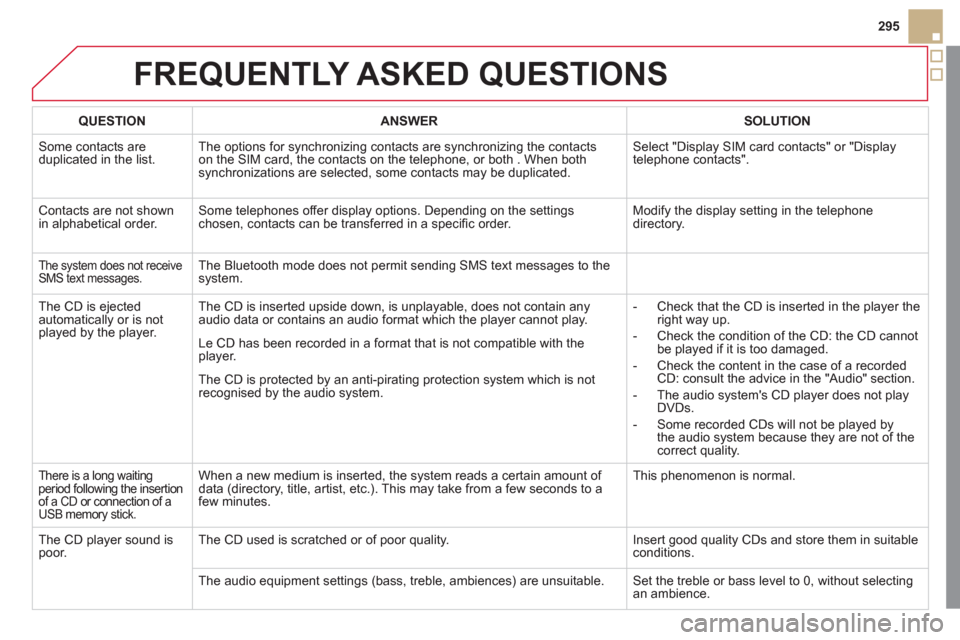
FREQUENTLY ASKED QUESTIONS
QUESTIONANSWERSOLUTION
Some contacts are
duplicated in the list.The options for synchronizing contacts are synchronizing the contacts
on the SIM card, the contacts on the telephone, or both . When both
synchronizations are selected, some contacts may be duplicated. Select "Displa
y SIM card contacts" or "Displaytelephone contacts".
Contacts are not shown
in alphabetical order.Some telephones offer display options. Depending on the settingschosen, contacts can be transferred in a specifi c order. Modify the display setting in the telephone
directory.
The system does not receiveSMS text messages.The Bluetooth mode does not permit sending SMS text messages to the
system.
The CD is e
jected
automatically or is not played by the player. The CD is inserted upside down, is unpla
yable, does not contain any audio data or contains an audio format which the player cannot play.
- Check that the CD is inserted in the player the
right way up.
-
Check the condition of the CD: the CD cannot
be played if it is too damaged.
-
Check the content in the case of a recordedCD: consult the advice in the "Audio" section.
- The audio s
ystem's CD player does not play
DVDs.
-
Some recorded CDs will not be played by
the audio system because they are not of thecorrect quality. Le
CD has been recorded in a format that is not compatible with the
player.
The CD is protected b
y an anti-pirating protection system which is not recognised by the audio system.
There is a long waiting period following the insertion
of a CD or connection of aUSB memory stick.
When a new medium is inserted, the system reads a certain amount of
data (directory, title, artist, etc.). This may take from a few seconds to a
few minutes. This phenomenon is normal.
The
CD player sound ispoor.The CD used is scratched or of poor quality. Insert good quality CDs and store them in suitable conditions.
The audio equipment settin
gs (bass, treble, ambiences) are unsuitable. Set the treble or bass level to 0, without selectingan ambience.
Page 300 of 348

QUESTIONANSWER SOLUTION
With the engine off, the system switches off after a few minutes of use.When the en
gine is switched off, the system's operating time depends on
the battery charge.
The switch-off is normal: the s
ystem switches to economy mode and
switches off to prevent discharging of the vehicle's battery.
Start the vehicle's engine to increase the batterycharge.
Playback o
f my USB memory stick starts only
after a very long wait (around 2 to 3 minutes).
Some fi les supplied with the memory stick may greatly slow down access
to reading the memory stick (multiplication by 10 of the catalogue time). Delete the fi les supplied with the memory stickand limit the number of sub-folders in the fi le structure on the memory stick.
When I connect myiPhone as telephone and
to the USB port at thesame time, I am unable
to play the music fi les. When the iPhone connects automaticall
y as a telephone, it forces the
streaming function. The streaming function takes the place of the USBfunction which is then not useable. Disconnect and reconnect to the U
SB port(the USB function takes priority over streaming).
FREQUENTLY ASKED QUESTIONS
Page 301 of 348
299
The system is coded in such a way that it will only
operate in your vehicle.
AUDIO SYSTEM/BLUETOOTH
01 First steps
For safety reasons, the driver must only carry out
operations which require prolonged attention while the
vehicle is stationary.
When the engine is switched o
ff and to prevent
discharging of the battery, the audio system may switch off after a few minutes.
CONTENTS
02 Steering mounted controls
03 Main menu
04 Audio
05 Using the telephone
06 Audio settings
07 Configuration
08 Screen menu map
Frequently asked questions p.
p.
p.
p.
p.
p.
p.
p.
p.
0
301
302
3
03
313
322
32
3
324
326
Page 302 of 348

01
On/Off.
FIRST STEPS
Volume adjustment.
Select screen display between modes:
Full screen: Audio
(or
telephone if call in progress)/
In a window: Audio
(or
telephone if call in progress) -Time or Trip computer.
Long press: black screen (DARK).
Selection of AM/FM
wavebands.
Select preset radio station.
Long press: store a
station.
Displa
y the list of stations received,CD/MP3 tracks or folders.
Long press: managing the classifi cation of MP3/WMA fi les/update
the list of stations received.
TA
(Traffi c Announcement)
function On/Off.
Lon
g press: access to type of
information.
Confi rmation
or display of contextual menu.
Automatic search up
/down for
radio frequencies.
Select previous/next CD, USB, streaming track.
Navi
gation in a list.
A
bandon the current
operation.
Up one level (menu or folder).
Manual step b
y step search up/downfor radio frequencies.
Select previous/next MP3 folder.
Select previous/next folder/genre/
artist/playlist in the USB device.
Navigation in a list.
Select source:
Radio, CD, AUX, USB,Streaming.
Accept an incoming call.
Access to main menu.
Audio settings:
au
dio ambiences, treble, bass,loudness, distribution, left/right
balance, front/rear fader, automatic
volume.
Page 303 of 348
02
SRC
+
-
301
STEERING MOUNTED CONTROLS
- Rotation
R
adio -automatic selection of next/previous frequency.
Media:
previous/next track.
- Pr
ess then rotation: access to 6 preset stations.
-
Change the audio source.
- TEL button
(short press):
Accept an incomin
g call
Call in pro
gress: access to telephonemenu: hang up, secret mode, hands-
free mode.
- TEL button
(long press):
Reject an incoming call or end a call
in pro
gress.
When not makin
g a call, access to
the telephone menu (Dial, Contacts,Calls log, Voice mailbox).
-
Increase volume.
- D
ecrease volume.
- Radio: displa
y the list of stations.
Media: displa
y the list of tracks.
Page 304 of 348
03
" Multimedia
": Media parameters, Radio parameters.
For a detailed global view of the menusavailable, refer to "Screen menu map" in this section.
> SCREEN C
"Bluetooth connection":Connections management, Search for a device.
" Telephone": Call, Directorymanagement, Telephone management, Hang up.
MAIN MENU
"Personalisation-confi guration": Defi ne thevehicle parameters, Choice of language, Display confi guration, Choice of units, Date and time adjustment.
Page 314 of 348

04
1
2
1
2
3
4
5
AUDIO
STREAMING - PLAYING AUDIO FILES
VIA BLUETOOTH
Depending on the compatibility of the phone
Pair
/connect the telephone: see the "USING THE
TELEPHONE" section.
Streaming allows music fi les on a telephone to be heard via the
vehicle's speakers.
The telephone must support the appropriate bluetooth pro
fi les (Profi les A2DP/AV RCP).
Activate the streaming source by pressing SOURCEor
SRC
. Control of playback is via the audio system. Thecontextual information can be displayed in the screen.
In certain cases, pla
ying of the audio fi les must be initiated from
the telephone.
The audio quality depends on the quality o
f the transmission from
the telephone.
PLAY MODE
The play modes available are:
- Normal: the tracks are pla
yed in order, depending on theclassifi cation of the selected fi les.
- Random: the tracks in an album or
folder are played in arandom order.
- Random all: all o
f the tracks saved in the media are played inrandom order.
- Repeat: the tracks pla
yed are only those from the currentalbum or folder.
Press OKfor access to the contextualmenu.
or
Pr
ess MENU.
Select "Multimedia" and confi rm.
Select "Media parameters
" and confi rm.
Select "Read mode
" and confi rm.
Select the desired play mode and confi rm OKto save the modifi cations.
Page 315 of 348

05
1
2
5
3
4
6
313
USING THE TELEPHONE
PAIRING A TELEPHONE
FIRST CONNECTION
The services offered depend on the network, the SIM card and the compatibility of the Bluetooth telephone used.
Consult
your telephone's manual and your operator to fi nd out which services are available to you.
Activate the telephone's Bluetooth function andensure that it is "visible to all" (refer to the telephone
user guide).
Pr
ess MENU . A window is displayed "Search in progress…".
Select the tele
phone to be connected from the list. Only one telephone can be connected at a time.
Select " Search for a device".
For safet
y reasons and because they require prolonged attention on the part of the driver, the operations for pairing of the Bluetooth mobile telephone
with the Bluetooth hands-free system of your audio system must be carried out with the vehicle stationary and the ignition on. y
Visit www.citroen.co.uk for more information (compatibility, additional help, ...).
Select " Bluetooth connection" andconfi rm.


