Page 76 of 332
74
Access
Locking the vehicle with
perimeter monitoring only
Deactivate the interior volumetric and tiltmonitoring to avoid unwanted triggering of thealarm in cer tain cases, such as:
- an animal left in the vehicle,
- a window left par tly open,
- washing your vehicle.
Deactivation of the interior volumetric and tilt monitoring
Raise and hold the wiper control stalk in the
" MIST " position for about three seconds to
activate them again, the audible signal sounds
twice.
) Switch off the ignition and remove thekey from the ignition switch (OFF mode if your vehicle has the "Keyless Entry andStarting" system). )
Raise and hold the wiper control stalk in
the "MIST"
position for about 3 seconds. )
The audible signal sounds once
and the
interior volumetric and tilt monitoring are
deactivated.
Page 77 of 332

75
2
Access
Tr iggering of the alarm
This is indicated by sounding of the siren andflashing of the direction indicators for thirtyseconds.
A message then appears in the instrument
panel screen while the siren is operating.
When the ignition is next switched on (ONmode if your vehicle has the "Keyless Entry and Starting" system), an audible signal sounds four
times to inform you that the alarm was triggeredduring your absence.
Complete deactivation of
the alarm
)
Switch off the ignition (OFF mode if your vehicle has the "Keyless Entry andStarting" system). )
Remove the key from the ignition switch,
if your vehicle does not have the "Keyless
Entry and Star ting" system.) Open the driver's door. )
Place the lighting control stalk in the "OFF"position. )
Pull the wiper control stalk towards you and
hold.
After about ten seconds there is an audible signal.) When the audible signal stops, continue to
hold the wiper stalk pulled towards you and
press the remote control locking button.
You can completely deactivate the alarm
system. To do this, proceed as follows:
) The state of the system is then signalled to you by the number of beeps:
One beep: the alarm system is completely deactivated.
Two beeps: the alarm system is activated.
Each new press of the remote control
lockin
g button changes the state of thesystem.
It is possible to adjust the sensitivity
of the alarm sensor and to deactivatethe function via the colour screen"Equipment" menu.
Page 85 of 332

83
3
Comfort
Rear seats
Bench seat with fixed one-piece cushion and split backrest (left hand 2/3, right hand 1/3) which can be folded individually to adapt the load space in the boot.
Folding the backrest
Repositioning the seat backrest
)Move the corresponding front seat for ward
if necessary. )Place the head restraints in the low position (see "Rear head restraints"). )Press control 1 forwards to release theseat backrest 2.)Fold the seat back 2
on to the cushion.
)
Straighten the seat backrest 2
and secure it. )
Check that the red indicator, located next to
the control 1, is no longer visible.
When repositionin
g the seat backrests, theycan be locked in one of two different positions,
depending on the speed in which the operation is carried out:
- if done quickly, the backrest returns to its
original position 1 ,
- if done slowly, the backrest goes into the
ver tical position 2
.
To go from position 2
to position 1
, simplyrelease the backrest and push it until it locks
in place.
Page 88 of 332
86
Comfort
From the outside:) by locking or unlocking the vehicle,using the remote control or the locking / unlocking buttons (for vehicles fitted with
the "Keyless Entry and Starting" system).
If you have folded the mirrors using thecontrol C
, you must use this control tounfold them, other wise the mirrors will not be lock in place correctly.
Some mirror functions (in particular the automatic folding and unfolding of the door mirrors) can be configured via thecolour screen "Equipment" menu.
The mirrors can also be foldedmanually. From inside:
- with the i
gnition switch in the "ON" or "ACC" position, by pressing the control C,
- with the ignition switch in the "LOCK"
position, by pressing control C, within30 seconds.
Page 89 of 332

87
3
Comfort
Rear view mirror
Adjustable mirror providing a central rear ward view.
Equipped with an anti-dazzle system, which darkens the mirror glass and reduces the nuisance to
the driver caused by the sun, headlamps from other vehicles...
Manual day/night model
Ad
justment
)
Adjust the mirror so that the glass is directed correctly in the "day" position.
As a safety measure, the mirrors should be adjusted to reduce the "blind spot".
In order to ensure optimum visibilityduring your manoeuvres, the mirror lightens automatically when reverse gear is engaged.
Day / night position
)
Pull the lever to change to the "night" anti-dazzle position.)
Push the lever to change to the normal
"day" position.
Automatic day/night model
By means of a sensor, which measures the
light from the rear of the vehicle, this system automatically and progressively changes
between the day and night uses.
Steering wheel adjustment
)When stationary, lower the control lever to yrelease the steering wheel adjustment mechanism.)
Adjust the height and reach to suit your
driving position.) Pull the control lever to lock the steering
wheel adjustment mechanism.
As a safety precaution, these operations should only be carried out while the vehicle is stationary.
Page 103 of 332
101
3
Comfort
Front armrest
Pull the right-hand lever to open the storage compartment lid, which serves as an armrest.
To close, fold down the lid until it locks. Pull the left-hand lever to open the lid.
To c l o s e , fold down the lid until it locks.
This storage compar tment may contain up
to 3 accessory sockets.
This operates when the i
gnition switch is in the
"LOCK", "ACC" or "ON" position.
Open the cover of the front armrest to gain access to the socket.
Upper storage compartment Lower storage compartment
Check that the electrical equipment operates on 12 V and that its maximum electrical power is 120 W.
The prolonged use of electrical equipment without running the engine may discharge the battery.
12 V socket
(120 W max)
Page 108 of 332
106
Driving
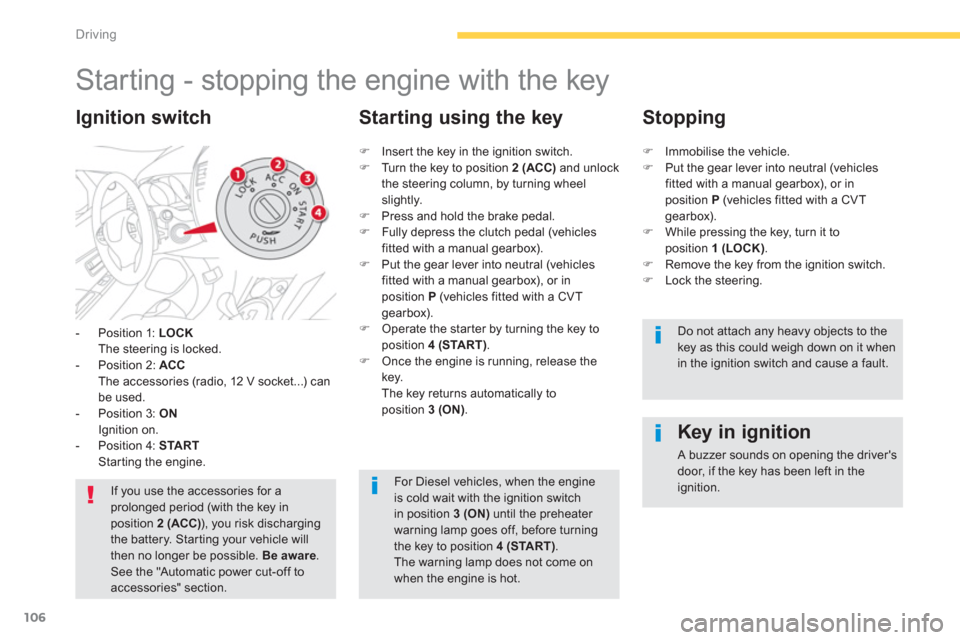
Starting - stopping the engine with the key
- Position 1: LOCKThe steering is locked.
- Position 2: ACCThe accessories (radio, 12 V socket...) can be used.
- Position 3: ONIgnition on.
- Position 4: STARTStarting the engine.
Ignition switch
If you use the accessories for aprolonged period (with the key in position 2 (ACC)), you risk dischargingthe battery. Star ting your vehicle will then no longer be possible. Be aware. See the "Automatic power cut-off toaccessories" section.
Key in ignition
A buzzer sounds on opening the driver'sdoor, if the key has been left in the ignition.
)
Inser t the key in the ignition switch.)
Turn the key to position 2 (ACC)
and unlock
the steering column, by turning wheelslightly.) Press and hold the brake pedal.)
Fully depress the clutch pedal (vehicles fitted with a manual gearbox). )
Put the gear lever into neutral (vehicles fitted with a manual gearbox), or in position P(vehicles fitted with a CVT
gearbox). ) Operate the star ter by turning the key to
position 4 (START).) Once the engine is running, release thekey.
The key returns automatically to
position 3 (ON).
Starting using the key
Stopping
)Immobilise the vehicle. )Put the gear lever into neutral (vehiclesfitted with a manual gearbox), or inposition P
(vehicles fitted with a CVT gearbox).)While pressing the key, turn it toposition 1 (LOCK).)Remove the key from the ignition switch.)Lock the steering.
Do not attach any heavy objects to the key as this could weigh down on it whenin the ignition switch and cause a fault.
For Diesel vehicles, when the engineis cold wait with the ignition switchin position 3 (ON)
until the preheater warning lamp goes off, before turning
the key to position 4 (START)
. The warning lamp does not come on when the engine is hot.
Page 110 of 332

108
Driving
For Diesel vehicles, when the engine is cold star ting does not take place until thepre-heater warning lamp has gone off.
If one of the star ting conditions is not met, a reminder message appears inthe instrument panel screen. In somecircumstances, it is necessary toturn the steering wheel slightly whilepressing the "START/STOP" buttonto assist unlocking of the steering; a message warns you when this isneeded.
The presence of the electronic keyin the defined zone is essential. For
reasons of safety, do not leave this area when the engine is running.
Switching off using the
electronic key
If the vehicle is not immobilised, theengine will not stop.
This message is displayedwhen the driver's door isopened and the vehicle is not
in "OFF" mode.
)Press the "STA R T/STOP" button again to change to "OFF" mode.
)Immobilise the vehicle.
)Place the gear lever in neutral for vehicles fitted with a manual gearbox , or on Pfor
vehicles fitted with a CVT gearbox . )With the electronic key inside the vehicle, press the " START/STOP
" button.
The engine stops.
The steering locks when a door is opened or on
locking the vehicle. Each attempt at star tin
g takes around
15 seconds. If the en
gine does not star t, press
the "START/STOP
" button once more to tryagain.
The presence of the electronic key inthe vehicle is essential for switching on the ignition and star ting only. Oncethe engine has started, make surethat the electronic key remains with the vehicle until the end of the journey: other wise you would not be able to lock the vehicle.


