Page 33 of 166

4-6
4
EBU18080Engine stop switch“/”
Set this switch to“” before starting the engine.
The engine stop switch controls the ignition and
stops the engine when it is running. Use this switch
to stop the engine in an emergency situation. The
engine will not start or run when this switch is set
to“”.EBU18101Start switch“”
Push this switch to crank the engine with the start-
er. See the starting instructions on page 6-1 prior
to starting the engine.EBU18152Light switch“//OFF”
Set this switch to“” to turn on the low beams
and the taillight. Set the switch to“” to turn on
the high beams and the taillight. Set the switch to
“OFF” to turn off all the lights.NOTICEECB00041Do not use the headlights with the engine
turned off for an extended period of time, oth-
erwise the battery may discharge to the point
that the starter motor will not operate properly.If this should happen, remove the battery and
recharge it. See page 8-51 for battery charging
information.
EBU18170Horn switch“”
Press the switch to sound the horn.EBU18190Override switch “OVERRIDE”
Top speed is normally limited when operating in
differential gear lock. If conditions require more en-
gine power when riding forward, push and hold this1. Override switch “OVERRIDE”
U37S61E0.book Page 6 Tuesday, June 2, 2009 10:33 AM
Page 37 of 166
4-10
4
Stop the ATV, move the differential gear lock lever
to position (a), and then push the differential gear
lock switch in to the “LOCK” position. When the dif-
ferential gear is locked, the differential gear lock in-
dicator light “DIFF. LOCK” will come on along with
the indicator“” in the multi-function display.To release the differential gear lock, stop the ATV
and push the switch to the “4WD” position.
TIP�When the switch is set to “LOCK”, the differential
gear lock indicator and indicator light will flash
until the differential gear is locked.�When the indicator and indicator light are flash-
ing, turning the handlebar back and forth will
help the differential gear lock to engage.
1. Differential gear lock lever
2. On-Command four-wheel-drive switch “2WD”/“4WD”
1. On-Command differential gear lock switch “4WD”/“LOCK”
U37S61E0.book Page 10 Tuesday, June 2, 2009 10:33 AM
Page 38 of 166
4-11
4
�Riding before the differential gear lock is proper-
ly engaged (e.g., when the indicator and indica-
tor light are flashing) will cause the vehicle
speed to be limited until engagement is com-
plete.�When the ATV is in four-wheel-drive differential
gear lock, the maximum traveling speed is limit-
ed to 35 km/h (22 mi/h). However, if conditions
require full engine power to be available, push
and hold the override switch to disable the differ-
ential gear lock speed limiter. (See page 4-6 for
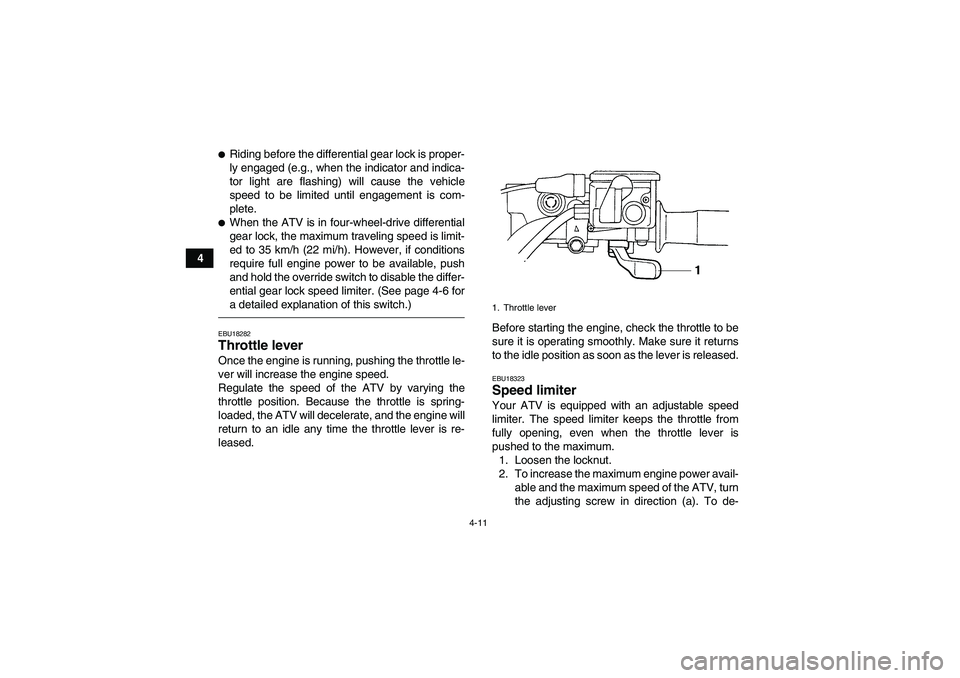
a detailed explanation of this switch.)EBU18282Throttle lever Once the engine is running, pushing the throttle le-
ver will increase the engine speed.
Regulate the speed of the ATV by varying the
throttle position. Because the throttle is spring-
loaded, the ATV will decelerate, and the engine will
return to an idle any time the throttle lever is re-
leased.Before starting the engine, check the throttle to be
sure it is operating smoothly. Make sure it returns
to the idle position as soon as the lever is released.
EBU18323Speed limiter Your ATV is equipped with an adjustable speed
limiter. The speed limiter keeps the throttle from
fully opening, even when the throttle lever is
pushed to the maximum.
1. Loosen the locknut.
2. To increase the maximum engine power avail-
able and the maximum speed of the ATV, turn
the adjusting screw in direction (a). To de-1. Throttle lever
U37S61E0.book Page 11 Tuesday, June 2, 2009 10:33 AM
Page 40 of 166
4-13
4
EBU18611Drive select lever The drive select lever is used to shift your ATV into
the low-range, high-range, neutral, reverse and
park positions. See the “Operating the drive select
lever and driving in reverse” section on page 6-3
for the drive select lever operation.EBU18690Recoil starter Firmly grasp the handle and pull slightly until en-
gagement can be felt. Then pull forcefully, being
careful not to pull the rope all the way out.
1. Brake pedal
1. Rear brake lever
1. Drive select lever
U37S61E0.book Page 13 Tuesday, June 2, 2009 10:33 AM
Page 42 of 166

4-15
4of sparks, open flames, or other sources of ig-
nition such as the pilot lights of water heaters
and clothes dryers.
2. Do not overfill the fuel tank. When refueling,
be sure to insert the pump nozzle into the fuel
tank filler hole. Stop filling when the fuel reach-
es the bottom of the filler tube. Because fuel
expands when it heats up, heat from the en-
gine or the sun can cause fuel to spill out of
the fuel tank.
3. Wipe up any spilled fuel immediately.
NOTICE: Immediately wipe off spilled fuel
with a clean, dry, soft cloth, since fuel may
deteriorate painted surfaces or plastic
parts.
[ECB00981]
4. Turn the fuel tank cap fully clockwise to make
sure it is securely closed.
WARNING
EWB02531Gasoline is poisonous and can cause injury or
death. Handle gasoline with care. Never siphon
gasoline by mouth. If you should swallow
some gasoline or inhale a lot of gasoline vapor,
or get some gasoline in your eyes, see your
1. Maximum fuel level
2. Fuel tank filler tube
Recommended fuel:
UNLEADED GASOLINE ONLY
For Europe: Regular unleaded gasoline only
with a research octane number of 91 or high-
er
Fuel tank capacity:
15.0 L (3.96 US gal, 3.30 Imp.gal)
Fuel reserve amount:
4.5 L (1.19 US gal, 0.99 Imp.gal)
U37S61E0.book Page 15 Tuesday, June 2, 2009 10:33 AM
Page 50 of 166

4-23
4
EBU19182Auxiliary DC jack The auxiliary DC jack is located at the front right
side of the ATV. The auxiliary DC jack can be used
for suitable work lights, radios, etc. The auxiliary
DC jack should only be used when the engine is
running and the light switch is set to “OFF”.
1. Set the light switch to “OFF”.
2. Start the engine. (See page 6-1.)
3. Open the auxiliary DC jack cap, and then in-
sert the accessory power plug into the jack.4. When the auxiliary DC jack is not being used,
cover it with the cap.
NOTICEECB00120�Do not use accessories requiring more than
the above maximum capacity. This may
overload the circuit and cause the fuse to
blow.�If accessories are used without the engine
running or with the headlights turned on, the
battery will lose its charge and engine start-
ing may become difficult.�Do not use an automotive cigarette lighter or
other accessories with a plug that gets hot
because the jack can be damaged.
1. Auxiliary DC jack cap
2. Auxiliary DC jack
1
2
Maximum rated capacity for the auxiliary DC
jack:
DC 12 V, 10 A (120 W)
U37S61E0.book Page 23 Tuesday, June 2, 2009 10:33 AM
Page 52 of 166

5-2
5
Front brakeCheck operation. If soft or spongy, have Yamaha dealer bleed hy-
draulic system.
Check brake pads for wear, and replace if necessary.
Check brake fluid level in reservoir, and add recommended brake
fluid to specified level if necessary.
Check hydraulic system for leakage. Correct if necessary.5-3, 8-39, 8-40, 8-41
Rear brakeCheck operation, and correct if necessary.
Lubricate cables if necessary.
Check lever and pedal free play, and adjust if necessary.5-3, 8-39, 8-42
Throttle leverMake sure that operation is smooth. Lubricate cable and lever hous-
ing if necessary.
Check cable free play, and adjust if necessary.5-4, 8-37
Control cablesMake sure that operation is smooth. Lubricate if necessary. 8-47
Wheels and tiresCheck wheel condition, and replace if damaged.
Check tire condition and tread depth. Replace if necessary.
Check air pressure. Correct if necessary.5-4
Brake pedal Make sure that operation is smooth. Lubricate pedal pivoting point if
necessary.8-48
Brake leversMake sure that operation is smooth. Lubricate lever pivoting points if
necessary.8-47
Axle bootsCheck for cracks or damage, and replace if necessary. 8-45
Chassis fastenersMake sure that all nuts, bolts and screws are properly tightened. 5-7
Instruments, lights and
switchesCheck operation, and correct if necessary. 5-7 ITEM ROUTINE PAGEU37S61E0.book Page 2 Tuesday, June 2, 2009 10:33 AM
Page 57 of 166
5-7
5
EBU19840Chassis fasteners Make sure that all nuts, bolts and screws are prop-
erly tightened.EBU19850Instruments, lights and switches Check that all instruments, lights and switches are
working properly. Correct if necessary.U37S61E0.book Page 7 Tuesday, June 2, 2009 10:33 AM


