Page 70 of 288
02 Instruments and controls
Hazard warning flashers
02
70
Hazard warning flashers
12
3
45
6
78
9 ABC
DEF
GHI
JKL
MNO
PQRS
TUVWXYZ
0
*
#
POWERVOLUMECDAM FM
G027096
The four-way flasher should be used to indi-
cate that the vehicle has become a traffic haz-
ard. To activate the flashers, press the triangu-
lar button in the center dash. Press the button
again to turn off the flashers.
NOTE
Regulations regarding the use of the hazard
warning flasher may vary, depending on
where you live.
Rear window and door mirror defrosterPress the switch to start heat-
ing the rear window and door
mirrors to remove ice or con-
densation. A light in the switch
will light up.
A timer automatically switches off the heating
after approximately 12 minutes. The LED will
go out correspondingly.
Page 71 of 288

02 Instruments and controls
Trip computer
02
��
* Option/accessory, for more information, see Introduction.71 Trip computer*
G026956
READ (press to acknowledge/confirm/
erase a message)
Thumb wheel (used to scroll among the trip
computer menus)
RESET
The trip computer stores information gathered
from several systems in your vehicle and has
four menus that can be displayed in the text
window.
•Driving distance on current fuel reserve
•Average fuel consumption
•Current fuel consumption
•Average speed
•Current speed in mph (Canadian models
only)
•DSTC (see page 147 for detailed informa-
tion)
NOTE
Warning messages from the vehicle's moni-
toring systems will override the trip com-
puter function. If a warning message is dis-
played in the text window while you are
using the trip computer, you must acknowl-
edge the message by pressing button A.
Press button A again to return to the trip
computer function.
1. Trip computer controls and functionsThe trip computer functions can be accessed
by twisting INFO (B) one step at a time in either
direction. Twisting a final time returns you to
the original function.
The trip computer can be reset (current data
will be erased from system memory) by press-
ing RESET (button C).
2. Driving distance on current fuel
reserve
This function shows the approximate distance
that can be driven on the fuel remaining in the
tank. The calculation is based on average fuel
consumption during the last 20 miles (30 km)of driving and the amount of fuel remaining in
the tank when the reading was taken.
When
"----" is displayed in the text window,
refuel as soon as possible.
3. Average fuel consumptionThis value indicates fuel consumption since the
last time the trip computer was reset (by press-
ing RESET, button C). When the engine is
switched off, information on fuel consumption
is stored and remains in system memory until
the RESET (button C) is pressed again.
4. Current fuel consumptionThis value indicates the current fuel consump-
tion, based on readings taken once per sec-
ond. When the vehicle is not moving, "----" will
be displayed.
5. Average speedThis value indicates average speed since the
last time the trip computer was reset (by press-
ing RESET, button C). When the engine is
switched off, information on average speed is
stored and remains in system memory until the
RESET (button C) is pressed again.
Page 74 of 288
02 Instruments and controls
Cruise control
02
74
Temporarily disengaging the cruise
control
1.
Press 0 to temporarily disengage cruise
control.
>
CRUISE will be displayed in the infor-
mation window in the instrument panel.
2. Depress the brake pedal.
Pressing "resume"
causes the vehicle to
return to the previously set speed.
WARNING
Cruise control should not be used in heavy
traffic or when driving on wet or slippery
roads, or when driving on unpaved or
uneven road surfaces. Cruise control may
not maintain set speed on steep down-
grades.
Page 75 of 288
02 Instruments and controls
12-volt sockets
02
* Option/accessory, for more information, see Introduction.75
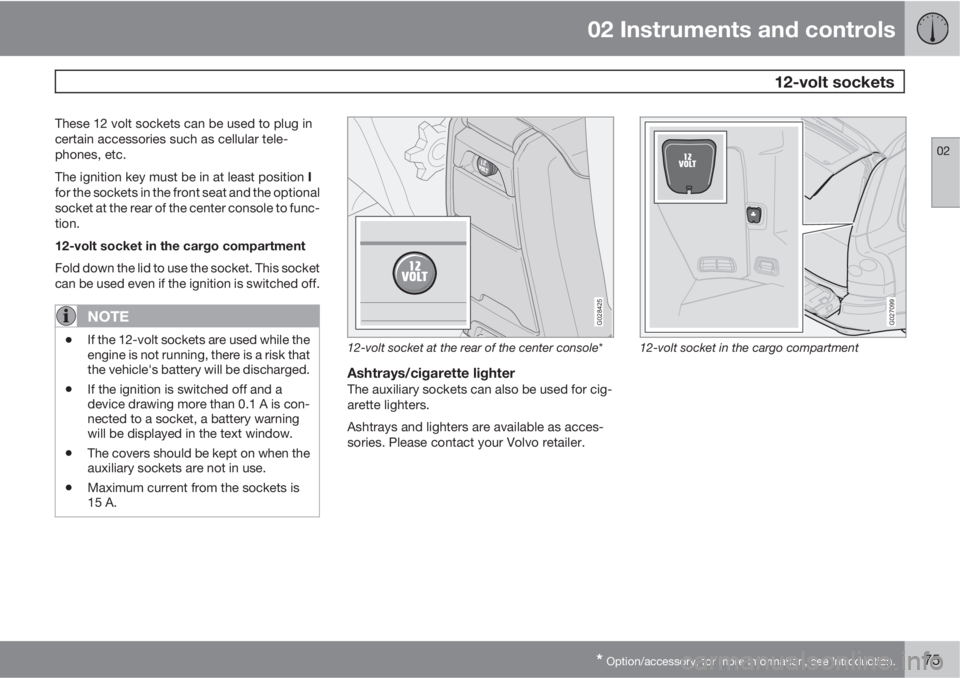
These 12 volt sockets can be used to plug in
certain accessories such as cellular tele-
phones, etc.
The ignition key must be in at least position I
for the sockets in the front seat and the optional
socket at the rear of the center console to func-
tion.
12-volt socket in the cargo compartment
Fold down the lid to use the socket. This socket
can be used even if the ignition is switched off.
NOTE
•If the 12-volt sockets are used while the
engine is not running, there is a risk that
the vehicle's battery will be discharged.
•If the ignition is switched off and a
device drawing more than 0.1 A is con-
nected to a socket, a battery warning
will be displayed in the text window.
•The covers should be kept on when the
auxiliary sockets are not in use.
•Maximum current from the sockets is
15 A.
G028425
12-volt socket at the rear of the center console*
Ashtrays/cigarette lighterThe auxiliary sockets can also be used for cig-
arette lighters.
Ashtrays and lighters are available as acces-
sories. Please contact your Volvo retailer.
G027099
12-volt socket in the cargo compartment
Page 76 of 288

02 Instruments and controls
Parking brake
02
76
G026992
Parking brake pedal
Handle for releasing the parking brake
The parking brake pedal is located under the
dashboard, to the left of the brake pedal.
NOTE
The indicator light will light up even if the
parking brake has only been partiallyap-
plied.
When applying the parking brake
1. Press firmly on the brake pedal.
2. Press down pedal (1) firmly to its full extent.3. Release the brake pedal and ensure that
the vehicle is at a standstill.
4. If the vehicle rolls, the parking brake pedal
must be pushed down more firmly.
5. When parking a vehicle always put the gear
selector in P.
Parking on a hill
•If the vehicle is pointing uphill, turn the front
wheels so that they point away from the
curb.
•If the vehicle is pointing downhill, turn the
front wheels so that they point toward the
curb.
Releasing the parking brake
1. Press firmly on the brake pedal.
2. Pull handle (2).
NOTE
If you inadvertently pull the plastic cover, it
can be pressed back into place.
WARNING
Press down the parking brake pedal firmly
to its full extent.
Page 77 of 288
02 Instruments and controls
Hood/tailgate
02
77 Opening/closing the hood
G026995
Opening the hood
1. Pull the lever located under the left side of
the dashboard to release the hood lock.
2. Lift the hood slightly.
3. Press up the release control located under
the front edge of the hood and lift.
To close the hood, place your hand on it and
press down until the hood locks in the closed
position.
WARNING
•Do not grasp the ribs in the grille when
closing the hood. If your fingers pro-
trude through the grille, they could be
injured on components in the engine
compartment as the grille closes. We
recommend pressing down on the hood
to close it.
•Check that the hood locks properly
when closed!
Opening the tailgate
G027005
To open the upper section of the tailgate, pull
the handle downward.To fold down the lower section of the tailgate,
pull handle upward.
Page 78 of 288

02 Instruments and controls
Power windows
02
78
Power windows
The power windows are controlled by buttons
in the arm rests. The ignition switch must be
ON
1 (ignition key in position I, II or the engine
running) for the electrically operated windows
to function.
To lower: Press down the front edge of the but-
ton to the first detent ("stop").
To raise: Lightly pull up the front edge of the
button to the first detent ("stop").
Auto up/down function (front doors only):Either front door window can be opened or
closed automatically.
Auto down: Press the front part of the button
as far down as possible and release it immedi-
ately. To stop the window at any time, pull the
button up.
Auto up: Pull the front part of the button up as
far as possible and release it immediately. To
stop the window at any time, press the button
down.G029571
Power window controls
Front windows
Rear windows
NOTE
If a window is obstructed during auto-up, it
will automatically reverse direction and
return to its starting position. If a window is
repeatedly obstructed during auto-up oper-
ation, an overload protection circuit breaker
will temporarily halt window function. The
window will return to normal function after a
brief cool-down period.
WARNING
Always remove the ignition key when the
vehicle is unattended.
Make sure that the windows are completely
unobstructed before they are operated.
Never leave children unattended in the vehi-
cle.
NOTE
To reduce buffeting wind noise if the rear
windows are opened, also open the front
windows slightly.
G029572
1The power windows will also function after the ignition has been switched off as long as neither of the front doors has been opened.
Page 82 of 288

02 Instruments and controls
Mirrors
02
82* Option/accessory, for more information, see Introduction.
For information about the optional folding mir-
ror function see page 60.
WARNING
The mirrors should always be adjusted prior
to driving. Objects seen in the passenger's
side wide-angle door mirror are closer than
they appear to be.
Mirror memory function (with the central
locking system)*
If you lock the vehicle and later unlock it with
the same remote key and open the driver's
door, the door mirrors (and the driver's seat)
will automatically move to the position they
were in when you left the vehicle. This feature
will work in the same way with all of the remote
key transmitters (up to 3) that you use with your
vehicle. This feature will not function if you lock
your vehicle with the key.
Water repellent glassThe side door mirrors can be treated
with a water repellent coating. The
symbol to the left indicates these windows
have this coating.
The coating improves vision by causing the
water to run off quickly.
For information on cleaning this type of glass,
see page 196.
CAUTION
Use the heating function to remove ice,
snow, or mist from the mirrors.


