Page 417 of 724
417
3-5. Using the hands-free phone system (for cellular phone)
3
Interior and exterior features
Using the hands-free phone system
■Audio unit
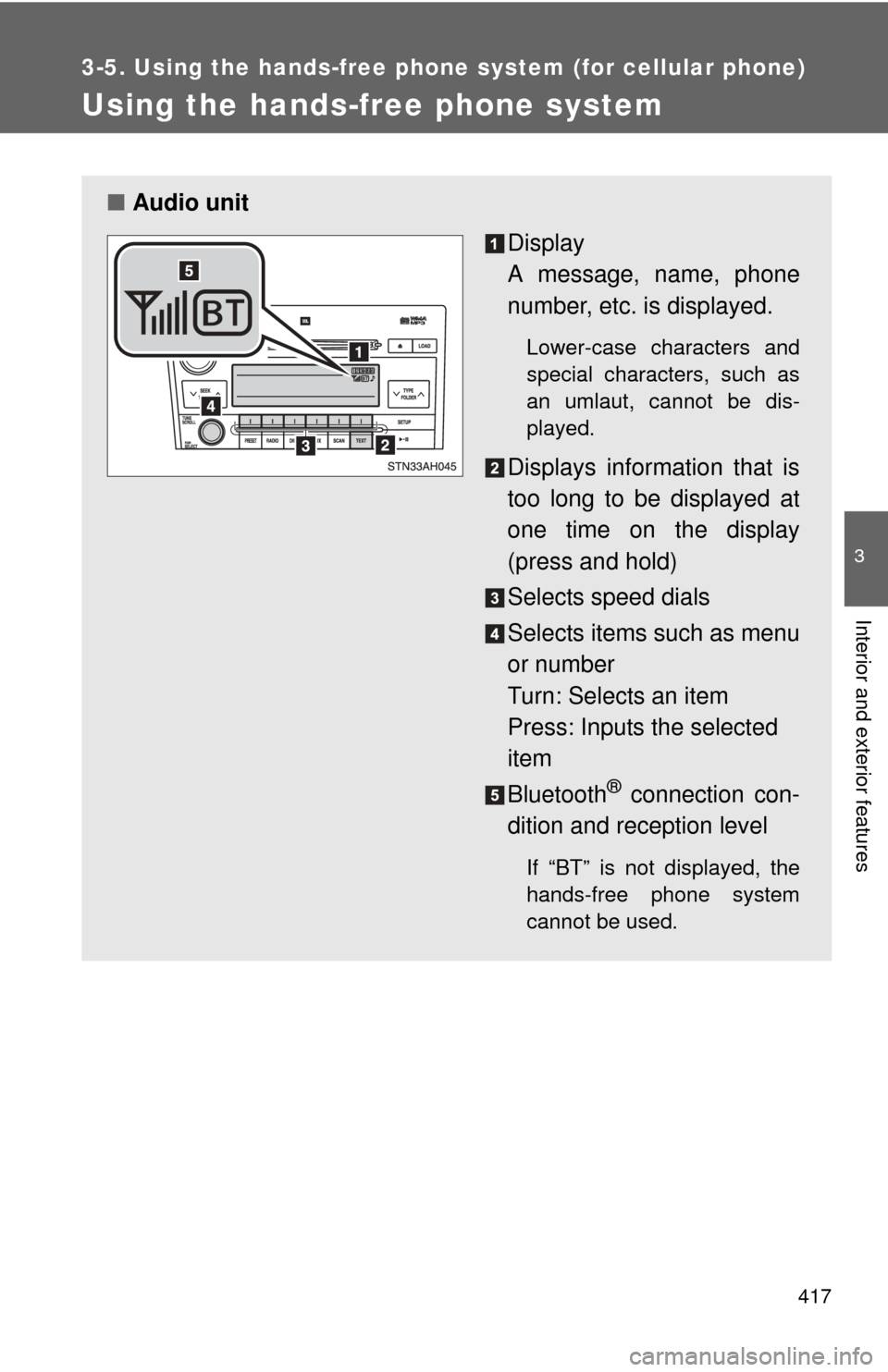
Display
A message, name, phone
number, etc. is displayed.
Lower-case characters and
special characters, such as
an umlaut, cannot be dis-
played.
Displays information that is
too long to be displayed at
one time on the display
(press and hold)
Selects speed dials
Selects items such as menu
or number
Turn: Selects an item
Press: Inputs the selected
item
Bluetooth
® connection con-
dition and reception level
If “BT” is not displayed, the
hands-free phone system
cannot be used.
Page 420 of 724
420 3-5. Using the hands-free phone system (for cellular phone)
Register a phone name by either of the following methods.
a. Select “Record Name” by using , and say a name to
be registered.
b. Press the talk switch and say a name to be registered.
A voice guidance instruction to confirm the input is heard.
Select “Confirm” by using a voice command or .
Registration to the hands-free phone system only
Select “Phone Only” using a voice command or .
Registration to the hands-free phone system and Bluetooth
® audio
system at the same time
Select “Internal Audio (Int. Audio)” using a voice command or
.
Select “Confirm” by using a voice command or .
A passkey is displayed and heard, and a voice guidance instruction
for inputting the passkey into the cellular phone is heard. Input the passkey into the cellular phone.
Refer to the manual that comes with the cellular phone for the oper-
ation of the phone.
Guidance for registration completion is heard.
Page 433 of 724
433
3-5. Using the hands-free phone system (for cellular phone)
3
Interior and exterior features
Security and system setup
Setting or changing the PIN■ Setting a PIN
Select “Set PIN” by using a voice command or .
Enter a PIN by using a voice command or .
When using , input the code 1 digit at a time.
To enter the menu of each setting, follow the steps below:
■ Security setting items and operation procedure
● Setting or changing t he PIN (Personal Identification Number)
1. “Setup” 2. “Security” 3. “Set PIN”
● Locking the phone book
1. “Setup” 2. “Security” 3. “Phonebook Lock”
● Unlocking the phone book
1. “Setup” 2. “Security” 3. “Phonebook Unlock”
■ System setup items and operation procedure
●Setting voice guidance volume
1. “Setup” 2. “System Setup” 3. “Guidance Volume”
● Displaying the Bluetooth
® device address and name
1. “Setup” 2. “System Setup” 3. “Device name”
● Initialization
1. “Setup” 2. “System Setup” 3. “Initialize”
can only be used for system setup operation.
Page 435 of 724
435
3-5. Using the hand
s-free phone system (for cellular phone)
3
Interior and exterior features
Displaying the Bluetooth® device address and name
Select “Device Name” using .
Turn to display the Bluetooth
® device address and
name.
Select “Go Back” using to return to “System Setup”
Initialization
Select “Initialize” and then “Confirm” by using .
Select “Confirm” by using .
■Initialization
●The following data in the system can be initialized:
• Phone book
• Outgoing and incoming call history
• Speed dials
• Registered cellular phone data
• Security code
● Once the initialization has been completed, the data cannot be restored
to its original state.
■ When the phone book is locked
The following functions cannot be used:
●Dialing by inputting a name
● Speed dialing
● Dialing a number stored in the call history memory
● Using the phone book
Page 709 of 724
709
Alphabetical index
Back window defogger ........... 307
Battery
Charging system warning light .................................... 595
Checking .............................. 538
If the vehicle has
discharged battery ............. 631
Preparing and checking
before winter ...................... 260
Bluetooth
® audio..................... 361
Bluetooth® phone ................... 413
Bottle holders .......................... 467
Brakes Brake system warning
buzzer ........................ 241, 247
Brake system warning light .................................... 595
Fluid...................................... 535
Parking brake ....................... 192
Brake assist ............................. 243
Break-in tips ............................ 175
Camper information ................ 693
Card holder .............................. 453
Care
Exterior ................................. 512
Interior .................................. 514
Seat belts ............................. 515
Cargo capacity ........................ 258
Cargo hooks ............................ 499
Cargo lamp Replacing light bulbs ............ 578
Switch ................................... 446
Wattage ................................ 668
CD changer CD ........................................ 322
MP3 ...................................... 331
WMA disc ............................. 331
CD player ................................. 322
Certification label ............ 272, 653
Chains ...................................... 261
Child restraint system Booster seats, definition ....... 143 Booster seats, installation .....160
Convertible seats,
definition .............................143
Convertible seats, installation ...........................159
Front passenger occupant classification system ........... 136
Infant seats, definition ...........143
Infant seats, installation.........158
Installing CRS with lower anchorages .........152, 155, 156
Installing CRS with seat belts ....................................158
Installing CRS with top
tether straps ........161, 163, 167
Passenger airbag off switch .......................... 132, 151
Child safety Airbag precautions ................127
Battery precautions .......539, 633
Child restraint system............143
Child-protectors .......................49
How your child should wear the seat belt ..........................82
Installing child restraints ........149
Moon roof precautions ..........108
Power window lock switch.......98
Power window precautions .....99
Removed wireless remote control battery
precautions .........................559
Seat belt extender
precautions ...........................84
Seat belt precautions ..............83
Seat heater precautions .................492, 494
Child-protectors .........................49
Cigarette lighter .......................481
Cleaning Exterior ..................................512
Interior ...................................514
Seat belts ..............................515
Clock ........................................ 476
C