Page 156 of 660
156
2-1. Driving procedures
Automatic transmission
Select a shift position appropriate for the driving conditions.
■Shifting the shift lever
While the engine switch is on, depress the brake pedal and
move the shift lever.
■ Shift position uses
*1: To improve fuel consumption and reduce noises, set the shift lever in
D for normal driving.
*2: Selecting shift ranges S mode restricts the upper limit of the possiblegear ranges, control engine braking forces, and prevents unneces-
sary upshifting.
Shift positionFunction
PParking the vehicle or starting the engine
RReversing
NNeutral
DNormal driving*1
SS mode driving*2 (P. 157)
Page 157 of 660

157
2-1. Driving procedures
2
When driving
Changing shift ranges in S mode
Shift the shift lever to the S position and operate the shift lever. Upshifting
Downshifting
The initial shift range in S mode is automatically set to 5 or 4 accord-
ing to vehicle speed. However, the initial shift range may be set to 3
or 2 if the AI-SHIFT has operated while the shift lever was in the D
position. (
P. 158)
■ Shift ranges and their functions
A lower shift range will provide greater engine braking forces than a higher
shift range.
Shift rangeFunction
6Automatically selecting gears between 1 and 6 according to
vehicle speed and driving conditions.
5Automatically selecting gears between 1 and 5 according to
vehicle speed and driving conditions.
4Automatically selecting gears between 1 and 4 according to
vehicle speed and driving conditions.
3Automatically selecting gears between 1 and 3 according to
vehicle speed and driving conditions.
2Automatically selecting gears between 1 and 2 according to
vehicle speed and driving conditions.
1Setting the gear at 1.
Page 158 of 660

158 2-1. Driving procedures
TOW/HAUL switch (with towing package)Use TOW/HAUL mode when pulling a trailer or hauling a heavy load. Press the TOW/HAUL switch.
The indicator will come on.
Press the switch once more to
cancel the mode.
■Gear range display when driving in S mode
The current gear range is displayed on the combination meter. ( P. 157)
■ When driving with the cruise control system
The engine brake will not operate in the S mode, even when downshifting to
5 or 4. ( P. 190,193)
■ If the shift lever cannot be shifted from P
P. 593
■ If the S indicator does not come on even after shifting the shift lever to
S
This may indicate a malfunction in the automatic transmission system. Have
the vehicle inspected by your Toyota dealer, immediately.
(In this situation, the vehicle will operate as if the shift lever is in D.)
■ AI-SHIFT
The AI-SHIFT automatically shifts the gear to the optimal position according
to the driver performance and driving conditions.
The AI-SHIFT automatically operates when the shift lever is in the D posi-
tion. (Shifting the shift lever to the S position cancels the function.)
Page 160 of 660
160
2-1. Driving procedures
Tur n signal lever
■Turn signals can be operated when
The engine switch is in the ON position.
■ If the indicators flash faster than usual
Check that a light bulb in the front or rear turn signal lights has not burned
out.
Right turn
Left turn
Move and hold the lever
partway to signal a lane
change.
The right hand signal will flash
until you release the lever.
Move and hold the lever
partway to signal a lane
change.
The left hand signal will flash
until you release the lever.
Page 163 of 660
163
2
When driving
2-2. Instrument cluster
Gauges and meters
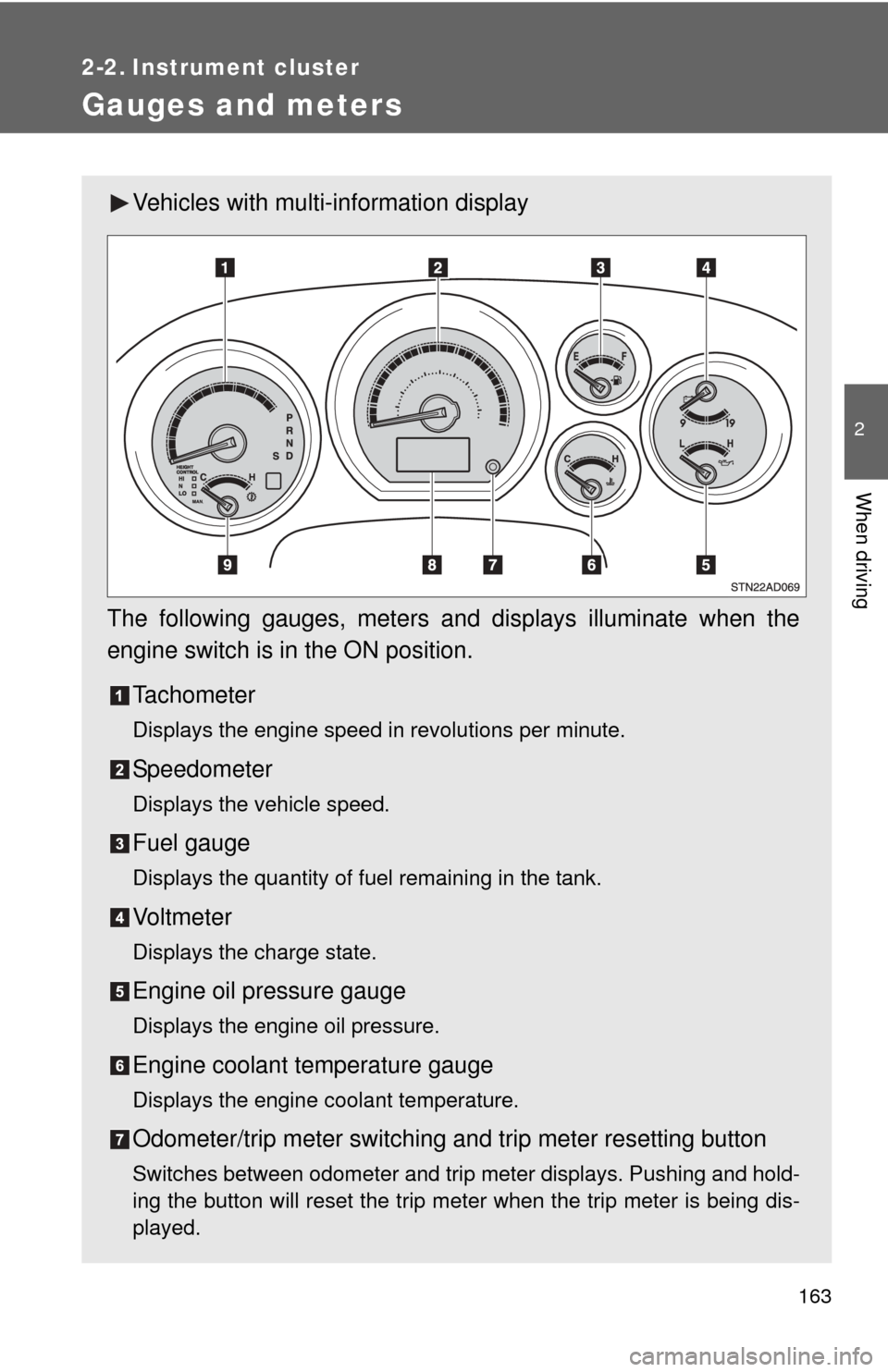
Vehicles with multi-information display
The following gauges, meters and displays illuminate when the
engine switch is in the ON position. Tachometer
Displays the engine speed in revolutions per minute.
Speedometer
Displays the vehicle speed.
Fuel gauge
Displays the quantity of fuel remaining in the tank.
Vo l t m e t e r
Displays the charge state.
Engine oil pressure gauge
Displays the engine oil pressure.
Engine coolant temperature gauge
Displays the engine coolant temperature.
Odometer/trip meter switching and trip meter resetting button
Switches between odometer and trip meter displays. Pushing and hold-
ing the button will reset the trip meter when the trip meter is being dis-
played.
Page 165 of 660
165
2-2. Instrument cluster
2
When driving
Vehicles without multi-information display
The following gauges, meters and displays illuminate when the
engine switch is in the ON position. Tachometer
Displays the engine speed in revolutions per minute.
Speedometer
Displays the vehicle speed.
Fuel gauge
Displays the quantity of fuel remaining in the tank.
Vo l t m e t e r
Displays the charge state.
Engine oil pressure gauge
Displays the engine oil pressure.
Engine coolant temperature gauge
Displays the engine coolant temperature.
Odometer/trip meter switching and trip meter resetting button
Switches between odometer and trip meter displays. Pushing and hold-
ing the button will reset the trip meter when the trip meter is being dis-
played.
Page 167 of 660

167
2-2. Instrument cluster
2
When driving
Instrument panel light control
The brightness of the instrument panel lights can be adjusted.
Brighter
Darker
Vehicles with multi-information
display
With the dial turned fully up, the
intensity of the instrument panel
lights will not be reduced even
when the tail lights/headlights are
turned on.
NOTICE
■ To prevent damage to the engine and its components
●Do not let the indicator needle of the tachometer enter the red zone, which
indicates the maximum engine speed.
● The engine may be overheating if the engine coolant temperature gauge is
in the red zone (H). In this case, immediately stop the vehicle in a safe
place, and check the engine after it has cooled completely. ( P. 598)
■ While driving
●When the voltmeter indicates more than 19 V or less than 9 V, the battery
may be malfunctioning. Have your vehicle checked at your Toyota dealer.
● When the engine oil pressure gauge does not work properly, immediately
stop the engine and contact your Toyota dealer.
● When the automatic transmission fluid temperature gauge needle continu-
ally points higher than normal, immediately contact your Toyota dealer. (if
equipped)
Page 171 of 660
171
2-2. Instrument cluster
2
When driving
■
Warning lights
Warning lights inform the driver of malfunctions in any of the
vehicle’s systems. ( P. 566)
*1: These lights turn on when the engine switch is turned to the ON
position to indicate that a system check is being performed. They
will turn off after the engine is started, or after a few seconds. There
may be a malfunction in a system if a light does not come on, or if
the lights do not turn off. Have the vehicle inspected by your Toyota
dealer for details.
*2: Vehicles with multi-information display
*3: Vehicles without multi-information display
*1Height control N indi-
cator (P. 216)*1Height control LO indi-
cator (P. 216)
*1Height control MAN.
indicator ( P. 217)
(Canada)(U.S.A.)(Canada)(U.S.A.)
(U.S.A.)
*2*1*1*1*1*1*1*1
*1*3*3*1*1